After hours answering service: what happens to your calls at 6pm
Learn how after hours answering services work, the main pricing models, and how to set up 24/7 coverage without overnight staff.After hours answering service: what happens to your calls at 6pm
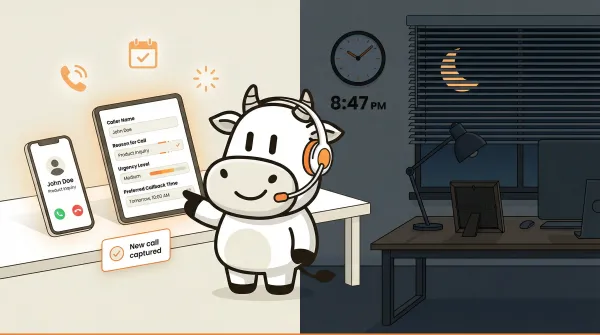
An after hours answering service picks up your business calls when your team goes home. Instead of voicemail, callers talk to a real person or an AI agent that can take a message, collect lead details, answer the questions you have configured, and route urgent calls to the right person. In some setups it can also help with scheduling. Stop losing revenue every evening, weekend, and holiday.
Most small business owners don't think about what happens to their phone after 5pm. I didn't either, until I started building CallCow and realized that a huge chunk of business calls come in outside normal hours. Medical offices get patient calls at 10pm. Real estate agents get leads on Sunday mornings. Home service contractors get emergency requests on Saturday nights. All of those calls go to voicemail. Most of those callers never call back.
This guide covers how after hours answering services work, what they cost, and how to set one up for your business. I'll walk through the options, the tradeoffs, and the honest limitations.
Table of contents
- How after hours answering services work
- Why businesses lose money after hours
- How CallCow handles after hours calls
- Step by step setup for after hours routing
- Pros and cons of after hours AI answering
- Comparison: after hours answering options
- FAQ
- Bottom line
How after hours answering services work
There are three main approaches to handling calls after your business closes.
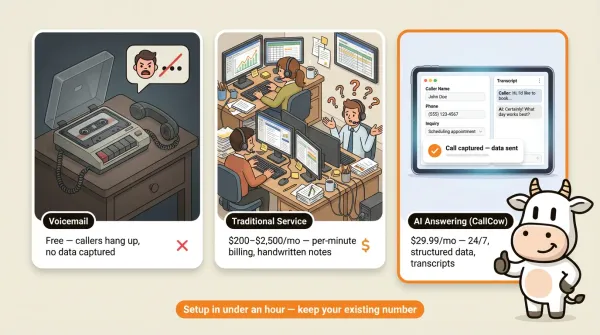
Traditional call centers. A third-party service staffs human agents who answer calls on your behalf. You give them a script, FAQs, and instructions on what qualifies as urgent. They take messages and forward them to you. Pricing is usually custom and tends to rise with volume, coverage hours, and escalation complexity. If you're weighing your options, the best phone answering service guide compares the main approaches side by side.
AI answering services. An AI voice agent answers calls 24/7. It greets callers, handles the questions and routing logic you configure, collects information through natural conversation, and in some setups can transfer urgent calls or help with scheduling. Pricing models vary by vendor, and with CallCow you should also expect separate Twilio telephony charges because it uses a BYOC model. The AI phone answering service guide covers how these systems work under the hood.
Voicemail-only. The default for most small businesses. Your existing voicemail picks up. Callers hear a greeting, leave a message, and hope you call back. It's free, and it's where most of your after hours revenue disappears.
Each approach has tradeoffs. Traditional services offer a human touch but cost more and scale poorly. AI services are cheaper and available around the clock but can't handle nuanced emotional conversations. Voicemail costs nothing and delivers nothing.
The right choice depends on your call volume, your industry, and how much a missed call actually costs you.
Why businesses lose money after hours
You do not need a spreadsheet model to know this problem is real. Check your own call log and listen to your own voicemail backlog. After-hours callers are usually calling because they want something now, not tomorrow morning.
For service businesses, the pattern is familiar. A plumbing emergency at night, a buyer asking about a listing on the weekend, or a prospect trying to book after work usually turns into a race against whoever answers first. When nobody answers, many callers move on instead of waiting for a callback.
The pattern shows up across industries:
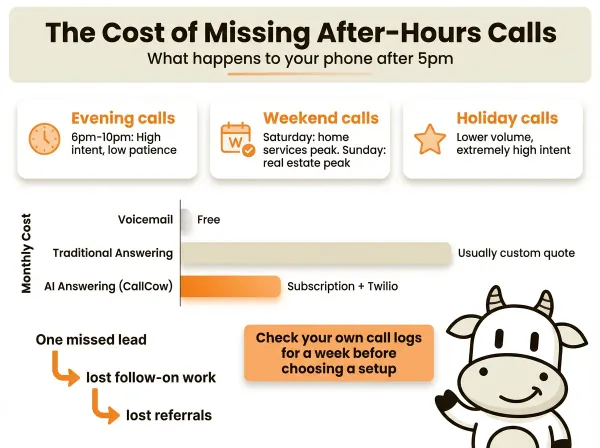
- Evening calls (6pm-10pm): People researching after work. High intent. Low patience.
- Weekend calls: Saturday morning is peak for home services. Sunday afternoon is peak for real estate. Medical offices get a steady stream both days.
- Holiday calls: Not as high volume, but extremely high intent. Someone calling on Thanksgiving about a burst pipe will pay premium rates.
The cost of missing these calls compounds. One missed lead can turn into lost follow-on work, lost referrals, and the general feeling that your phone is less reliable than your competitor's.
Most businesses do not track missed call rates closely. The data is usually sitting in carrier logs or voicemail inboxes and nobody reviews it until something feels off.
If after-hours calls matter to your business, check your own logs for a week before you choose a setup. That tells you more than any industry benchmark.
How CallCow handles after hours calls
We built CallCow to answer the calls you miss. Not replace your existing phone setup. Not force you to change carriers. Just catch the calls that fall through the cracks.
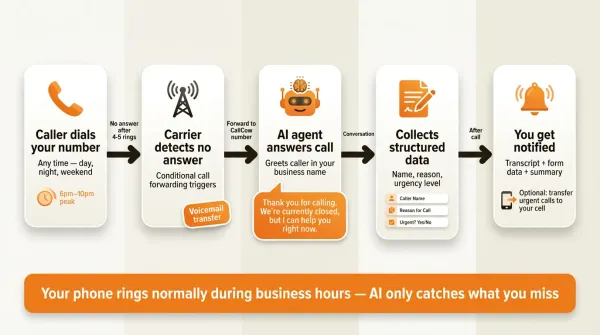
The way it works is called voicemail transfer. Instead of your carrier playing your voicemail greeting when you don't answer, the carrier forwards the call to CallCow. Our AI agent picks up, greets the caller, and handles the conversation.
The caller experience goes like this:
- Someone calls your business number at 8pm on a Tuesday.
- Your phone rings. You don't answer because you're at dinner.
- After your normal ring count, the carrier forwards the call to CallCow instead of your voicemail.
- CallCow's AI answers in your business name. It says something like "Thank you for calling [your business]. We're currently closed, but I can help you right now."
- The AI asks what the caller needs. It follows the workflow you configured, collects their information, and if it's urgent, can transfer the call to your cell phone.
- After the call completes, you can review the summary, transcript messages, and any form data in CallCow. If you use webhooks, that data posts after the call finishes, not in real time. Make.com offers bidirectional integration for teams that want to trigger calls or route data through automation.
The AI can also text the caller during the conversation using SMS Instructions. This is useful for sending a booking confirmation link, directions to your office, an emergency service reference, or any URL that is easier to share as a clickable link than to read out loud. It requires Twilio SMS capability on your account (part of the BYOC setup). For after-hours callers who need immediate next steps, getting a text with a link or instruction while still on the call reduces the chance they move on to a competitor before morning.
The key advantage of voicemail transfer over full call forwarding is that you still get to answer calls personally during business hours. The AI only kicks in when you don't pick up. It's a safety net, not a replacement.
A few things worth knowing upfront:
- Voicemail forwarding is not available on all carriers. This is a carrier-level feature. Some carriers support it, some don't. We have a Rogers demo on YouTube showing the setup process. For other carriers, you may need to call their business support line and ask about conditional call forwarding to a third party.
- CallCow uses a BYOC model. You connect your own Twilio account. This means you manage your own Twilio billing for phone numbers and call minutes. We don't mark up Twilio costs. You pay Twilio directly.
- The AI always self-identifies as AI. It will tell callers it's an automated assistant. We can't turn this off. It's a design decision, not a technical limitation.
- Trial accounts are limited to 4 concurrent calls. If you need more, you'll need to set up a Twilio Business Profile, which unlocks unlimited concurrent calling.
We also support full call forwarding if you want every call to go to the AI. But for most businesses, voicemail transfer is the better starting point. It preserves the personal touch during business hours while catching everything else. The voicemail transfer setup guide covers the full configuration process.
Step by step setup for after hours routing
To get after hours answering set up with CallCow, follow these steps.
Step 1: Create your CallCow account
Go to callcow.ai and sign up. You'll need to connect a Twilio account during onboarding. The voicemail transfer docs walk through the Twilio connection process. If you don't have a Twilio account, create a free one at twilio.com. You'll need your Twilio Account SID and Auth Token.
Twilio bills the phone number and usage directly to you. CallCow does not bundle those telephony costs into a single flat fee, so review Twilio pricing for your country and call volume before you estimate total cost.
Step 2: Build your after hours workflow
In the CallCow dashboard, create a new workflow. This is where you define what the AI says and does when it answers a call.
Give the AI a greeting that matches your business. Something like "Thanks for calling [your business name]. Our office is currently closed, but I'm here to help."
Set up the questions you want the AI to ask. For a medical office, that might be the caller's name, callback number, reason for calling, and whether it sounds urgent. For a real estate office, it might be which property they're asking about and their budget range.
You can use CallCow's forms feature to structure data collection. Forms let you define typed fields (text, number, email, phone, select, multi-select) that the AI fills conversationally. The data gets stored with each call record and included in webhook payloads if you connect to a CRM.
After-hours callers are often new leads. CallCow automatically saves every caller as a contact, phone, name, email, building a lead database passively.
You can also clone your own voice from a 30-second recording for a branded caller experience even when you're not available.
One caveat: the workflow system is flexible, but the written docs are still pretty thin in places. If you want the fastest path, start with one simple after hours workflow first, test real calls, then add transfer logic or CRM automation after that.
For model selection, GPT 5.4 is the safest default for after-hours workflows. After-hours callers are often stressed or urgent, and the model handles those conversations more reliably with fewer hallucinations in testing. There is a slight latency increase compared to earlier models, but for calls where accuracy matters more than speed, the tradeoff is worth it. Select it per-workflow in LLM Models settings.
Step 3: Configure transfer rules
Set up transfer-to-human rules for urgent calls. CallCow supports both static and dynamic transfers. A static transfer routes to a single phone number. A dynamic transfer uses a webhook to determine the right person to route to based on the caller's information.
Transfer requires a Twilio Business Profile. The verification process takes a few business days. During the trial period, you can set up the rules but won't be able to use live transfer until the profile is approved.
Note that CallCow only supports cold transfers, not warm transfers. The caller gets transferred directly without the AI introducing them or staying on the line. This is a limitation we're aware of.
Step 4: Set up carrier voicemail forwarding
This is the part that varies by carrier. You need to configure your carrier to forward unanswered calls to your CallCow number instead of your voicemail.
For Rogers in Canada, we have a documented setup process with a YouTube demo. The general steps are:
- Call your carrier's business support line.
- Ask for conditional call forwarding (sometimes called "no answer transfer" or "forward when busy/no answer").
- Provide your CallCow Twilio number as the forwarding destination.
- Set the ring count before forwarding. We recommend 4-5 rings to give yourself time to answer during business hours.
- Test by calling your business number and not answering.
Not all carriers support this. Some carriers only offer unconditional forwarding, which sends every call to CallCow regardless of whether you're available. Others don't support third-party voicemail forwarding at all.
If your carrier doesn't support conditional forwarding, you have two options: switch to full forwarding where all calls go to CallCow, or use CallCow alongside your existing phone setup with a separate number.
Step 5: Test and iterate
Call your business number after hours and see what happens. Check the CallCow dashboard for the transcript messages, summary, and any form data collected. Adjust the AI's greeting, questions, and transfer rules based on what you see.
We recommend checking your call logs for the first week. Look at what callers are asking, what information the AI captured, and whether the transfer rules triggered correctly. If you collect sensitive information, be deliberate about which fields you ask for and who can access the call records. Most businesses need a few rounds of adjustments to get the workflow dialed in.
Pros and cons of after hours AI answering
Pros:
- Available 24/7 including holidays and weekends, no shift scheduling required
- More predictable software cost than a human answering service, though Twilio usage is still billed separately
- Collects structured data through forms instead of handwritten operator notes
- Works well for repetitive after hours call patterns like lead capture, routing, and basic intake
- Call records give you something reviewable instead of a pile of voicemails
Cons:
- The AI always identifies itself as AI, and some callers will hang up when they hear that
- Cold transfer only, no warm handoff where the AI briefs you before connecting
- Cannot handle emotional nuance or complex multi-party negotiations
- Voicemail forwarding is not supported by all carriers
- Requires a Twilio account and a Twilio Business Profile for transfer features
Comparison: after hours answering options
| Feature | Voicemail | Traditional answering service | AI answering service (CallCow) |
|---|---|---|---|
| Cost | Free | Usually custom quote | CallCow subscription + Twilio |
| Availability | 24/7 (passive) | 24/7 | 24/7 |
| Answers every call | No | Yes | Yes |
| Takes messages | Caller leaves voicemail | Agent takes message | AI collects structured data |
| Books appointments | No | Some services | Yes - via Calendly, Cal.com, Google Calendar (beta), or Outlook Calendar (beta) integrations |
| Transfers urgent calls | No | Yes | Yes (with Twilio Business Profile) |
| Language handling | No | Available, usually costs more | Depends on your workflow design; do not assume broad bilingual coverage out of the box |
| Scales with call volume | Yes (does nothing) | Costs increase linearly | CallCow plan stays fixed, but Twilio usage rises with call volume |
| Setup time | None | Days to weeks | Minutes to hours |
| Customizable script | Fixed greeting | You provide a script | Full workflow builder |
| Human touch | None | Yes | AI only (self-identifies) |
| Data capture | Audio file | Text message or email | Structured forms + webhooks |
| HIPAA compliant | No | Some services | No |
The biggest difference is cost structure. Traditional services usually charge per minute or per call, so your bill rises directly with volume. With CallCow, the software plan is fixed, but your Twilio usage still increases as minutes increase. That is still usually easier to predict than human operator billing, but it is not an all-in flat-rate model.
The tradeoff is flexibility. A human agent can handle unexpected situations, show empathy, and adapt on the fly. An AI agent follows the workflow you defined. If a caller asks something outside the workflow, the AI does its best but might not handle it perfectly.
If after-hours booking is part of your flow, be specific about the scheduling stack. Google Calendar and Outlook are still beta. TidyCal cannot book paid appointments through the API, and Trafft assigns the first available employee rather than a specific staff member.
For after hours specifically, this tradeoff often tilts toward AI when the calls are repetitive: lead capture, appointment requests, basic intake, or routing. In healthcare, be more careful. If callers are likely to share PHI, route those calls through a compliant workflow instead of assuming a general AI setup is safe.
Start a free trial, set up your first after-hours workflow in under 10 minutes at callcow.ai
FAQ
What is the cheapest after hours answering service?
The cheapest option is still voicemail, because it is usually included with your phone service. AI answering usually comes next, especially if you are comfortable with CallCow's BYOC model and separate Twilio billing. Traditional human answering services generally cost more, but you need quotes to compare real plans.
How much does an after hours answering service cost?
Traditional services usually price by quote, minutes, or coverage level. CallCow pricing is separate from Twilio telephony because of the BYOC model, so your actual cost depends on your plan, your call volume, and Twilio usage. CallCow plans start at $29.99/month for the software, plus Twilio telephony usage (roughly $1.15/month per number plus per-minute rates). Treat any estimate as a starting point, not a guarantee.
Do answering services work on weekends?
Yes. Both traditional and AI answering services operate 24/7 including weekends and holidays. That's the whole point. Your business is closed but your phone stays open.
Can I keep my existing business phone number?
Yes. With voicemail transfer, your carrier forwards unanswered calls from your existing number to CallCow. Your number doesn't change. Callers dial the same number they always have.
What happens if the AI can't answer a caller's question?
CallCow's AI handles calls based on the workflow you define. If a question falls outside the workflow, the AI will do its best to help and can transfer the call to a human if you've configured transfer rules. The AI always self-identifies as an automated assistant, so callers know they're talking to AI.
How long does setup take?
With CallCow, you can usually create a workflow and start testing quickly. The carrier voicemail forwarding step depends on your carrier. For some carriers it's a quick settings change. For others it requires a support call. Plan for anywhere from same day to a few business days.
Bottom line
After-hours calls are usually an operational blind spot. If your business gets meaningful call volume outside business hours, voicemail alone is rarely the best long-term answer.
Which setup fits your business depends on your needs. If you need human judgment, compliance coverage, or nuanced escalation, a traditional answering service may make more sense. If you want 24/7 coverage for repetitive call flows without staffing overnight, AI answering is often the cleaner starting point.
CallCow is different from a generic after hours answering service in one important way: it is built to sit behind your existing phone flow, not replace it with a shared call center queue. You keep your number, your team still answers first when available, and the AI steps in only when a call would otherwise hit voicemail. On top of that, CallCow captures structured form data, supports static or webhook-driven transfers, and runs on your own Twilio account instead of hiding telephony costs inside a bundled operator fee.
Your best next step depends on how you want calls routed:
- Voicemail transfer: Start here if your carrier supports conditional forwarding. It's the cleanest setup for businesses that want to keep answering live during business hours and only use AI as an after hours safety net.
- Full forwarding: Use this if you want every call handled by AI from the start, or if your carrier does not support voicemail transfer to a third party. This is simpler operationally, but it changes the caller experience for all calls, not just missed ones.
- Hybrid coverage: Use this if you want voicemail transfer for your main line plus a separate CallCow number for campaigns, overflow, or departments with different hours. It gives you more control, but it adds setup complexity.
In all three cases, check your first week of call logs, transcripts, and transfers. You'll see how many calls were being missed after hours, what callers needed, and whether your workflow needs tighter questions or better escalation rules. Just remember that webhook automations run after a call completes, so build your follow-up process around post-call actions rather than mid-call triggers.
If you want to test it on your own number, CallCow has a trial at callcow.ai.
YiMeng Han is the founder of CallCow and writes about phone automation, missed calls, and the tradeoffs that show up when small businesses actually deploy voice AI.