AI phone answering service: complete 2026 guide
Compare AI phone answering tools, BYOC pricing tradeoffs, setup caveats, and the documented CallCow limits buyers should know up front.AI phone answering service: complete 2026 guide
An AI phone answering service uses conversational AI to handle business calls automatically. It answers with your business name, understands what callers need, books appointments, answers questions, and transfers calls to the right person. The headline price matters less than the operating model underneath it: bundled vs BYOC, warm vs cold transfer, and whether your automation runs during the call or only after it ends.
Table of contents
- What is an AI phone answering service?
- How AI phone answering services work
- AI vs traditional phone answering services
- What to look for in an AI phone answering service
- How much does an AI phone answering service cost?
- Best AI phone answering services compared
- How to set up an AI phone answering service in under 30 minutes
- Which businesses need an AI phone answering service?
- Frequently asked questions
What is an AI phone answering service?
An AI phone answering service replaces or supplements a human receptionist by using conversational AI to handle incoming calls. When someone calls your business number, an AI agent answers with your business name, holds a natural conversation, takes action based on what the caller needs, and delivers a transcript and summary after the call ends.
The term covers two pricing models. Bundled services include the phone number and per-minute costs in one monthly fee. BYOC (bring your own carrier) services let you connect your own Twilio account and pay Twilio directly for phone infrastructure. CallCow uses BYOC. I will explain why that matters in the pricing section.
"AI phone answering service" pulls 720 monthly searches at $58 CPC. The broader "ai answering service" draws 1,900 monthly searches. Google's AI Overview for this query cites Rosie AI, Synthflow, Goodcall, Allo, and Loman. No single provider dominates the SERP with technically specific content. Reddit ranks at position 4, which tells you the existing content is not answering people's questions well enough. Real users are resorting to forum threads instead of reading the listicles.
CallCow came out of the same problem: I kept missing calls while showing properties at my last company, LavaReach. I tried human answering services first. The cost was fine for a few dozen calls, but it scaled poorly and quality dropped during peak hours. Then I tried AI, and the economics were impossible to argue with. That experience shaped how I think about this market and what a real AI phone answering service should do.
How AI phone answering services work
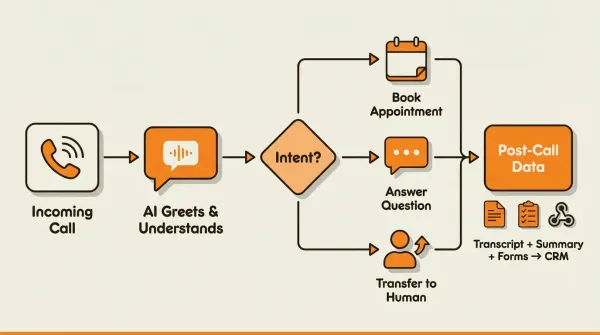
The technical flow behind every AI phone answering service follows the same pattern. The details differ, but the architecture is the same whether you use CallCow, Goodcall, Rosie, or anyone else.
Incoming Call to Your Business Number
    |
    v
Carrier (Twilio) Routes Call to AI Platform
    |
    v
AI Workflow Executes
    +-- Greeting: "Thank you for calling [Business Name]..."
    +-- Intent Recognition: NLP determines what caller needs
    +-- Conversation: AI responds, asks follow-up questions
    +-- Action: Books appointment / answers / transfers call
    +-- Wrap-Up: Confirms details, thanks caller
    |
    v
Post-Call Processing
    +-- Transcript generated
    +-- Summary created (key points, action items)
    +-- Form data captured (name, email, reason)
    +-- Webhook fires -> Data sent to CRM
Call ingestion. Your business phone number receives a call. With CallCow, this works through a connected Twilio account. You provide your Twilio Account SID and Auth Token in Settings, and calls flow into the AI platform. You manage Twilio billing directly, which means you see exactly what each minute costs.
AI workflow execution. The AI loads a pre-configured workflow for your business. This workflow defines the greeting, conversation flow, available actions (book, transfer, answer), and what data to collect. The AI uses natural language processing to understand caller intent, even when callers phrase things unpredictably. Someone might say "I need to see someone about my roof" or "I want an inspection" or "can someone come look at my house." The AI understands all three mean the same thing. The conversation quality is good enough that callers usually just follow the flow. CallCow identifies itself as AI at the start, and callers still engage normally with it. CallCow now supports GPT 5.4 as a selectable model per workflow. GPT 5.4 is the safest default here. In testing shows fewer hallucinations and more accurate data collection compared to earlier models. There is a slight latency tradeoff, but for business calls where getting the details right matters more than shaving milliseconds, it is worth it.
After the call ends, the system generates a full transcript, a summary, and any structured data collected during the conversation. This data is stored in the dashboard and can be sent to your CRM via webhooks. CallCow's webhooks fire on call completion only, not in real time during the call. That is a real limitation if you need live data mid-conversation, but it works well for post-call processing and CRM updates.
AI vs traditional phone answering services
I have used both. Human answering services were the only option when I started. AI has since caught up in most areas and surpassed human services in a few. The honest comparison:
| Factor | AI phone answering | Traditional human answering |
|---|---|---|
| Cost shape | Software subscription plus telephony costs in a BYOC model | Service fee, often bundled and sometimes usage-based |
| Availability | 24/7/365, no breaks | Limited by shift schedules |
| Response time | Instant, every call | Varies, hold times during peaks |
| Language support | Any language you configure | Limited to available staff |
| Call volume | Easier to scale, subject to platform and carrier limits | Depends on staffing and plan design |
| Consistency | Same quality every single call | Varies by agent experience |
| Empathy | Conversational but not emotional | Genuine emotional intelligence |
| Complex queries | Handles most, transfers the rest | Better with nuanced situations |
| Setup time | Often faster to test | Usually involves onboarding and scripts |
| Data capture | Structured forms, auto-CRM sync | Handwritten notes, manual entry |
| Scalability | Instant, no hiring needed | Requires recruitment for growth |
AI usually wins on consistency, easier after-hours coverage, and structured data capture. Human services usually win on empathy and handling emotionally complex situations. In practice, a hybrid model is often the most honest answer.
The "empathy gap" is real and I will not pretend otherwise. If a distressed caller needs someone who understands nuance, AI will handle the conversation competently but miss the subtext. Start with AI, route the calls that matter to humans. For a deeper comparison of these two approaches, read our AI vs traditional answering service guide.
A detail that affects buying decisions but rarely gets discussed: most human answering services have high turnover. The person answering your calls this month might not be the same person next month. Script adherence drops, quality varies, and you have no visibility into individual call performance. AI gives you the same quality on call one and call ten thousand.
What to look for in an AI phone answering service
Most AI answering services look similar on their homepages. CallCow came out of the same problem: the existing options did not do what I needed. I have evaluated dozens of services, both as a customer and as a founder building one. These are the real differentiators.
Must-haves:
- 24/7 availability. If a service only covers business hours, you are still losing after-hours calls. That defeats the purpose.
- Direct calendar booking. Your AI should book directly into your calendar, instead of only taking a message. CallCow documents Google Calendar (beta), Outlook Calendar (beta), Cal.com, Calendly, TidyCal, and Trafft. Our calendar integration guide covers each one in detail.
- Intelligent call transfer. When callers need a human, the AI should transfer intelligently, not forward everything to one number. CallCow supports dynamic routing via a webhook endpoint. The AI asks who the caller needs, sends that information to your server, and your server returns the right destination number. Caveats apply: transfers are cold/blind only and require a verified Twilio Business Profile.
- Transparent pricing. If you cannot find the price without a sales call, that is a red flag. They are either hiding high prices or do not have standardized pricing at all.
Nice-to-haves:
- Structured data capture via forms. Forms are underdiscussed but they solve a real problem: without them, you get a transcript and summary. With them, you get structured lead data. CallCow's forms let you define typed fields (text, number, email, phone, select, multi-select) that the AI fills conversationally during live calls. The data gets stored with the call record and included in webhook payloads. Without forms, you get a transcript and a summary. With forms, you get structured lead data that flows directly into your CRM. Our forms platform guide explains how to set this up.
- Voicemail transfer. Instead of playing a generic voicemail greeting when you do not answer, voicemail transfer forwards missed calls to your AI. You keep the personal touch for calls you answer yourself. Caveat: not available on all carriers.
- Voice cloning. A 30-second audio sample of your voice trains the AI to sound like your brand on every call. Caveat: the AI always identifies itself as AI regardless of voice customization.
- Outbound calling. CallCow's Agent Calling API lets external AI agents (Claude, GPT, n8n, Make, or custom bots) make outbound phone calls with a single API request containing a natural language prompt. Rate limit is 60 requests per minute.
- SMS Instructions. The AI agent can send text-based instructions to the caller via SMS during a live call. Useful for payment links, booking URLs, directions, or any reference material that is hard to communicate verbally. Requires Twilio SMS capability on your account.
- Website widget. An embedded widget turns your website into a calling surface. Visitors click a button and connect to your AI receptionist directly, no phone number needed.
- Make.com. Make.com is CallCow's most fully available automation integration (bidirectional), unlike Zapier which is invite-only.
- Zapier. Zapier integration is available for triggering calls from 7000+ apps (currently invite-only).
- Monday.com. Monday.com integration triggers AI calls on new board rows and writes call logs back, useful for teams already using it as a CRM.
- Inbound contacts. Every caller and texter automatically creates a contact record with their phone number, name, email, and conversation history. Your contact database builds itself passively.
- REST API. CallCow exposes three REST endpoints for programmatic access: POST /call to trigger calls, POST /call-prompt for agent-initiated calls, and GET /workflows to list configurations. This is not a full API surface, so if you need extensive programmatic control, three endpoints may not be enough. For most businesses, the webhook system covers automation needs better than polling an API.
Red flags:
- No free trial. If they will not let you test it, they are hiding something.
- Bundled phone costs with no per-minute transparency. You cannot optimize what you cannot see.
- No API or webhook access. If you cannot get data out, you cannot automate anything.
- Per-call overages with no pricing cap. A spike in call volume should not bankrupt you.
- No documentation. If the docs are thin, the product is thin.
How much does an AI phone answering service cost?
Three of the four People Also Ask questions for this keyword are about cost. Most competitors bury pricing behind "contact us" forms or show a starting price with no explanation of what you actually pay at real call volumes.
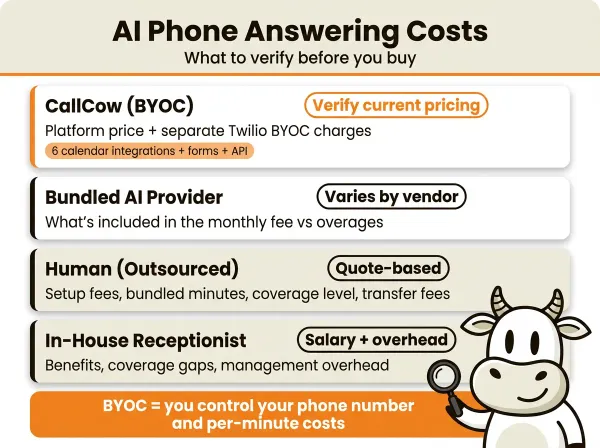
The cost model that matters
| Setup | What to verify |
|---|---|
| CallCow | Current platform pricing plus separate Twilio BYOC charges |
| Bundled AI provider | What is included in the monthly fee and what happens on overages |
| Human answering service | Setup fees, bundled minutes, after-hours coverage, and transfer fees |
| In-house receptionist | Salary, benefits, coverage gaps, and management overhead |
What CallCow buyers should price out
Check the current CallCow pricing page, then add the separate Twilio line items because the product uses a BYOC model.
The clean way to estimate a monthly bill is:
- Current CallCow plan price
- Twilio number cost for the type of number you want
- Twilio usage based on your call volume and duration
- Extra telephony cost if many calls get transferred
BYOC vs bundled pricing
Most AI answering services bundle phone costs into the monthly fee. You pay one price and that is it. The downside: you do not know what you are paying per minute, and you cannot optimize.
CallCow uses BYOC. You connect your own Twilio account and pay Twilio directly for phone numbers and usage. That is transparent, but it also means you own the extra billing complexity.
The tradeoff: you manage Twilio billing yourself. For some businesses that is a feature, not a bug. For others who want one invoice for everything, a bundled provider may feel simpler. The key difference is direct control over the phone layer.
Hidden costs nobody mentions
Transferred calls count both call legs on the telephony side. If your workflow transfers a lot of calls, your Twilio bill will rise faster than a simple inbound-only setup.
This is where the hybrid model matters. Use AI to handle the calls it can handle. Book appointments, answer FAQs, collect lead information. Transfer only the calls that genuinely need a human.
Toll-free numbers usually cost more than local numbers on Twilio. If you want a toll-free presence, factor that in.
When AI costs more than human services
There is one scenario where AI gets expensive: if almost every call still ends in a human handoff. At that point, the software layer may add less value than a more human-first service model.
You can check current CallCow pricing at callcow.ai.
Best AI phone answering services compared
I looked at every competitor in the top 8 SERP results. Here is the comparison I can stand behind using documented CallCow features and public competitor pages.
| Feature | CallCow | Goodcall | Rosie AI | Synthflow | Allo | Loman AI |
|---|---|---|---|---|---|---|
| Pricing visibility | Publicly visible | Not obvious on ranking page | Publicly visible | Not obvious on ranking page | Not obvious on ranking page | Not obvious on ranking page |
| Carrier model | BYOC (Twilio) | Appears bundled | Appears bundled | Appears bundled | Appears bundled | Appears bundled |
| Documented automation depth | Strong docs surface | Verify directly | Verify directly | Verify directly | Verify directly | Verify directly |
| Best fit signal | Businesses wanting structured capture and workflow control | Verify directly | Buyers wanting simple bundled setup | Teams comparing developer-heavy options | Verify directly | Restaurant-specific use case |
A few things stand out. Public pricing is still the exception, not the rule. CallCow is easier to evaluate from docs because the caveats are explicit, while many competitors need a demo or sales call before you can verify how much of the workflow is real versus marketing copy.
The practical takeaway: choose CallCow if you want an AI receptionist that does more than answer and summarize, and if you are comfortable with the Twilio BYOC model. If you mostly care about a simpler bundled experience, compare that tradeoff directly with a few providers instead of assuming the lowest published number tells the whole story.
The row missing from most competitor tables is operational ownership. With CallCow, the phone layer sits in your Twilio account. That is a feature if you want control, and overhead if you do not.
If that is your use case, do not start by rebuilding your whole phone system. Start with one real workflow: missed-call coverage, after-hours booking, or lead intake. Forward a number you already own, connect the calendar your team already uses, and test whether the AI is capturing the exact fields you need. You can start that in CallCow's 7-day trial at callcow.ai without a sales call.
If you want the product detail behind the marketing claims, read the docs for phone number setup, webhooks, and Agent Calling before you commit. Those pages surface most of the caveats buyers miss.
For more options and a broader comparison including human services, see our best answering service for small business guide.
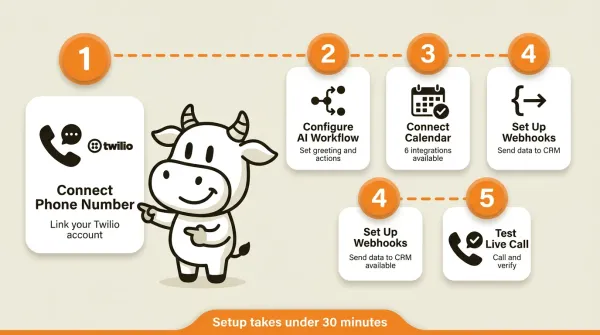
How to set up an AI phone answering service in under 30 minutes
For a detailed step-by-step walkthrough with screenshots, see our setup guide. Here is the quick version.
Step 1: Connect your phone number
Sign up for a Twilio account and purchase or port a phone number. Then connect it to your AI service by entering your Twilio Account SID and Auth Token in Settings. CallCow uses BYOC, so you manage Twilio billing directly.
Step 2: Configure your AI workflow
Define what your AI says and does. Set your greeting, conversation flow, and available actions (book appointment, answer questions, transfer call, collect information). CallCow's custom workflow builder handles this. You write the instructions in plain English. The AI follows them.
Step 3: Connect your calendar
Link your scheduling tool so the AI can book appointments in real time. CallCow supports Google Calendar (beta), Outlook Calendar (beta), Cal.com, Calendly, TidyCal, and Trafft. Verify that test bookings appear in your calendar before going live. TidyCal cannot book paid appointments through the API, and Trafft always picks the first available employee instead of a specific one. Our appointment scheduling guide covers each integration.
Step 4: Set up call transfer (optional)
If you want the AI to transfer calls to your team, configure a transfer number in your workflow. For intelligent routing, set up a Dynamic Transfer URL. This is a webhook endpoint on your server that receives caller information and returns the right destination number. This requires a verified Twilio Business Profile.
Step 5: Configure webhooks (optional)
Set up a webhook endpoint to receive call data after each call. The payload includes the transcript, summary, form fills, and call metadata. This integrates with your CRM, email marketing tool, or any system that accepts webhooks. Webhooks fire on call completion only, not during the call.
Step 6: Embed on your website (optional)
Add CallCow's widget to your website so visitors can call your AI directly from their browser. The widget supports both floating and inline placement. No phone number needed on the visitor's end.
Step 7: Test everything
Call your configured number and run through every scenario. Test the greeting, try booking an appointment, test a transfer, and check that webhook data arrives correctly at your endpoint. Fix anything that does not work before going live.
Trial limitations
CallCow's 7-day free trial supports 4 concurrent calls with verified numbers only. Full call capacity requires a Twilio Business Profile. See the getting started docs for details.
If you want to run a live test, CallCow has a 7-day trial at callcow.ai.
Which businesses need an AI phone answering service?
Real estate agents
Real estate agents miss calls while showing properties. Every missed call can become a lead for the next agent on Zillow. An AI receptionist can qualify leads, answer property questions, and book viewings after hours.
Home services
Plumbers, electricians, HVAC contractors, and landscapers receive emergency calls outside business hours. An AI receptionist triages urgency, collects job details (address, problem description, preferred time), and routes urgent calls to the on-call technician. Emergency calls after hours are the difference between winning a customer and losing them to the first Google result that picks up. For outbound follow-up, CallCow's list calling feature dials from a CSV with daily scheduling and auto-resume.
Law firms
Potential clients call at all hours and often will not leave voicemails. An AI receptionist can capture intake information, schedule consultations, and transfer urgent calls to the on-call attorney. For a detailed breakdown, see our law firm guide.
Medical and dental offices
Missed calls mean missed appointments and lost revenue. An AI receptionist handles scheduling, answers basic insurance questions, and routes urgent calls to the right staff member. Important: AI receptionist services are not HIPAA-compliant. Do not use AI for calls involving protected health information. Route those calls to a HIPAA-compliant service or staff member.
Small businesses and solopreneurs
Any small business without a dedicated front desk person can benefit from an AI phone answering service. If you are a solopreneur or a team under 10 people, every missed call can be a potential customer gone.
E-commerce and SaaS companies
These businesses often get customer support calls but do not have phone support teams. An AI receptionist handles common questions (order status, return policy, pricing), collects contact information for follow-up, and transfers complex issues to the right team member. The website embed widget works well here because customers are already on your site when they need help.
Who this is for (and who it's not)
Good fit:
- Small businesses and solopreneurs spending $200+/month on a human answering service or losing leads to missed calls
- Teams that want structured lead data (name, email, service type) from every call instead of handwritten notes
- Businesses comfortable managing a Twilio account for phone costs in exchange for transparent per-minute pricing
- After-hours coverage: anyone whose callers reach voicemail at nights and weekends
- Agencies managing phone answering for multiple clients can use CallCow's share billing to keep client usage and billing separate under one account
Not a good fit:
- Healthcare practices handling protected health information: CallCow is not HIPAA compliant and does not sign BAAs. Route PHI calls to a HIPAA-compliant service
- Businesses that need warm transfers where the AI briefs your team before connecting. CallCow does cold/blind transfer only
- Anyone who wants one invoice for everything: the BYOC model means separate bills from CallCow and Twilio
- High-volume operations needing parallel dialing or real-time mid-call data streaming
Frequently asked questions
What is the best AI answering service?
The best AI answering service depends on what you need it to do. For CallCow buyers, the key questions are whether you want structured form capture, multiple calendar integrations, webhook automation, and a Twilio BYOC setup. If you prefer a more bundled experience, compare a few alternatives directly on their current pricing and demo flows. See our best answering service for small business guide for a broader comparison.
Can you use AI to answer phone calls?
Yes. AI phone answering services connect to your business phone number and handle calls autonomously using natural language processing. When someone calls, the AI answers with your business name, understands what the caller needs through conversation, and takes action. It can book appointments into your calendar, answer common questions, collect caller information through structured forms, or transfer the call to a human team member. Setup takes under 30 minutes for basic configurations. No coding required for standard use cases. For developers, most services also offer API access for deeper integration with existing systems.
How much does AI phone answering service cost?
Pricing varies by vendor and billing model. With CallCow, verify the current platform price separately from Twilio number and usage costs because the product uses BYOC. With bundled providers, verify what is actually included in the monthly fee and what happens when usage spikes.
How much does AI call assistant cost?
An AI call assistant has two main cost buckets: the software and the phone layer. With CallCow, that means the platform plus separate Twilio costs, and transfer-heavy workflows usually cost more than simple inbound handling. Compare that against human services only after you map your actual call volume and transfer rate.
If that checklist matches what you need, do the simplest possible test: set up one workflow, forward one number, and run a few real calls through it. The trial at callcow.ai is enough for that.
Yiming Han is the founder of CallCow and writes about phone automation, missed calls, and the tradeoffs that show up when small businesses actually deploy voice AI.