AI answering service vs traditional answering service
Honest comparison of AI vs traditional answering services. Real pricing, real tradeoffs, and when each option makes sense for your business.AI answering service vs traditional answering service
An AI answering service uses a voice agent to answer your business calls, collect caller information through structured forms, and deliver transcripts and data directly to you. A traditional answering service uses human operators to do the same thing. CallCow publicly lists entry pricing, while traditional services usually cost materially more depending on coverage, minute bundles, and overages. I have used both. I will tell you exactly where each one falls apart.
I have been on both sides of this. CallCow came out of the same problem: I kept missing calls while showing properties.
Before that, I paid for a traditional answering service and watched them fumble my leads for three months straight. The operator did not know the difference between a 2-bedroom and a 3-bedroom unit. She could not check my calendar. She took messages on a notepad and I got them six hours later in a batch email.
That experience is not unusual. Traditional answering services have been around for decades. They work. But they work within a narrow set of constraints that most business owners do not fully understand until they are already locked into a contract.
This guide walks through both options with sample pricing logic and the caveats worth checking before you buy. I also included pricing at four different call volumes and the situations where humans still beat AI.
Table of contents
- How traditional answering services work
- How AI answering services work
- Cost comparison
- Comparison table
- When traditional answering still wins
- When AI answering wins
- The hybrid approach
- Frequently asked questions
How traditional answering services work
A traditional answering service staffs a call center with human operators. When someone calls your business number, the call routes to the answering service. An operator picks up, reads a script you provided, and either takes a message, transfers the call, or answers basic questions from a knowledge base you gave them.
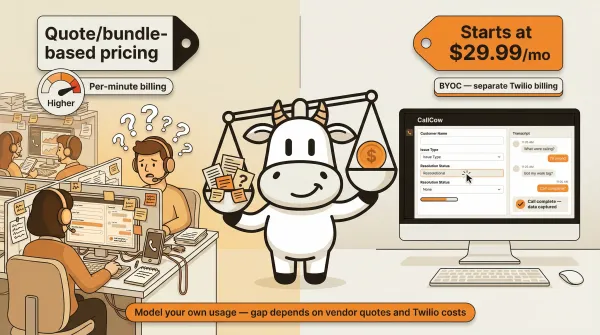
Most services sell themselves as "your virtual receptionist." Ruby, Posh, AnswerConnect, ReceptionHQ, and MAP Communications dominate this space. They pitch 24/7 coverage, US-based operators, and custom scripts. Many traditional services use quote-based or bundle-based pricing, so you need to check each vendor directly rather than assuming one comparison article will stay current.
The pricing models vary. Per-minute billing is the most common. You will usually see either minute-based billing or per-call billing, with overages once you move past the included volume. Monthly plans bundle a set number of minutes or calls, then overage kicks in at higher rates.
Watch out for minute-bundle pricing. A plan can look reasonable until calls run longer than expected, and then overages push the monthly total well above the headline price.
Setup takes anywhere from one day to two weeks. You fill out an onboarding form. You write your greeting script, your FAQ responses, your escalation rules. A dedicated account manager reviews everything. The service runs a test call. Then you go live. During peak seasons, some services have waitlists for new accounts.
What you actually get varies by price tier. At the low end, operators answer calls, take names and numbers, and email you a message. At the high end, operators schedule appointments, qualify leads, transfer calls, and integrate with your CRM. Ruby and AnswerConnect offer some of the more polished experiences, with operators who sound professional and follow detailed scripts.
Operator quality is the real problem. Operators handle calls for dozens of different businesses simultaneously. They switch context every thirty seconds. Your roofing company script sits next to a dental practice script and a law firm script on the same screen. Mistakes happen. Names get mixed up. Specific product knowledge is surface level at best.
If you want the best answering service for small business, treat ultra-low headline prices carefully and check what level of real coverage they actually buy.
How AI answering services work
An AI answering service uses a voice agent powered by large language models to handle your calls. When someone dials your number, the AI picks up instantly, greets the caller, asks questions based on a workflow you designed, and collects structured data through forms.
CallCow works like this. You connect a Twilio phone number to your account. You build a workflow that tells the AI what to say, what questions to ask, and what data to collect. When a call comes in, the AI answers immediately, has a conversation with the caller, fills out any forms you configured, and sends you the transcript and data when the call ends. The getting started docs walk through this process step by step.
If you want to see the AI setup instead of just reading about it, the getting started guide and the phone number guide show the exact BYOC steps. You can test it on real calls with the 7-day trial at callcow.ai.
Cost is the obvious difference. CallCow lists entry pricing publicly. The software pricing is separate from your Twilio bill under the BYOC model, so your real total depends on phone usage and setup.
The BYOC model matters here. You manage your own Twilio account and phone bill. Twilio costs vary by country, number type, and usage. The important point is that CallCow uses separate telephony billing through Twilio, so do your own math for your traffic pattern instead of copying a sample total blindly.
Setup is faster. Most businesses can get a simple version live quickly on CallCow once Twilio is connected. You connect Twilio, write a workflow, and you are answering calls. No onboarding calls. No script review process. No waiting for an account manager.
What you get with AI answering is different from what you get with humans. The AI answers every call instantly. Near-instant response once connected, no hold queues. It operates 24 hours a day, seven days a week, including holidays. It never calls in sick or mixes up your script with another client's.
The data capture is where AI pulls ahead of human operators by a wide margin. CallCow's forms system lets you define specific data fields: name, email, phone, property address, service type, preferred appointment time, budget range, whatever your business needs. The AI collects this information conversationally during the call and stores it as structured data. You get a clean form submission, not a scribbled note from a distracted operator.
Every caller automatically becomes a contact with phone, name, email, and notes when available, which is a practical advantage if your team is still piecing follow-up together from inboxes and spreadsheets.
Call transcripts come with every call. You can read exactly what the caller said and how the AI responded. This is useful for training, quality control, and catching leads that a human operator might have written off.
Voice cloning is another differentiator. You can record a 30-second clip of your own voice and the AI uses it for all calls. Callers hear something that sounds like your brand, not a generic robot voice.
Two capabilities that traditional services do not offer: Agent Calling lets any AI agent trigger a real phone call with a single API request, and embed widgets turn any website page into a live voice-capture surface.
Model quality matters more than most people realize. CallCow supports GPT 5.4 as a selectable model per workflow. Our testing shows meaningfully fewer hallucinations, which is critical when the AI is collecting caller data or answering questions about your business. There is a slight latency tradeoff, but for calls where accuracy matters, I would pick it over earlier models.
The tradeoffs are real and I will not pretend otherwise. The AI always identifies itself as AI. CallCow does not let you disable this. Some callers hang up immediately when they hear it. The AI cannot handle emotional nuance the way a trained human can. Complex multi-step reasoning can break down. And the transfer feature has specific limitations I will cover later.
If you want a deeper look at how AI phone answering services work end to end, I wrote a full guide on the architecture and setup process.
Cost comparison
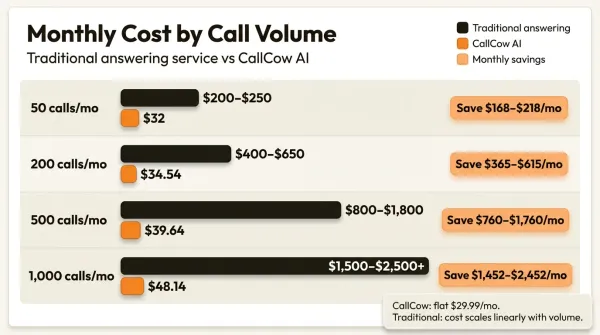
Let me run the numbers at four different call volumes.
50 calls per month
This is a low-volume scenario. At this level, the main difference is that human services often still require a meaningful base plan, while CallCow keeps a lower software entry price and separate Twilio usage. Exact savings depend on the vendor quote you get and your actual telephony bill.
200 calls per month
A busier small business. At that point, human-service quotes usually move up because of larger minute bundles and overages, while CallCow still keeps telephony on a separate Twilio bill. The exact gap depends on the quotes you get and your real call duration.
500 calls per month
High volume is where pricing-model differences matter most. Human-service plans often become quote-heavy and overage-heavy, while AI software keeps a lower base price and leaves telephony on a separate usage bill.
1,000 calls per month
Very high volume usually pushes traditional vendors into custom quotes and pushes AI buyers to think carefully about telephony limits, workflow design, and Twilio requirements. For CallCow, trial limits still apply until your Twilio setup is ready for broader production use.
Hidden fees in traditional services
The comparison above is generous to traditional services. These are the costs they do not advertise upfront.
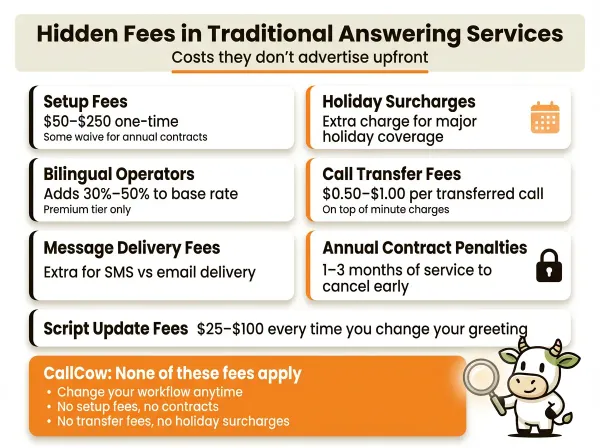
Typical hidden-cost categories to ask about with traditional services include setup fees, holiday coverage, bilingual coverage, transfer fees, message-delivery charges, contract terms, and account-management fees. On the CallCow side, the main extra cost to disclose is separate Twilio billing under BYOC.
Comparison table
| Feature | Traditional answering service | AI answering (CallCow) | Hybrid |
|---|---|---|---|
| Cost structure | Usually bundle or quote based | Public entry pricing + separate Twilio | Usually quote based |
| Per-call economics | Usually labor-based | Lower software cost, separate telephony usage | Mixed |
| Availability | Often plan-dependent | 24/7 included | Plan-dependent |
| Setup time | Usually slower | Usually faster once Twilio is ready | Varies |
| Scalability | Linear cost increase | Flat software fee, variable Twilio telephony | Moderate increase |
| Personalization | Script-based, limited | Workflow-based, flexible | Script + workflow |
| Data capture | Freeform messages | Structured forms | Mixed |
| Transfer capability | Warm transfer standard | Cold/blind transfer only | Depends on primary |
| Call transcripts | Rarely available | Every call | Varies |
| Empathy handling | Strong | Limited | Strong on complex calls |
| Brand voice | Inconsistent across operators | Consistent, voice cloning available | Mixed |
| Holiday coverage | Extra charge | Included | Partial extra charge |
| Voice cloning | No | Yes (30-second sample) | No |
| CRM integration | Limited, expensive | Webhooks, Make.com, Monday.com | Varies |
When traditional answering still wins
I am not going to pretend AI handles everything. There are situations where human operators are the better choice, and no amount of workflow engineering closes that gap.
Medical emergencies and grief counseling are the clearest examples. When a patient calls a hospice, a crisis line, or a mental health practice, they need a human voice on the other end. AI cannot read the tremor in someone's breathing or adjust its tone in real time based on a long pause. The silence that sometimes matters more than words is not something AI can offer.
High-touch client relationships also favor humans. Wealth management firms, boutique law practices, luxury real estate agencies. These businesses sell trust. A prospect who is about to move $2 million into a managed account wants to hear a person, not an AI. The cost of a human answering service is irrelevant when the lifetime value of a single client is six figures.
Industries where AI self-identification is a dealbreaker should stick with humans. CallCow always identifies as AI. You cannot turn this off. In some jurisdictions, disclosure may be legally required anyway. But even where it is not, some callers will not engage with an AI no matter how natural it sounds. If your business depends on building personal rapport on the first call, a human operator gives you a better shot.
Nuanced routing that requires human judgment is another weak point for AI. If your routing logic involves reading a caller's emotional state, assessing urgency from context clues, or making judgment calls about escalation, a trained human operator will outperform an AI workflow. CallCow can transfer calls based on rules you define. But the AI cannot decide on its own that a caller sounds distressed and should skip the normal queue.
Complex multi-party negotiations do not work well on AI either. If a call involves three stakeholders, contract terms being discussed live, and real-time adjustments to proposals, you need a human. AI voice agents handle structured conversations well. They break down on the unstructured ones.
If you need warm transfers specifically, AI will disappoint you. CallCow supports cold transfer only. The AI hangs up and the caller is bridged to your number. There is no warm handoff where the operator briefs you before connecting. Traditional services offer warm transfer as a standard feature. Ruby and AnswerConnect both handle this well.
When AI answering wins
AI answering dominates in a few specific scenarios, and these happen to be the scenarios where most small businesses actually lose money.
High call volume is the most obvious one. If you are getting 200 or more calls per month, the cost savings are dramatic. As call volume rises, AI often wins the cost comparison faster than human services do, but you should still run the numbers with your own usage. The per-call economics make traditional services unsustainable at scale for cost-conscious businesses.
After-hours coverage is where AI delivers the most value per dollar. Most businesses do not need a human answering service at 2 AM. Callers at that hour want to leave a message, book an appointment, or get basic information. AI handles all of that. You can set up after-hours answering on CallCow by configuring your workflow to handle nighttime calls differently from daytime calls. No extra charge for coverage outside business hours.
Structured intake is a killer use case. Medical offices that need to collect patient name, date of birth, insurance provider, and reason for visit. Real estate agencies that need property address, budget, timeline, and financing status. Home services businesses that need service type, location, urgency, and preferred time. The AI fills out your forms during the conversation, so you get clean structured data instead of a message that says "called about roof, seemed urgent, call back."
SMS Instructions adds another layer. The AI can text callers mid-conversation with payment links, booking confirmations, directions, or intake form URLs. A human operator would have to manually send a text or email after the call. The AI does it while the caller is still on the line. This is something traditional answering services simply do not offer. Requires Twilio SMS capability.
Cost-sensitive businesses should look at AI first. Solo operators, startups, bootstrapped companies. If your budget is tight, lower-cost AI is usually the first thing to test before committing to a higher-cost human service.
Scaling without hiring is the long-term play. When you hire a receptionist, you pay salary, benefits, training, and management overhead. When volume drops, you still pay. When volume spikes, one person cannot keep up. AI scales with your volume at a flat rate. The software pricing stays flat, but your broader operational limits still depend on Twilio, workflow design, and your actual call volume. If you want to learn how to set up AI phone answering from scratch, the process is straightforward and takes minutes.
AI appointment scheduling is another strong point. CallCow integrates with Cal.com, Calendly, TidyCal, and Trafft for booking appointments, and it also supports Google Calendar and Outlook Calendar in beta. Two caveats matter here: TidyCal paid bookings are excluded, and Trafft books the first available employee rather than a specific one. The AI can check availability, book slots, and send confirmations during the call. Traditional operators can do this too, but they charge premium rates for it and the error rate is higher.
The hybrid approach
The smartest setup for most businesses is not one or the other. It is both, used for different things.
The easiest CallCow entry point is not replacing your front desk on day one. It is using voicemail transfer for missed-call coverage or routing only after-hours calls to AI first. That lets you keep your daytime human workflow while CallCow catches the calls you were already losing. Set up voicemail transfer in under 10 minutes. Get started at callcow.ai. It is a lower-risk starting point, and it matches how a lot of small businesses actually adopt the product.
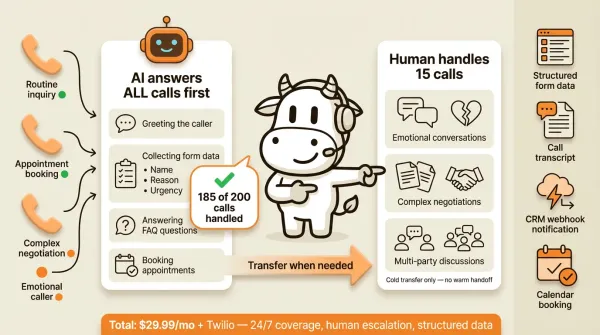
From there, use AI for first-line call handling where the conversation is repetitive. Let the AI answer overflow calls, collect basic information, handle routine questions, and book appointments. Most of your calls are routine. A real estate agent gets 200 calls per month and maybe 15 of them need a human conversation. A medical office gets 150 calls and 10 of them are urgent. The AI handles the other calls that do not need a person.
For the calls that do need a person, use the transfer feature. CallCow can transfer live calls to a human. When the AI detects that a caller needs something beyond its capabilities, it routes the call to your phone or your staff. The caller does not have to call back. They do not have to leave a message and wait. They get transferred.
I need to be transparent about the transfer limitations. CallCow's transfer is cold or blind only. The AI cannot brief you before connecting. The caller gets bridged to your number and you pick up without context about what was discussed. You would need to check the transcript afterward. Warm transfer, where the operator stays on the line to introduce the caller and share context, is not available.
Transfer also requires a Twilio Business Profile. Without it, you cannot use the transfer feature at all. Getting a Business Profile approved takes a few business days. Twilio reviews your profile and applies it to your numbers once approved. Most legitimate businesses get approved without issues, but it is not instant. If you want to start immediately, voicemail transfer is often the more practical first deployment because it does not depend on live transfer.
The webhook system helps close the context gap. When a call completes, CallCow sends a POST to your webhook URL with the full transcript, call summary, form fills, and metadata. If you integrate with Make.com or Monday.com, you can push call data into your CRM or project management tool automatically. The webhook fires on completion, not in real time during the call. So you cannot use it to pull context mid-call. But you get everything after.
A practical hybrid setup looks like this. During business hours, your team answers the calls they can. If no one picks up, voicemail transfer sends the missed call to CallCow. After hours, you can route all calls to the same workflow. The AI collects caller information through forms, answers FAQ questions from your workflow, and books appointments through your scheduling tool. For calls that need a human and meet your transfer rules, it transfers to your cell phone or staff line. After every call, the webhook pushes data to your CRM. You follow up with leads based on the structured form data, not on a handwritten message from an operator.
This gives you 24/7 coverage, structured data capture, appointment booking, and human escalation. Total cost on CallCow means the software subscription plus your separate Twilio bill, plus any tools you layer on top. Compared with many traditional quotes, the AI path can be materially cheaper while still giving you better structured data.
Some traditional services offer their own hybrid approach. Smith.ai combines AI receptionists with live human agents. Ruby offers a similar model. These are more expensive than pure AI options but cheaper than full human answering. They are worth considering if you want someone else to manage the entire stack for you. The best phone answering service comparison breaks down the full market.
Who this is for (and who it's not)
Good fit:
- Businesses spending heavily on a traditional answering service and not getting the data capture or flexibility they expected
- Cost-sensitive businesses that want to test a lower-cost AI layer before committing to a bigger service contract
- Teams that want structured lead data from every call, not handwritten notes from a distracted operator
Not a good fit:
- Situations requiring genuine empathy: grief counseling, hospice, mental health crises, or high-touch client relationships where trust is the product
- Anyone who needs warm transfer as a standard feature. CallCow does cold/blind transfer only
- Businesses where AI self-identification is a dealbreaker. You can't turn it off
- Operations needing real-time mid-call data streaming. Webhooks fire on completion only
Frequently asked questions
How much does a virtual receptionist cost?
Traditional virtual receptionist pricing usually depends on call volume, bundled minutes, and features. CallCow publicly lists entry pricing, but your real total still includes separate Twilio billing under the BYOC model. The more calls you handle, the more important it is to compare the vendor's real pricing math instead of just the headline plan.
Can a virtual receptionist answer calls 24/7?
Yes. Both traditional and AI answering services offer 24/7 coverage. Traditional services charge premium rates for round-the-clock staffing. AI services include it at no extra cost. The quality differs though. Traditional operators at 3 AM may be less alert than daytime staff. AI answers every call the same way regardless of time.
Can I forward voicemail to an AI answering service?
Yes, with caveats. CallCow supports voicemail transfer, which configures your carrier voicemail to forward missed calls to the AI. The AI only handles calls that you do not pick up, so you keep the personal touch for calls you answer yourself. This is not available on all carriers. Setup requires carrier-level configuration. Some carriers make this easier than others.
Is a virtual receptionist worth it for a small business?
If missed calls are costing you leads, bookings, or support load, yes. The exact ROI depends on your business, but that is the right math to run before choosing AI or a traditional service.
What happens if the AI cannot answer a caller's question?
The AI can transfer the call to a human, take a message, or provide a fallback response based on your workflow configuration. CallCow's transfer feature routes the caller to your phone when the AI hits its limits, but it requires a Twilio Business Profile and remains a cold transfer rather than a warm handoff. The transcript and data still get recorded and sent via webhook after the call.
Do callers know they are talking to an AI?
Yes. CallCow always identifies as AI during calls. This cannot be disabled. Some callers will hang up when they hear this. Others do not care as long as their question gets answered. In practice, caller acceptance depends a lot on your use case, script quality, and how quickly the AI proves it can help.
If your real problem is missed calls after hours or during busy periods, start there. Use the voicemail transfer docs and getting started guide, connect Twilio, and set up missed-call or after-hours coverage before you decide whether to expand it further. Then try it on real calls at callcow.ai.
Yiming Han is the founder of CallCow and writes about phone automation, missed calls, and the tradeoffs that show up when small businesses actually deploy voice AI.