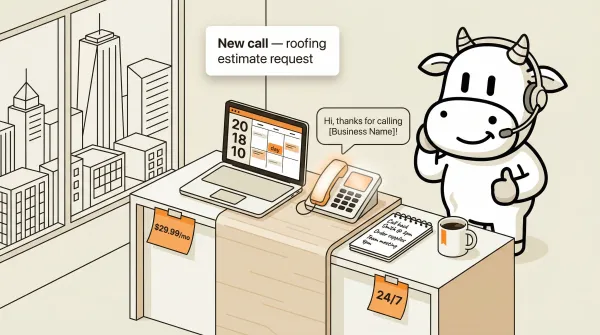
Best phone answering service in 2026: 7 compared with public pricing where available
The best phone answering service in 2026 compared with public pricing where available. AI vs human, honest tradeoffs, and a clear recommendation.Best phone answering service in 2026: 7 compared with public pricing where available
A phone answering service handles incoming calls on your behalf around the clock. AI tools usually start below human services, but your actual cost comes down to whether telephony is bundled, how usage is billed, and what level of coverage you need. The right pick depends on whether you need instant AI response or human empathy, and how much you want to spend.
I have spent the last year building CallCow, and I have spent plenty of time reading competitor sites, pricing pages, and product docs. Every provider here has a real use case, and every provider here has tradeoffs.
Table of contents
- How phone answering services work
- AI answering services
- Human answering services
- Hybrid services
- Comparison table
- How to choose the right service
- Frequently asked questions
How phone answering services work
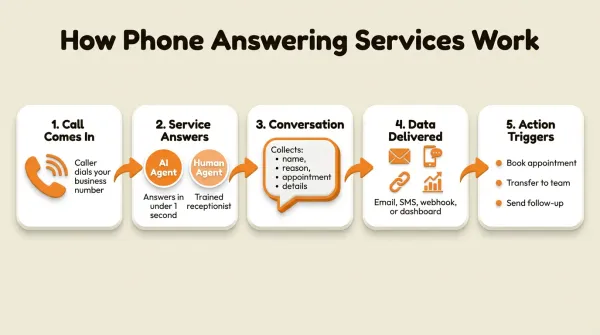
Most phone answering services follow the same basic flow, whether they use AI or humans.
- Call comes in. A caller dials your business number. This number forwards to the answering service, or the service provides a number you publish.
- The service answers. Either an AI agent or a trained human picks up in your business name.
- Conversation happens. The agent collects information: caller name, reason for calling, appointment details, or whatever you configured.
- Data gets delivered. After the call ends, you receive a summary, transcript, or structured data. This arrives via email, SMS, webhook, or dashboard.
- Action triggers. Based on the call, the service can book appointments, transfer to a human, send follow-up texts, or update your CRM.
The difference between providers is in step 2 and step 4. AI often answers faster than human services and usually uses a lower-cost software pricing model. Humans take longer to pick up, cost per minute, but handle nuance better. Some services combine both approaches. For a deeper look at how AI receptionists differ from traditional services, see our virtual receptionist guide.
AI answering services
AI answering services have gotten good enough in 2026 that many small businesses should test one before committing to a human service. The biggest difference is usually pricing model: software plus telephony on the AI side versus labor-heavy bundles or quotes on the human side.
CallCow
CallCow is an AI phone answering service built for businesses that want full control over their calls. It works by connecting your own Twilio phone number, then using AI workflows to handle calls.
What it does. You configure workflows that tell the AI how to handle different types of calls. It can answer questions, collect lead information through structured forms, book appointments via Google Calendar and Outlook Calendar in beta plus Calendly, Cal.com, TidyCal, and Trafft, and transfer calls to your team. TidyCal paid bookings are excluded, and Trafft books the first available employee rather than a specific one. SMS Instructions lets the AI text callers mid-conversation with payment links, booking URLs, directions, or other links that are hard to communicate verbally, as long as your connected number has Twilio SMS capability. The Prompt-to-Call API lets external AI agents trigger phone calls with a single natural-language request. GPT 5.4 is available as a selectable model per workflow, recommended for fewer hallucinations with a slight latency tradeoff. Voice cloning lets you record 30 seconds of your own voice and use it on calls, and voicemail transfer lets AI cover missed calls instead of every call. Every caller automatically becomes a contact in your database - phone, name, email, and notes when available - so you build a lead list passively. Website widgets give you another lead-capture surface directly on your site.
Pricing. CallCow publicly shows plans starting at $29.99/month. You need your own Twilio account for the phone number, which means you manage your own phone bill separately under the BYOC model.
Best for. Small businesses, agencies managing multiple clients, developers who want API control. The BYOC model means you own your number and can leave at any time.
Limitations to know about. The AI always identifies itself as AI. You cannot disable this. Transfer to human requires a Twilio Business Profile, which takes a few business days to set up. Transfers are cold only, not warm. The trial allows 4 concurrent calls with verified numbers only. Webhooks fire on call completion, not in real time. Make.com is CallCow's most fully available automation integration, Monday.com is documented, and Zapier access is invite-only. Voicemail transfer does not work on all carriers. Outbound list calling is sequential only, not parallel.
CallCow came out of the same problem: I was tired of losing customers to missed calls. The tradeoffs are real. If you need warm transfers, HIPAA compliance, or parallel outbound dialing, we are not there yet. If you want to see the setup before you compare more vendors, use the getting started guide and voicemail transfer docs.
Rosie AI (HeyRosie)
Rosie AI is an AI answering service aimed at small businesses. It answers calls, takes messages, and books appointments.
What it does. Rosie picks up your calls 24/7, answers common questions from a knowledge base you provide, and sends you the details via text or email. It can handle appointment booking through integrations.
Pricing. Rosie has publicly shown lower-cost entry pricing, but verify the current plan details directly on the vendor site.
Best for. Solo operators and small service businesses that want something simple with minimal setup.
Limitations. Limited integration options compared to CallCow. No structured data collection forms. No API access for developers. Transfer capabilities are basic.
Goodcall
Goodcall positions itself as an AI phone agent for service businesses. It handles inbound calls, answers customer questions, and automates scheduling.
What it does. Goodcall answers calls in your business name, uses a knowledge base to respond to questions, and can route calls or take messages. It targets home services, healthcare, and professional services specifically.
Pricing. Goodcall now publishes pricing publicly. The current entry plan is $79/month per agent, with higher tiers at $129/month and $249/month. Their pricing model is based on unique customers rather than minutes, and they offer a free trial.
Best for. Businesses that want a sales-guided setup process and do not mind talking to a rep before knowing the price.
Limitations. The pricing model is easier to understand now, but it is still a very different cost structure from BYOC tools because Goodcall prices per agent and by unique-customer allowance rather than exposing raw telephony costs. No public BYOC model or number-ownership positioning is visible.
Lucy AI (Curious Thing)
Lucy is a free AI phone answering agent from Curious Thing. It targets both personal and business use.
What it does. Lucy answers calls when you are unavailable, has natural conversations using LLMs, and forwards messages to you. It works as a standalone tool without requiring a Twilio account.
Pricing. Free tier available. Paid plans exist but pricing is not clearly listed on their site.
Best for. Individuals and micro-businesses that want to try AI answering with zero financial commitment.
Limitations. Limited feature set. No transfer to human. No structured data collection. No CRM integrations. The free tier likely has call volume limits.
Human answering services
Human answering services have been around for decades. They employ trained receptionists who answer in your business name. The quality varies widely by provider, and pricing is usually per-minute or per-call.
ReceptionHQ
ReceptionHQ provides US-based virtual receptionists for call answering and message taking.
What it does. Real people answer your calls 24/7, take messages, and forward them to you. They offer bilingual receptionists and industry-specific training for healthcare, legal, and real estate.
Pricing. ReceptionHQ publishes entry pricing clearly. General message-taking starts from $25/month, while their ReceptionistPlus transfer-capable service starts from $35/month, with higher call-bundle tiers above that. They also offer a 7-day free trial. Watch the after-hours surcharge language before you compare totals.
Best for. Businesses that specifically want a human voice and do not need AI automation. The low entry price makes it easy to test.
Limitations. No AI component. Pricing can escalate quickly with overage minutes. No self-serve API or webhook integrations. Limited to message taking and basic transfer, no appointment booking automation.
AnswerConnect
AnswerConnect is a 24/7 live answering service targeting lead capture and customer support.
What it does. Human receptionists answer calls around the clock, qualify leads, schedule appointments, and take detailed messages. They integrate with some CRM platforms.
Pricing. Not publicly listed. Get a direct quote if you are considering AnswerConnect.
Best for. Businesses with higher call volumes that need professional human receptionists and have budget to match.
Limitations. No AI option. No transparent pricing. Requires a sales call to get started. Setup takes longer than AI services.
AMBS Call Center
AMBS is a family-owned 24/7 answering service and call center that has operated for years.
What it does. Live receptionists handle calls, take messages, provide overflow coverage, and offer after-hours support. They serve multiple industries including healthcare and property management.
Pricing. Custom quotes only. Their website does not list any pricing.
Best for. Businesses that value long-standing operations and family-owned business relationships over modern AI features.
Limitations. No AI capabilities. No transparent pricing. Website feels dated. No API or developer tools. Setup and onboarding likely involves multiple calls.
Hybrid services
Hybrid services combine AI and human agents. The AI handles routine calls, and complex situations get escalated to a human.
Smith.ai
Smith.ai combines AI receptionists with live human agents in a single platform.
What it does. AI handles initial call intake, qualifies leads, and answers common questions. When a caller needs human judgment, the call transfers to a live agent. Smith.ai also handles web chat and text messages.
Pricing. Smith.ai publishes pricing, but exact call allowances and add-ons change over time. Verify the current structure directly with the vendor.
Best for. Businesses that want AI efficiency with a human safety net. Law firms and professional services are their primary market.
Limitations. Expensive compared to pure AI services. The AI component is less customizable than CallCow or Rosie. Transfer quality depends on agent availability. No BYOC model.
Ruby
Ruby is one of the older, better-known virtual receptionist brands.
What it does. Ruby provides virtual receptionists who answer calls and live chat in your business name. They focus on creating a personal connection with callers. They serve legal, healthcare, and general business markets.
Pricing. Ruby pricing is quote-based or package-dependent. Verify current plan details directly with the vendor.
Best for. Businesses where caller experience and personal connection matter more than cost. Law firms and boutique service businesses are their core market.
Limitations. Expensive for what it does. No AI option. Per-minute overages add up fast. Limited integrations compared to AI-native tools. The premium you pay is for brand reputation and human touch, not features.
Comparison table
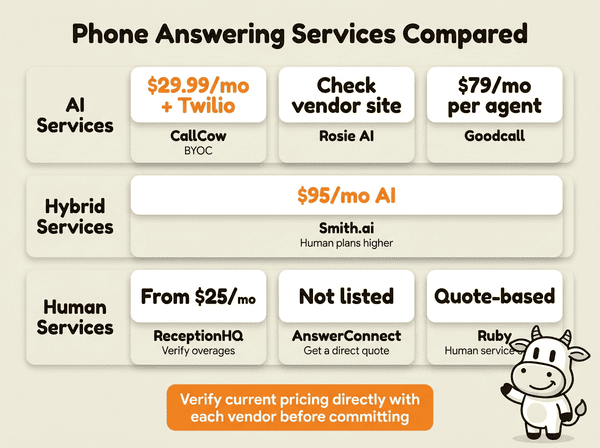
| Feature | CallCow | Rosie AI | Goodcall | ReceptionHQ | AnswerConnect | Smith.ai | Ruby |
|---|---|---|---|---|---|---|---|
| Type | AI | AI | AI | Human | Human | Hybrid | Human |
| Public starting price | $29.99/mo + Twilio | Check vendor site | $79/mo per agent | From $25/mo | Not listed | $95/mo AI | Quote-based |
| Per-minute billing | No (Twilio separate) | No | No | Yes (overage) | Yes | Yes | Yes |
| 24/7 coverage | Yes | Yes | Yes | Yes | Yes | Yes | Yes |
| Transfer to human | Yes (cold, Twilio Business Profile required) | Basic | Not listed | Yes | Yes | Yes | Yes |
| Structured data capture | Yes (forms) | No | No | No | No | No | No |
| API access | Yes (REST) | No | Limited / verify directly | No | No | No | No |
| Calendar integrations | Google/Outlook beta, Calendly, Cal.com, TidyCal, Trafft | Limited | Not listed | No | Limited | Yes | Limited |
| BYOC / number ownership | Yes (Twilio) | No | No | No | No | No | No |
For a deeper cost breakdown, see our AI phone answering service cost guide.
Want to test CallCow against your current setup? Start with the getting started guide, then start a 7-day free trial or call the number on the homepage and talk to the AI yourself.
Quick recommendations by business size and use case
If you want the short version, use this shortlist before you go deeper. Start with voicemail forwarding, CallCow only picks up when you don't. This preserves your personal touch while ensuring zero missed calls.
- Solo operator or micro-business (under 50 calls/month). Start with a low-cost AI option. CallCow makes the most sense if you want structured lead capture, calendar booking, and control over your own number. Lucy is the lowest-friction test if you mainly want basic message handling.
- Small service business (50-300 calls/month). This is where AI usually wins on economics. CallCow is the better fit when you want forms, API access, voicemail transfer as a missed-call backstop, or integrations like Google Calendar and Outlook Calendar in beta plus Calendly, Cal.com, TidyCal, or Trafft. Rosie is the simpler option if you want less setup and can live with fewer integrations.
- Professional services where caller experience matters. If your calls regularly involve urgency, confusion, or emotional nuance, human or hybrid coverage is safer. Smith.ai is the practical middle ground if you want AI for routine intake but still need human backup. Ruby and ReceptionHQ are better fits if a human voice is the priority from the first second of the call.
- Compliance-heavy or highly regulated workflows. If you need HIPAA compliance or specialized legal intake, skip general AI tools and go straight to niche providers built for that requirement. This is a use-case decision more than a feature decision.
- Agencies, multi-location teams, or developer-led workflows. CallCow stands out if you want BYOC with Twilio, REST API access, Prompt-to-Call API, and separate client org billing under one parent account. Embed widgets let you add a floating or inline voice widget to any website page, turning it into a live lead-capture surface. That matters more here than a polished done-for-you setup.
If you are comparing for a typical small business and want the clearest starting point, begin with CallCow's 7-day trial, route a real number through it, and test the exact jobs that matter: lead capture, appointment booking, after-hours coverage, and missed-call recovery through voicemail forwarding. You will know within a day whether flat-rate AI is enough or whether your call flow really needs a human layer.
How to choose the right service
The quick picks above tell you which provider to test first. The factors below explain why, and when to reevaluate.
Picking a phone answering service is not about finding the "best" one. It is about finding the right fit for your business size, call pattern, and use case. I have talked to hundreds of businesses about this, and the decision usually comes down to four factors.
Call volume. If you get fewer than 50 calls per month, a low-cost AI service handles it easily. If you get 200+ calls per month, you need to watch per-minute costs carefully. Human services often use minute bundles and overages, so high call volume is where quote math matters most. AI tools usually feel more predictable on the software side, though BYOC tools still add usage-based phone costs.
Industry requirements. Law firms and medical practices have specific compliance needs. If you need HIPAA compliance, most AI services cannot help you yet. Look at specialized providers built for that requirement rather than assuming a general-purpose AI tool will cover it. Real estate agents and home service businesses have more flexibility. Our AI receptionist guides for real estate and home services break this down by vertical.
Control vs convenience. CallCow gives you full control over your phone number, workflows, and data. You manage the Twilio billing. ReceptionHQ and Ruby handle everything for you, but you do not own the infrastructure. If you want to leave, porting your number can be complicated. With BYOC, your number is always yours.
Budget reality. Be honest about what you can sustain. A lower-cost AI service that handles most routine calls well is often better than paying for a human service you cannot sustain. Start with AI, add human escalation later if you need it.
Pros and cons of phone answering services
Pros. 24/7 coverage means no more missed calls. AI services answer in under a second and cost a flat monthly rate. Human services handle emotionally complex calls better. Both options save you from answering routine questions yourself. Structured data capture (on AI services) means better lead tracking than handwritten notes.
Cons. AI cannot handle genuine empathy. Callers dealing with bereavement, legal crises, or medical emergencies should talk to a human. Human services are expensive at scale. Per-minute billing is unpredictable. AI services have real limitations: cold-only transfers, no warm handoffs, and the AI always identifies itself as AI. Setup takes time regardless of which path you choose.
The businesses that get the most value from any answering service are the ones that treat it as a system, not a tool. Configure the prompts, train the knowledge base, review the call logs weekly, and iterate. The service is only as good as the instructions you give it.
Who this is for (and who it's not)
This comparison is for business owners who are actively choosing a phone answering service and want public pricing where vendors actually publish it. If you know you need 24/7 call coverage, have a budget between $30 and $500/month, and want to understand the tradeoffs between AI and human options, this article gives you the data to decide.
CallCow specifically is a good fit if you want the lowest possible cost, full control over your phone number, structured data capture, and API access. It is not a good fit if you need warm transfers, HIPAA compliance, or a fully managed setup where you never touch the phone infrastructure. If you are in healthcare or legal and need compliance guarantees, skip to the specialized providers. If you want AI with a human safety net and do not mind paying $140+/month for 20 calls, Smith.ai is the better starting point.
Frequently asked questions
How much does a phone answering service cost?
AI phone answering tools often start below human services, but your final bill hinges on vendor packaging, usage, and whether telephony is bundled. Human answering services frequently require minute-bundle math or direct quotes.
What is the best virtual receptionist?
CallCow scores highest on pricing transparency, structured data capture, and number ownership in our comparison. Start with the 7-day free trial and test on real calls. For a human voice, look at human-first providers. For a hybrid approach, look at vendors that explicitly combine AI with live agents. The right pick comes down to your workflow, not just the sticker price. There is no single best for everyone.
Can a virtual receptionist answer calls 24/7?
Yes. Both AI and human answering services offer 24/7 coverage. AI services answer instantly at any hour. Human services staff shifts around the clock. The practical difference is that AI never sleeps, takes breaks, or calls in sick. Humans do. For after-hours coverage specifically, AI is more reliable and cheaper. See our virtual receptionist guide for the full breakdown.
Is a virtual receptionist worth it?
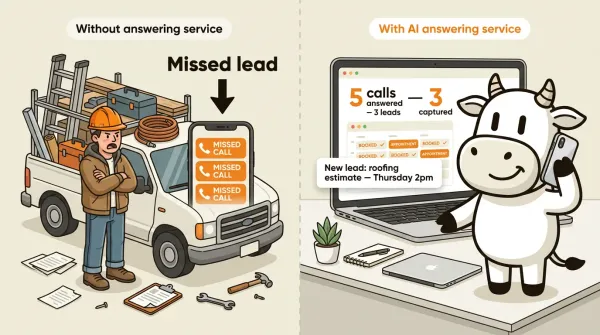
If missing calls costs you money, yes. One missed lead from a potential client calling after hours can cost more than a year of AI answering service. If one missed call can cost you a meaningful sale, the service can pay for itself quickly. Calculate what one missed call costs your business. If it exceeds the monthly service fee, the math is straightforward.
How much does a virtual receptionist cost per month?
AI virtual receptionist software often starts lower than human or hybrid services, but what you actually pay varies with usage, telephony, and plan structure. BYOC providers like CallCow add separate Twilio costs.
What happens when the AI cannot answer a question?
The AI tells the caller it does not have that information and offers alternatives. On CallCow, you can configure the AI to transfer the call to a human team member when it encounters something it cannot handle. This requires a Twilio Business Profile and the transfer is cold, meaning the caller hears a brief pause before your team picks up. For more on this, read our call transfer guide.
Conclusion
The phone answering service market in 2026 splits into three tiers: AI-only, hybrid, and human-only. Many small businesses should at least test AI first. The cost savings are too large to ignore, and the technology has improved enough to handle routine calls well.
CallCow publicly lists entry pricing. You bring your own Twilio number, configure your workflows, and pay Twilio separately under the BYOC model. The limitations are real: no warm transfers, no HIPAA compliance, and sequential-only outbound calling. If those are dealbreakers for your business, look at Smith.ai or a specialized human service.
If you want to test it, start with the phone number guide, then launch a free 7-day trial at callcow.ai. Setup is usually quick once your Twilio account is ready. Or call the number on our homepage and talk to the AI yourself.
I built this because I kept missing calls while building my previous company. The businesses that deploy AI answering first will capture the callers their competitors are still sending to voicemail.
Yiming Han is the founder of CallCow and writes about phone automation, missed calls, and the tradeoffs that show up when small businesses actually deploy voice AI.