Virtual receptionist: The complete 2026 guide
Compare AI and human virtual receptionist options, practical setup tradeoffs, and the CallCow caveats that matter before you switch your phones.Virtual receptionist: The complete 2026 guide
A virtual receptionist is a remote service, either a live human professional or an AI powered system, that answers your business calls, screens callers, books appointments, and routes important calls to the right person. AI tools can cost materially less than staffed services, but the real comparison is not just price. It is setup model, caveats, and how much of your phone workflow you actually trust automation to handle.
Table of contents
- What is a virtual receptionist?
- How virtual receptionist services work
- AI vs. human virtual receptionists
- Virtual receptionist features that matter
- How much does a virtual receptionist cost?
- Virtual receptionist options compared
- How to set up a virtual receptionist in under 30 minutes
- Which businesses need a virtual receptionist?
- Frequently asked questions
What is a virtual receptionist?
A virtual receptionist handles the same responsibilities as an in-office front desk worker (answering calls, taking messages, transferring callers, scheduling appointments) but operates remotely. The term covers two distinct approaches:
Human virtual receptionists are real people working from call centers or home offices. Services like Ruby, Smith.ai, and Abby Connect market trained receptionists who answer calls on behalf of your business using customized scripts.
AI virtual receptionists use natural language processing to handle calls autonomously. They greet callers, understand intent, answer common questions, book appointments, collect caller information through structured forms, and transfer calls to the right person, all without a human on the line. With CallCow specifically, remember the BYOC/Twilio model, AI self-identification, completion-only webhooks, and cold-transfer limitation.
The shift in 2026 is that AI receptionists are credible enough to sit in the same buying conversation as human services. But "credible" is not the same as "identical," and the caveats matter more than most landing pages admit.
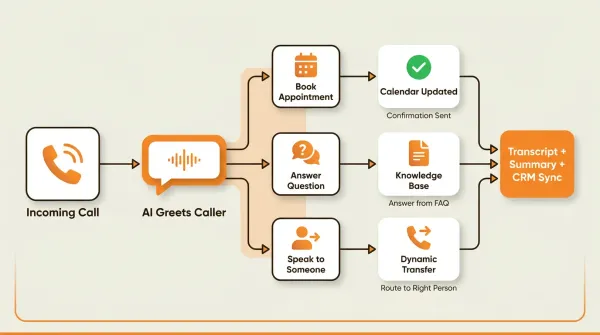
How virtual receptionist services work
Incoming Call
    │
    ▼
AI Greets Caller by Business Name
    │
    ▼
Caller States Their Reason for Calling
    │
    ├── Appointment Booking? → Checks Calendar → Books Slot → Sends Confirmation
    │
    ├── General Question? → Answers from Knowledge Base → Offers Further Help
    │
    ├── Needs to Speak to Someone? → Asks Who → Transfers Call
    │
    └── After Hours / No Answer? → Takes Message → Sends Transcript via SMS/Email
-
Call routing. Your business phone number rings into the virtual receptionist system. With AI services like CallCow, this works through your existing Twilio phone number. You connect your Twilio Account SID and Auth Token in Settings, and calls flow through an AI workflow you configure.
-
AI greeting and intent recognition. The AI answers with your business name and a natural greeting. It uses natural language processing to understand what the caller needs, whether they want to book an appointment, ask a question, or speak to a specific person.
-
Conversation handling. The AI holds a natural conversation with the caller. It can answer frequently asked questions, collect information through structured forms (name, email, phone, reason for calling), and check calendar availability for appointment booking.
-
Smart routing. When a caller needs to speak with a human, the AI transfers the call. CallCow's Dynamic Transfer uses a webhook to determine the right person based on the caller's input, then routes accordingly. Full disclosure: transfers are cold/blind only (the AI doesn't brief the human before connecting), and this requires a Twilio Business Profile.
-
Follow-up. After every call, the system generates a transcript, summary, and structured data from any forms filled during the conversation. This data is available in the dashboard and can be sent to your CRM via webhooks. Note: webhooks fire on call completion only, not in real time. During the call itself, the AI can also send SMS Instructions to the caller, texting links like payment portals, booking confirmations, or directions directly to their phone. This requires Twilio SMS capability on your account.
AI vs. human virtual receptionists
CallCow came out of the same problem: I kept missing calls while showing properties at LavaReach. I tried human answering services first. The cost was reasonable for a few dozen calls, but it scaled poorly and the quality dropped during peak hours. Then I tried AI, and the economics were impossible to argue with.
I've used both. Here's how they compare:
| Factor | AI Virtual Receptionist | Human Virtual Receptionist |
|---|---|---|
| Cost shape | Software subscription plus Twilio BYOC costs | Service pricing usually bundled into the provider fee |
| Availability | 24/7/365, no breaks | Limited by shift schedules |
| Response Time | Instant, every call | Varies (hold times during peaks) |
| Language Support | Any language you configure | Limited to available staff |
| Call Volume | Easier to scale, subject to platform and carrier limits | Depends on staffing and plan structure |
| Consistency | Same quality every single call | Varies by agent experience |
| Empathy | Conversational but not emotional | Genuine emotional intelligence |
| Complex Queries | Handles most, transfers the rest | Better with nuanced situations |
| Setup Time | Often faster to test, especially with voicemail forwarding | Usually involves onboarding, scripts, and handoff |
| Scalability | Instant, no hiring needed | Requires recruitment for growth |
| Data Capture | Structured forms, auto-CRM sync | Handwritten notes, manual entry |
AI usually wins on consistency and structured capture. Human receptionists usually win on empathy, nuance, and warm handoff. A lot of teams end up with some hybrid of the two.
If your business takes calls after hours, AI coverage is cheaper and more reliable than paying someone to sit by a phone. If your callers need emotional nuance, keep a human in the loop. Most businesses land somewhere in between.
Virtual receptionist features that matter
If you're comparing providers, don't ask which one has the longest feature page. Ask which one can replace manual front-desk work without creating new admin work for your team.
Buyer checklist: what to compare before you buy
Use this as a real shortlist filter, not a wish list:
| Ask this question | Why it matters | What a strong answer looks like |
|---|---|---|
| Can it book directly into my calendar, instead of only taking a message? | Manual callback chains kill conversion speed. | Direct booking into Google Calendar (beta), Outlook Calendar (beta), Cal.com, Calendly, TidyCal, or Trafft. |
| Can it route calls based on caller intent instead of forwarding everything to one number? | A receptionist should reduce interruptions, not merely move them around. | Dynamic call transfer that asks who the caller needs, then routes accordingly. |
| Does it capture structured lead data I can actually use later? | Notes are fine until you need reporting, CRM sync, or follow-up automation. | Forms that capture name, phone, email, service type, and preferred time during the call. |
| Does it build a contact record automatically? | Repeated callers should not start from zero every time. | Auto-created inbound contact records with conversation history. |
| Can it cover missed calls without replacing my normal phone behavior? | Many owners want AI as backup, not as the first touch on every call. | Voicemail transfer that forwards unanswered calls to AI only when you miss them. |
| Can it fit my brand without pretending to be human? | Voice quality matters, but so does staying honest with callers. | Optional voice cloning from a 30-second sample, while the AI still identifies itself as AI. |
| Can it plug into the rest of my stack? | If call data gets trapped in one dashboard, someone still has to retype everything. | Webhooks on call completion, API access, website embed widgets, Make.com (fully available, bidirectional), Monday.com (trigger calls from new board rows), and Zapier (invite-only). |
| Can it do more than answer inbound calls? | The best systems help recover revenue, not merely catch it. | Agent Calling for outbound follow-ups, appointment confirmations, and reminder calls from external AI agents. CallCow's Agent Calling API lets any AI agent, Claude, GPT, n8n, Make, trigger a real phone call with a single API request containing a natural language prompt. No workflow setup needed. |
| Can it send links or instructions to callers mid-call? | Payment links, booking URLs, directions, and reference material are painful to communicate verbally. | SMS Instructions lets the AI agent text the caller links and text-based information during the conversation. Useful for payment portals, booking confirmations, and directions. Requires Twilio SMS capability. |
Read that checklist with these priorities:
- If appointment booking is core to your business, rule out any provider that only promises "message taking."
- If your team already lives in a CRM, prioritize structured forms plus webhooks over polished call scripts.
- If you mostly want overflow coverage, voicemail transfer is more useful than full replacement.
- If you need nuanced human judgment on every call, a human or hybrid service still makes more sense.
Important caveats, because this is where comparison tables get slippery: TidyCal cannot book paid appointments via API. Trafft always selects the first available employee, not a specific one. Dynamic transfers require a verified Twilio Business Profile and are cold/blind only, not warm transfers. Voicemail transfer is not available on all carriers. Webhooks fire on call completion, not mid-call. Agent Calling is capped at 60 requests per minute, and the AI always identifies itself as AI. SMS Instructions requires Twilio SMS capability on your account.
If you are comparing vendors and want the documented feature list instead of a sales demo, start with the product docs for forms, voicemail transfer, and transfer to human. Those three pages usually tell you faster than a homepage whether the workflow actually fits your business.
For the model powering the conversation, CallCow now supports GPT 5.4 as a selectable option in LLM settings. GPT 5.4 is the safest default for most virtual receptionist workflows. In testing it showed meaningfully fewer hallucinations compared to earlier models, which matters when the AI is collecting caller details or answering questions about your business. There's a slight latency increase, but for a receptionist use case where accuracy beats speed, it's the right tradeoff. Model selection is per-workflow.
How much does a virtual receptionist cost?
The top 4 People Also Ask questions for this keyword are all about cost. Most of the top 10 SERP results bury pricing behind "contact us" forms.
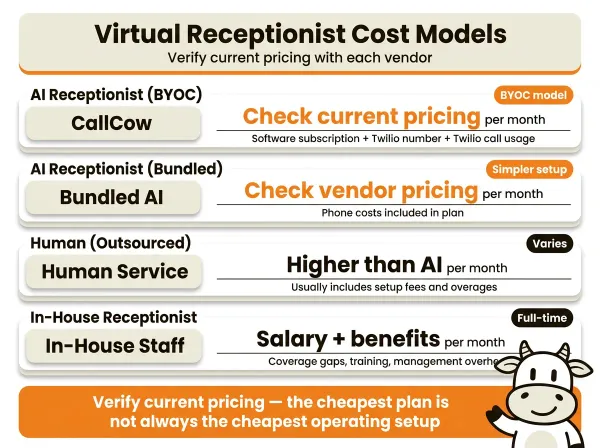
Cost at a glance
| Setup | Pricing pattern |
|---|---|
| AI receptionist (CallCow) | Platform fee plus separate Twilio BYOC charges |
| Human receptionist (outsourced) | Monthly fee, often with setup fees or overages |
| In-house receptionist | Salary, benefits, coverage gaps, and management overhead |
What to verify before you trust any number
For CallCow, verify the current subscription price and any included usage on the pricing page, then add separate Twilio number and call costs because the product uses a BYOC model.
For human services, check whether the quote includes setup, after-hours coverage, overflow fees, transfers, and overages. That is where a lot of "starting at" pricing gets slippery.
The pricing model nobody explains
Most human services bundle their phone costs into the monthly fee. You pay one price and that's it. The downside: you don't know what you're paying per minute, and you can't optimize.
CallCow uses a bring-your-own-carrier model (BYOC). You connect your own Twilio account, so you pay Twilio directly for phone numbers and usage. The upside is transparency and control over the phone layer. The tradeoff is an extra account and an extra bill.
Hidden costs
- Transferred calls count both call legs on the telephony side, so transfer-heavy workflows cost more.
- Toll-free numbers usually cost more than local numbers.
- Human service setup fees: $50–$200 for script development, non-refundable in most cases.
- Overtime: human services bill $1–3/minute beyond plan limits. At 200 overage minutes/month, that's $200–$600 extra.
When AI costs more than expected
There's one scenario where AI gets expensive: transfer-heavy call flows. If most callers still need a human, you are paying for the software layer and the telephony on both sides of the handoff.
This is where the hybrid model works best. Use AI where it clearly reduces admin work, then transfer only the calls that genuinely need a person.
Virtual receptionist options compared
I looked at the top 10 results for "virtual receptionist" on Google. Most comparison tables hide pricing behind "contact us" forms and skip operational caveats. Here's what I could actually verify:
| Feature | CallCow (AI) | Posh (Human) | Ruby (Human) | Smith.ai (Hybrid) | ReceptionHQ (Human) |
|---|---|---|---|---|---|
| Pricing visibility | Publicly visible | Not obvious on ranking page | Not obvious on ranking page | Some pricing published | Publicly visible |
| 24/7 coverage | Yes | Marketed as yes | Verify by plan | Marketed as yes | Marketed as yes |
| Automation depth | Strong documented product surface | Verify with vendor | Verify with vendor | Verify with vendor | Verify with vendor |
| Transfer caveat | Cold/blind only, requires Twilio Business Profile | Verify with vendor | Verify with vendor | Verify with vendor | Verify with vendor |
| Phone model | BYOC (Twilio) | Bundled | Bundled | Bundled | Bundled |
*CallCow's 7-day trial includes 4 concurrent calls with verified numbers only. Full call capacity requires a Twilio Business Profile.
A few things stand out. The human-service players rank on brand and category authority, not on transparent operational detail. CallCow is easier to evaluate from docs because the caveats are specific: BYOC, completion-only webhooks, cold transfers, invite-only Zapier, and the calendar integration limits called out in the docs.
The missing row in every comparison table is still pricing transparency. The honest version is not "here is one magic monthly number." It is "here is what is bundled, what is usage-based, and what you still need to verify yourself."
If you already know your current receptionist setup breaks down on pricing transparency, data capture, or after-hours coverage, this is the point where an AI trial is worth doing. CallCow lets you test the exact pieces that usually get glossed over in demos: calendar booking, structured intake, voicemail backup, and transfer logic on your own number. Start a 7-day free trial →
How to set up a virtual receptionist in under 30 minutes
You can usually get an AI receptionist test environment running quickly. Just do not confuse "trial working" with "production ready." The Twilio and carrier pieces are what turn a fast test into a real rollout.
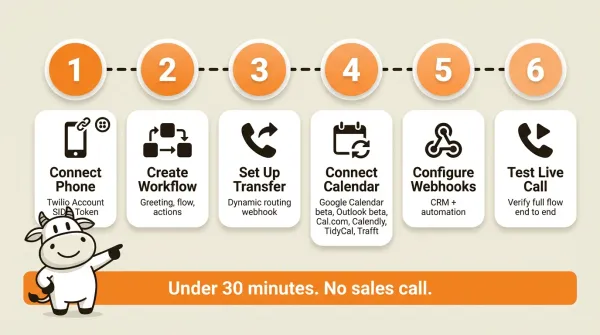
Step 1: Connect your phone number
Sign up for a Twilio account and purchase a phone number (or port your existing one). Then connect it to CallCow by entering your Twilio Account SID and Auth Token in Settings. CallCow uses a bring-your-own-carrier (BYOC) model. You manage Twilio billing directly.
Step 2: Create a workflow
Configure what your AI receptionist says and does using the workflow builder. Set your greeting, define the conversation flow, and specify what happens when callers ask to book, have questions, or need to speak to someone. See the custom workflow guide.
Step 3: Set up call transfer (optional)
If you want the AI to transfer calls to your team, configure a transfer number in your workflow. For intelligent routing, set up a Dynamic Transfer URL, a webhook endpoint that receives caller information and returns the right destination number. This requires a verified Twilio Business Profile.
Step 4: Connect your calendar
Link your scheduling tool so the AI can book appointments in real time. CallCow supports Google Calendar (beta), Outlook Calendar (beta), Cal.com, Calendly, TidyCal, and Trafft. If you use TidyCal, paid bookings are excluded through the API. If you use Trafft, the system books the first available employee rather than a specific staff member.
Step 5: Configure webhooks (optional)
Set up a webhook endpoint to receive call data (transcripts, summaries, and form fills) directly to your CRM or automation tool. Webhooks fire on call completion and include structured JSON payloads. If you want a low-code path, Make.com is the most fully documented option. Zapier exists too, but it is currently invite-only.
Step 6: Test with a live demo call
Call your configured number and test the full flow. Verify the greeting, try booking an appointment, test a transfer, and check that webhook data arrives correctly.
For a detailed walkthrough, see our guide: How to Set Up an AI Phone Answering Service in Under 30 Minutes.
If you want to test the setup on your own number, CallCow has a 7-day trial at callcow.ai. You can usually get the first workflow running in under 30 minutes.
Which businesses need a virtual receptionist?
Real estate
Real estate agents miss calls while showing properties. An AI receptionist can qualify leads, answer property questions, and book viewings after hours. See our real estate guide →
Law firms
Potential clients call at all hours and often will not leave voicemails. An AI receptionist can capture intake information, schedule consultations, and transfer urgent calls to the on-call attorney. See our law firm guide →
Medical offices
Missed calls mean missed appointments and lost revenue. An AI receptionist handles scheduling, answers insurance questions, and routes urgent calls. Important: AI receptionist services are not HIPAA-compliant by default. Use AI for non-PHI calls only, and route PHI-related calls to a HIPAA-compliant service. See our medical office guide →
Home services
Plumbers, electricians, and HVAC companies receive emergency calls outside business hours. An AI receptionist triages urgency, collects job details, and dispatches the right technician. Emergency calls after hours are the difference between winning a customer and losing them to the first Google result that picks up. See our home services guide →
Small business
Any small business without a dedicated front desk person can benefit from a virtual receptionist. If you're a solopreneur or a team under 10 people, every missed call can be a potential customer gone. See our small business guide →
Looking for more options?
- Best phone answering services compared
- How to transfer AI calls to a human
- AI phone answering service costs broken down
If you want to sanity-check the setup against your own call volume, CallCow has a 7-day trial at callcow.ai.
What to look for in a virtual receptionist
I tested both human and AI services. These are the real differentiators:
Must-haves:
- 24/7 coverage: if a service only covers business hours, you're still losing after-hours calls
- Appointment booking: manual notes aren't enough; the receptionist should book directly into your calendar
- Call transfer: not forwarding to one number, but intelligent routing based on what the caller needs
- Transparent pricing: if you can't find the price without a sales call, that's a red flag
Nice-to-haves:
- Structured data capture: forms that collect name, email, phone, and reason for calling, synced to your CRM
- Voicemail transfer: the AI handles calls only when you don't answer, so you keep the personal touch
- Voice customization: sound like your business, not a generic robot
- Outbound calling: follow up with leads and confirm appointments without switching tools. For outbound follow-up, CallCow's list calling feature dials from a CSV with daily scheduling and auto-resume, useful for real estate agents following up on leads. Note: outbound calling via list calling is sequential only, no parallel dialing.
Red flags:
- No free trial: if they won't let you test before committing, they're hiding something
- Bundled phone costs: you can't see what you're paying per minute, and you can't optimize
- Per-call overages: $1–3/minute adds up fast if call volume spikes
- No API access: if you can't get data out, you can't integrate with your existing tools
- Long contracts: month-to-month or annual with exit clause is fine; anything longer is a trap
Can you try it free, and does the pricing work at your call volume?
After evaluating a dozen services, it comes down to this: can you try it free, and does the pricing make sense at your actual call volume? Most businesses overestimate their call volume and underestimate how many calls AI can handle. Start with a free trial. Track your actual numbers for a week. Then decide.
Who this is for (and who it's not)
An AI virtual receptionist makes sense for businesses where missed calls directly cost money: real estate agents showing properties, law firms fielding after-hours intake, home service contractors getting emergency calls, and any small business without a dedicated front desk. If you want 24/7 coverage, structured data collection, and direct calendar booking for under $35/month, the math is straightforward.
It is not for you if you need warm transfers, HIPAA compliance, or a managed phone experience where someone else handles the infrastructure. The BYOC model requires setting up a Twilio account and managing a second bill. The AI always identifies itself as AI, so if your brand depends on callers believing they reached a live person, that will not work. Businesses that handle mostly emotionally complex calls, therapy practices, bereavement services, crisis lines, should start with a human service and add AI only for routine overflow.
Frequently asked questions
How much does a virtual receptionist cost?
It varies by model. Human services usually cost more than software-led tools, and with CallCow you should also budget for separate Twilio BYOC costs. The right way to compare is total monthly spend plus setup burden, not a headline starting price by itself.
Do receptionists get paid a lot?
Compensation varies by market and employer. For a buyer choosing a service, the more useful comparison is total operating cost, coverage quality, and whether the workflow actually fits your business.
How much does a virtual front desk cost?
A virtual front desk can mean anything from call answering software to a staffed service. CallCow covers the call answering and scheduling side; physical visitor management is outside the documented product scope.
How much does a virtual receptionist make?
That depends on the employer, market, and role structure. If you are buying a service, treat wage estimates as background context, not as a substitute for a real provider quote.
If you want to test the practical pieces first, calendar booking, voicemail backup, structured intake, and transfer logic, CallCow has a 7-day trial at callcow.ai.
Yiming Han is the founder of CallCow and writes about phone automation, missed calls, and the tradeoffs that show up when small businesses actually deploy voice AI.