Virtual receptionist medical: AI answering for clinics
Compare virtual receptionist options for medical offices, after-hours coverage tradeoffs, and where non-HIPAA AI can fit without overstating compliance.Virtual receptionist medical: AI answering for clinics
A virtual receptionist for medical offices answers calls, books routine appointments, handles basic office questions, and catches after-hours demand that would otherwise go to voicemail. The pricing gap between AI, outsourced staff, and in-house staff can be real, but the more important boundary is compliance. If the workflow drifts into PHI-heavy calls, low price stops mattering fast.
The important caveat up front: CallCow is not HIPAA compliant and does not sign BAAs. So this is not a "replace your front desk for all patient calls" pitch. It's a guide to where non-HIPAA AI actually fits in a medical office, where it doesn't, and whether the savings are worth testing on low-risk call types.
Table of contents
- How a virtual receptionist works for medical offices
- AI vs human virtual receptionist for medical
- Where non-HIPAA AI fits safely in a medical office
- After-hours call handling for medical offices
- HIPAA and phone answering: what you actually need to know
- Virtual receptionist medical options compared
- Setting up an AI receptionist for your medical office
- Pros and cons
- Frequently asked questions
How a virtual receptionist works for medical offices
Before the flow, the boundary matters more than the workflow. If your office wants help with calls about symptoms, medications, diagnoses, results, insurance disputes, or anything that obviously involves PHI, stop here and use a HIPAA-compliant provider instead. CallCow is for the boring operational stuff: routine booking, rescheduling, directions, and missed-call coverage. For a walkthrough, see the getting started guide.
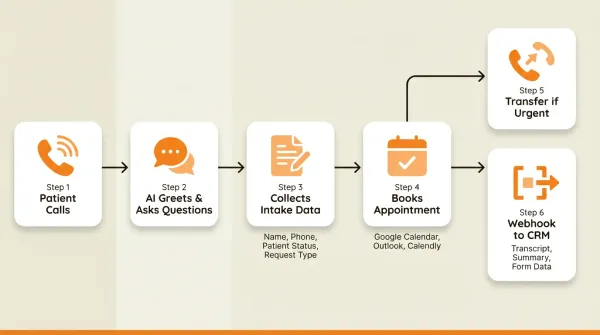
Inside that narrower lane, the flow is simple. When someone calls your practice:
Step 1: The phone rings. Either the AI or the human picks up.
Step 2: The caller is greeted and asked why they're calling. For AI, this greeting can use a cloned version of your actual receptionist's voice, recorded from a 30-second snippet. The AI still identifies itself as AI on the call.
Step 3: A few operational details get collected. Usually a name, callback number, whether they're a new or existing patient, and preferred day or time. With AI, this happens through structured forms that the system fills conversationally.
Step 4: An appointment gets booked. The AI checks your calendar or scheduling tool (Google Calendar beta, Outlook Calendar beta, Calendly, Cal.com, TidyCal, or Trafft) and offers available slots. The caller picks one. It shows up in the connected system.
Step 5: If the caller needs a link, the AI can text it to them mid-call. SMS Instructions lets the agent send the caller a link to your new-patient intake form, a Google Maps link to the clinic, or a booking confirmation URL. This avoids spelling out URLs over the phone. Requires Twilio SMS capability.
Step 6: If the caller needs staff, the call gets transferred. With AI, this is a cold transfer. With a human VA, they can do a warm transfer where they brief your staff first.
Step 7: After the call ends, a webhook fires with the transcript, summary, and form data. This can go to a CRM, Google Sheet, email workflow, or another back-office system. It fires on completion only, not during the live call.
Exact call length depends on your workflow and the caller, so test it with real scenarios before you promise timing to your team.
If you are comparing this against general-purpose receptionist tools, keep in mind that medical offices hit the compliance wall much faster than most other industries.
AI vs human virtual receptionist for medical
This is where most existing articles fall flat. Every single result on the first page of Google for "virtual receptionist medical" is selling human receptionists. Not one mentions AI as an option. That's a gap worth filling, because the economics are radically different.
What a human virtual receptionist costs
Human medical receptionist services usually price much higher than AI software, but published rates are inconsistent. HelloRache is one of the few ranking providers with visible pricing. Most others still push you into a quote or sales conversation.
The human model has real advantages. A person can read nuance in a caller's voice. They can tell the difference between "my child has a fever" and "I need to reschedule my checkup." They can warm-transfer calls with context. They sound like a person, because they are one.
The downsides are cost and availability. One person can only handle one call at a time. If two patients call simultaneously, someone waits. If your VA takes a break, gets sick, or quits, you have a gap. After-hours coverage requires a separate service or additional staff.
What an AI virtual receptionist costs
With CallCow, do not rely on an old blog price. Verify the current platform pricing, then add separate Twilio costs because the product uses a BYOC model.
The AI handles multiple concurrent inbound calls via Twilio better than a single human receptionist. It collects structured operational data through forms, sends it after the call via webhooks, and can book appointments into a connected calendar. Note: outbound list calling is sequential only.
The downsides are different. AI can't warm-transfer calls. It does cold transfer only, which means your staff picks up without prior context. AI doesn't handle emotional nuance the way a person can. And critically for medical offices, CallCow is not HIPAA compliant. I'll get into that in detail later.
Where AI makes sense for medical offices
AI works well for simple booking flows with a narrow script and a calendar behind them. It also handles after-hours missed-call coverage well, catching the calls that would otherwise hit voicemail and booking a callback or routine slot. For office logistics like accepted plans and new-patient status, the AI gives consistent answers. And during busy periods, it answers the simple calls instead of letting them stack up.
Where humans still win
Human receptionists are better at clinical judgment, the moment a caller starts describing symptoms or asking for medical advice, a human process should take over. They handle sensitive conversations better, including results, complaints, billing disputes, and upset callers. They can also warm-transfer calls with context, where CallCow only does cold/blind transfer. For detailed insurance or records work that needs portal access or policy interpretation, a person is the right choice.
The honest answer is that most medical offices need a combination. AI handles the routine slice well. Humans handle the rest. The question is whether you staff the humans in-house, hire a VA service, or use AI for the repetitive front-desk work and keep your existing staff for the complex calls.
For more on finding the right service, the best medical answering service comparison breaks down providers by specialty and compliance status.
Where non-HIPAA AI fits safely in a medical office
This is the part too many AI healthcare articles blur on purpose. I'm not going to. If the product is not HIPAA compliant, don't design the workflow around PHI-heavy intake and then hope nobody notices.
The better approach is to use AI on the front edge of the call, where the workflow can stay operational instead of clinical. CallCow's forms feature is still useful here, but the form should stay lean. Think:
- Caller name (text field)
- Callback phone (phone field)
- New or existing patient (select)
- Preferred appointment day (text field)
- Preferred time window (select: morning, afternoon, evening)
- General request type (select: new appointment, reschedule, office question, callback request)
When someone calls, the AI asks these questions conversationally. It does not need to read out a stiff form. It can say, "Are you calling to book, reschedule, or ask an office question?" Then it captures the few details your front desk actually needs to finish the job. CallCow also maintains SMS threads per contact and auto-links preferred numbers for better follow-up rates.
After the call ends, that data arrives via webhook as a clean JSON payload. Your CRM, Google Sheet, email automation, or internal ops workflow can receive it automatically. Webhooks fire on completion only, so this is best for follow-up and record-keeping, not live orchestration.
That still creates leverage. Staff get a structured callback request instead of a half-useful voicemail. The office stops losing routine callers after hours. And you get consistency without pretending the AI should act like a medical assistant.
Voice cloning for a consistent patient experience
One concern practices have is that AI sounds robotic. Voice cloning helps. You record a 30-second snippet of your actual receptionist speaking, and the AI can use that voice across workflows. Callers still hear the AI identify itself as AI; that disclosure is not optional.
This is a native feature in CallCow, not an add-on. You pick the cloned voice per workflow. Setup takes about 2 minutes in the Settings tab. CallCow supports GPT 5.4 as a selectable model, which reduces hallucinations at the cost of a slight latency increase. For a narrow medical-office script, that tradeoff is usually fine.
Calendar integration for appointment booking
The AI connects to Google Calendar beta, Outlook Calendar beta, Calendly, Cal.com, TidyCal, or Trafft. When someone wants to book, the AI checks availability and offers slots. The appointment appears in the connected system immediately.
Google Calendar and Outlook integrations are currently in beta. Calendly uses a personal access token. Cal.com, TidyCal, and Trafft use API keys. If you use TidyCal, paid bookings cannot be booked through the API. If you use Trafft, the system picks the first available employee rather than a specific one.
Webhooks for office follow-up and automation
After every call, CallCow fires a webhook with a payload that includes the call transcript, a summary, form data, and metadata. You point this webhook at your CRM, a Google Sheet bridge, a Make.com scenario, or Zapier if you have invite-only access.
The webhook fires on call completion, not in real-time. That caveat matters. If your workflow depends on live staff intervention mid-call, this is the wrong tool.
After-hours call handling for medical offices
This is the use case where AI delivers the most value for medical practices, precisely because it can stay simple.
The exact volume varies by practice, but the pattern is familiar: enough routine calls land outside ideal staffing hours that voicemail becomes a revenue and patient-experience problem.
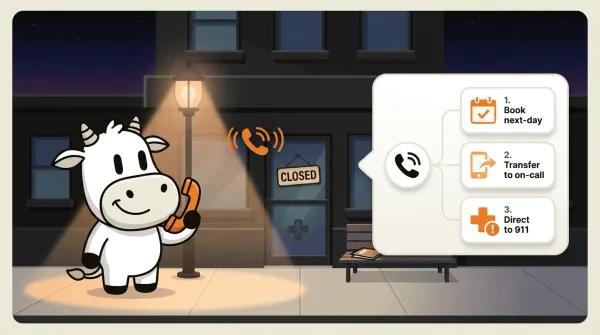
An AI receptionist answers every after-hours call and keeps the script narrow:
- Routine logistics: books a next-day slot, takes a callback request, or answers office information.
- Potentially urgent or clinical: routes immediately to your on-call line or tells the caller how to reach emergency help based on your script.
The rule here is simple: when in doubt, transfer or stop. Do not ask the AI to improvise on medical urgency. Use it to catch the easy calls and get out of the way on the hard ones.
For appointment reminders or recall campaigns, CallCow's list calling feature dials sequentially from a CSV and auto-resumes the next day. This works well for hygiene recall, annual checkup nudges, or any batch outreach where you need to reach patients who haven't booked recently.
Voicemail transfer as a middle ground
If you don't want AI answering every call, there's a middle option. Configure your carrier to forward unanswered calls to the AI after 3 to 4 rings. You answer the calls you can. The AI catches everything else.
CallCow supports this through voicemail transfer. Setup is carrier-dependent. It works on some carriers (Rogers, for example, has documented setup) and doesn't work on others. When it works, it's the best of both worlds: your staff handles calls personally during business hours, and the AI is the safety net for everything else.
Transfer to human for escalation
When the AI can't handle a call, it transfers to a human. This requires a Twilio Business Profile, which takes a few business days to set up and verify. The transfer is cold, meaning the caller gets routed to your staff number without prior context from the AI.
For medical offices, this means your on-call staff picks up blind. That's a real limitation, not a small footnote. If warm transfers are non-negotiable for your practice, you need a human receptionist service for those calls.
HIPAA and phone answering: what you actually need to know
Most of the competitors ranking for "virtual receptionist medical" throw around "HIPAA compliant" like it's a feature checkbox. Ruby says it. MedVA says it. Medical Staff Relief says it. Almost none of them explain what that actually requires or what it means for you as a practice.
What HIPAA compliance for phone answering actually involves
HIPAA (the Health Insurance Portability and Accountability Act) sets rules for handling protected health information (PHI). Once a call includes medical history, symptoms, medications, test results, diagnoses, or other identifiable health data, you're in that world.
For a phone answering service, compliance means:
-
Business Associate Agreements (BAAs). The answering service signs a BAA with your practice, taking on legal responsibility for PHI they handle. Without a BAA, you can't legally share PHI with them.
-
Encryption. Call audio must be encrypted in transit and at rest. This means the phone carrier and the software platform both need encryption.
-
Access controls. Only authorized personnel can access call recordings, transcripts, or patient data. The service must have audit logs.
-
Breach notification. If PHI is exposed, the service must notify you within the timeframes HIPAA requires (60 days for the practice to notify patients, but the service should notify you much sooner).
-
Minimum necessary standard. The service only collects the PHI it actually needs. Recording entire calls when you only need appointment details might violate this.
-
Staff training. Human receptionists need HIPAA training. AI doesn't need training, but the systems it runs on need to meet security standards.
Why most "HIPAA compliant" claims are misleading
A human VA service saying they're "HIPAA compliant" may mean they signed a BAA and trained their staff. That still does not answer all the implementation questions you should ask.
Ask any provider claiming HIPAA compliance these questions:
- Do you sign a Business Associate Agreement?
- Is call audio encrypted in transit and at rest? What standard do you use?
- Where is call data stored? What's the data residency?
- Who has access to call recordings and transcripts?
- Have you had a HIPAA security risk assessment? Can I see the summary?
- What's your breach notification process and timeline?
- Do you retain call recordings? For how long? How are they deleted?
If they can't answer these, "HIPAA compliant" is a marketing claim, not a guarantee.
CallCow's HIPAA status
Full disclosure: CallCow is not HIPAA compliant. We don't sign BAAs. We don't guarantee that call data meets the Security Rule. If your practice handles PHI on phone calls (and you almost certainly do), using CallCow for those calls means you're accepting that risk.
What CallCow can do for medical offices is handle the non-PHI or low-risk operational calls. Appointment scheduling without clinical discussion. Whether you're taking new patients. The calls where the person says, "I'd like to book a cleaning next week," not, "I've had jaw pain for three days."
Quick decision: use AI here or use a HIPAA-compliant provider?
If you want the short version, use this rule:
| If the call is mostly about... | Safe fit for a non-HIPAA AI setup like CallCow? | Better fit for a HIPAA-compliant provider? |
|---|---|---|
| Office hours, location, parking, accepted insurance plans | Yes | No |
| Booking or rescheduling a routine visit without discussing symptoms or medical history | Usually yes | No |
| Missed-call coverage that only says "we'll call you back" or routes to staff | Usually yes | No |
| New patient intake that includes symptoms, medications, diagnosis details, test results, or treatment questions | No | Yes |
| Calls about pain, complications, prescriptions, results, referrals, or anything clinical | No | Yes |
| Anything where you need a BAA and documented HIPAA controls | No | Yes |
The practical line is simple. If the workflow can stay at the level of scheduling and office logistics, AI can be useful. Once the conversation moves into symptoms, treatment, medications, or medical history, use a provider that will sign a BAA and can explain its HIPAA controls in detail.
See how clinics use CallCow for non-clinical calls.
For a deeper understanding of what HIPAA requires from phone answering, the HIPAA compliant phone answering guide breaks down the requirements, questions to ask providers, and what compliance actually costs.
Virtual receptionist medical options compared
Here's a direct comparison of the three main approaches for medical offices. I am intentionally keeping the competitor side high-level because most of the publicly visible detail is still thin.
| Feature | AI (CallCow) | Human VA (HelloRache) | Human VA (Ruby) | In-house receptionist |
|---|---|---|---|---|
| Cost pattern | Platform plus Twilio BYOC | Staff-style service pricing | Premium service pricing | Salary plus overhead |
| 24/7 availability | Easier to cover | Verify by plan | Verify by plan | No |
| Concurrent calls | Better suited to overflow | One at a time | One at a time | One at a time |
| Appointment booking | Yes, with documented calendar caveats | Verify by workflow | Verify by workflow | Yes |
| Transfer type | Cold only | Verify by vendor | Verify by vendor | Warm |
| HIPAA posture | Not HIPAA compliant | Review vendor claims carefully | Review vendor claims carefully | Your responsibility |
| Data automation | Webhooks + forms | Usually more manual | Usually more manual | Depends on your stack |
| Setup model | Faster to test | Service onboarding | Service onboarding | Hiring cycle |
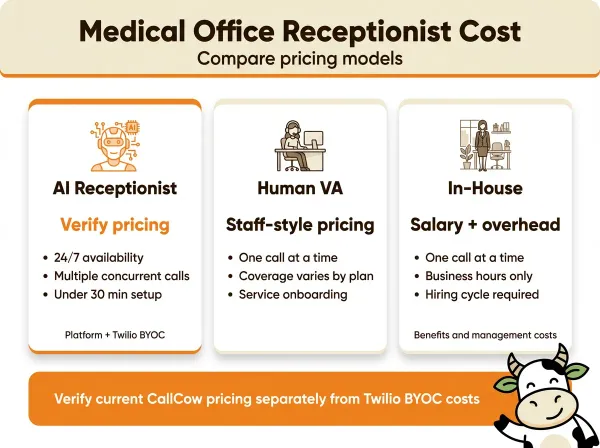
The price gap is only useful if you're honest about scope. AI is not replacing a HIPAA-ready human receptionist across every workflow. It is replacing the narrow slice of repetitive operational calls that do not justify human labor.
For small practices and solo practitioners, this math matters. The best answering service for small business guide has more options at different price points.
Setting up an AI receptionist for your medical office
If you decide AI makes sense for some of your call volume, here's how to get it running. This is specific to CallCow since that's what I built, but the general steps apply to any AI receptionist platform.
Step 1: Create a Twilio account and connect it to CallCow
Go to twilio.com and create an account. Purchase or port a phone number, then connect it to CallCow. Twilio Business Profile approval takes a few business days and matters for capabilities like transfer and higher limits. Without it, trial use stays more limited.
Then connect Twilio to CallCow. In the CallCow dashboard, go to Settings and enter your Twilio Account SID and Auth Token. The practical billing reality is simple: you pay Twilio for phone infrastructure and CallCow for the AI software. You can also add a CallCow call widget to your practice website for new-patient booking, as long as that widget stays on non-clinical workflows.
Step 2: Build a narrow, safe workflow with forms
Create a workflow in the CallCow dashboard. Define what the AI says when it answers, what questions it asks, and what it does with the answers. For a medical office, the workflow should stay narrow on purpose:
- Greeting: "Thank you for calling [Practice Name]. This is an AI assistant. I can help with booking, rescheduling, and basic office questions."
- Classify the call: appointment booking, rescheduling, office information, or urgent matter.
- For appointments: collect name, callback number, patient status, and preferred time. Check calendar. Book slot. Confirm details.
- For information: answer based on your configured knowledge (office hours, how to find the clinic, whether you're taking new patients, high-level insurance info).
- For urgent or clinical matters: transfer to on-call staff or direct to 911 based on your script.
Here's a concrete example for a dental practice. Say you want after-hours coverage for routine hygiene bookings and reschedules, but nothing clinical. Your workflow might say: "Thanks for calling BrightSmile Dental. I'm an AI assistant helping with scheduling. If this is severe pain, swelling, bleeding, or a dental emergency, please hang up and call our emergency line at [number]. Otherwise, I can help book or move a cleaning." Then it collects the caller's name, whether they're a new or existing patient, their preferred day, and a callback number. It books the cleaning directly into your calendar and sends the structured form data to your front desk by webhook when the call ends.
That's the kind of use case I think is realistic. "I'd like a cleaning next Thursday" is a good fit. "My crown fell out and I'm in pain" should go to a human process immediately.
While building the workflow, set up only the form fields you actually need for safe call handling. In most cases that's name, callback number, patient status, request type, and preferred time. Keep it operational. Link your Google Calendar, Outlook, Calendly, or Cal.com account so the AI can check availability when booking appointments. Google Calendar and Outlook are in beta. Calendly uses a personal access token. Cal.com uses an API key.
The custom workflow builder is the core of CallCow, but I'll be honest: the UX needs improvement. We have a YouTube video guide that walks through it. If you get stuck, book a free setup call and we'll build it with you.
For offices with existing AI tools, the Prompt-to-Call API lets external agents trigger calls with a single natural language prompt and a callback. That is useful for reminder or outreach workflows, but it still follows the same non-PHI boundary.
Book a free setup call and the team will build your workflow with you.
Step 3: Configure transfer and webhooks
Set up a transfer destination number (your on-call staff or main office line). This requires a verified Twilio Business Profile. The transfer is cold/blind, meaning the caller hears a brief hold message and then gets connected without a live briefing. Configure the AI to transfer for urgent calls and handle everything else autonomously.
At the same time, point a webhook at your CRM or a tool like Make.com. Every completed call sends a payload with transcript, summary, form data, and caller info. For most practices, that means creating a structured callback log or office task queue, not writing directly into clinical systems.
Step 4: Test with real calls
Call your new number. Test each path: routine appointment, rescheduling, information request, urgent transfer. Check that form data arrives correctly via webhook. Verify calendar bookings show up. Make sure transfers connect properly. Adjust the workflow based on what doesn't work.
The workflow test can be quick. The slower part is getting the Twilio and operational details production-ready.
Pros and cons
Pros of AI receptionist for medical offices
- Cost shape. Software can be materially cheaper than staffed coverage if your workflow stays narrow and operational.
- 24/7 coverage. AI doesn't sleep, take lunch, or call in sick. Every call gets answered, including weekends and holidays.
- Structured capture. Forms collect the same operational details the same way every time. No variation, no forgotten callback info.
- Scalability. Handles multiple concurrent inbound calls via Twilio. During flu season when call volume spikes, the AI doesn't get overwhelmed.
- Calendar integration. Books routine appointments directly into your scheduling system. No double-booking, no manual entry.
- Consistent experience. Voice cloning means every caller hears the same professional greeting, regardless of when they call.
Cons and honest limitations
- Not HIPAA compliant. This is the big one for medical offices. CallCow doesn't sign BAAs and doesn't guarantee PHI security. Use accordingly.
- Cold transfer only. When the AI transfers a call, your staff picks up without context. No warm handoff. This matters for clinical calls.
- No clinical judgment. The AI can follow triage rules you define, but it can't assess symptoms the way a nurse can. It's a router, not a clinician.
- Carrier limitations on voicemail transfer. Not all carriers support forwarding unanswered calls to an AI. Check your carrier before relying on this feature.
- BYOC model. You manage your own Twilio account and phone bill. Two accounts, two bills. More control, but more overhead.
- AI self-identifies. The AI always tells callers it's an AI. You can't turn this off. Some patients prefer human interaction and may not like this.
- Webhooks fire on completion only. No real-time data during the call. You get everything after the call ends.
Who this is for (and who it's not)
Good fit:
- Medical offices and clinics where a big share of calls are routine: scheduling, rescheduling, directions, new-patient status, and high-level insurance questions
- Practices wanting to reduce the cost of the routine, non-clinical slice of their call volume
- After-hours coverage where callers just need to book an appointment or get basic information
Not a good fit:
- Practices where most calls involve protected health information. CallCow is not HIPAA compliant and does not sign BAAs. Do not use it for calls discussing symptoms, test results, diagnoses, or medications
- Practices that need warm transfers with clinical context. Transfers are cold only, so your on-call staff picks up blind
- Offices that want the AI to sound human without disclosure. It always identifies as AI
Frequently asked questions
How much does a virtual medical receptionist cost?
It depends on whether you use a human service, in-house staff, or an AI tool. With CallCow, verify the current platform price separately from Twilio BYOC costs before you rely on a blog number.
What does a virtual medical receptionist do for a medical office?
A virtual medical receptionist answers incoming calls, books and reschedules routine appointments, answers common questions about hours and location, and routes urgent callers to staff. Human services can go further into PHI-heavy workflows if they are actually HIPAA compliant. A non-HIPAA AI tool like CallCow should stay focused on office logistics and low-risk scheduling.
Can AI replace a medical receptionist?
Partially. AI handles routine calls well: scheduling, rescheduling, information requests, and after-hours missed-call coverage. It works 24/7, handles concurrent calls, and captures structured data automatically. What it can't do is provide clinical judgment, handle PHI safely in CallCow's case, warm-transfer with context, or manage sensitive conversations the way a trained person can.
Is a virtual receptionist HIPAA compliant?
It depends on the provider. Some human VA services (MedVA, Ruby) claim HIPAA compliance and will sign Business Associate Agreements. AI receptionist services vary. CallCow is not HIPAA compliant and does not sign BAAs. Any provider claiming compliance should be able to answer specific questions about encryption standards, data residency, access controls, breach notification processes, and whether they've had a HIPAA security risk assessment. "HIPAA compliant" without specifics is a marketing claim. For the full breakdown of what to ask, see the HIPAA compliant phone answering guide.
If your goal is narrow, non-HIPAA call coverage, routine booking, office questions, and missed-call capture, you can test that in the trial at callcow.ai.
If your practice is spending $1,500+ per month on call answering and a big chunk of that volume is routine, the math is still worth testing. Just keep the boundaries honest. Use AI for the simple calls. Keep humans and HIPAA-ready processes for the rest.
For more options across different budgets and use cases, the best virtual receptionist and best phone answering service comparisons cover the full market.
Yiming Han is the founder of CallCow and writes about phone automation, missed calls, and the tradeoffs that show up when small businesses actually deploy voice AI.