Best medical answering service: real costs, HIPAA rules, and AI options
Compare the best medical answering services with real pricing, HIPAA compliance requirements, and an honest AI vs human breakdown. Updated for April 2026.Best medical answering service: real costs, HIPAA rules, and AI options
A medical answering service handles patient calls 24/7, routing urgent issues to on-call providers and booking non-urgent appointments. Pricing varies widely by service model, and the compliance posture matters more than the cheapest monthly number. HIPAA compliance is legally required for any service handling patient information, but most providers are vague about what that actually means. The CallCow getting-started guide is relevant only if you want to test an AI option for non-clinical calls.
Quick self-selection
If you need a signed BAA or plan to handle PHI over the phone, stop here: CallCow is not HIPAA compliant. Use a dedicated vendor that will sign a BAA.
If you only want help with low-risk, non-PHI workflows like office hours, location questions, routine appointment requests, or after-hours overflow routing, CallCow can still be a practical low-cost option.
Table of contents
- How medical answering services work
- HIPAA compliance: what it actually requires
- Traditional vs AI medical answering services
- Medical answering service cost breakdown
- Comparison: top medical answering services
- Patient intake with AI: forms, webhooks, and EHR integration
- How to evaluate a medical answering service
- What we tested and what we found
- Frequently asked questions
How medical answering services work
Every medical answering service follows the same basic flow. A patient calls your office number. Instead of ringing through to your front desk or going to voicemail, the call gets intercepted by either a live human operator or an AI system. The service collects the caller's information, determines urgency, and either books an appointment, takes a message, or escalates to an on-call provider.
Step 1: Call arrives at your practice phone number during business hours, after hours, or when all lines are busy.
Step 2: The answering service (human or AI) answers and greets the caller. With a traditional service, this is a trained operator reading from your custom script. With an AI service, it uses a workflow you configured that includes your office hours, services, and escalation rules.
Step 3: The service collects patient information. Name, date of birth, reason for calling, insurance details if relevant, and urgency level. AI systems can use structured forms to gather this data conversationally.
Step 4: Routing happens based on urgency. High-priority calls (chest pain, severe symptoms) get transferred immediately to an on-call provider. Routine calls get triaged to the next available appointment slot or logged as a message.
Step 5: Documentation and notification. The service sends the call details, transcript or summary, and any collected data to your practice via secure message, email, or webhook integration with your EHR system.
The difference between services comes down to who handles steps 2 through 5, how fast they do it, how much it costs, and whether the entire chain is HIPAA compliant.
HIPAA compliance: what it actually requires
Most competitors slap "HIPAA compliant" on their homepage and move on. HIPAA compliance for a phone answering service means three things. For a deeper walkthrough, see our full HIPAA-compliant phone answering guide.
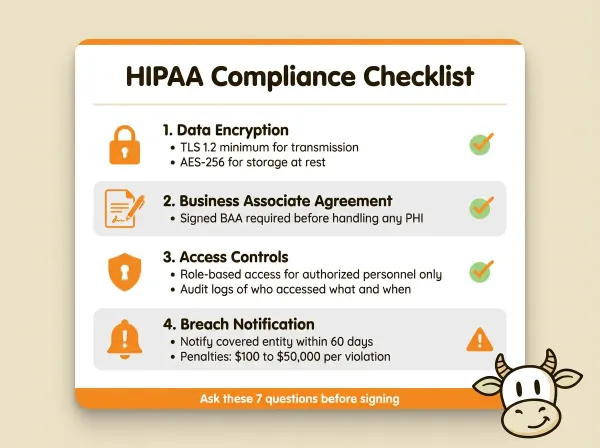
The Health Insurance Portability and Accountability Act (HIPAA) sets federal rules for protecting patient health information (PHI). Any service that touches PHI on behalf of a covered entity (your medical practice) is a business associate and must comply. That means the answering service needs a signed Business Associate Agreement (BAA) with your practice.
HIPAA compliance for a phone answering service involves three core requirements:
-
Data encryption. Ask how PHI is protected in transit and at rest, including recordings, transcripts, voicemails, and stored metadata.
-
Access controls. Only authorized personnel can access patient data. The service must maintain audit logs of who accessed what and when. Role-based access is the standard.
-
Breach notification. If the service experiences a data breach involving PHI, they must notify you within 60 days, and you must notify affected patients and HHS. The penalty structure is tiered: $100 to $50,000 per violation depending on whether the violation was unknowing, reasonable cause, willful neglect corrected, or willful neglect uncorrected. Annual maximums range from $25,000 to $1.5 million per violation category.
When evaluating a service, ask these specific questions:
- Do you sign a Business Associate Agreement?
- What encryption standard do you use for call recordings and transcripts?
- Where is PHI stored, and who has access?
- What is your breach notification process and timeline?
- Do your agents (human or AI) undergo HIPAA training?
- Is call recording automatic, and how long are recordings retained?
- Can you provide a copy of your most recent HIPAA security risk assessment?
If a service cannot answer these clearly, they are not HIPAA compliant regardless of what their website says.
Traditional vs AI medical answering services
The market splits into two camps right now. Traditional human-operated services have been around for decades. AI-powered services are newer and cheaper but come with tradeoffs, especially around compliance.
Traditional medical answering services use trained live operators who follow your custom scripts. Services like NotifyMD, PerfectServe, and AMBS fall into this category. Operators answer calls in your practice name, collect patient information, and follow your escalation protocols. The advantages are familiarity and flexibility: a human can handle unusual situations that an AI might misinterpret. The disadvantages are cost and scalability. You are paying per minute or per call for human labor, and volume surges (flu season, Monday mornings) mean longer hold times.
AI medical answering services use voice AI to handle calls conversationally. CallCow supports GPT 5.4, which can reduce hallucination risk at the cost of slightly more latency - important when you need accurate information delivery even for non-PHI calls. The AI follows a workflow you configure, collects structured data through forms, and routes calls based on rules you define. Services like Whippy AI and CallCow operate in this space. Our AI receptionist guide for medical offices breaks down the clinical-specific considerations. The advantages are lower software cost than human staffing, consistency, and 24/7 availability without overtime. The disadvantages are limitations in handling complex medical scenarios, the current inability to do warm transfers, and the fact that most AI answering services are not HIPAA compliant yet.
CallCow, the product I built, is not HIPAA compliant, and I am not going to pretend otherwise. If you are a covered entity that needs a BAA, CallCow is not the right choice for handling PHI today. Some practices use CallCow for non-clinical calls: appointment scheduling for non-sensitive visits, general inquiries about office hours and location, and routing that directs clinical questions to staff. That is a legitimate use case. But the moment the AI handles protected health information, you need a HIPAA-compliant solution.
The AI vs human question for medical answering comes down to this: AI handles routine, repetitive calls well and cheaply. Human operators handle complex, emotionally sensitive, or clinically nuanced calls better. Most practices end up needing some combination of both, which is why voicemail transfer exists as a middle ground. For non-PHI calls, CallCow's voicemail transfer feature routes missed calls to AI instead of a dead-end greeting, so callers asking about office hours or scheduling get an immediate answer. Your staff picks up first. If they cannot, the AI catches the overflow. Carrier support varies, so verify that setup before you depend on it.
Medical answering service cost breakdown
Actual numbers from public pricing pages and industry data:
Traditional human-operated services:
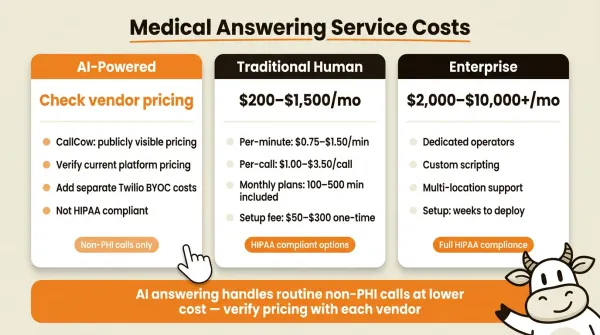
| Service tier | Typical price range | What you get |
|---|---|---|
| Per-minute billing | Varies by vendor | Pay only for time on calls. This can look efficient at low volume and get expensive when call volume spikes. |
| Per-call flat rate | $1.00 to $3.50 per call | Simpler billing. Same 50 calls/day scenario costs $1,500 to $5,250 per month. |
| Monthly plans | $200 to $1,500 per month | Includes a block of minutes (typically 100-500). Overage billed per minute. |
| Enterprise | $2,000 to $10,000+ per month | Dedicated operators, custom scripting, multiple location support, detailed reporting. |
Setup fees are common in the traditional space. Expect $50 to $300 one-time for script development and number provisioning. Some services charge for after-hours escalation protocols as an add-on.
AI-powered services:
| Service | Starting price | Minutes included | Notes |
|---|---|---|---|
| CallCow | Verify current pricing | Verify current plan details | Not HIPAA compliant. BYOC model means you manage your own Twilio billing separately. |
| Whippy AI | Custom pricing | Varies | Markets itself as healthcare-focused; verify claims directly. |
| RingCentral AI | $30 to $45/user/month | Varies | Part of broader unified communications platform. |
The AI pricing can look dramatically cheaper on the surface. But factor in the BYOC model for services like CallCow. You need a Twilio account, and your Twilio number and usage charges sit on top of the software subscription.
There is also the question of what happens when the AI cannot handle a call. With CallCow, transfer to a human requires a Twilio Business Profile, and the transfer is cold/blind only. The caller gets transferred without a warm handoff. For a medical practice, that matters because the patient may have to repeat themselves to the person who picks up.
Comparison: top medical answering services
I looked at every service ranking on the first page of Google for this query. Most of them are fine. None of them are transparent about pricing or limitations. Here is an honest comparison.
| Feature | CallCow | PerfectServe | NotifyMD | Whippy AI |
|---|---|---|---|---|
| HIPAA posture | Not HIPAA compliant | Review vendor claims directly | Review vendor claims directly | Review vendor claims directly |
| Pricing visibility | Publicly visible | Not publicly visible | Not publicly visible | Not publicly visible |
| BAA availability | No | Verify directly | Verify directly | Verify directly |
| AI vs human model | AI | Human-first | Human-first | AI-first positioning |
| Transfer caveat we can confirm | Cold/blind only | Verify directly | Verify directly | Verify directly |
| Structured post-call data | Yes, on completion | Verify directly | Verify directly | Verify directly |
If you are HIPAA-covered, focus on vendors that will sign a BAA and explain their compliance controls in detail. Do not rely on a generic blog table, including this one, as your final verification step.
If an AI vendor claims HIPAA readiness, treat that as the beginning of diligence, not the end. Ask for the BAA template, security assessment process, and breach notification policy before signing anything.
CallCow is the low-risk AI option only for practices that want non-clinical call handling: appointment scheduling, office hours questions, and routing to the right department. See how clinics use CallCow for non-clinical calls. If you are not specifically in healthcare, our best answering service for small business comparison covers broader use cases.
Patient intake with AI: forms, webhooks, and downstream routing
AI answering services have a structural advantage over traditional operators in patient intake: the ability to collect structured data programmatically and route it to downstream systems through webhooks or middleware. None of the competitors on page one provide technical detail on this, so here is how it works.
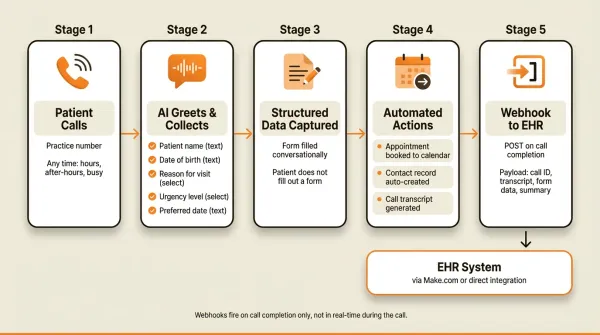
Structured data collection through forms. CallCow supports form definitions with six field types: text, number, email, phone, select, and multi-select. You configure a form template that the AI fills conversationally during a live call. For a medical practice intake, that form might include: patient full name (text), date of birth (text), reason for visit (select with options like "new patient visit", "follow-up", "prescription refill", "test results", "other"), urgency level (select: "routine", "soon", "urgent"), and preferred appointment date (text).
The AI asks these questions naturally during the conversation. The patient does not feel like they are filling out a form. But behind the scenes, every answer gets captured as structured data attached to the call record. This data is included in the webhook payload when the call completes.
Webhook automation for downstream systems. When a call ends, CallCow fires a POST request to a webhook URL you configure. The payload includes the call ID, workflow ID, status, full transcript, summary, all form fills, and call metadata. You can point this webhook at your own middleware or an intermediary like Make.com. CallCow integrates with Make.com for bidirectional automation, and Monday.com is documented as a direct integration. Zapier exists too, but it is currently invite-only. You decide what should flow into non-clinical systems.
One limitation worth knowing: webhooks fire on call completion only, not in real-time during the call. If a patient hangs up mid-conversation, the partial data still gets sent, but you do not get live updates as the conversation progresses. We built it this way for reliability. Real-time streaming introduces failure modes that cause more problems than they solve for most practices.
Voice cloning for branded experience. You can train a custom voice from a 30-second audio snippet. The cloned voice is used across all your workflows. For a medical practice, this means your AI receptionist can sound like your actual front desk staff, which reduces patient confusion and feels more personal than a generic text-to-speech voice. The AI always identifies itself as AI, so patients know they are not talking to a real person, but the voice consistency helps.
Inbound contacts for patient records. CallCow auto-creates contact records for anyone who calls. Phone number, name, email, and notes are stored automatically. Every caller is automatically saved as a contact with their phone number, name, and any collected data, so your front desk starts with context before the patient walks in. This builds a patient database passively over time without manual data entry.
Calendar integration for appointment booking. The AI can book appointments directly into Google Calendar and Microsoft Outlook in beta, plus Calendly and Cal.com. For a medical practice using one of those tools for scheduling, this means a patient can call after hours, the AI checks availability, books the appointment, and the slot appears on your calendar immediately. TidyCal and Trafft are also documented, but TidyCal paid bookings are excluded and Trafft books the first available employee, so they are usually less relevant for clinical scheduling.
SMS Instructions for callers. When the AI is handling a call and the patient needs a link or reference material, the agent can text it directly to the caller's phone mid-conversation. This is useful for sending directions to the clinic, a link to your new-patient intake form, or a booking confirmation URL. It avoids spelling out URLs over the phone. This feature requires Twilio SMS capability on your account.
How to evaluate a medical answering service
Most comparison articles tell you to "consider your needs" and leave it at that. An actual evaluation framework:
Step 1: Determine your compliance requirement. If your practice is a HIPAA covered entity, you need a service that will sign a BAA. Period. Do not skip this step. Ask for the BAA template before signing anything. If they cannot provide one, move on.
Step 2: Map your call volume and patterns. Pull your phone records for the past three months. How many calls do you get per day? What percentage come after hours? What is your average call duration? What is your current no-answer rate? These numbers tell you what tier of service you need and whether per-minute or flat-rate billing makes more sense.
Step 3: Define your escalation protocol. What constitutes an urgent call for your practice? Who is the on-call provider, and how do they want to be reached? What information does the answering service need to collect before escalating? Write this down. The service needs a clear script or workflow, not vague instructions.
Step 4: Test the service with real scenarios. Call the service yourself. Role-play as a patient with a routine appointment request. Then call again as someone with an urgent concern. See how the service handles both. For AI services, test edge cases: a caller who speaks quickly, one who gives vague symptoms, one who asks questions the script does not cover.
Step 5: Check integration capabilities. How does call data get into your EHR or scheduling system? Is there a direct integration, or do you need middleware like Make.com? If a vendor mentions Zapier, verify whether the integration is fully available or still limited. While you evaluate HIPAA-compliant services, you can start testing CallCow for free on your non-PHI calls in parallel. How are messages delivered to your providers: SMS, secure message, email? What is the latency from call completion to message delivery?
Step 6: Read the contract for hidden costs. Setup fees, overage charges, minimum commitments, additional number fees, transfer fees, recording storage fees. Traditional services are particularly bad about burying costs in per-minute overages. AI services like CallCow still need separate Twilio costs under the BYOC model, so verify the current pricing page and Twilio rate card instead of assuming a flat overage number.
What we tested and what we found
I run CallCow, so take that bias into account. Still, after talking with a lot of medical practices about phone coverage, the same concerns come up over and over.
What works well with AI answering for medical practices:
Routine appointment scheduling is the strongest use case. Patients call to book, reschedule, or check appointment times. The AI handles this reliably at a fraction of the cost. Routine scheduling is the kind of front-desk work AI is best at absorbing.
After-hours call capture is the second strongest. A lot of new-patient calls come in evenings and weekends, and many of those callers will not wait for a callback. An AI that answers at 9 PM and books an appointment for Monday morning gives the practice a better shot at keeping that patient.
Office information queries (hours, location, insurance accepted, parking) are trivial for AI and free up your front desk for actual patient care.
For proactive outreach like appointment reminders or recall campaigns, CallCow's list calling feature dials sequentially from a CSV and auto-resumes the next day.
Where AI answering falls short for medical:
Complex clinical triage is beyond current AI capabilities. A patient describing overlapping symptoms in a rambling, emotional way will confuse most AI systems. A trained human operator with medical knowledge handles this better.
Warm transfer matters more in healthcare than in any other industry. When a patient is escalated from AI to a nurse or doctor, they should not have to repeat their symptoms. Cold transfer is a poor experience for clinical calls. CallCow does cold/blind transfer only, and that is a real limitation for medical use.
HIPAA compliance is the elephant in the room. Until an AI answering service can demonstrate full HIPAA compliance with a signed BAA, covered entities cannot use it for PHI. That rules out most AI options for most medical practices today.
What practices actually do:
The most common setup I have seen is a hybrid model. Human receptionists answer calls during business hours. After hours, calls forward to either a traditional answering service (for HIPAA-covered practices) or an AI system (for non-clinical routing). This hybrid approach is similar to what we describe in our best virtual receptionist guide for businesses that need both human and AI coverage. Some practices use AI as the first line of triage during business hours too: the AI answers, collects basic information, and routes to the right staff member. If the AI cannot handle it, the call transfers to a human. CallCow's transfer-to-human feature can route callers to your HIPAA-compliant service or on-call staff when a conversation moves beyond non-PHI territory. Transfer still requires a Twilio Business Profile and remains cold or blind only. Dynamic transfer via webhook lets your system decide the destination number based on call content.
Recommended path: choose the lane that fits your practice
Most practices do not need more options. They need the wrong options ruled out quickly.
Path 1: low-risk, non-PHI workflows. If you want coverage for office hours questions, location and parking info, routine appointment requests, or simple overflow routing, CallCow is worth testing. That is the lane where low cost and fast setup matter most, and where the compliance line is easier to keep clean if your staff handles clinical conversations separately.
Path 2: PHI, clinical questions, or BAA-required operations. If callers will discuss symptoms, medications, test results, insurance details tied to treatment, or anything else that puts PHI in the call flow, use a vendor that will sign a BAA and has a healthcare-specific compliance posture. That usually means PerfectServe, NotifyMD, or another dedicated compliant provider after your own due diligence.
If your practice handles a mix of administrative and clinical calls, set up a free CallCow trial and test the non-PHI side of your call volume.
How to try CallCow for your medical office
If your practice fits Path 1 and handles non-clinical calls like appointment scheduling, office hours inquiries, or routing to the right department, you can test CallCow without touching PHI. Here is how to get started.
Step 1: Sign up and connect your phone number. Go to docs.callcow.ai/getting-started and create an account. CallCow uses a bring-your-own-carrier (BYOC) model, so you will need a Twilio account to provision a phone number. The setup guide walks you through connecting Twilio to CallCow.
Step 2: Configure your medical office workflow. Create a workflow with your practice name, office hours, and the services you offer. Add an intake form with fields like patient name, reason for visit, and preferred appointment time. You can upload a 30-second audio clip of your front desk staff to clone their voice so the AI sounds familiar to your patients.
Step 3: Set up calendar integration. Connect your Google Calendar, Outlook, Calendly, or Cal.com account so the AI can book appointments directly into your scheduling system. Test this by booking a dummy appointment through the workflow editor.
Step 4: Make a live demo call. Go to the CallCow homepage and use the live demo call feature to hear how the AI sounds with your workflow. Call from your personal phone, run through a few scenarios (routine appointment, after-hours inquiry, transfer to staff) and see how it handles each one. You get a full transcript and form data after each call.
The free trial lasts seven days. If your use case involves PHI, you will need a HIPAA-compliant provider instead. See the HIPAA compliance section above for what to ask them.
Who this is for (and who it's not)
This article is for medical practice managers and clinic owners evaluating phone answering options. The honest answer depends entirely on whether your practice handles protected health information over the phone.
If you are a HIPAA-covered entity that needs a Business Associate Agreement, CallCow is not the right choice for clinical calls. No amount of cost savings justifies a HIPAA violation. Use PerfectServe, NotifyMD, or another vendor that will sign a BAA after you review their security posture carefully.
CallCow works for practices that want AI answering for non-clinical calls only: appointment scheduling for routine visits, office hours and location inquiries, insurance acceptance questions at a high level, and routing callers to the right department. If your front desk staff handles the clinical conversations and you just need something to catch after-hours overflow for booking and basic questions, this is the lane where CallCow fits.
Frequently asked questions
What is the cheapest HIPAA-compliant phone service?
There is no universal cheapest option because most healthcare-focused vendors do not publish transparent pricing. The safer answer is to ask for a BAA, security documentation, and a full quote that includes setup, usage, and after-hours handling.
How is HIPAA used when dealing with an answering service?
HIPAA applies to medical answering services through the Business Associate Agreement (BAA). Under the HIPAA Privacy Rule, any third party that creates, receives, maintains, or transmits protected health information on behalf of a covered entity is a business associate. The answering service must sign a BAA with your practice before handling any patient calls that involve PHI. The BAA legally binds the service to the same HIPAA security and privacy requirements that apply to your practice directly. Without a signed BAA, using an answering service for patient calls is a HIPAA violation.
How much does a medical answering service cost?
Medical answering service pricing varies by workflow, staffing model, and compliance posture. AI options can look cheaper, but most are not HIPAA compliant. For CallCow specifically, you also need to budget for separate Twilio BYOC costs on top of the platform price.
What are the four most common HIPAA violations?
The four most common HIPAA violations are: (1) unauthorized access or disclosure of PHI, which includes employees looking at records they have no reason to access; (2) failure to conduct a security risk assessment, which is required annually and frequently missed by small practices; (3) lack of a Business Associate Agreement with third-party vendors like answering services, software providers, and billing companies; and (4) improper disposal of PHI, such as throwing paper records in regular trash or failing to wipe electronic records from decommissioned devices. For answering services specifically, the most relevant violations are number three (no BAA) and number one (operators accessing patient data beyond what the call requires).
If you are in the low-risk, non-PHI lane, start a free 7-day trial at callcow.ai. Test the AI with a live demo call from the homepage before you put any real workflow around it.
If you need a signed BAA or a dedicated compliant vendor, skip the trial and short-list providers like PerfectServe or NotifyMD instead. Ask for the BAA template, security assessment process, and breach notification policy before you sign anything.
CallCow exists to handle the calls businesses miss. For medical practices, that means after-hours appointment booking, office information, and routing. I am upfront about what it cannot do because finding out the hard way, with a HIPAA fine, is a much worse experience.
Yiming Han is the founder of CallCow and writes about phone automation, missed calls, and the tradeoffs that show up when small businesses actually deploy voice AI.