Best answering service for small business in 2026
The best answering service for small businesses in 2026, compared by setup model, workflow fit, and feature depth.Best answering service for small business in 2026
The best answering service for a small business in 2026 is the one that matches your call volume, your workflow, and your tolerance for setup. For many small teams, that points to an AI-first setup with calendar booking, structured lead capture, missed-call coverage, and optional transfer to a human. What actually matters is whether the service handles the calls you miss without creating more cleanup work later, not the headline plan price.
Table of contents
- What is the best answering service for a small business?
- How small business answering services work
- Types of answering services
- Features small businesses actually need
- How much does a small business answering service cost?
- Best answering services for small businesses compared
- How to choose the right answering service
- Which small businesses benefit most?
- What to look for in a small business answering service
- Frequently asked questions
What is the best answering service for a small business?
The best answering service for a small business depends on your call volume, budget, and what you need the service to actually do. For many small businesses, the answer in 2026 is an AI receptionist. The category has become affordable enough that small teams can test 24/7 call answering, appointment booking, lead capture, and missed-call coverage without hiring a full human front desk first.
CallCow came out of the same problem: I was tired of missing calls while running my previous company. I tried human answering services first. They worked okay for a while, but the quality varied and the pricing scaled badly. Then I tried AI. The economics were better, and the technology had gotten good enough that callers were willing to complete the interaction as long as the workflow was useful. With CallCow specifically, the AI still identifies itself as AI at the start of the call.
The top 9 results for "ai receptionist for small business" on Google are all listicles or product pages. Reddit ranks at position 3. That tells you the existing content is not answering real questions well enough. People are resorting to forum threads instead of reading the articles. The biggest gap across all nine results: nobody does a real pricing comparison with itemized costs. Nobody explains what 100 calls per month actually costs you. That changes now.
How small business answering services work
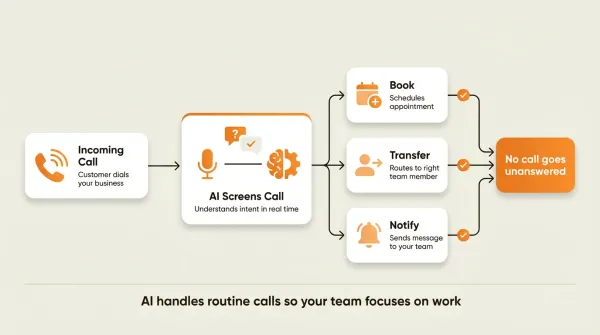
The technical flow is the same whether you use an AI service or a human one. The difference is who is on the other end of the call.
Incoming Call to Your Business Number
    |
    v
Carrier (Twilio or Bundled) Routes Call
    |
    v
Service Answers the Call
    +-- Greets caller by your business name
    +-- Identifies why they are calling
    +-- Handles the request:
    |     Book appointment? --> Checks calendar --> Books slot
    |     Has a question?   --> Answers from knowledge base
    |     Needs a human?    --> Transfers to right person
    |     After hours?      --> Takes message, sends transcript
    +-- Wraps up, thanks caller
    |
    v
Post-Call
    +-- Transcript and summary generated
    +-- Lead data captured and sent to CRM
    +-- Notification sent to you
With AI services like CallCow, the flow runs through your own Twilio account. You connect your Twilio Account SID and Auth Token in Settings, and calls flow into an AI workflow you configure. This is called BYOC, or bring your own carrier. You manage Twilio billing directly, which means you can inspect the underlying telephony charges yourself.
With bundled services like Smith.ai or Ruby, the phone infrastructure is included in the monthly fee. You pay one price. The downside is you do not know what you are paying per minute and you cannot optimize.
The post-call step matters more than most small businesses realize. After every call, an AI service generates a transcript, a summary, and structured data (name, email, phone, reason for calling). This data flows to your CRM via webhooks. Make.com is CallCow's most fully available automation integration, you can trigger calls from Make scenarios and receive call data via webhooks, all bidirectionally. CallCow's webhooks fire on call completion, not in real time during the call. That works well for CRM updates. If you need live data mid-conversation, that is a limitation worth knowing about upfront.
Types of answering services
There are three categories. Understanding the differences saves you money and prevents you from buying the wrong thing.
AI answering services
AI services use natural language processing to handle calls autonomously. The AI answers with your business name, understands caller intent, takes action, and delivers a transcript after the call. Pricing varies a lot by setup model: some tools use subscription-plus-carrier billing, while others bundle everything into one monthly plan.
The strengths: 24/7 coverage, instant response, consistent quality on every call, structured data capture, and direct calendar booking. The weaknesses: no genuine emotional intelligence, and on CallCow the AI always identifies itself as AI.
Human answering services
Human services employ real receptionists who answer calls on behalf of your business using customized scripts. Ruby, Smith.ai, Abby Connect, and ReceptionHQ are some of the better-known names. Pricing is usually meaningfully higher than AI-first setups, but the exact number depends on hours, call volume, and how much human handling is included.
The strengths: genuine human empathy, better with emotionally complex conversations, and callers who specifically want to talk to a person. The weaknesses: limited availability unless you pay for 24/7 coverage, inconsistent quality across agents, manual data entry, and costs that scale poorly.
Hybrid services
Hybrid services combine AI with human fallback. Smith.ai is a common example. AI handles routine calls, and when a caller needs something complex or wants a human, a live agent takes over. The pricing usually lands between pure AI and pure human coverage, but you should verify current plan structure before comparing vendors.
For most small businesses, pure AI is the right starting point. You get 24/7 coverage at a fraction of the cost. If you find that callers regularly need human escalation, add a hybrid layer later. Starting with human or hybrid is like buying a truck when a sedan does the job.
Features small businesses actually need
Most answering services overload their feature lists with things that sound impressive but do not matter for day-to-day operations. These are the features that actually move the needle for a small business, especially when you are trying to stop missed calls from turning into missed jobs.
Appointment scheduling
The single most requested feature. Your answering service should book appointments directly into your calendar, not "take a message and someone will get back to you." CallCow supports Google Calendar (beta), Outlook Calendar (beta), Cal.com, Calendly, TidyCal, and Trafft, which covers the scheduling stack most small businesses actually use.
A few caveats that matter. TidyCal cannot book paid appointments through the API, so if you run a salon, spa, or consulting practice that charges upfront, keep that in mind. Trafft always selects the first available employee regardless of who the caller asks for, which matters if customers book a specific stylist or technician. Google Calendar and Outlook are both in beta, which means they work but may have edge cases.
Call transfer
When callers need a human, the service should transfer intelligently. CallCow supports dynamic routing via a webhook endpoint. The AI can ask whether the caller needs sales, support, or the on-call person, send that info to your server, and your server returns the right destination number.
Full disclosure: transfers are cold/blind only. The AI does not brief the human before connecting, so the person picking up has no context beyond what the caller tells them. Transfer also requires a verified Twilio Business Profile, which takes a few business days to set up.
Structured data collection
This is the feature nobody talks about but every business needs. CallCow's forms let you define typed fields such as name, service needed, address, budget range, appointment type, or preferred callback window using six field types: text, number, email, phone, select, and multi-select. The AI fills them conversationally during live calls. The data gets stored with the call record and included in webhook payloads.
Without forms, you get a transcript and a summary. With forms, you get structured lead data that can be sent to your CRM or internal system through webhooks after the call completes. Every call becomes a typed lead record instead of an unstructured blob of text. If you want to see the setup, the forms docs and webhook docs show the exact payload model.
Inbound contact capture
Every call should leave a usable contact trail. CallCow automatically creates inbound contact records for people who call or text, storing details like phone number, name, email, and notes when available. For small teams that are still living out of a phone inbox and a spreadsheet, that is a practical upgrade because repeat callers stop feeling anonymous.
This matters most for businesses with repeat follow-up cycles: contractors quoting jobs, agencies qualifying leads, clinics returning non-PHI calls, and consultants booking callbacks.
Voicemail transfer
Instead of playing a generic voicemail greeting when you do not answer, voicemail transfer forwards missed calls to your AI. The AI handles the call only when you do not pick up, so you keep the personal touch for calls you answer yourself. This is my recommended setup for most small businesses.
Caveat: voicemail transfer is not available on all carriers. Check with your provider before relying on this feature.
Voice cloning
Some AI services let you train the AI on a 30-second audio sample of your voice. The AI then sounds like you on every call. CallCow supports this. The catch: the AI always identifies itself as AI regardless of voice customization. Callers will know they are talking to AI even if it sounds like you.
Website embed
An embedded widget turns your website into a calling surface. Visitors click a button and connect to your AI receptionist directly, no phone number needed. CallCow offers both floating and inline widget types. This matters for businesses that get web traffic but want to offer a phone option without forcing visitors to switch devices.
For example, a home services company can place a floating widget on every service page, while a consultant can put an inline widget on a contact page next to a booking form. Same feature, different practical use.
Agent Calling
If you want to start calls from your own systems rather than waiting for inbound ones, CallCow's Prompt-to-Call API lets you trigger a real phone call from a single API request. If you use Make.com, n8n, or any AI agent, you can start calls without building a workflow, just send a natural language prompt and CallCow handles the rest.
SMS instructions
Some calls involve information that is easier to share as a link than to communicate verbally. Payment URLs, booking confirmation pages, directions, resource links. CallCow's SMS Instructions feature lets the AI agent text these to the caller mid-conversation. The caller receives a text on their phone while still talking to the AI, with a clickable link they can open immediately.
This is useful for businesses that need to send payment links (home services quotes, consultation deposits), booking confirmations, directions to an office or job site, or any reference material the caller might need. It requires Twilio SMS capability on your connected account.
How much does a small business answering service cost?
Most small business owners ask this first. The top 9 SERP results for this keyword either bury pricing behind "contact us" forms or show a starting price with no explanation of what you actually pay at real call volumes. I am going to do what they do not.
The real cost at real volumes
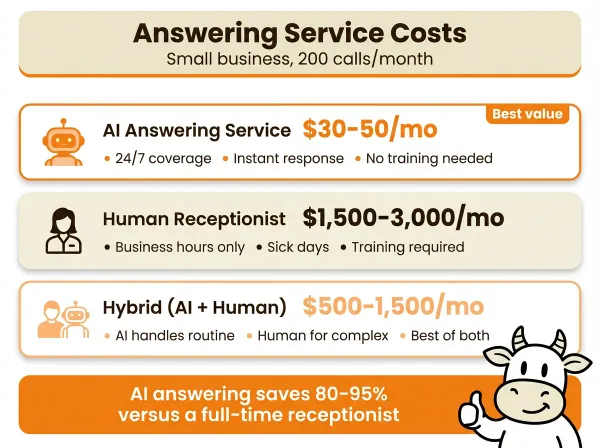
The honest answer is that pricing depends on the billing model.
- A BYOC setup like CallCow combines a software subscription with separate Twilio billing.
- A bundled AI provider rolls number costs and call usage into one plan.
- A hybrid or human service usually charges more, but gives you more human coverage.
If you want a clean buying process, model your own call volume, average call length, transfer rate, and required integrations first. Then verify current pricing directly with each vendor. That gets you closer to reality than any static comparison table.
Where the bill usually comes from
For a BYOC setup, your monthly total usually has four parts:
- software subscription
- phone number cost
- call usage billed through Twilio
- any separate calendar, automation, or CRM tooling you connect
BYOC vs bundled: what nobody explains
Most human and hybrid services bundle their phone costs into the monthly fee. You pay one price and that is it. Simple, but you have no idea what you are paying per minute and you cannot optimize.
CallCow uses BYOC. You connect your own Twilio account and pay Twilio directly for phone numbers and usage. The real advantage of BYOC is that costs are transparent and you control your phone infrastructure. The downside: you manage a second bill.
For a deeper pricing breakdown across every major provider, see our AI phone answering service cost guide.
Hidden costs that add up
Transferred calls count two call legs on Twilio. You pay for both the inbound leg and the outbound leg to your team member. If your workflow transfers a large share of calls, that can change the economics more than the headline subscription price suggests.
Toll-free numbers usually cost more than local numbers, and some human services charge overages beyond plan limits. The exact numbers vary, so verify the current rate card instead of assuming the advertised monthly plan is your final bill.
Best answering services for small businesses compared
I looked at every result in the top 9 SERP positions for this keyword. Here is how they compare on the features that actually matter for a small business.
| Feature | CallCow | Rosie AI | Smith.ai | Ruby | RingCentral | Goodcall |
|---|---|---|---|---|---|---|
| Starting price | Check current pricing | Check current pricing | $95/mo AI or higher | Check current pricing | Check current pricing | $79/mo per agent |
| Pricing visible | Yes | Yes | Yes | No | No | Yes |
| Type | AI | AI | Hybrid | Human | AI/UCaaS | AI |
| 24/7 coverage | Yes | Yes | Yes | No | Yes | Yes |
| Calendar integrations | 6 options | Google only | Limited | Manual | Limited | Limited |
| Structured forms | Yes | No | No | No | No | No |
| Call transfer | Dynamic webhook | Basic | Agent handoff | Patch | Basic | Basic |
| Voice cloning | Yes | No | No | N/A | No | Yes |
| Webhook/API | REST + webhooks | Limited | Limited | Limited | Limited | Limited |
| Website widget | Floating + inline | No | No | No | No | No |
| SMS instructions | Yes | No | No | No | No | No |
| Free trial | 7-day* | Trial | 30-day money-back guarantee | No | No | Free trial |
| Phone model | BYOC (Twilio) | Bundled | Bundled | Bundled | Bundled | Bundled |
*CallCow's 7-day trial supports 4 concurrent calls with verified numbers only. Full call capacity requires a Twilio Business Profile.
A few observations from reviewing these services. The practical comparison is less about a single sticker price and more about what you are actually buying: bundled simplicity, human fallback, broader phone-system tooling, or deeper workflow control. Verify current pricing and included usage directly before turning any of these rows into a budget decision.
Here is the more useful way to read the table:
- Choose
CallCowif you are a service business, solo operator, or small office that cares about structured intake, flexible scheduling, and a BYOC model. - Choose
Rosie AIif you want a simpler bundled setup and can live with lighter feature depth, especially if your team just needs basic answering and simple Google Calendar booking. - Choose
Smith.aiif you handle lower call volume but want human backup for edge cases, intake conversations, or callers who insist on a person. - Choose
Rubyif brand perception matters more than automation and you are comfortable paying more for a traditional receptionist experience. - Choose
RingCentralorGoodcallmainly if you are already committed to a broader phone system and the answering layer is only one part of a bigger stack.
The row missing from most comparison tables is pricing transparency. Some vendors are getting better about publishing entry pricing, but you still need to look past the headline. Per-agent pricing, call bundles, unique-customer caps, overages, and after-hours surcharges can change the economics fast.
For a broader comparison including more providers, see our virtual receptionist guide.
Ready to test it? Start with the getting started guide and phone number guide, then start a 7-day free trial at callcow.ai.
How to choose the right answering service
Choosing an answering service for a small business is not complicated, but most people overthink it. I have talked to hundreds of small business owners about this. The decision comes down to four questions.
Question 1: How many calls do you get per month?
If you get fewer calls than you think, do not overbuy. Start with the lightest plan that supports your workflow and then upgrade only if real usage forces it. If you get more than a few hundred calls, compare higher-tier AI plans, bundled providers, and hybrid services carefully. If you genuinely do not know your call volume, test for a week and count.
Question 2: Do you need appointment booking?
If yes, check which calendar integrations the service supports. CallCow supports Google Calendar and Outlook natively in beta, plus Cal.com, Calendly, TidyCal, and Trafft. Most competitors support one or two options at most. Two caveats matter here: TidyCal cannot book paid appointments through the API, and Trafft books the first available employee rather than a specific one. If your scheduling tool is not supported, the AI cannot book for you, which defeats half the purpose.
Question 3: Do callers need to speak to a human?
Estimate what percentage of your calls genuinely require a human conversation. For many small businesses, a large share of calls are routine: booking appointments, asking about hours or pricing, requesting directions. AI often handles those well. If only a minority of calls truly need a person, start with AI and use call transfer for the ones that do.
Question 4: What is your budget?
Be honest about this. Calculate your real monthly cost including phone charges, transfer behavior, and any separate integrations before committing. The cheapest-looking plan is not always the cheapest operating setup.
Quick segmentation: choose this if...
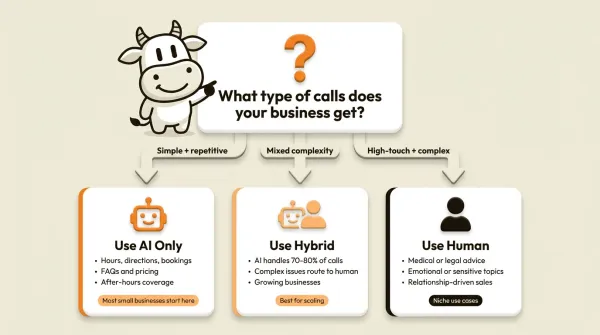
- Choose AI-first if you run a home services company, real estate team, solo practice, consultancy, or small office where most calls are bookings, quotes, hours, directions, or lead intake.
- Choose hybrid if you run a law office, high-ticket consulting firm, or any business where a noticeable share of callers want reassurance from a human before they commit.
- Choose traditional human answering if your call volume is low but every caller expects empathy, hand-holding, or a warm transfer and you are willing to pay for that.
- Choose BYOC if you want to keep control of your number, see your per-minute costs, and avoid getting locked into a bundled phone setup.
- Choose bundled pricing if your team hates managing telecom setup and you prefer one bill even if it is less transparent.
The one thing that matters more than features
Can you try it before committing? If a service will not let you test it with real calls before you pay, move on. A demo is not a trial. You want to call your own business number and see what happens.
Which small businesses benefit most?
Some industries gain more from an answering service than others. The common thread: businesses where a missed call equals a missed customer.
Real estate agents
Real estate agents miss calls while showing properties. Every missed call is a potential buyer or seller going to the next agent on Zillow. An AI receptionist qualifies leads, captures property interest and budget details in structured fields, answers basic questions, and books viewings. For a dedicated guide, read our AI receptionist for real estate article.
Law firms
Potential clients call at all hours, and many will not leave voicemails. An AI receptionist captures intake information, schedules consultations, and transfers urgent calls to the on-call attorney when transfer is enabled. Law firms with emotionally complex intake or frequent urgent matters may still prefer hybrid or human coverage for some calls. See our AI phone answering for law firms guide.
Home services
Plumbers, electricians, HVAC contractors, and landscapers receive emergency calls outside business hours. An AI receptionist triages urgency, collects job details like address, problem description, and preferred time, and routes urgent calls to the on-call technician. This is one of the best use cases for forms because every field can map cleanly into a job intake process. Emergency calls after hours are the difference between winning a customer and losing them to the first Google result that picks up. SMS Instructions can text booking confirmations or estimate links to callers mid-conversation, which is faster than spelling out a URL verbally. Read our AI receptionist for home services article.
Medical and dental offices
Missed calls mean missed appointments and lost revenue. An AI receptionist handles scheduling and answers basic questions about hours, location, and insurance acceptance. SMS Instructions can also text the caller a link with office directions or intake forms during the call. Important caveat: AI receptionist services are not HIPAA compliant. Use AI for non-PHI calls only. Route any calls involving protected health information to a HIPAA-compliant service or staff member.
Professional services and consultants
Accountants, financial advisors, marketing consultants, and coaches lose leads when they are in client meetings and cannot answer the phone. An AI receptionist captures lead information, books discovery calls, and sends post-call details through webhook workflows. This segment usually benefits most when monthly volume is modest but missed-call value is high.
Retail and restaurants
Customer calls about hours, location, and product availability tie up staff who could be helping in-store customers. An AI receptionist handles these routine inquiries and only transfers calls that genuinely need a human. This is a strong fit for higher call counts with repetitive questions, but less of a fit if every caller needs detailed inventory or table-side service decisions.
What to look for in a small business answering service
I have looked at a lot of answering services from both sides of the buying decision. These are the criteria that actually matter, separated into three tiers.
Must-haves
- 24/7 availability. If a service only covers business hours, you are still losing after-hours calls. That defeats the purpose.
- Direct calendar booking. "We will take a message" is not booking. The service should book into your calendar in real time.
- Call transfer. Not forwarding everything to one number, but intelligent routing based on what the caller needs.
- Transparent pricing. If you cannot find the price without a sales call, that is a red flag.
Nice-to-haves
- Structured data capture. Forms that collect name, email, phone, and reason for calling, then pass the data into your CRM or workflow via webhooks.
- Voicemail transfer. The AI handles calls only when you do not answer, preserving the personal touch for calls you pick up yourself.
- Voice cloning. Sound like your business instead of a generic robot.
- Website widget. Let website visitors call you from their browser.
- Outbound calling. Follow up with leads and confirm appointments through the same system.
- SMS instructions. Let the AI text links and instructions to the caller during the conversation, useful for payment links, booking URLs, and directions.
Red flags
- No free trial. If they will not let you test it, they are hiding something.
- Bundled phone costs with no per-minute transparency. You cannot optimize what you cannot see.
- No API or webhook access. If you cannot get data out, you cannot automate anything.
- Per-call overages with no pricing cap. A spike in call volume should not double your bill.
- Long contracts. Month-to-month or annual with an exit clause is fine. Anything longer is a trap.
The decision framework
Start with the cheapest plan from a service that offers a free trial. Test it with real calls for one week. Check the data: how many calls came in, how many the AI handled fully, how many got transferred, and what the quality was like. If it works, keep it. If it does not, try the next one. The cost of testing is usually low, not zero, because BYOC setups still incur phone usage. The cost of picking wrong and committing to a contract is worse.
Who this is for (and who it's not)
CallCow fits small businesses that want 24/7 coverage without moving immediately to a traditional human answering service. It is strongest for service businesses, appointment-driven teams, and operators who want structured intake instead of just transcripts. It also fits businesses that want to own their phone number, keep Twilio billing visible, and use a BYOC setup rather than a bundled phone model.
It is not a good fit if you cannot tolerate cold-only transfers. The person picking up has no idea who is calling or why. If your business requires warm handoffs where someone briefs your team before connecting, look at Smith.ai or a traditional human service. It also does not work if you need HIPAA compliance, or if you want a fully managed experience where someone else handles the phone infrastructure. The BYOC model means you manage your own Twilio account, and the 7-day trial is limited to 4 concurrent calls with verified numbers only. CallCow has a 60 requests-per-minute rate limit for all calling.
Frequently asked questions
How much does an AI receptionist cost for a small business?
An AI receptionist for a small business can be billed a few different ways. BYOC setups combine software subscription plus Twilio usage. Bundled providers include more of the phone cost in one plan. Human answering services are usually priced higher than AI-first setups, but the only honest comparison is your real call volume, transfer rate, and required workflow depth.
Is an AI receptionist worth it?
It can be. What matters is whether missed calls are already costing you more than the software and setup overhead. If a meaningful share of your calls are bookings, quotes, or new leads, recovering even a small number of them can justify the tool. But you still need a workflow that fits your business, not just a cheap plan.
Is there a free AI receptionist?
No fully free AI receptionist exists in any meaningful sense because real phone calls have infrastructure costs. Some products offer trials or very limited free tiers, but you should treat those as test environments, not as long-term production setups. No fully free option exists, but CallCow offers a 7-day trial where you can test on real calls with no credit card.
What is the best AI receptionist app?
The best AI receptionist depends on your specific needs. CallCow is strongest for small businesses that need structured data capture, multiple calendar integrations, call transfer, webhook automation, and API access in a BYOC model. Simpler bundled tools can make more sense if you want one bill and less setup. Hybrid tools can make more sense if human fallback is non-negotiable. The best approach is to test two or three options on your actual calls. For a deeper comparison, see our AI phone answering service guide.
Before you commit to any answering service, test one real call flow. Connect Twilio, set up one workflow, and run it on live missed calls. The getting started guide and voicemail transfer docs are the fastest way to do that.
Yiming Han is the founder of CallCow and writes about phone automation, missed calls, and the tradeoffs that show up when small businesses actually deploy voice AI.