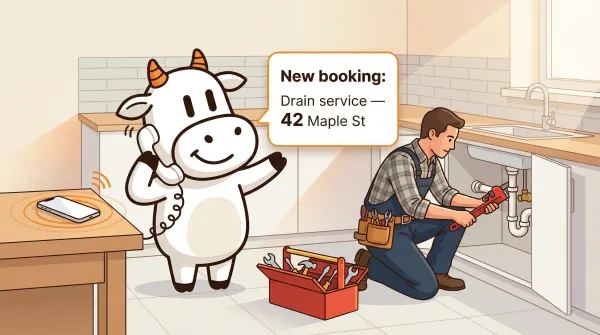
AI Receptionist for Home Services: What Plumbers, HVAC, and Electricians Need
How an AI receptionist for plumbing, HVAC, and electrical businesses handles missed calls, triages urgent jobs, and where CallCow's workflow caveats matter.An AI receptionist for home services is a voice AI system that answers calls for plumbing, HVAC, and electrical businesses 24/7. It can collect service details, sort urgent from routine calls, and book appointments into a connected calendar. For CallCow specifically, the useful details are not just the upside. They are the caveats: BYOC through Twilio, cold transfers only, completion-only webhooks, and carrier-dependent voicemail forwarding.
The best fit is trades with a steady stream of missed first-time inbound calls: plumbers handling leak and drain calls, HVAC shops splitting urgent no-heat/no-cool calls from routine maintenance, and electricians screening outage or sparking calls from estimate requests. It is especially useful for owner-operators and small teams where the same people answering the phone are also in crawlspaces, on rooftops, or inside electrical panels.
Table of contents
- How an AI receptionist works for home services
- Emergency triage: the feature nobody else talks about
- Collecting service details with AI forms
- What happens when you are on a job site: voicemail forwarding
- Booking service appointments with calendar integration
- After-hours emergency handling for trades
- Pushing service requests to Jobber and Housecall Pro with webhooks
- Outbound follow-ups for home service businesses
- Transfer to human: when AI needs to hand off
- Comparison: AI receptionist options for home services
- Setting up CallCow for your home service business
- Pros and cons of an AI receptionist for home services
- FAQ
How an AI receptionist works for home services
The call flow for a home service business looks different from a law firm or real estate office. A plumber does not sit at a desk. An HVAC tech is on a roof. Electricians have their hands inside a panel. The phone rings, and nobody picks up.
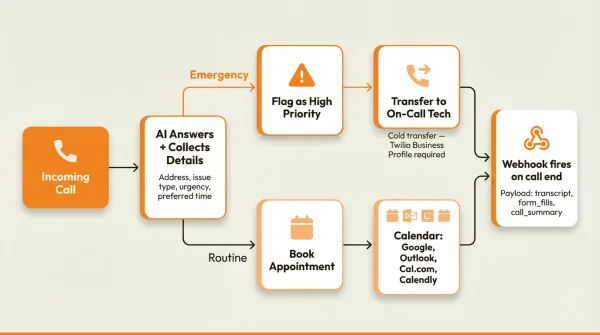
With an AI receptionist, the call flow runs like this:
- A customer calls your business number.
- The AI answers immediately, identifies itself as AI, and greets the caller by your business name.
- The AI asks what the issue is and collects details: property address, type of problem, urgency level, preferred time for service.
- If it is an emergency (burst pipe, no heat in winter, electrical sparking), the AI flags it as high priority and either transfers to you or captures the details for immediate callback.
- If it is a routine request (drain cleaning, maintenance check, outlet installation), the AI books an appointment into your calendar based on your availability.
- During the call, the AI can text the caller useful links via SMS Instructions: a Google Maps link to your shop, a booking confirmation URL, or a link to your online estimate form. This beats spelling out a web address over the phone. Requires Twilio SMS capability.
- After the call ends, a webhook fires with all the collected data, including the form fills, so it can flow into your field service management tool.
Exact call duration depends on your workflow and the caller, so test it with real scenarios before you promise response times to your team.
Emergency triage: the feature nobody else talks about
No competitor I found explains how AI actually handles the difference between "my basement is flooding" and "I want a quote on a water heater." I looked at nine top-ranking pages for "AI receptionist for home services" and none of them cover it.
The distinction matters. A burst pipe at 2 AM needs a different response from a water heater quote that can wait until Monday. If your AI treats both the same, it is not helping.
With CallCow, you set up the triage logic in your workflow. The AI asks the caller to describe the issue, then classifies it based on keywords and context. In practice, CallCow's triage works through keyword and context classification:
Caller: "Yeah, there's water everywhere in my basement, I think a pipe burst."
AI: "I'm sorry to hear that. That sounds like an emergency. Can you confirm your address? I need to get a technician dispatched to you right away."
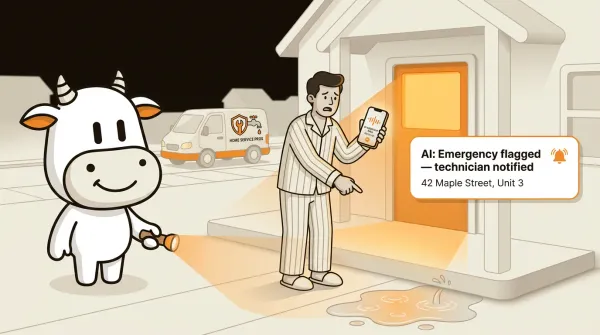
Caller: "42 Maple Street, Unit 3."
AI: "I have 42 Maple Street, Unit 3. I'm flagging this as an emergency and routing it based on your on-call process. Is there anything else I can help with?"
Compare that to a routine call:
Caller: "Hi, I'm looking to get a quote on installing a garbage disposal."
AI: "I can help with that. What's the address where the work would be done? And do you have a preferred day for an estimate?"
The AI fills out a form during each call. For emergencies, the form includes an urgency field set to "Emergency." For routine calls, it is set to "Standard." That urgency data flows into your webhook payload, so your dispatch system or CRM gets the priority level automatically.
The AI always identifies itself as AI. You cannot turn that off. Some callers will prefer a human, and for those situations, CallCow supports transfer to a human (more on that below).
Collecting service details with AI forms
Every home service job needs the same basic information before a technician can be dispatched or an appointment booked. You need the property address, the type of problem, how urgent it is, and a callback number. Some jobs need more: is it a residential or commercial property? Which floor? Is there access to a water shutoff? What brand is the furnace?
CallCow's forms feature handles this. You define a form template in the dashboard with typed fields (text, number, email, phone, select, multi-select), and the AI fills it out conversationally during the call. The caller does not fill out a form on a website. They just talk, and the AI extracts the data.
A typical plumbing service form might include:
- Name (text field)
- Phone number (phone field)
- Property address (text field)
- Issue type (select: drain clog, leak, burst pipe, water heater, fixture install, other)
- Urgency (select: emergency, same day, this week, flexible)
- Preferred time (text field)
- Property type (select: residential, commercial)
- Additional details (text field)
The AI asks for these details naturally. It does not read a checklist. If the caller volunteers information early ("My name is Sarah, I'm at 42 Maple, and my kitchen sink is backed up"), the AI captures it and moves on to the next missing field instead of asking redundant questions.
After the call, the filled form data appears on the call detail page in the dashboard. More importantly, it gets included in the webhook payload, so it can push directly into your CRM or field service tool. That form_fills array in the webhook payload contains every field the AI collected.
Read more about how forms work in CallCow.
What happens when you are on a job site: voicemail forwarding
Every tradesperson knows this one. You are under a sink, hands covered in pipe dope, and your phone rings. You cannot answer. The caller hears your voicemail greeting. They hang up. They call the next plumber in their search results.
Voicemail forwarding solves this differently from just forwarding all calls to AI. Instead of having the AI answer every single call (which some business owners do not want), voicemail forwarding configures your carrier to send missed calls to the AI instead of playing your voicemail greeting. If you pick up, you talk to the customer directly. If you do not pick up, the AI handles it.
This is the recommended setup for most home service businesses that still want to answer live when they are available. It works best when missed calls happen because techs are on site or driving between jobs, and during after-hours periods, not because you run a full-time dispatch desk that needs to coordinate in real time. You keep the personal touch when you can, and you stop sending overflow calls to voicemail when you cannot answer.
The catch: voicemail forwarding is not available on all carriers. It works on some (we have a demo for Rogers), but carrier support varies. If your carrier does not support it, the alternative is to forward all calls to AI or use a separate business number that routes through CallCow.
Setup requires carrier-level configuration. For some carriers it takes a few minutes. For others, you may need to book a setup call. Check the voicemail forwarding docs for details on your carrier, or book a custom setup at callcow.ai/schedule-custom.
Ready to stop losing calls on job sites? Start a free 7-day trial at callcow.ai.
Booking service appointments with calendar integration
When a caller wants to book a service appointment, the AI checks your calendar and offers available time slots. CallCow supports Google Calendar and Microsoft Outlook Calendar (both currently in beta), plus Cal.com, Calendly, TidyCal, and Trafft for businesses that already use those scheduling tools.
The caller says they need a plumber on Thursday. The AI checks your connected calendar, sees that you have openings at 9 AM, 11 AM, and 2 PM, and offers those to the caller. The caller picks one, and the appointment is booked directly.
For field service businesses that use Calendly or Cal.com, the AI reads available slots from your scheduling tool and books through it. This means your existing booking system stays the source of truth. You do not have to manage appointments in two places.
If you use TidyCal, note that paid bookings are excluded from the API flow. If you use Trafft, the booking goes to the first available employee rather than a specific technician. Those are scheduling-tool constraints, not something you can prompt around.
If you are a one-person operation, the AI can book into your personal calendar. If you have a team, test your scheduling setup carefully before you promise technician-level routing. The docs confirm the supported calendar connections, but they do not document a full field-service dispatch engine.
If scheduling is the bottleneck, read the calendar integration guide before you roll this out to live callers.
After-hours emergency handling for trades
Home service emergencies do not follow business hours. A pipe bursts at 11 PM. A furnace dies on a Saturday. The customer calls, and if nobody answers, they find someone else.
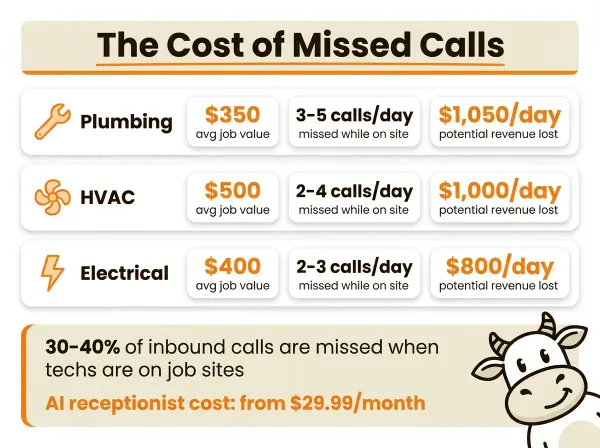
After-hours call handling is where AI receptionists deliver the most obvious ROI for home services. The AI answers 24/7. Traditional answering services charge per minute around the clock, which adds up fast.
For after-hours calls, the workflow is typically more aggressive about triage:
- True emergencies (flooding, no heat, gas smell, electrical sparking) get flagged immediately and the customer is routed according to your workflow.
- Non-emergencies get booked for the next business day and the caller receives a confirmation.
- After-hours calls that are clearly not urgent (someone wanting a quote on a bathroom renovation at midnight) still get logged, so you have the lead information the next morning.
The AI handles the first layer without you being involved in every call. In the morning, you should have a clearer record of what came in and what still needs a person.
Pushing service requests to Jobber and Housecall Pro with webhooks
Most home service businesses use field service management software. Jobber is a common example, and Housecall Pro, ServiceTitan, and FieldEdge show up often too. CallCow does not document native integrations with those tools, so the realistic path is a webhook plus your own middleware or automation layer.
When a call completes, CallCow sends a POST request to your webhook URL with a JSON payload that includes the call transcript, summary, and form fills. That form_fills array contains everything the AI collected during the call: the customer name, phone number, address, issue type, urgency, and preferred time.
You can set up an endpoint on your server to receive that webhook and then pass the data into whatever field service tool you use if that tool exposes an API or automation path. Make.com offers bidirectional integration: trigger calls from Make scenarios and receive call data via webhooks. The point is not that CallCow has a native Jobber or Housecall Pro integration. It is that the structured post-call payload gives you something clean to automate with.
Every caller automatically becomes a contact in CallCow, capturing their phone number, name, and email so you build a lead database without manual data entry.
For tech-forward teams using Make.com or custom bots, CallCow's Agent Calling API triggers calls from a single natural language prompt.
One important limitation: CallCow webhooks fire on call completion, not in real-time during the call. If you need to dispatch a technician while the caller is still on the line, the webhook approach will not work for that. You would need to use the transfer-to-human feature instead, or build a more custom integration.
The webhook payload includes call_id, workflow_id, call_status, call_summary, the full message transcript, context data, and form_fills. Read the webhook documentation for the complete payload structure.
Outbound follow-ups for home service businesses
Missed calls are not the only revenue leak in home services. Estimates that never get booked, seasonal maintenance that customers forget about, and leads that go cold after the first contact all represent money left on the table.
CallCow's list calling feature lets you run outbound follow-up campaigns. You upload a CSV of past customers or open leads, and the AI calls them sequentially to book follow-up appointments. For example:
- Customers who received a quote last month but never booked: the AI calls to check if they want to proceed.
- Past customers due for seasonal maintenance: the AI calls to schedule a furnace inspection or water heater flush.
- Leads from a home show or online ad that went cold: the AI calls to re-engage.
The calling runs sequentially in the background. You upload a list, pick a workflow and phone number, and click start. For large lists, you can set a daily schedule so it stops after a certain time and resumes the next day.
Limitations to know about: list calling is sequential only. There is no parallel or concurrent calling from a list. If you have 200 numbers to call, it goes one at a time. Also, the feature does not have retry logic yet. If a number does not pick up, it moves to the next one without calling back.
Transfer to human: when AI needs to hand off
Sometimes the AI cannot handle a call. A customer insists on talking to a person. A situation is too complex for the workflow to process. An emergency requires immediate human judgment.
CallCow supports transfer to human, with some caveats you need to know about:
How it works: When the caller asks for a human or the workflow triggers a transfer condition, the call gets forwarded to a phone number you specify. The AI tells the caller they are being transferred, and the call connects to your number.
Dynamic routing: You can set up a Dynamic Transfer URL that receives the caller's phone number and returns the appropriate destination. For example, plumbing emergencies go to the on-call plumber, HVAC calls go to the HVAC technician, and general inquiries go to the office. Your endpoint receives a POST with the caller's number and returns the transfer number.
The caveats: Transfer to human requires a Twilio Business Profile on your account. Without it, the feature does not work. Getting a Business Profile takes a few business days of verification through Twilio's Trust Hub. Also, CallCow does cold or blind transfers only. There is no warm transfer where the AI briefs you on the caller's situation before connecting. The call goes straight through.
For most home service businesses, this is fine. The AI already collected the service details through the form, and you can see the call transcript in your dashboard before you call back. But if you need the AI to stay on the line and brief you, that is not available yet.
Comparison: AI receptionist options for home services
I looked at what is actually available for home service businesses specifically, not generic AI receptionist tools. Here is the comparison I can stand behind without pretending to know more than the public material shows:
| Feature | CallCow | Marlie.ai | Smith.ai | HeyRosie | Jobber AI |
|---|---|---|---|---|---|
| Home-services positioning | Yes | Yes | Not primary focus | Not primary focus | Yes |
| Pricing visibility | Publicly visible | Not obvious | Not obvious | Publicly visible | Tied to Jobber ecosystem |
| Operational detail available publicly | Strong CallCow docs | Thin public detail | Verify directly | Verify directly | Verify directly |
| Transfer caveat we can confirm | Cold/blind only, requires Twilio Business Profile | Verify directly | Verify directly | Verify directly | Verify directly |
| Phone model | BYOC (Twilio) | Verify directly | Verify directly | Verify directly | Tied to Jobber product model |
A few observations from this comparison. Marlie.ai is one of the few other home-services-specific entries, but the public detail is thin. Jobber's AI matters if you already live inside Jobber. The clearest thing CallCow brings to the table is not "best" in the abstract. It is that the documented tradeoffs are concrete enough to evaluate.
CallCow's BYOC model means you manage your own Twilio billing. That is a tradeoff. You get more direct control over the phone layer, but you also have to set up and maintain the Twilio account. If you want someone else to handle the phone bill entirely, a more bundled service may be a better fit.
If you are comparing this to other industries, the approach for home services shares similarities with medical offices in terms of urgency handling, but the dispatch and field service integration needs are unique to trades. For a broader comparison across business types, see our virtual receptionist guide.
Setting up CallCow for your home service business
Getting started can be quick if you already have a Twilio account, but production readiness usually takes longer than the first test call.
Step 1: Create a Twilio account and get a phone number. Go to twilio.com, sign up, buy a phone number with voice and SMS capabilities. Copy your Account SID and Auth Token.
Step 2: Sign up for CallCow and connect Twilio. Create your CallCow account, go to the phone number setup, and paste your Twilio credentials. Your Twilio number is now connected to CallCow.
Step 3: Build your workflow. Create a workflow for inbound calls. For home services, you want the AI to greet the caller, ask about the issue, collect service details via a form, and either book an appointment or flag an emergency. You can start from a template or write a custom prompt describing what the AI should do.
Step 4: Set up your form. In the forms section, create a service request form with fields for name, phone, address, issue type, urgency, and preferred time. Add the form to your workflow.
Step 5: Connect your calendar. Link Google Calendar, Outlook, Cal.com, Calendly, TidyCal, or Trafft so the AI can book appointments based on your real availability. Keep the caveats in mind: Google Calendar and Outlook are beta, TidyCal does not support paid bookings through the API, and Trafft books the first available employee.
Step 6: Enable SMS Instructions (optional). If your callers often need links sent to them, configure SMS Instructions in your workflow. The AI can text the caller a Google Maps link to your location, a booking confirmation, or a payment portal URL during the conversation. This requires Twilio SMS capability on your number.
Step 7: Set up webhooks (optional). If you use Jobber, Housecall Pro, or another field service tool, create a webhook endpoint and configure it in the Integrations tab. Every completed call will push the service details to your tool.
Step 8: Configure voicemail forwarding (optional). If your carrier supports it, set up voicemail forwarding so the AI only handles calls you miss. This keeps the personal touch when you can answer.
Step 9: Test with a real call. Call your Twilio number and walk through a test scenario. Try both an emergency ("burst pipe") and a routine request ("quote on water heater") to verify the triage logic works.
Trial accounts are limited to 4 concurrent calls and verified numbers only. For full production use, you will want to upgrade your Twilio account and complete the Twilio Business Profile verification, which also unlocks the transfer-to-human feature.
Watch the getting-started video at docs.callcow.ai/getting-started for a walkthrough, or book a free custom setup at callcow.ai/schedule-custom.
Pros and cons of an AI receptionist for home services
What works well
You stop losing calls while on job sites. That is the core value. If missed calls regularly turn into lost jobs, even a simple overflow workflow can matter.
Emergency triage means the right calls get priority. Not every call needs a technician dispatched at midnight. The AI sorts the real emergencies from the "I want a quote" calls, so you only get woken up when it actually matters.
Forms collect structured data without the customer doing any work. They talk, the AI captures the address, issue type, urgency, and everything else you need to dispatch or book. That data flows into your webhook payload and lands in your field service tool.
CallCow runs on GPT 5.4, which reduces hallucinations and improves call accuracy. That matters when a plumbing customer trusts the AI with their emergency details and you need the address right the first time.
You can clone your own voice from a 30-second recording so your business sounds consistent and branded, not like a generic robot.
Voicemail forwarding preserves the personal touch. You answer when you can, and the AI handles it when you cannot. The customer never knows the difference unless the AI tells them (which it does, since it always self-identifies).
The tradeoffs
BYOC means you manage your own Twilio account. You buy the number, you pay the per-minute charges, you handle carrier configuration. CallCow provides the AI and the workflow; the phone infrastructure is on you.
Transfer is cold only. When the AI hands off to a human, the caller gets connected directly without any briefing. You will need to look at the call transcript in the dashboard to get context.
Voicemail forwarding does not work on every carrier. Check your carrier before counting on this feature.
Webhooks fire after the call ends. If you need real-time data during a call (like dispatching a technician while the caller is still on the line), webhooks will not do that.
The AI always identifies itself as AI. You cannot disable this. Most customers do not care, but some will, and for those calls you will want the transfer-to-human option ready.
Trial accounts are limited. Four concurrent calls and verified numbers only until you upgrade.
Who this is for (and who it's not)
Good fit:
- Plumbers, HVAC techs, and electricians who miss inbound calls because they are on job sites, driving, or covering after-hours overflow
- Businesses with a clear split between urgent calls and routine booking calls, like burst pipe vs. drain cleaning, no heat vs. maintenance, or sparking outlet vs. quote request
- Owner-operators and small teams that want voicemail forwarding or full call forwarding to catch missed calls without hiring a full-time receptionist
- Teams using Jobber or Housecall Pro that can receive structured service data after the call via webhooks
Not a good fit:
- Businesses needing real-time dispatch while the caller is still on the line. Webhooks fire on call completion only, so you can't push data mid-call
- Operations that need parallel dialing for high-volume campaigns. CallCow calls sequentially, one at a time
- Businesses that want warm transfers. The AI drops off when it hands the call to your team, no briefing
- Anyone wanting the AI to sound human without identifying as AI
FAQ
How much does an AI receptionist cost for home services?
Verify current CallCow pricing before you publish or buy based on a number in this article. What does not change is the billing model: you pay CallCow for the platform and Twilio separately for the phone layer.
Can AI handle emergency plumbing calls?
Yes. You configure the triage logic in your workflow. The AI asks the caller to describe the issue, classifies it based on keywords and context (burst pipe, flooding, no heat), and flags emergencies for immediate attention. For true emergencies, the AI can transfer the call to your on-call technician or collect the address and issue details for a fast callback workflow. Read more at callcow.ai/use-cases/plumbing.
What is the best AI answering service for contractors?
It depends on what you need. CallCow is a strong fit if you want structured data collection, completion-based webhook automation, and control over your own phone number through BYOC. If you prefer a more bundled or human-heavy setup, compare a few alternatives directly on their current product pages and demos.
How do AI receptionists book service appointments?
The AI checks your connected calendar or scheduling tool for available time slots and offers them to the caller. CallCow supports Google Calendar and Outlook Calendar in beta, plus Cal.com, Calendly, TidyCal, and Trafft. When the caller picks a time, the appointment is booked into that connected system. TidyCal excludes paid bookings, and Trafft books the first available employee rather than a specific technician.
Can an AI receptionist dispatch technicians to emergency calls?
Yes, with caveats. The AI can flag a call as an emergency, collect the customer's address and issue details, and transfer the call to your on-call technician (cold transfer). It can also send the emergency details to your dispatch system by webhook after the call ends. What it cannot do is real-time dispatch during the call, because webhooks fire on call completion. For instant dispatch, you need the transfer-to-human feature, which requires a Twilio Business Profile.
Is CallCow HIPAA compliant?
No. If you run a medical practice alongside your home services, CallCow does not meet HIPAA requirements. This article covers plumbing, HVAC, and electrical use cases only.
When your tech is under a sink or on a roof, the job to be done is simple: do not let the next inbound caller hit voicemail and move on to another contractor. If that is your problem, test the exact missed-call flow you want: voicemail forwarding if your carrier supports it, or full call forwarding if it does not. Start a free 7-day trial at callcow.ai, connect your Twilio number, and run real scenarios before you roll it out broadly.
Yiming Han is the founder of CallCow and writes about phone automation, missed calls, and the tradeoffs that show up when small businesses actually deploy voice AI.