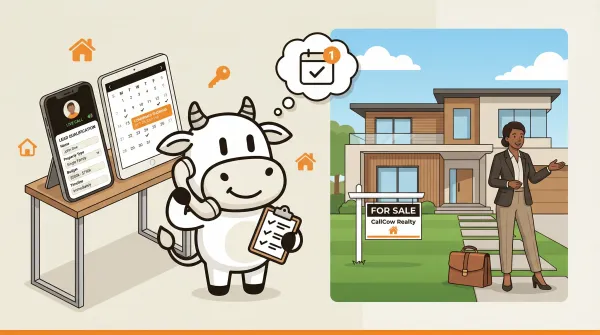
AI Receptionist for Real Estate: What Agents Actually Need
An AI receptionist for real estate answers buyer calls, qualifies leads, and books showings. How it works, pricing caveats, and honest limitations.AI Receptionist for Real Estate: What Agents Actually Need
An AI receptionist for real estate is a voice AI system that answers buyer and seller calls 24/7, qualifies leads by collecting property type, budget, and timeline, and can book one-on-one showings into a connected calendar or scheduling tool. With CallCow, the real total depends on the current plan you choose plus your Twilio setup and call volume under the BYOC model. The AI self-identifies as AI on every call.
Table of contents
- How an AI Receptionist for Real Estate Works
- Lead Qualification: Collecting the Data That Matters
- Showing Scheduling and Calendar Integration
- After-Hours Calls and Voicemail Forwarding
- Voice Cloning: Sounding Like Your Brokerage
- Webhooks and CRM Integration for Agents
- Comparison: AI Receptionist Options for Real Estate
- How to Set Up an AI Receptionist for Real Estate
- Pros and Cons
- Frequently Asked Questions
How an AI receptionist for real estate works
The flow is straightforward. A buyer calls your number. The AI answers, identifies itself as AI, asks qualification questions, and either books a showing or forwards the call. You get the lead data without touching your phone.
Here's the full flow:
- Caller dials your number. This can be a dedicated number or your existing number via voicemail forwarding.
- AI answers the call. It greets the caller, states it's an AI assistant, and asks what the caller needs.
- Lead qualification runs. The AI asks structured questions about property type, budget range, timeline, and whether the caller is buying or selling.
- Action taken. Based on the conversation, the AI books a showing via your calendar integration, transfers the call to you, or takes a message.
- Lead data captured. Call transcript, summary, and form fills are stored in your dashboard. Webhooks push the data to your CRM if you have one connected.
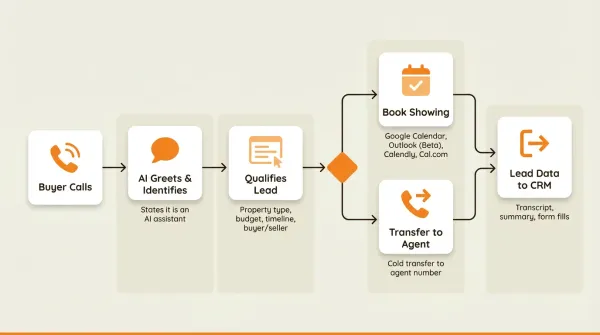
The entire process runs without you. The caller never waits on hold. The data is structured, not a scribbled note from a voicemail or a half-complete message from a general answering service.
Where CallCow fits
CallCow handles this with a BYOC (Bring Your Own Carrier) model. You connect a Twilio account, set up a workflow with a prompt, and the AI handles calls through your number. You manage your own Twilio billing for phone costs, which means you pay Twilio's per-minute rates directly. Twilio costs are separate under the BYOC model, and the exact total depends on your country, number setup, transfer behavior, and call usage.
The BYOC model sounds like extra work, but it means you own your phone numbers. You can port them anywhere. No vendor lock-in on the carrier side. CallCow supports GPT 5.4 as a selectable model per workflow, and GPT 5.4 is the safest default for real estate calls. In testing it showed fewer hallucinations during lead qualification, important when you're collecting budget ranges and property preferences that need to be accurate. There's a slight latency tradeoff, but for calls where data accuracy matters more than sub-second response times, it's worth it. Full setup guide in the CallCow docs.
Lead qualification: collecting the data that matters
Most agents I've talked to say the same thing about missed calls: they get a voicemail that says "interested in the listing on Main Street" and nothing else. No budget, no timeline, no indication of whether the caller is pre-approved. You call back and the number doesn't pick up. That lead is gone.
This is where AI receptionists actually earn their cost. A traditional answering service usually takes a message. A VA or ISA can qualify more deeply, but only when they're staffed and available. The AI sits in the middle: always on, consistent, and able to fill out a qualification form during the call so you get a complete lead profile instead of a transcript you have to read through.
How forms work in CallCow
CallCow's forms feature lets you define data collection templates with typed fields: text, number, email, phone, select, and multi-select. You configure what the AI should ask, and it collects the data conversationally during the call.
For real estate, a typical qualification form includes:
- Name (text field)
- Phone number (phone field)
- Email (email field)
- Buyer or seller (select: buyer, seller, both)
- Property type (select: single-family, condo, townhouse, multi-family, commercial, land)
- Budget range (number field)
- Timeline (select: immediately, 1-3 months, 3-6 months, 6-12 months, just browsing)
- Preferred neighborhoods (text field)
- Pre-approved for mortgage (select: yes, no, in progress)
The AI doesn't read these as a checklist. It weaves them into the conversation naturally. "What kind of property are you looking for?" comes before "Do you have a budget range in mind?" The form data gets stored with the call record and included in webhook payloads if you want to pass it into your CRM, spreadsheet, or automation stack after the call.
What this looks like in practice
Here's a real CallCow demo call transcript from our realtor use-case page:
AI: "Hi. This is the CallCow realtor assistant AI. Yiming is not available right now. Can I ask a few questions on what you are looking for so we can follow-up? It will only take two minutes."
The caller then answers qualification questions. The AI collects name, phone, property preferences, and timeline. The whole interaction takes about two minutes. The agent gets a structured lead record, not a voicemail.
No competitor in this space documents their form fields or explains how structured data collection works during a live call. Most just say "AI qualifies leads" without explaining what that means. A form with typed fields that feeds into a webhook payload is a specific, verifiable capability. If you're evaluating AI receptionists, ask whether they can push structured form data to your CRM or automation stack on call completion. That is the documented behavior to compare.
Limitations to know
The form system has a few constraints worth mentioning. There's no conditional logic, so the AI asks every field regardless of previous answers. Select options must be predefined; the AI can't invent new categories mid-call. There's no file upload type, so callers can't send documents through the voice call. These aren't dealbreakers for most agents, but they matter if you need complex branching qualification logic.
Showing scheduling and calendar integration
Booking showings is where most agents lose the most time. Not the showing itself, but the back-and-forth. "Tuesday at 2 works for me, does that work for you? No? How about Thursday at 10?" Three or four texts, sometimes spanning days, to lock down 30 minutes.
An AI receptionist handles this by connecting directly to your calendar. When a qualified lead wants to see a property, the AI checks your availability and books the showing in one conversation.
Supported calendar integrations
CallCow connects to six documented scheduling options:
- Google Calendar (beta) via Google OAuth
- Microsoft Outlook Calendar (beta) via Microsoft OAuth
- Calendly via personal access token
- Cal.com via API key
- TidyCal via API key
- Trafft via API key
Google Calendar and Outlook are native scheduling assistant integrations, still in beta. They work well for agents who manage their availability in a single calendar. Calendly and Cal.com are better if you already use those tools for other booking types or if you need features like buffer times between meetings. TidyCal works for standard bookings but not paid ones through the API. Trafft books the first available employee rather than a specific agent.
The AI checks available slots within the windows you define, presents options to the caller, and confirms the booking. No human involvement needed for straightforward one-on-one scheduling. The event shows up in your connected calendar or scheduling tool with the lead's contact info in the description.
You can also configure the AI to text the caller mid-conversation using SMS Instructions. For real estate, this means the AI can send listing URLs, Google Maps directions to the property, or a booking confirmation link while the caller is still on the line. Links are hard to communicate verbally, the caller gets the information on their phone without having to write anything down. SMS Instructions requires Twilio SMS capability on your number.
What about group showings or open houses?
The current integration books one-on-one showings. For open houses or group events, you'd need to set those up as block availability in your calendar and have the AI book individual time slots within the block. It works, but it's not a purpose-built open house registration system.
After-hours calls and voicemail forwarding
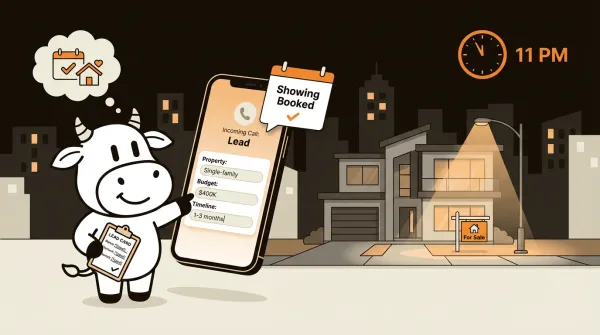
Real estate leads don't keep business hours. Someone browsing Zillow at 11 PM sees your listing, calls, and gets voicemail. By the time you call back at 9 AM, they've already scheduled showings with two other agents.
This is the highest-value use case for an AI receptionist in real estate. Not replacing your daytime calls. Capturing the leads that call when you can't answer.
Voicemail transfer vs always-on answering
There are two ways to handle this:
Voicemail forwarding: Your carrier routes unanswered calls to CallCow instead of your voicemail greeting. You answer when you can. The AI picks up only when you don't. This preserves your personal touch for calls you can take, so no leads slip through.
Always-on AI answering: Every call goes straight to the AI. You never answer your own phone. Simpler setup, but you lose the personal connection on calls you could have handled yourself.
For most agents, voicemail forwarding is the simplest place to start. You keep the direct relationship with callers you can reach, and the AI covers everything else. The tradeoff is that voicemail forwarding isn't available on all carriers. It works on major Canadian carriers like Rogers (there's a setup demo on our YouTube channel) but availability varies in the US depending on your carrier. You may need to book a setup call for carrier-specific configuration.
Transfer to human
CallCow supports call transfer, but with specific limitations you should know about:
- Requires a Twilio Business Profile. You need to complete Twilio's identity verification before transfer is available. This takes a few business days and requires business documentation.
- Cold/blind transfer only. The AI can't warm-transfer (stay on the line, introduce the caller, then hand off). It transfers and drops off the call. The caller hears ringing, then you pick up.
- No queue or round-robin. Transfers go to one number. If you're on another call, the transfer fails. There's no call queue system.
These aren't dealbreakers for solo agents or small teams. But if you're a brokerage with five agents and want calls distributed based on availability, that's not what this does today.
Voice cloning: sounding like your brokerage
Most AI receptionists sound like a generic assistant. Same voice, same cadence, same tone as every other AI phone system on the market. For a real estate agent who spends years building a personal brand, that's a problem.
Voice cloning lets you record a 30-second sample of your voice and use that cloned voice across all your AI calls. Callers hear your voice (or your brokerage's voice) when the AI answers, not a stranger.
How it works
The setup takes about two minutes:
- Go to Settings, then Voice tab in the CallCow dashboard
- Record a 30-second audio sample
- Select the cloned voice in your workflow configuration
The AI speaks with your voice's tone and cadence. It's not a recording playing back on loop; it's a generated voice that matches your vocal patterns. Callers who know you will recognize it. Callers who don't will assume they reached your office.
Only the 30-second training snippet is stored. Actual call audio is never stored. The cloned voice is available across all workflows, so you set it up once and it applies everywhere.
This matters for real estate specifically because agents compete on trust. A caller who hears a familiar voice is more likely to stay on the line and answer qualification questions. A generic robotic voice triggers hang-ups. Voice cloning is a conversion feature, not a cosmetic one.
Voice cloning is not something I consistently saw explained in the public real-estate AI receptionist public pages I checked. It's one of the clearer differentiators, and it takes two minutes to set up. For a deeper look at voice cloning beyond real estate, check out our voice cloning guide for businesses.
Webhooks and CRM integration for agents
Every AI call generates data: caller name, phone, qualification answers, transcript, and a summary. That data is useful sitting in a CallCow dashboard, but it's far more useful when it lands in the systems your team already checks after the call.
CallCow's webhook system pushes a JSON payload to any endpoint you configure when a call completes. The payload includes:
call_idandworkflow_idfor tracking- Call status and duration
- Conversation summary
- Full message transcript
- Form fills from your qualification template
- Context metadata
You configure the webhook URL in the Integrations tab. On call completion, CallCow POSTs the payload. You can point this at Make.com, Zapier (currently invite-only), a custom server endpoint, or your CRM's API if that CRM exposes one. That's automation via webhook, not a blanket promise of native CRM integrations.
Important limitation
Webhooks fire on call completion only. Not in real-time during the call. If you need to trigger actions mid-conversation (like pulling up a caller's CRM record while they're still talking), that's not how this works. The payload arrives after the call ends. This is a deliberate choice for reliability, but it means you can't build real-time screen-pop integrations.
Make.com for CRM workflows
For agents using Follow Up Boss, HubSpot, kvCORE, Salesforce, or another CRM, Make.com or a custom webhook endpoint is the most practical path unless CallCow documents a native integration. Make.com supports both triggering calls from scenarios and receiving webhook data from CallCow. Monday.com is documented too if your team uses it for pipeline tracking. You can build workflows like:
- New call completed in CallCow, parse form fills, create or update a contact in HubSpot, then email the assigned agent the summary
- New lead call with "seller" selected in the form, create a Follow Up Boss task with the caller's name, number, timeline, and call summary
- New buyer call books a showing, log the booking details in your CRM and send an SMS or email follow-up from your automation tool
The Make.com integration is bidirectional and documented. The 60 RPM rate limit applies, but that's only relevant if you're doing bulk outbound calling, not inbound receptionist calls.
Comparison: AI receptionist options for real estate
Most articles listing "AI receptionist for real estate" options don't actually compare features or show pricing. They list names and link to product pages. Here's a real comparison based on what's documented and verifiable. Real estate isn't the only industry using AI receptionists. Home services businesses and law firms use them too.
Before the vendor table, it's worth comparing categories because most agents aren't choosing between four AI tools. They're choosing between AI, an ISA, a VA, or a traditional answering service.
| Option | Best at | Weak spot | Typical fit |
|---|---|---|---|
| AI receptionist | 24/7 call coverage, consistent qualification, one-on-one scheduling | No warm transfer, no human judgment on edge cases | Solo agents and small teams missing calls during showings |
| ISA | Live lead follow-up, objection handling, outbound nurture | Highest staffing cost, only works when staffed | Teams with enough lead volume to justify dedicated sales labor |
| VA | Admin help across multiple tasks | Usually not available instantly for every inbound call | Agents who need broad admin support, not only call coverage |
| Traditional answering service | Reliable message taking | Usually captures less structured qualification data and rarely books directly into your workflow | Teams that mainly want overflow coverage |
| Feature | CallCow | Other AI receptionist options |
|---|---|---|
| Starting software price shown publicly | Check the current pricing page | Varies by vendor and often requires checking the vendor site directly |
| Voice cloning | Yes | Verify directly with each vendor |
| Structured forms | Yes (6 documented field types) | Verify directly with each vendor |
| Calendar booking | Google, Outlook, Calendly, Cal.com, TidyCal, Trafft | Verify directly with each vendor |
| Voicemail forwarding | Yes (carrier-dependent) | Verify directly with each vendor |
| Webhook delivery | Yes (POST on completion) | Verify directly with each vendor |
| Transfer to human | Yes (cold/blind only, requires Twilio Business Profile) | Verify directly with each vendor |
| BYOC model | Yes (Twilio) | Varies by vendor |
| Trial | 7-day trial | Varies by vendor |
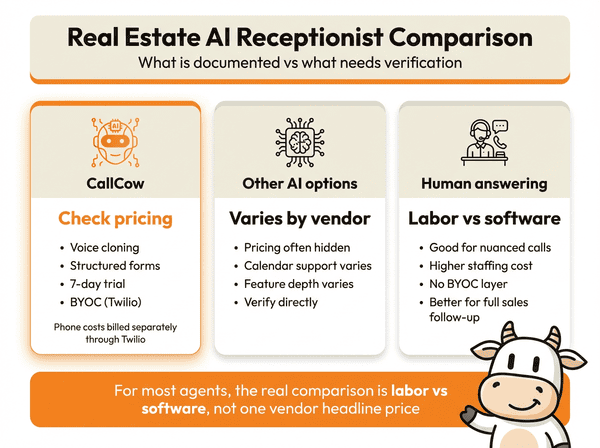
A few things stand out from this comparison. CallCow is easier to verify than most vendors because the docs and pricing page surface the operating model clearly. Many other vendors either hide pricing behind demos or change packaging often enough that you should verify current pricing on the vendor site before treating any comparison table as final. That's frustrating when you're just trying to figure out if this is worth testing.
The more useful comparison for most agents is labor versus software. If you need someone to chase leads, work objections, and do outbound follow-up all day, an ISA still does more than an AI receptionist. If your real problem is missed inbound calls while you're in the car, at a showing, or off-hours, AI is closer to a replacement for an answering service than for a full sales hire.
The BYOC model means CallCow pricing does not include phone carrier costs. You pay Twilio directly. Your Twilio bill sits on top of the CallCow subscription. The exact total depends on your call volume, number type, transfer behavior, and country, so treat any sample total as directional rather than guaranteed. For a full cost breakdown across use cases, see our AI phone answering service cost guide.
If you want to test the real-estate workflow before you change your phone setup, start with missed-call coverage and one qualification form. That is usually enough to see whether the AI is capturing the fields your CRM and follow-up process actually need. See the realtor use case.
How to set up an AI receptionist for real estate
Here's the actual setup process for CallCow, specific to real estate agents. This isn't theoretical. If you already have Twilio set up, you can usually get a simple version live quickly.
Step 1: create a Twilio account and get credentials
Sign up at twilio.com. You'll need an Account SID and Auth Token. These go into CallCow's phone number setup screen. Twilio offers a free trial with limited capabilities. For production use, upgrade your Twilio account and complete their Business Profile verification. This unlocks higher concurrent call limits and the transfer-to-human feature.
Step 2: connect your phone number in CallCow
In the CallCow dashboard, go to Settings and enter your Twilio credentials. You can use an existing Twilio number or purchase a new one through Twilio. If you want to use your current business number, you'll need to port it to Twilio. Porting takes a few days and requires verification documents.
For voicemail forwarding instead of full number replacement, you'll configure this at the carrier level. Contact your carrier to forward unanswered calls to your Twilio number. This setup varies by carrier.
Step 3: create a real estate workflow
If your workspace includes a suitable starter workflow, use that as a base and customize the prompt. The prompt tells the AI how to handle calls: what to ask, how to qualify, when to book showings, and when to transfer.
If you're building from scratch, the prompt needs to cover:
- Greeting and self-identification as AI
- Qualification questions (property type, budget, timeline, buyer/seller)
- Calendar booking for showings
- Transfer conditions (when to forward to you directly)
- What to do with tire-kickers and unqualified leads
Step 4: configure your qualification form
In the workflow builder, add form state nodes for each data point you want to collect. Set the field types appropriately: phone for phone numbers, email for email addresses, select for predefined options like property type. The AI will fill these fields conversationally during each call.
Step 5: connect calendar and integrations
Link your Google Calendar, Outlook, Calendly, Cal.com, TidyCal, or Trafft account in the Integrations tab. Set your availability windows. Configure your webhook URL if you want post-call automation into a CRM or custom workflow. Make.com is the cleanest documented low-code option. Zapier can trigger calls too, but it is invite-only. Set up email or SMS notifications so you know when a lead books a showing.
Step 6: test with a real call
Call your number from a different phone. Talk to the AI. Check that it asks the right questions, books showings correctly, and the form data appears in your dashboard. Try calling during your available hours and during off-hours to verify both paths work.
The CallCow docs have a video walkthrough of the full setup process. If you hit issues, you can book a custom setup call and someone will build the workflow while you watch.
Pros and cons
Pros
- Transparent cost model. You can verify the current plan on the pricing page, then layer in your separate Twilio bill and your actual usage.
- Structured lead qualification forms. Six field types, typed data, stored with call records and pushed via webhooks. This is the feature that actually replaces a human receptionist's note-taking more than a generic answering service does.
- Voice cloning in 30 seconds. Your callers hear your voice, not a robot. Two-minute setup, per-workflow selection.
- Calendar integration with six documented options. Books showings directly into Google Calendar beta, Outlook Calendar beta, Calendly, Cal.com, TidyCal, or Trafft, with the documented caveats noted earlier.
- Voicemail forwarding. Keeps your personal touch on calls you can answer while covering everything else, when your carrier supports it.
- BYOC model. You own your Twilio numbers. You can port them anywhere. No vendor lock-in on the phone infrastructure.
Cons
- Transfer is cold/blind only. No warm handoff where the AI introduces the caller before connecting. The AI transfers and drops off.
- Transfer requires Twilio Business Profile. You need to complete identity verification, which takes a few business days. No transfer on trial accounts.
- Voicemail forwarding not available on all carriers. Works on major Canadian carriers. US availability varies. You may need carrier-level configuration help.
- Webhooks fire on completion only. No real-time mid-call data streaming. If you need screen-pop integrations, this isn't the tool.
- Trial is limited. Four concurrent calls, verified phone numbers only. Enough to test, not enough to run a brokerage.
- AI always self-identifies as AI. This can't be disabled. Some agents want the AI to sound like a human assistant. That's not how CallCow works, by design.
- Custom workflows are underdocumented. The YouTube video guide helps, but there's no written documentation for building complex workflows from scratch. The UX is being improved.
Who this is for (and who it's not)
Good fit:
- Solo agents and small teams who lose leads to missed calls while showing properties or on the go
- Agents who want structured lead qualification (property type, budget, timeline) collected automatically instead of from voicemail scribbles
- Teams already using Google Calendar, Outlook, Calendly, Cal.com, TidyCal, or Trafft for showing bookings
Not a good fit:
- Large brokerages needing call queue or round-robin distribution across multiple agents. CallCow transfers to one number only
- Agents who need warm transfers where the AI introduces the caller before connecting. Transfers are cold only
- Teams that don't want to manage a Twilio account. The BYOC model means you handle your own phone billing
- Agents who want the AI to sound human without disclosure. The AI always identifies itself as AI
Frequently asked questions
How much does an AI receptionist cost for real estate?
Pricing depends on the current CallCow plan plus separate Twilio costs under the BYOC model, so your real total depends on usage, number setup, transfer behavior, and country. If you are comparing against human services, check current vendor pricing directly because packaging and overage rules vary a lot.
Can AI answer phone calls for real estate agents?
Yes. An AI receptionist answers incoming calls, asks qualification questions about property type and budget, books showings into your calendar, and forwards calls when needed. It works 24/7 including evenings and weekends when most buyer inquiries come in. The AI self-identifies itself as AI on every call, so callers know they're talking to a system, not a person.
What does an AI receptionist do for real estate?
It handles four things: answers calls you can't get to (during showings, after hours, or when you're on another line), qualifies leads by collecting property preferences, budget, and timeline, books one-on-one showings into a connected calendar or scheduling tool, and sends structured lead data into your CRM or automation stack through webhooks after the call. The structured form data it collects replaces the scribbled notes you'd get from a voicemail.
Is there a free AI receptionist for real estate?
CallCow offers a 7-day free trial. After that, use the current pricing page as the source of truth and budget separately for Twilio costs. Twilio trial accounts are limited to verified numbers and 4 concurrent calls, so treat the trial as a test environment rather than a production setup.
If you want to test it on a real line, the trial is at callcow.ai. Setup is usually quick if you already have a Twilio account, and you can book a setup call if you want help building the workflow.
CallCow came out of the same problem: I kept losing leads to missed calls. Real estate agents have the same problem, just with higher stakes. A single missed showing request can mean a $10K commission goes to the agent who answered their phone.
Yiming Han is the founder of CallCow and writes about phone automation, missed calls, and the tradeoffs that show up when small businesses actually deploy voice AI.