AI Voice Cloning for Business Phone Calls
AI voice cloning for business phones uses a 30-second audio sample to create a cloned voice for calls. Here's what works, the limits, and how to set it up.AI Voice Cloning for Business Phone Calls
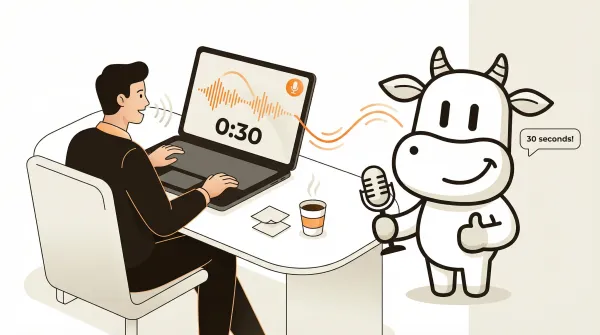
AI voice cloning for business uses a short audio recording to generate speech that sounds like you on phone calls. On CallCow, the documented setup starts with a 30-second sample that you can assign to workflows. The practical upside is not novelty. It is a phone experience that can feel more consistent, more on-brand, and easier for callers to recognize across repeated interactions.
The rest of this guide stays focused on voice cloning itself rather than the broader voice-agent stack.
Table of contents
How AI voice cloning for phone calls works
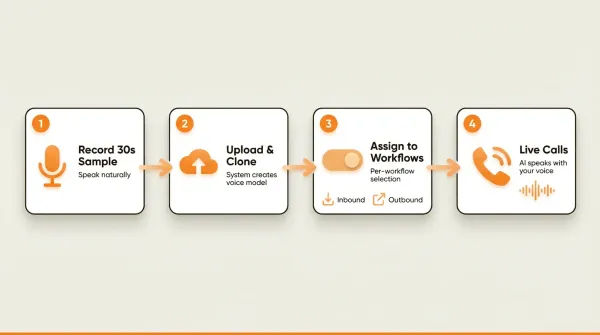
The process is straightforward. You record a short sample of your voice, the system creates a voice model from it, and you assign that cloned voice to your phone workflows. When a call comes in or goes out, the AI speaks using your voice instead of a generic text-to-speech voice.
The flow:
- Record a 30-second audio snippet from your device's microphone. Speak naturally, the way you would on a real business call.
- Upload and clone through the settings panel. The system processes your sample and generates a voice model.
- Assign the cloned voice to workflows on a per-workflow basis. You can use your voice on inbound receptionist workflows, outbound calling campaigns, or both.
- The AI speaks with your voice on every call that uses that workflow. Callers hear what sounds like a real person answering the phone.
That is the entire setup. Two steps in the settings, then toggle the voice on per workflow. You do not configure APIs, train models, or wait hours for processing.
The distinction between voice cloning for content creation and voice cloning for phone calls matters because the engineering requirements are different. Tools like ElevenLabs and PlayHT generate static audio files from text. You upload a script, they produce an MP3. That works for videos, podcasts, and audiobooks.
Phone-based voice cloning is different. The AI needs to generate speech in real time during a live conversation. It cannot pre-render the response because it does not know what the caller will say next. The voice model needs to be fast enough to keep up with conversational latency while maintaining natural intonation. That is a harder engineering problem than generating a static file, and it is why most voice cloning tools are not built for live phone use.
Why 30 seconds is enough for phone calls
Most voice cloning tools advertise how little audio they need. ElevenLabs says "a few minutes." MiniMax says 10 seconds. The exact number sounds like a marketing spec, and for content creation it partly is. More training data means the model captures more of your speaking patterns, emotional range, and vocal habits.
For phone calls, 30 seconds hits a practical sweet spot.
Phone audio is narrowband. Traditional phone calls compress audio to the 300 Hz to 3.4 kHz range. That means a lot of the vocal richness that good microphones capture never makes it through the phone network anyway. The subtle breath sounds, the warmth in your voice, the sibilance in your consonants. Gone. The phone codec strips most of it out.
So the model does not need to learn your voice at studio quality. It needs to learn it at phone quality. A 30-second sample recorded in a normal environment captures enough phonetic data, speaking pace, and pitch characteristics to sound convincing over a phone line.
There is also a practical reason. Business phone calls use a limited vocal range. You are not acting, singing, or reading dramatic prose. You are answering questions and confirming appointments. The emotional range is narrow, polite, professional, helpful. A 30-second sample of you speaking in that register gives the model what it needs.
Could a longer sample produce a better clone? In some contexts, probably. But CallCow's documented product flow is built around a 30-second sample for phone use, where the goal is consistency on a phone line rather than studio-quality voice reproduction.
CallCow only stores the 30-second training snippet. No actual call audio is stored. That is a deliberate privacy trade-off. The snippet is the minimum data needed to make the feature work, and nothing beyond that gets retained.
Voice cloning use cases for business
Most voice cloning articles target content creators: YouTubers, podcasters, marketers generating voiceovers. That is fine, but it ignores the use cases with immediate business impact.
AI receptionist with your voice
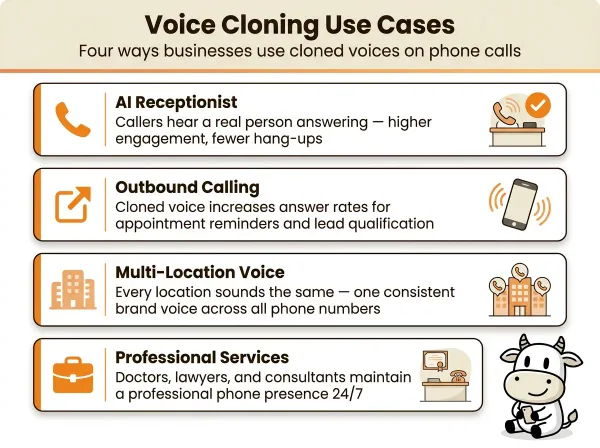
This is the most common application. Your business phone number rings, and instead of a robotic text-to-speech voice, the caller hears a voice modeled on yours. The AI answers questions, books appointments, collects caller information, and transfers to the right person, all in a voice that matches your brand.
For small businesses, this matters because the phone voice shapes first impressions. A generic system voice makes your business sound interchangeable. A cloned voice makes the experience feel closer to your actual front desk or owner-led brand. That can help preserve trust at the start of the call and make the handoff to booking or routing feel more coherent.
You can set different cloned voices for different workflows. One voice for your main business line, another for after-hours answering. Per-workflow selection means you are not locked into one voice for everything.
Outbound calling campaigns
When your AI makes outbound calls, the voice affects how credible the call feels in the first few seconds. That matters for appointment reminders, follow-up calls, and lead qualification. A cloned voice can make those conversations sound more consistent with the rest of your business instead of sounding like a generic robocall. The automated outbound calling guide covers how to set up these campaigns with cloned voices in detail.
The same 30-second voice model works for both inbound and outbound workflows. You record once, and the AI uses your voice whether it is answering calls, making outbound calls, or responding through a website widget tied to that workflow.
Brand consistency across locations
If you run a business with multiple locations or phone numbers, voice cloning lets every location sound the same. Instead of different voices on different lines, or worse, the default TTS voice on some and a human on others, you get a consistent brand voice everywhere. That consistency supports brand recall. The customer calls your downtown office or your suburban location and hears the same voice identity each time.
Professional services
Doctors, lawyers, accountants, and consultants face a specific problem. Their clients expect a certain level of professionalism. A robotic voice answering the phone at a law firm or medical office can weaken confidence before the conversation even starts. Voice cloning lets these businesses maintain a professional, recognizable phone presence even when no one is available to answer.
What else the cloned voice can do
A cloned voice on CallCow is not limited to answering questions and ending the call. During that same conversation, the AI can:
- Fill forms conversationally. The AI collects structured data fields (name, email, service type) through natural dialogue. That data flows to your CRM via webhook.
- Text callers mid-call. Instead of trying to spell out a URL or address over the phone, the AI sends an SMS with links, booking URLs, or directions directly to the caller's phone.
- Book appointments directly. The AI connects to Google Calendar (beta), Outlook Calendar (beta), Calendly, Cal.com, TidyCal, or Trafft for scheduling without the caller leaving the call. TidyCal cannot book paid appointments through the API, and Trafft books the first available employee.
- Transfer to a human. If the caller needs a real person, the AI can transfer with static routing or dynamic routing via webhook. Transfer requires a Twilio Business Profile and stays cold/blind rather than warm.
Voice cloning ethics: the AI self-identification rule
Voice cloning raises legitimate ethical questions, and most of the tools ranked on Google for "ai voice cloning" do not address them. The focus is on what the technology can do, not what it should do.
For business phone calls, the biggest ethical concern is deception. If a caller hears a voice that sounds exactly like a specific person, they will assume they are talking to that person. If the voice is actually an AI, that assumption is wrong.
CallCow handles this by having the AI always self-identify as AI. This is not optional and cannot be disabled. At the start of the call, the AI states that it is an AI assistant. The cloned voice makes the call sound more natural and professional, but the caller is never misled about who they are talking to. That is the right trade-off. You keep the trust and brand benefits of a familiar voice without crossing into deception.
Some businesses ask whether this defeats the purpose of voice cloning. It does not. The value of a cloned voice is not in tricking callers into thinking they are talking to a human. The value is in making the interaction more pleasant and natural. A voice that sounds human is easier to listen to, easier to understand, and less jarring than a synthetic voice, even when the caller knows it is AI.
Think of it like a well-designed website. Nobody thinks they are talking to a person when they use a good website. But good design still matters because it makes the interaction smoother. Voice cloning works the same way for phone calls.
The privacy model is also worth noting. CallCow stores only the 30-second training snippet used to create the voice model. Actual call audio is never recorded or stored. The cloned voice exists as a model, not as a library of recordings someone could dig through.
Comparison: voice cloning tools for phone use
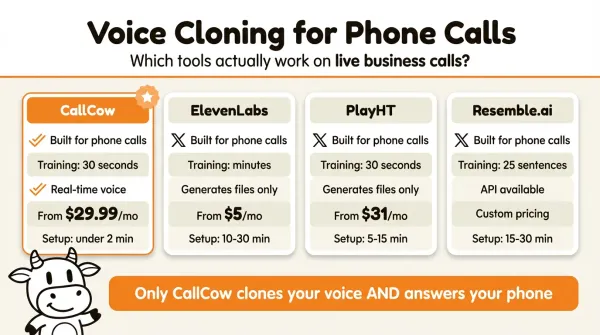
Most voice cloning tools are built for content creation, not live phone calls. That gap is what makes this comparison useful.
| Feature | CallCow | ElevenLabs | PlayHT | Resemble.ai |
|---|---|---|---|---|
| Built for live phone calls | Yes | No | No | No |
| Training sample required | 30 seconds | Variable (minutes) | 30 seconds | 25 sentences |
| Real-time voice generation | Yes (during calls) | No (generates files) | No (generates files) | Yes (API available) |
| AI self-identifies as AI | Yes, always | Not applicable | Not applicable | Not applicable |
| Call audio storage | Never stored | N/A | N/A | N/A |
| Per-workflow voice selection | Yes | N/A | N/A | N/A |
| Integration with phone system | Native | None | None | API only |
| Pricing for business use | Check current pricing | Check current pricing | Check current pricing | Check current pricing |
| Setup time | Quick in the documented flow | Varies | Varies | Varies |
If you want to hear it on your own workflow, you can test voice cloning at callcow.ai or start with the voice clone docs.
The table is meant to separate phone-ready workflows from general voice tools, not to claim a perfect apples-to-apples benchmark. If you start with a creator-focused voice tool, you should expect extra telephony and workflow work before it behaves like a business phone system.
That is a real engineering project. CallCow bundles the voice cloning with the phone system. The cloned voice is not an audio file you download. It is the voice the AI uses when it talks to your callers. That integration is what makes it useful for businesses that just want their phone answered.
Voice cloning vs generic TTS for phone calls
Most AI phone systems use generic text-to-speech voices. These are the standard voices you hear on phone trees everywhere: clearly synthetic, flat in tone, and instantly recognizable as automated. They work, but they set a low bar for the caller experience.
Voice cloning changes the dynamic in ways that generic TTS cannot. The most obvious difference is naturalness. A cloned voice carries more of your pace, cadence, and conversational texture because it is modeled on a real speaker. Generic TTS voices follow predictable prosody patterns that callers quickly recognize as automated.
The other difference that gets less attention is conversion quality. If your AI is booking appointments, collecting lead details, or routing qualified callers, the goal is not just to finish the call. The goal is to make the interaction clear enough that callers are willing to share accurate information and follow the next step. A voice that sounds familiar and business-specific supports that better than a generic platform voice.
For businesses that use prompt-to-call API triggers to initiate calls programmatically, voice quality shapes how the business is perceived before the caller evaluates the script itself. The content may be identical, but the delivery still influences whether the interaction feels polished, trustworthy, and worth continuing.
There is also the brand consideration. A generic TTS voice sounds like every other business using the same platform. A cloned voice is unique to your business. It becomes part of your brand identity the same way a logo or color scheme does. When callers associate a specific voice with your business, you get stronger brand recall and a more consistent customer experience across inbound and outbound calls.
How to clone your voice for business calls
The documented setup is short: record a sample, create the clone, then assign it to a workflow. For the full docs, see docs.callcow.ai/clone-voice/voice-clone.
Step 1: Open the voice settings
Log into your CallCow dashboard and navigate to Settings, then select the Voice tab. This is where you manage all voice-related configuration, including your cloned voice.
Step 2: Record your 30-second sample
Click the record button and speak naturally for 30 seconds. Do not read from a script. Speak the way you would on a real business call. A greeting like "Hi, thanks for calling [your business name], how can I help you today?" followed by some natural talking works well. The system captures your pitch, cadence, and tone from this sample.
Some practical tips for a good recording:
- Use the device you normally work from. A laptop microphone or headset is fine.
- Find a quiet room. Background noise reduces quality.
- Speak at your normal volume and pace. Do not over-enunciate or slow down.
- One continuous take is better than multiple short clips stitched together.
What you say during the 30-second recording matters less than whether it sounds like your normal business-call voice. A natural, calm sample usually gives you a more useful result than an over-rehearsed one.
A natural greeting works well because it puts you in the right register. You are speaking the way you would speak to a customer, which is exactly the context the cloned voice will be used in. If you record yourself reading a news article or reciting a poem, the vocal patterns will not match your business-call speaking style, and the clone will sound slightly off when used on actual calls. Some businesses pair voice cloning with AI voice agent forms to collect caller information during the same interaction.
If you are not happy with the result, re-record and test again before rolling it out broadly.
Step 3: Clone the voice
After recording, click the clone button. The system processes your sample and generates the voice model. This happens quickly. Once cloned, the voice appears as an option in your voice settings.
Step 4: Assign the voice to your workflows
Go to any workflow in your CallCow dashboard and select the cloned voice from the voice options. Each workflow can use a different voice if you want. Your main inbound workflow uses your cloned voice, while a test workflow might use a default voice for comparison.
Step 5: Test with a live call
Call your business number and verify the AI is using your cloned voice. The call will start with the AI identifying itself as AI, then proceed using your voice. If something sounds off, you can re-record your sample and re-clone at any time.
If you want to try this before rolling it out broadly, start with your main inbound workflow or missed-call coverage through voicemail forwarding. That gives you a realistic test path without changing every call flow at once.
Not sure where to start? Book a free setup call at callcow.ai
Pros and cons
Pros
- Setup is short in the documented flow: record a 30-second sample, create the clone, and assign it to a workflow.
- Per-workflow flexibility: use your cloned voice on some workflows and a different voice on others.
- Built for real calls: the cloned voice generates in real time during live phone conversations, not as a post-production audio file.
- Privacy-conscious design: only the 30-second training snippet is stored. No call recordings are kept on the system.
- Works inbound and outbound: same cloned voice handles both incoming customer calls and outgoing campaigns.
- AI self-identifies: callers always know they are speaking with AI.
Cons
- The 30-second sample limits vocal range. The clone captures your speaking voice in a narrow context. It will not reproduce laughter, whispers, or emotional variation well.
- The docs do not describe multilingual voice-cloning support. Plan around the language you record in unless you've tested otherwise.
- The voice is optimized for narrowband phone audio, not studio-quality playback.
- Scaling past 4 concurrent calls requires a Twilio Business Profile. (Note: the 4-call limit applies to Twilio trial accounts specifically. Upgrading to a verified Twilio account removes this restriction.)
- You cannot disable AI self-identification. The AI always discloses its identity at the start of each call.
Who this is for (and who it's not)
Good fit:
- Businesses that want a consistent branded voice on every AI call instead of a generic robot voice
- Real estate agents, professional services, and home services businesses where caller trust matters and a familiar voice can make the interaction feel more personal and credible
- Teams running outbound campaigns where the voice needs to sound consistent with the rest of the brand experience
Not a good fit:
- Anyone needing multi-language voice cloning. The cloned voice works in the language you recorded in
- Use cases requiring emotional range beyond professional conversation: laughter, whispers, dramatic delivery. The 30-second sample captures a narrow vocal register
- Content creators looking for studio-quality audio output. This is optimized for narrowband phone calls, not podcast production
- Anyone who wants to disable AI self-identification. The AI always tells callers it's an AI, even when using a cloned voice
Frequently asked questions
How does AI voice cloning work?
AI voice cloning trains a neural voice model on a short audio sample of your voice. The model learns your pitch, speaking pace, and tonal patterns, then generates new speech that matches those characteristics. For phone-based business use, a 30-second sample is sufficient because phone audio quality is narrowband and business calls use a limited vocal range.
Is AI voice cloning safe for business?
Voice cloning is safe for business use when the platform follows responsible practices. The key factors are AI self-identification (callers should always know they are talking to AI), minimal data retention (only the training sample should be stored, not call audio), and transparent disclosure. CallCow stores only the 30-second training snippet and the AI always identifies itself at the start of each call.
How long does it take to clone a voice?
On CallCow, the documented flow is short: record a 30-second sample in voice settings, create the clone, assign it to a workflow, and test it with a live call. Exact processing time can vary, so treat it as a quick setup rather than a guaranteed stopwatch number.
Can AI voice cloning be used for phone calls?
Most voice cloning tools cannot be used directly for phone calls because they generate static audio files, not real-time speech. CallCow is built specifically for phone use. The cloned voice generates speech in real time during live inbound and outbound phone conversations, integrated natively with the calling system. You do not need a separate TTS integration or phone system setup.
What is the best AI voice cloning tool?
The best tool depends on your use case. If your goal is content creation, evaluate creator-focused tools on their own terms. If your goal is live business phone calls, use a platform that documents voice cloning inside an actual calling workflow. That is where CallCow fits.
Can I use different voices for different phone workflows?
Yes. CallCow lets you assign your cloned voice on a per-workflow basis. Your main business line can use your voice, your after-hours workflow can use a different voice, and your outbound calling campaigns can use whichever voice you choose. You are not locked into one voice across all workflows.
Start with one workflow, record your 30-second sample, and put the cloned voice on your main inbound flow or missed-call voicemail-forwarding setup first. That is the cleanest way to hear whether the phone experience feels more recognizable and more aligned with your brand before you roll it out more broadly. If you want help with the setup, book a setup call from callcow.ai.
Most search results for "ai voice cloning" point to tools built for making videos and podcasts. Few of them cover what happens when you put a cloned voice on a phone line and let it answer calls. The 30-second sample is enough. The AI self-identifies. And your callers hear a voice that sounds like a real person picked up the phone.
Yiming Han is the founder of CallCow and writes about phone automation, missed calls, and the tradeoffs that show up when small businesses actually deploy voice AI.