AI outbound call guide: automate your dialing in 2026
An AI outbound call uses a voice agent to dial contacts, deliver your pitch, and collect responses. Setup guide covering CSV workflows and API integration.AI outbound call guide: automate your dialing in 2026
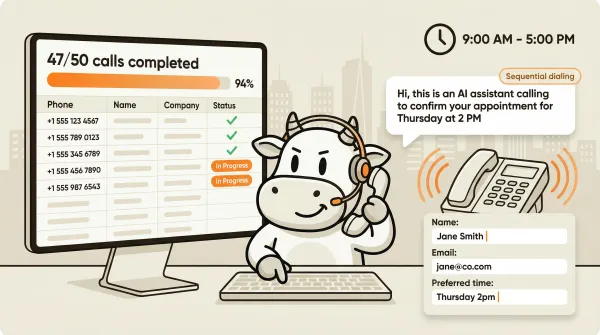
An AI outbound call is a phone call made by a voice agent instead of a human. You give the system a list of contacts or a prompt, and the AI dials each number, holds a conversation, and returns structured data from every call. No SDR needed. No dialer software eating your budget.
The inbound side of voice AI gets most of the attention. Everyone wants to stop missing calls. Outbound is where a lot of businesses recover revenue they already paid to acquire. Lead follow-up. Appointment reminders. Customer re-engagement. The kind of calls your team never has time to make. For appointment reminders and confirmations, CallCow integrates directly with Google Calendar (beta), Outlook Calendar (beta), Calendly, Cal.com, TidyCal, and Trafft for booking during calls, with the usual caveats around TidyCal paid bookings and Trafft choosing the first available employee.
Most AI voice agent platforms handle both inbound and outbound. But the outbound workflows, the APIs, the rate limits, and the actual mechanics of getting calls out the door are different enough that they deserve their own guide.
I run CallCow, and outbound calling ended up splitting into two very different jobs. This guide covers both, when each one makes sense, and where the tradeoffs show up in practice.
Table of contents
- How automated outbound calling works
- List calling: upload a CSV and let the AI dial
- Agent calling API: trigger calls from your own code
- List calling vs agent calling API vs traditional dialers
- Setting up your first outbound call campaign
- Scheduling and daily limits
- Webhooks: getting data back from every call
- Pros and cons of automated outbound calling
- Frequently asked questions
- Start making AI outbound calls
How automated outbound calling works
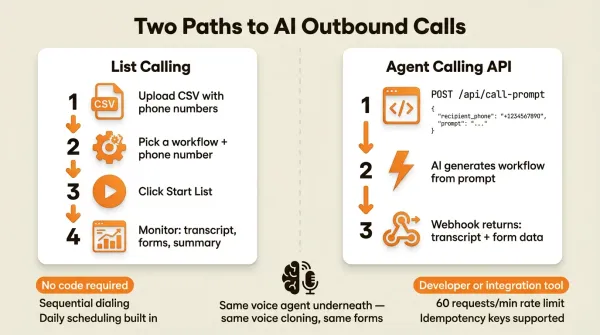
There are two paths to making AI outbound calls with CallCow. The first is list calling. You upload a CSV of phone numbers, pick a workflow, and the system dials each contact one at a time in the background. The second is the agent calling API. You send a single HTTP request with a phone number and a prompt, and the AI handles the rest.
Both paths use the same underlying voice agent. The same workflow. The same voice cloning if you set it up. The difference is how the call gets triggered and how much control you want over the process.
List calling is for non-technical users who want to load up a spreadsheet and walk away. Agent calling API is for developers who want to trigger calls from their own systems, whether that is a CRM, a n8n workflow, a Make.com scenario, or a custom application.
If you are trying to decide which outbound workflow to start with, use this simple rule. If your team already has a CSV and wants a no-code campaign, start with list calling. If you want outbound calls to fire from your product, CRM, or automation stack, start with the API and use prompt-to-call when you want the fastest path from idea to live call.
The workflow itself determines what the AI says, how it responds, and what data it collects. You build the workflow once in the CallCow dashboard. Then you reuse it across as many outbound calls as you need. If you want the AI to collect specific information during calls, you can attach forms to the workflow. The AI fills those forms conversationally and the data lands in your call logs and webhook payloads.
Sequential calling only
CallCow makes calls sequentially, one at a time. Not in parallel.
Most high-volume dialer platforms advertise parallel or concurrent calling. They will dial 10 or 20 numbers at once and connect whichever ones answer to an AI agent. CallCow does not do this. Every call in a list is dialed one after the other.
Sequential calling is more respectful of the people you are calling. It avoids the compliance headaches that come with high-volume parallel dialing. And it keeps call quality consistent because the system is not splitting resources across multiple simultaneous conversations.
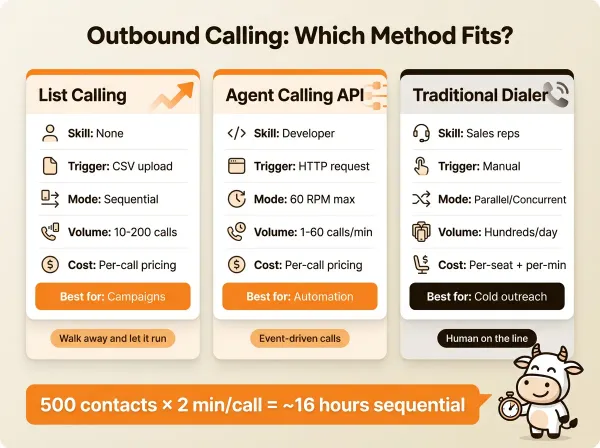
The tradeoff is speed. If you have 500 numbers to call, and each call takes two minutes on average, that list takes roughly 16 hours to complete. With a daily schedule, you can spread that across multiple days. But if you need to blast through thousands of numbers in an hour, CallCow is not the right tool for that.
For most small and medium businesses, sequential calling is fine. You are following up with leads who gave you their number, reminding customers about appointments, or re-engaging past clients. Volume is typically under 200 calls per campaign. Speed matters less than quality.
Quick decision check: when CallCow is the wrong outbound tool
Do not use CallCow for outbound if your success metric depends on parallel dialing, aggressive retry logic, or clearing huge call blocks in a short window. CallCow is built for sequential outreach where call quality, structured data, and workflow control matter more than raw dial velocity.
That usually means CallCow is a good fit for lead follow-up, appointment reminders, and reactivation campaigns. It is usually not the right fit for sales floors expecting a power dialer, teams trying to run 10 or 20 live dials at once, or operations that need to chew through thousands of cold numbers before lunch.
List calling: upload a CSV and let the AI dial
List calling is the simplest way to do automated outbound calls. No code. No API keys. No integrations. Just a spreadsheet and a workflow.
Step 1: prepare your CSV
Your CSV needs phone numbers with country codes. That is the only required field. A basic CSV looks like this:
phone
+14155551234
+14155555678
+14155559012
You can add more columns if you want. Name, email, company, or any context that helps the AI have a better conversation. The system pulls in whatever data you provide and makes it available during the call.
Step 2: upload to CallCow
Go to the contacts page and click Upload Contacts. Select your CSV file. The system parses it and creates a contact list automatically. You can also create a list manually by clicking Create List and adding numbers one at a time. The list calling docs walk through the full upload process with screenshots.
Check that the numbers look right after upload. Missing country codes are the most common mistake. A number like 4155551234 will fail. It needs the +1 prefix for US numbers.
Step 3: start the list
Open the list detail page. Click Start List. Pick the workflow you want the AI to use and the phone number it should call from. The AI starts dialing sequentially in the background.
You do not need to keep the page open. The system runs the list in the background. You can close your browser and come back later to check results.
Step 4: monitor results
The list detail page shows the status of every call. Completed, failed, in progress. Click into any individual call to see the full transcript, summary, and any form data the AI collected during the conversation.
Step 5: schedule for large lists
If your list is big, set a daily schedule. Pick a start time and end time. The system will call during that window and automatically resume the next day at the same time until the entire list is finished.
This is useful for businesses that only want to make calls during business hours. You set the window from 9 AM to 5 PM and the system handles the rest across as many days as it takes.
Upload your first list and make your first test call at callcow.ai. If you want the exact product flow first, use the list calling docs.
Agent calling API: trigger calls from your own code
The agent calling API is for developers who want to trigger outbound calls programmatically. It is the same voice agent underneath, but instead of uploading a CSV and clicking a button, you make an HTTP request.
There are two API endpoints for outbound calls. The trigger call endpoint and the prompt-to-call endpoint.
Trigger call endpoint
POST /api/call with a JSON body:
{
  "recipient_phone": "+14155551234",
  "workflow_id": "wf_abc123",
  "name": "Jane Smith",
  "email": "jane@example.com",
  "context": "Follow up on the demo she attended last Tuesday"
}
Required fields are recipient_phone in E.164 format and workflow_id. Everything else is optional but useful. The context field lets you pass in information that helps the AI tailor the conversation. The name and email fields populate the contact record.
Prompt-to-call endpoint
This is the one that makes CallCow different from most platforms. POST /api/call-prompt with a natural language prompt:
{
  "recipient_phone": "+14155551234",
  "prompt": "Call Jane and confirm her appointment for Thursday at 2 PM. Ask if she needs to reschedule. Collect her preferred time if she does."
}
You do not need to pre-build a workflow for this. The system generates a workflow from your prompt, executes the call, and returns results via callback. One API request. One phone call. No workflow setup required.
This is the approach I use when I am building quick automations with n8n or Make.com. I write a prompt, pass in the phone number, and the call goes out. For more on how this works, check the full prompt-to-call API guide.
Rate limits
The agent calling API has a rate limit of 60 requests per minute. That is enough for many operational workflows, but it is still a real ceiling to plan around. For most use cases, this is more than enough. If you are triggering calls from a CRM workflow or a webhook, you are probably sending a handful at a time, not hundreds.
Idempotency
Both endpoints support idempotency keys. If you send the same request twice within a five-minute window with the same idempotency key, the system only makes one call. This prevents duplicate calls when your integration retries due to a timeout or network error.
{
  "recipient_phone": "+14155551234",
  "workflow_id": "wf_abc123",
  "idempotency_key": "lead-12345-followup-20260408"
}
Get your API key and make your first prompt-to-call, callcow.ai.
List calling vs agent calling API vs traditional dialers
| Feature | List calling | Agent calling API | Traditional dialer |
|---|---|---|---|
| Technical skill required | None | Developer or integration builder | Varies |
| Call trigger | CSV upload in dashboard | HTTP API request | Manual or dialer software |
| Calling mode | Sequential only | Sequential (60 RPM max) | Often parallel/concurrent |
| Workflow setup | Required (pre-built) | Optional (prompt-to-call) | N/A |
| Data collection | Forms, transcripts, summaries | Forms, transcripts, summaries | Manual notes |
| Scheduling | Built-in daily schedule | You manage scheduling | Built into most platforms |
| CRM integration | Via webhooks | Direct API or webhooks | Varies by platform |
| Best for | Non-technical teams, campaigns | Developers, automated workflows | High-volume sales teams |
| Cost model | Per-call pricing | Per-call pricing | Per-seat + per-minute |
| Typical volume | 10-200 calls per list | 1-60 calls per minute | Hundreds to thousands per day |
The big practical difference is who is pushing the buttons. List calling is a business user uploading a spreadsheet. Agent calling API is a developer writing code. Traditional dialers are sales reps sitting in front of a screen.
For a small business that wants to follow up with 50 leads from a trade show, list calling is the right choice. Upload the CSV, pick a workflow, let it run. For a SaaS company that wants to trigger a call every time a trial user signs up, the agent calling API is the way to go. For a 50-person sales team doing cold outreach all day, you probably want a traditional power dialer, not an AI voice agent.
Setting up your first outbound call campaign
Get a phone number
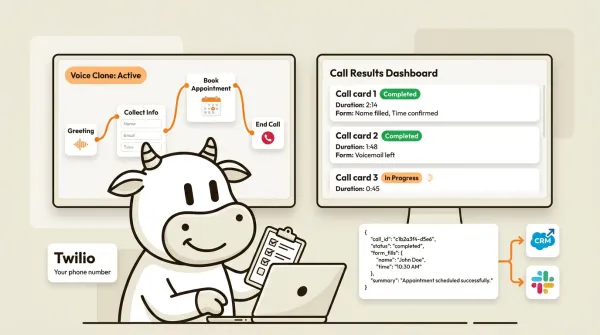
CallCow uses a bring-your-own-carrier model. You connect your own Twilio account. This means you manage your own Twilio billing for phone numbers and call minutes. The setup is straightforward. Go to the phone number guide in the CallCow docs, enter your Twilio Account SID and Auth Token, and you are connected.
If you are on a trial account, you are limited to 4 concurrent calls and can only call verified numbers. To remove these limits, you need a Twilio Business Profile approved. That process takes a few business days. Plan accordingly.
Build a workflow
Your workflow defines what the AI says and does on every call. You create workflows in the CallCow dashboard using the workflow builder. The workflow builder lets you set the greeting, conversation flow, transfer rules, and form collection.
If you want to collect structured data during calls, add forms to your workflow. Forms support 6 field types: text, number, email, phone, select, and multi-select. The AI fills these fields conversationally. The data shows up in call logs and webhook payloads.
For outbound calls where accuracy matters, payment follow-ups, appointment confirmations, lead qualification, select GPT 5.4 as your model in the LLM Models settings. It's configurable per-workflow, and our testing shows meaningfully fewer hallucinations. There's a slight increase in latency compared to earlier models, but for calls where the AI is collecting data or confirming details, the accuracy tradeoff is worth it.
You can also clone your voice so the AI sounds like you or someone on your team. A 30-second recording is all it takes. The cloned voice is available across all your workflows.
Configure webhooks
Set up a webhook URL in the Integration tab. After each call completes, CallCow sends a POST request with a JSON payload containing the call ID, status, transcript, summary, form fills, and metadata. You can pipe this data into your CRM, a Google Sheet, a Slack channel, or anywhere else.
Webhooks fire on call completion, not in real time during the call. If you need live monitoring, documented webhooks are not the right mechanism for that today.
Send links via SMS during the call
If your outbound campaign involves payment collection, booking confirmations, or resource sharing, configure SMS Instructions in your workflow. The AI texts the caller mid-conversation with links like payment pages, booking URLs, or directions. This is especially useful for outbound follow-up calls where you need to send a link the caller can act on immediately rather than hoping they check their email later. Requires Twilio SMS capability.
Run a test call
Before you launch a campaign, run a single test call to a number you control. Verify the greeting sounds right, the conversation flow works, and the data collection picks up what you expect. Fix any issues before loading up a full list.
Launch the campaign
Upload your CSV, pick the workflow and phone number, and start the list. Monitor the first few calls to make sure everything is working. Then set your daily schedule and let it run.
Scheduling and daily limits
CallCow's list scheduling lets you define a daily calling window. You pick the start time and end time. The system dials within that window and pauses outside of it. If the list is not finished by the end of the window, it picks up where it left off the next day at the same start time.
This is a straightforward feature, but it solves a real problem. Businesses do not want their AI calling prospects at 11 PM. Setting a 9-to-5 window keeps your outreach professional and compliant.
For API-based calling, scheduling is on you. Your application decides when to send the API request. You can implement your own time windows, queue management, and retry logic. The 60 RPM rate limit applies regardless of how you schedule calls.
Webhooks: getting data back from every call
Every completed call triggers a webhook to whatever URL you configure. The payload includes:
call_id: Unique identifier for the callworkflow_id: Which workflow was usedstatus: Completed, failed, or other statussummary: AI-generated summary of the conversationmessages: Full transcript of the conversationform_fills: Any form data the AI collected during the callcontext: Any context you passed in when triggering the call
This is how outbound calls feed back into your business systems. Send the webhook to a Make.com scenario, Monday.com, or your own server. Parse the payload, extract the form fills and summary, and push them into your CRM. Zapier exists, but it is still invite-only, so I would not build your main outbound workflow around it yet.
The webhook fires once per call after completion. There is no real-time streaming during the call. If you need mid-call data, that is not available through the webhook system today.
Pros and cons of automated outbound calling
Pros
Consistent delivery. Every call gets the same greeting, the same questions, the same energy. A human SDR has good days and bad days. An AI voice agent does not.
No scheduling headaches. The AI does not call in sick, take vacation, or need a lunch break. Your calls go out on schedule regardless.
Structured data from every call. Forms collect the same fields on every conversation. You get clean, queryable data instead of handwritten notes or half-filled CRM fields.
Cost structure is lighter than staffing. You are paying for software plus telephony instead of hiring and managing a human calling team, though your exact total still depends on Twilio usage and campaign volume.
Easy to iterate. Change the workflow, update the prompt, adjust the form fields. Test again tomorrow. You cannot A/B test human SDRs this quickly.
Cons
Sequential only on CallCow. This is the biggest limitation. If you need parallel dialing for high-volume campaigns, CallCow is not built for that today. Many outbound platforms market concurrent or parallel dialing.
60 RPM rate limit on the API. For most businesses this is fine. If you are trying to push thousands of calls per hour through the API, you will hit the ceiling.
Trial limitations. On a trial account, you get 4 concurrent calls and can only dial verified numbers. You need a Twilio Business Profile to unlock full capacity, and that approval process takes days.
AI always identifies itself as AI. You cannot turn this off. Every call starts with the AI disclosing that it is an AI agent. Some prospects will hang up immediately. Others do not care. This is a transparency tradeoff you cannot avoid.
BYOC model. You manage your own Twilio account and billing. That means one more vendor, one more invoice, and one more place where things can go wrong. The upside is you keep full control over your phone numbers and minute rates.
No warm transfer. If the AI needs to hand a call to a human, it does a cold transfer. Note: even cold transfer requires a verified Twilio Business Profile. There is no warm transfer where the AI briefs the human before connecting. For businesses where warm handoffs matter, this is a gap.
Webhooks are post-call only. You get data after the call finishes. No real-time mid-call streaming. If you need to monitor live calls, you have to check the dashboard manually.
Who this is for (and who it's not)
Good fit:
- Small businesses with a spreadsheet of leads or past customers that nobody has time to call. Upload the CSV, pick a workflow, and let it run
- Teams doing appointment reminders, payment follow-ups, or seasonal maintenance re-engagement at moderate volume (under 200 calls per campaign). CallCow integrates directly with Google Calendar (beta), Outlook Calendar (beta), Calendly, Cal.com, TidyCal, and Trafft for booking during calls.
- Developers who want to trigger individual outbound calls from their CRM or automation platform via the API
Not a good fit:
- Sales teams needing parallel dialing to blast through thousands of numbers before lunch. CallCow calls sequentially, one at a time
- Campaigns requiring retry logic for unanswered numbers. If a call isn't picked up, it moves on without calling back
- Anyone needing warm transfers during outbound calls. The AI drops off when handing to a human
- High-volume operations exceeding 60 calls per minute via the API rate limit
If that describes your team, the right move is to choose a parallel dialer or a traditional sales engagement platform instead of trying to force CallCow into a job it is not designed for.
Frequently asked questions
How do I set up automated outbound calling?
Create an account on CallCow, connect your Twilio phone number, build a workflow in the dashboard, and either upload a CSV of contacts or use the API to trigger calls. The list calling path requires no code. The API path requires a developer or integration tool like Make.com or n8n.
What is the difference between list calling and agent calling API?
List calling is a no-code approach where you upload a CSV and the system dials each number sequentially. Agent calling API is a developer approach where you send HTTP requests to trigger individual calls. List calling is better for campaigns and batch outreach. The API is better for event-driven calls triggered by your own systems.
Can AI make outbound phone calls?
Yes. AI voice agents can make outbound phone calls using either a list-based approach or an API approach. The AI handles the full conversation, collects data through forms, and returns structured results via webhooks. CallCow supports both approaches.
How many calls can an AI voice agent make per minute?
On CallCow, the API rate limit is 60 requests per minute. List calling is sequential, so it depends on how long each call lasts. A typical two-minute call means roughly 30 calls per hour through list calling. If you need higher throughput, you would need a platform that supports parallel calling.
Is automated outbound calling legal?
The legality depends on your jurisdiction, your relationship with the contacts, and how you obtained their phone numbers. Calling customers who opted in is generally fine in most jurisdictions. Cold-calling purchased lists carries more risk. CallCow requires you to connect your own Twilio account, which means Twilio's compliance policies apply. Consult a lawyer if you are unsure about your specific situation.
What happens if a call goes to voicemail?
Voicemail behavior depends on how your workflow is configured and how the call is handled by the receiving carrier or voicemail system. Test this with your own numbers before treating voicemail handling as a production assumption.
Start making AI outbound calls
If you are running a small business and your outbound follow-up consists of a spreadsheet nobody has time to work through, automated outbound calling fixes that problem today. Upload the list, pick a workflow, and let it run. No code needed. CallCow integrates directly with Google Calendar (beta), Outlook Calendar (beta), Calendly, Cal.com, TidyCal, and Trafft for booking during calls.
If you are a developer building automations around lead follow-up, appointment reminders, or customer engagement, the agent calling API gives you a single HTTP request that puts a real voice on the phone. No workflow setup required if you use the prompt-to-call endpoint. Full workflow control if you want it.
Either way, setup is usually same-day for a basic test, especially if you already have Twilio set up.
The honest limitation is volume. CallCow calls sequentially. If you need to dial 5,000 numbers before lunch, this is not the platform for that. But if you need to follow up with 50 trade show leads, confirm 30 appointments, or re-engage 100 past customers, sequential calling gets the job done without the complexity and cost of a full dialer platform.
Here is the practical next step. If you already have a contact list, start a small list calling campaign with 10 to 20 numbers and review the transcripts, summaries, and form fills. If you already have an app or automation stack, start with the prompt-to-call API for one real workflow and then decide whether you need a reusable workflow or a prompt-driven setup.
Pick the outbound workflow that matches how your team already works, then run a small test campaign at callcow.ai. If you need sequential, AI-led follow-up with structured data after each call, a short test will tell you pretty quickly whether it fits.
Yiming Han is the founder of CallCow and writes about phone automation, missed calls, and the tradeoffs that show up when small businesses actually deploy voice AI.