AI agent phone call API: trigger calls with one request
Trigger real phone calls from any AI agent with a single API request. CallCow's prompt-to-call API generates workflows from natural language, no setup required.AI agent phone call API: trigger calls with one request
CallCow came out of the same problem: I got tired of the status quo in voice AI. Every platform makes you configure conversation flows, set up phone infrastructure, and write boilerplate before your first call goes out. That's backwards if you just need an AI agent to make a phone call.
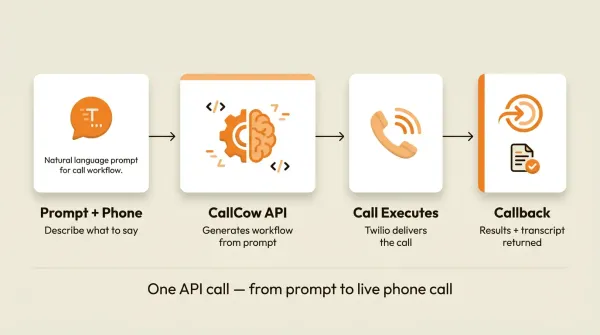
CallCow's Agent Calling API takes a different approach. You send a natural language prompt and a phone number to a single endpoint. The API generates the workflow, places the call, and returns the results. One request. No pre-configuration. No conversation state management. No telephony setup beyond connecting a phone number.
This is a developer guide. I'll walk through the API reference, code examples in three languages, integration patterns, production gotchas, and honest comparisons with Vapi, Retell, Bland, and OpenAI's voice API.
If you want to test this right now, skip to the cURL example, replace ck_live_your_api_key_here with your API key, swap in your own phone number in E.164 format, set a unique idempotency_key, and run the request. If you already have a callback endpoint, include it. If you don't, send the test call first and add callback handling next.
Before we get into examples, the operational caveats are straightforward. The API is capped at 60 requests per minute. idempotency_key protects you from duplicate calls for 5 minutes, not forever. And the AI always identifies itself as AI at the start of the call.
Table of contents
- What is a prompt-to-call API?
- How the CallCow Agent Calling API works
- API reference
- Prompt writing guide
- Integration patterns
- How much does it cost?
- CallCow vs developer platforms
- Code examples
- Production considerations
- Frequently asked questions
What is a prompt-to-call API?
A prompt-to-call API accepts a natural language description of what should happen on a phone call, then executes that call with an AI agent following your instructions. You don't build a workflow. You don't define conversation states. You describe the goal and the API handles the rest.
The concept is simple. Most AI voice platforms (Vapi, Retell, Bland) follow the same pattern: you create an agent configuration with a system prompt, tools, voice settings, and phone numbers. Then you trigger calls against that agent. Every call uses the same configuration. If you need a different type of call, you build a different agent.
A prompt-to-call API collapses that into one step. You send the prompt directly with each call request. The workflow is generated on the fly. Call 1 can confirm a dentist appointment. Call 2 can qualify a sales lead. Call 3 can survey a customer about their experience. Each call gets its own instructions, its own workflow, its own context.
This matters because most business calls are one-offs. Appointment confirmations, follow-ups, payment reminders, satisfaction surveys. Building a dedicated agent configuration for each of these is overkill. You end up with dozens of agent configs that are mostly the same except for a paragraph of instructions.
The alternative: send that paragraph directly in the API request. That's what prompt-to-call does.
For a broader overview of how AI voice agents work, including the infrastructure behind them, see our complete guide to AI voice agents.
How the CallCow Agent Calling API works
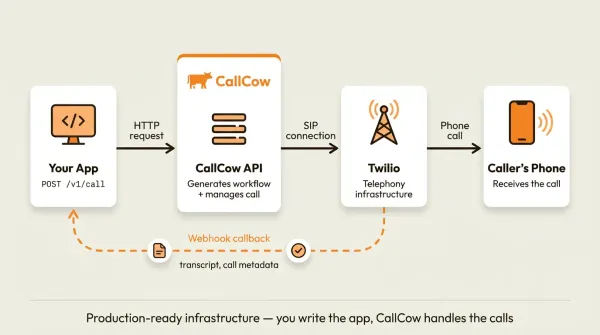
The full flow takes three steps.
Step 1: you send a POST request. Your application calls POST https://www.callcow.ai/api/call-prompt with a prompt, a phone number, and optional fields. Authentication uses a Bearer token (your API key from Settings > API Keys, starting with ck_live_).
If you're evaluating this for production, note the constraints up front: 60 requests per minute max, a 5-minute idempotency window when you reuse the same idempotency_key, and mandatory AI self-identification on every call.
Step 2: CallCow generates a workflow and places the call. The API parses your prompt, builds a conversation flow, and executes the phone call. The AI agent follows your instructions conversationally. It adapts to what the person on the other end says. It collects the data you asked for. CallCow now supports GPT 5.4 as a selectable model in LLM settings, and GPT 5.4 is the safest default for prompt-to-call workflows. In testing it showed meaningfully fewer hallucinations compared to earlier models. There's a slight latency increase, but for business calls where accuracy matters more than sub-second response times, the tradeoff is worth it. You select the model per-workflow.
Step 3: you receive a callback. When the call finishes, CallCow sends a POST request to your callback URL with the results: call status, summary, full transcript, and any structured data the AI collected.
Your App ─── POST /api/call-prompt ───> CallCow
                                          │
                                          ├── Parse prompt
                                          ├── Generate workflow
                                          ├── Place call
                                          └── AI handles conversation
                                          │
Your App <── POST callback_url ────────────┘
            { call_id, status, summary, messages, form_fills }
The callback fires for every outcome: completed, not picked up, busy, voicemail, failed. You don't have to poll for status. Set up your endpoint, handle the callback, and you're done.
One thing that catches people off guard: the AI always identifies itself as AI at the start of every call. This is not optional. CallCow requires transparency. The person on the phone knows they are talking to an AI agent.
API reference
Authentication
Every request needs a Bearer token in the Authorization header. Get your API key from Settings > API Keys in the CallCow dashboard. Keys start with ck_live_.
Authorization: Bearer ck_live_your_api_key_here
Endpoint
POST https://www.callcow.ai/api/call-prompt
Content-Type: application/json
Authorization: Bearer ck_live_your_api_key_here
Request body
{
  "prompt": "Call and confirm the dental appointment for Friday at 3 PM.
If they need to reschedule, offer Monday or Tuesday slots. Collect their email for the confirmation.",
  "recipient_phone": "+14155551234",
  "callback_url": "https://your-app.com/api/call-callback",
  "idempotency_key": "order-12345-confirm"
}
| Field | Required | Description |
|---|---|---|
prompt | Yes | Natural language instructions for the call |
recipient_phone | Yes | Phone number in E.164 format (e.g., +14155551234) |
callback_url | No | URL to receive the completion callback |
idempotency_key | No | Prevents duplicate calls within a 5-minute window |
Response
{
  "success": true,
  "workflow_id": "wf_abc123def456",
  "call_id": "call_xyz789ghi012"
}
Save the call_id and workflow_id. You'll need them to match callbacks or debug issues.
POST /call vs POST /call-prompt: CallCow also offers a standard
POST /callendpoint for pre-built workflows. Use/call-promptwhen you want the AI to generate the workflow from a prompt, or/callwhen you already have aworkflow_id.
Callback payload
CallCow sends a POST request to your callback_url when the call finishes. The payload looks like this:
{
  "call_id": "call_xyz789ghi012",
  "workflow_id": "wf_abc123def456",
  "call_status": "completed",
  "provider_status": "completed",
  "call_summary": "Customer confirmed their Friday 3 PM appointment. No rescheduling needed. Email collected: jane@example.com.",
  "messages": [
    {
      "role": "ai",
      "content": "Hi, this is an AI assistant calling from City Dental to confirm your appointment."
    },
    { "role": "human", "content": "Yes, I'm here." },
    {
      "role": "ai",
      "content": "Great. You have an appointment this Friday at 3 PM. Does that still work for you?"
    },
    { "role": "human", "content": "Yes, that's fine." },
    {
      "role": "ai",
      "content": "Perfect. Could I get your email so we can send a confirmation?"
    },
    { "role": "human", "content": "Sure, jane@example.com." },
    {
      "role": "ai",
      "content": "Got it. You're all set for Friday at 3 PM. Have a great day."
    }
  ],
  "form_fills": {
    "email": "jane@example.com",
    "appointment_confirmed": "yes"
  },
  "created_at": "2026-04-07T14:30:00Z"
}
Key fields in the callback:
call_status: the outcome. Possible values:completed,not picked up,busy,voicemail,failedcall_summary: AI-generated one-paragraph summary of what happenedmessages: full transcript, alternating betweenaiandhumanrolesform_fills: structured data extracted from the conversation based on your prompt instructions
If you rely on callbacks in production, treat the receiving endpoint like any other public webhook endpoint: keep it private to your server, validate the payload shape, and log the raw request before downstream processing.
Error codes
| Status | Meaning |
|---|---|
| 200 | Success. Call initiated. |
| 400 | Bad input. Missing required fields or invalid phone number. |
| 401 | Authentication failed. Check your API key. |
| 422 | Workflow generation failed. Usually means the prompt is too vague. |
| 429 | Rate limited. You've hit 60 requests per minute. Retry after the window resets. |
For more on handling webhooks and automating call-based workflows, see our guide to AI phone answering webhook automation.
<!-- IMAGE: screenshot, callcow-api-dashboard.webp -->Prompt writing guide
The quality of the call depends almost entirely on the prompt. A vague prompt produces a vague call. A specific prompt produces a focused, useful conversation.
Bad prompt
Call the customer and see how they're doing.
This tells the AI nothing useful. No purpose, no questions to ask, no data to collect. The AI will make small talk and hang up.
Good prompt
Call this customer who signed up for a free trial 3 days ago.
Ask if they've had a chance to set up their account.
If they say no, offer to schedule a 15-minute onboarding call.
If they say yes, ask if they have any questions.
Collect their email if you don't already have it.
Thank them and end the call.
This prompt tells the AI who the customer is, what to ask, what to do based on the answer, and what data to collect. The call will be structured and productive.
Principles for good prompts
Be specific about the caller's identity. The AI needs to know who it's representing. Include the business name, the reason for calling, and any relevant context about the recipient.
List the questions you want answered. Don't leave it open-ended. If you want a satisfaction rating, say "ask for a rating from 1 to 10." If you want to know their budget, say "ask about their monthly budget range."
Tell the AI what to do with the answers. If the customer wants to reschedule, what are the available slots? If they have a complaint, should the AI apologize and escalate, or try to resolve it?
Specify what data to collect. "Collect their email" is clear. "Get their info" is not. The AI will try to extract structured form_fills data based on what you explicitly ask for.
Keep it under 500 words. Longer prompts don't produce better calls. The AI needs clear instructions, not a novel. State the goal, list the steps, define the data, done.
Examples by use case
Appointment confirmation:
Call and confirm the appointment for Sarah Kim on Thursday April 10 at 2 PM
at the downtown clinic. If she needs to reschedule, offer April 14 at 10 AM
or April 15 at 3 PM. Collect her current phone number to verify it's correct.
Lead qualification:
Call this lead from the contact form. They expressed interest in our $299/month
plan. Ask about their company size, what problem they're trying to solve, and
their timeline for a decision. Collect their email and preferred meeting time
for a follow-up demo.
Payment reminder:
Call about invoice #4521 for $1,200 due on April 15. Ask if they have questions
about the charges. Confirm their payment method and expected payment date.
If they mention financial difficulty, note it in the summary but do not
negotiate payment plans.
If your workflow involves sending payment links or booking URLs that are hard to communicate verbally, CallCow's SMS Instructions feature lets the agent text the caller a link mid-conversation. This requires Twilio SMS capability on your account. The agent can send things like payment portals, booking confirmations, or resource links directly to the caller's phone during the call, which beats spelling out a URL over the phone.
For a deeper look at how CallCow extracts structured data from calls, see our guide to AI voice agent forms and data collection.
Integration patterns
Webhook handling
The most common integration pattern. Your app sends a call request, then updates its state when the callback arrives.
from flask import Flask, request, jsonify

app = Flask(__name__)

@app.route("/api/call-callback", methods=["POST"])
def handle_callback():
    payload = request.get_json()

    call_status = payload["call_status"]
    call_id = payload["call_id"]

    if call_status == "completed":
        form_fills = payload.get("form_fills", {})
        summary = payload.get("call_summary", "")

        # Update your database
        update_customer_record(
            call_id=call_id,
            email=form_fills.get("email"),
            notes=summary
        )
    elif call_status == "not picked up":
        schedule_retry(customer_id=extract_customer_id(call_id))
    elif call_status == "failed":
        alert_team(call_id=call_id, reason=summary)

    return jsonify({"status": "received"}), 200
Return a 200 status quickly. Process the payload asynchronously if you have heavy logic. The docs do not spell out retry behavior, so assume your receiver should be durable on its own.
CRM sync
If you use HubSpot, Salesforce, or a custom CRM, the callback is where you push call data.
CallCow callback arrives
    │
    ├── call_status == "completed"
    │     ├── Create "Call" activity in CRM
    │     ├── Update contact fields from form_fills
    │     └── Add summary as activity notes
    │
    ├── call_status == "not picked up"
    │     └── Create "Missed Call" task for sales rep
    │
    └── call_status == "voicemail"
          └── Log voicemail in CRM, no action needed
The form_fills object maps cleanly to CRM fields. If your prompt asks for email, company size, and meeting time, those end up as structured key-value pairs you can write directly to contact properties.
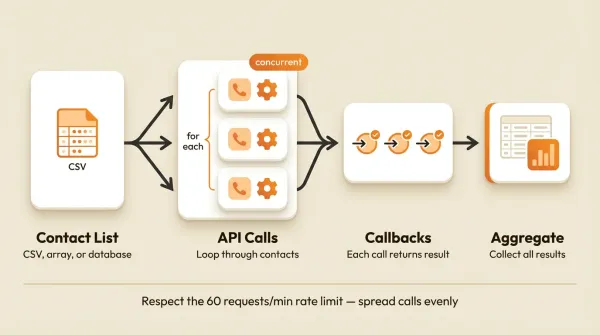
Calling the API in a loop
You might need to call a list of customers. A few rules for doing this through the API.
First, respect the 60 requests per minute rate limit. That's one request per second on average. Don't burst 60 calls in the first second and wait. Spread them out.
Second, use idempotency_key for every request. Use something unique per call, like customer-{id}-campaign-{id}. If your batch script crashes and restarts, duplicate keys won't trigger duplicate calls within the 5-minute window.
Third, handle callbacks at scale. If you fire 60 calls in a minute, you'll get 60 callbacks when they finish. Make sure your callback endpoint can handle concurrent POST requests.
import time
import requests

customers = get_customers_due_for_reminder()

for customer in customers:
    requests.post(
        "https://www.callcow.ai/api/call-prompt",
        headers={"Authorization": f"Bearer {API_KEY}"},
        json={
            "prompt": f"Call {customer['name']} about invoice #{customer['invoice_id']} "
                      f"for ${customer['amount']} due on {customer['due_date']}. "
                      "Confirm payment method and expected date.",
            "recipient_phone": customer["phone"],
            "callback_url": "https://your-app.com/api/call-callback",
            "idempotency_key": f"reminder-{customer['id']}"
        }
    )
    time.sleep(1.1)  # stay under 60 RPM
Chaining with n8n or Make.com
If you use automation platforms, the integration is straightforward.
In n8n, add an HTTP Request node that POSTs to the CallCow endpoint. Use the Webhook node as your callback receiver. Map the form_fills to your CRM update node.
In Make.com, use the HTTP module to send the call request. Set up a custom webhook to receive the callback. Route the data to your spreadsheet, CRM, or email module.
The prompt can reference data from earlier steps in the automation. If a new row appears in Google Sheets with a name and phone number, your Make scenario can pull those fields into the prompt dynamically.
If your team already lives in Monday.com, that path is documented too: Monday.com can trigger calls from new board rows and log the result back after completion. Zapier exists, but it is still invite-only and limited to a narrow action set, so I would treat Make.com or direct webhooks as the reliable default.
How much does it cost?
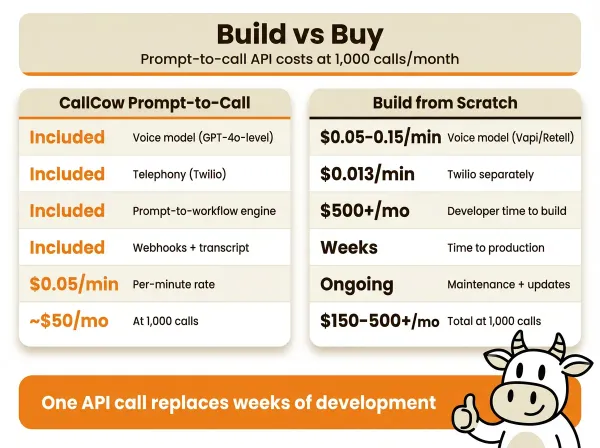
The pricing model is the main thing to verify before you commit. CallCow's published pricing can change, and this guide is not the source of truth for current plan details.
What is documented clearly is the phone model: CallCow uses Twilio for telephony, so you should expect two cost layers.
| Component | What to verify |
|---|---|
| CallCow platform pricing | Check the current pricing page or sales team |
| Twilio phone number | Depends on the number type and country |
| Twilio call usage | Depends on destination, duration, and transfer behavior |
Verify current plan pricing before you promise economics to anyone. CallCow uses a BYOC model with Twilio, so you're paying for both the platform and your own telephony costs.
For a full cost breakdown of AI phone answering, including comparisons with human receptionists and traditional answering services, see our guide to AI phone answering service costs.
CallCow vs developer platforms
I want to be straightforward about this. CallCow's Agent Calling API is not the right tool for every use case. If you're building a voice AI product with custom voices, real-time streaming, and fine-grained conversation control, use Vapi or Retell. They're built for that.
CallCow is built for making business phone calls. The prompt-to-call approach trades flexibility for simplicity. Here's an honest comparison.
Vapi
Vapi is a solid developer platform. You create agents with system prompts, tools, and voice models. You have full control over the conversation flow, including real-time streaming, function calling, and transfer logic.
The downside: you need to build everything. Setting up a basic outbound call requires creating an agent, configuring a phone number, and wiring up the call. There's no "just send a prompt and it works" mode.
If you're comparing pricing models, verify them directly on Vapi's current pricing page. Pricing changes faster than architecture does.
Retell AI
Retell is similar to Vapi. Strong developer experience, good documentation, and flexible agent configuration. You define conversation flows, set up tools, and manage phone numbers.
Retell is built around preconfigured agents and developer control. If your use case is one-off business calls from a natural-language prompt, CallCow is the more direct fit.
Bland AI
Bland focuses on outbound calling at scale. Their API handles high-volume campaigns. Good if you're doing thousands of calls with the same script.
Bland's approach is campaign-oriented, not call-oriented. You build a campaign, upload a list, and fire. It works well for sales outreach. It doesn't work well for dynamic, per-customer calls where the instructions change every time.
OpenAI Voice API
OpenAI's real-time voice API gives you low-level access to their speech models. You handle the telephony yourself (or use a partner like Twilio). You manage the conversation state, the prompts, the tools, everything.
OpenAI provides the brain. You build everything else. That's fine if you want maximum control. It's a lot of work if you just want to confirm an appointment.
When to use CallCow
- You need to make different types of calls, each with unique instructions
- You're integrating phone calls into an existing app or automation
- You want minimal setup: one endpoint, one request, one callback
- You don't want to manage agent configurations, phone routing, or conversation state
- You're a small team or solo developer who needs phone calls working today, not next week
When to use a developer platform
- You're building a voice AI product (not using one)
- You need real-time streaming, custom voice models, or fine-grained conversation control
- You need mid-call webhooks (CallCow only fires on completion)
- You're doing high-volume campaigns with identical scripts
For a deeper comparison of approaches, see our breakdown of OpenAI voice agents vs built platforms.
Code examples
cURL
The fastest way to test the API. No dependencies, no setup.
If your goal is to see the product work in the next two minutes, do this now: copy the command below, paste in your real API key, replace the sample phone number with your own verified test number in E.164 format, change test-call-001 to a fresh unique value, and run it from your terminal. You'll get a call_id back immediately if the request is accepted.
curl -X POST https://www.callcow.ai/api/call-prompt \
  -H "Content-Type: application/json" \
  -H "Authorization: Bearer ck_live_your_api_key_here" \
  -d '{
    "prompt": "Call and confirm the appointment for Thursday at 2 PM. Ask if they need to reschedule. Collect their email.",
    "recipient_phone": "+14155551234",
    "callback_url": "https://your-app.com/api/call-callback",
    "idempotency_key": "test-call-001"
  }'
Response:
{
  "success": true,
  "workflow_id": "wf_abc123",
  "call_id": "call_xyz789"
}
Python
import requests

API_KEY = "ck_live_your_api_key_here"
BASE_URL = "https://www.callcow.ai"

def make_call(prompt: str, phone: str, callback_url: str, idempotency_key: str = None) -> dict:
    payload = {
        "prompt": prompt,
        "recipient_phone": phone,
        "callback_url": callback_url,
    }
    if idempotency_key:
        payload["idempotency_key"] = idempotency_key

    response = requests.post(
        f"{BASE_URL}/api/call-prompt",
        headers={
            "Content-Type": "application/json",
            "Authorization": f"Bearer {API_KEY}",
        },
        json=payload,
    )
    response.raise_for_status()
    return response.json()


result = make_call(
    prompt="Call this customer and confirm their appointment for Friday at 3 PM. "
           "Offer Monday or Tuesday if they need to reschedule. Collect their email.",
    phone="+14155551234",
    callback_url="https://your-app.com/api/call-callback",
    idempotency_key="cust-12345-appt-confirm",
)

print(f"Call initiated: {result['call_id']}")
print(f"Workflow: {result['workflow_id']}")
Node.js
async function makeCall({ prompt, phone, callbackUrl, idempotencyKey }) {
  const response = await fetch("https://www.callcow.ai/api/call-prompt", {
    method: "POST",
    headers: {
      "Content-Type": "application/json",
      Authorization: `Bearer ${process.env.CALLCOW_API_KEY}`,
    },
    body: JSON.stringify({
      prompt,
      recipient_phone: phone,
      callback_url: callbackUrl,
      ...(idempotencyKey && { idempotency_key: idempotencyKey }),
    }),
  });

  if (!response.ok) {
    const error = await response.json();
    throw new Error(`CallCow API error ${response.status}: ${error.message}`);
  }

  return response.json();
}

const result = await makeCall({
  prompt:
    "Call this lead from the website form. Ask about their company size, " +
    "current challenges, and timeline. Collect their email for a follow-up demo.",
  phone: "+14155551234",
  callbackUrl: "https://your-app.com/api/call-callback",
  idempotencyKey: "lead-67890-qualify",
});

console.log(`Call initiated: ${result.call_id}`);
Express callback handler
import express from "express";

const app = express();
app.use(express.json());

app.post("/api/call-callback", (req, res) => {
  const { call_id, call_status, call_summary, form_fills } = req.body;

  console.log(`Callback received for ${call_id}: ${call_status}`);

  if (call_status === "completed") {
    console.log(`Summary: ${call_summary}`);
    console.log(`Form data:`, form_fills);
    // Update your database, CRM, etc.
  }

  res.status(200).json({ received: true });
});

app.listen(3000, () => console.log("Callback server running on port 3000"));
Production considerations
Rate limiting
The API enforces 60 requests per minute. That's a hard limit, not a guideline. If you hit it, you get a 429 status code.
Build your integration to handle this gracefully. Use a queue if you're sending calls from an automated process. Track your request count per minute and throttle when you approach the limit.
import time

class RateLimiter:
    def __init__(self, max_per_minute=55):
        self.timestamps = []
        self.max = max_per_minute

    def wait(self):
        now = time.time()
        self.timestamps = [t for t in self.timestamps if now - t < 60]
        if len(self.timestamps) >= self.max:
            sleep_time = 60 - (now - self.timestamps[0]) + 0.5
            time.sleep(sleep_time)
        self.timestamps.append(time.time())

limiter = RateLimiter()

for customer in customers:
    limiter.wait()
    make_call(prompt=..., phone=customer.phone, ...)
I set the default to 55 instead of 60 to leave headroom for any other calls your account might be making.
Idempotency
Network requests fail. Servers crash. Retries happen. Without idempotency, a retried request creates a duplicate call, and you end up calling the same customer twice. That's a bad experience.
Include an idempotency_key in every request. Use something that ties the call to your business logic: a customer ID, an order ID, a task ID.
The idempotency window is 5 minutes. If you send the same key twice within 5 minutes, the second request returns the original call's call_id without placing a new call. After 5 minutes, the key expires and a new call can be created with the same key.
Error handling
Don't just log errors and move on. Handle each error code appropriately.
400 (bad input): Fix your request. Check that recipient_phone is in E.164 format and that prompt is present. This is a bug in your code, not a transient failure.
401 (bad API key): Your key is wrong or expired. Check the dashboard. This shouldn't happen in production if you set it up correctly.
422 (workflow generation failed): Your prompt is likely too vague or the API couldn't parse it. Rewrite the prompt with more specific instructions and retry.
429 (rate limited): Back off and retry. Use exponential backoff. Don't immediately retry at the same rate.
import time

def make_call_with_retry(prompt, phone, max_retries=3):
    for attempt in range(max_retries):
        try:
            return make_call(prompt=prompt, phone=phone, ...)
        except requests.exceptions.HTTPError as e:
            if e.response.status_code == 429:
                wait = 2 ** attempt
                print(f"Rate limited, waiting {wait}s before retry")
                time.sleep(wait)
            elif e.response.status_code == 422:
                print(f"Workflow generation failed: {e.response.text}")
                raise  # don't retry 422, fix the prompt
            else:
                raise
    raise Exception(f"Failed after {max_retries} retries")
Callback reliability
CallCow fires callbacks on completion only. Not during the call. Not at intervals. When the call finishes, you get one POST request with the full results.
This means you need to be ready to receive it. If your server is down, the callback is lost. CallCow does not retry failed callbacks.
For production use, consider using a webhook reliability service like Svix or Hookdeck. These services receive the callback, store it, and deliver it to your endpoint with automatic retries. If your server is temporarily down, they queue the callback and deliver it when you're back.
If you don't want to use a middleware service, at minimum log the raw callback payload to a file or database before processing it. That way, even if your processing logic fails, you have the data.
Security
A few things to keep in mind.
Never expose your API key in client-side code. The API key should only exist on your server or in your automation platform.
Treat your callback endpoint like any other internet-facing webhook receiver. Keep it server-side, validate the payload you receive, and log requests before downstream processing.
Validate phone numbers before sending them to the API. CallCow accepts E.164 format, but it's good practice to validate and sanitize input on your end.
Don't log full phone numbers in your application logs. Log the call_id instead and look up the phone number from your database when debugging.
Who this is for (and who it's not)
Good fit:
- Developers who want to trigger phone calls from their own application with a single HTTP request, no workflow pre-configuration required
- Teams building automations with n8n, Make.com, or custom servers that need phone calls as part of a larger workflow
- Businesses that make different types of calls (appointment confirmations, lead qualification, payment reminders) and don't want to build a separate agent config for each
Not a good fit:
- Engineers building a voice AI product who need real-time streaming, custom model selection, or fine-grained conversation control. Use Vapi, Retell, or OpenAI's Realtime API
- Teams needing mid-call webhooks or real-time data streaming. CallCow fires callbacks on completion only
- High-volume outbound campaigns needing list-management or concurrency controls beyond the documented 60 requests per minute
- Anyone wanting warm transfer or call recording during the conversation
Frequently asked questions
How do I make an AI agent make a phone call?
Send a POST request to https://www.callcow.ai/api/call-prompt with a natural language prompt and a phone number in E.164 format. Authenticate with a Bearer token (your API key from the CallCow dashboard). CallCow generates the workflow, places the call, and sends a callback to your endpoint with the transcript, summary, and collected data. No pre-configuration or agent setup needed. You can test it with cURL in about 30 seconds.
Can I trigger phone calls from a webhook?
Yes. The most common pattern is to use your existing webhooks (from Stripe, your CRM, a form submission, etc.) as triggers. When a webhook fires, your server or automation platform (n8n, Make.com, Zapier, currently invite-only) sends a POST request to CallCow's API with the appropriate prompt. The call happens asynchronously and results come back via CallCow's callback to your endpoint. This creates a fully automated pipeline: event triggers webhook, webhook triggers call, call results update your system.
What happens if the person doesn't answer?
The callback still fires with the final status. Your application should handle the documented outcomes: completed, not picked up, busy, voicemail, and failed. Each one might require different follow-up logic (retry, log, alert, etc.).
How much does an AI phone call API cost?
Check current CallCow pricing before you publish or build around a number in this article. What is consistent in the docs is the Twilio BYOC model, so you should budget for both the CallCow platform and separate Twilio number and usage charges.
Want to run your first live test call now? Open the cURL example in this guide, replace the API key, phone number, and idempotency_key, then send the request to POST https://www.callcow.ai/api/call-prompt. If you don't have an account yet, start your free trial, grab your API key from Settings > API Keys, and make the test call before you leave this page. Trial accounts are limited to 4 concurrent calls with verified numbers only. A Twilio Business Profile unlocks unlimited concurrent calls.
If you want the endpoint details and callback shape in the docs before you wire anything up, start with the Agent Calling docs.
Yiming Han is the founder of CallCow and writes about phone automation, missed calls, and the tradeoffs that show up when small businesses actually deploy voice AI.