AI voice agent: the complete 2026 guide for business
An AI voice agent handles phone calls autonomously using conversational AI. Compare no-code platforms, developer tools, costs, and setup steps in this 2026 business guide.AI voice agent: the complete 2026 guide for business
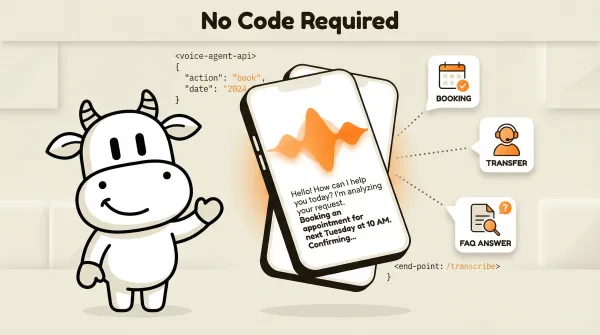
An AI voice agent is a software system that handles phone calls using conversational AI. It answers inbound calls, makes outbound calls, understands natural speech, and takes actions like booking appointments, answering questions, and transferring to humans. The important distinction is not one magic price. It is whether you want a no-code business tool or a developer platform with more build-your-own work.
Table of contents
- What is an AI voice agent?
- How AI voice agents work
- Build vs buy: developer platforms vs no-code solutions
- AI voice agent features that matter for business
- How much does an AI voice agent cost?
- AI voice agent platforms compared
- How to set up an AI voice agent without code
- Which businesses use AI voice agents?
- What to look for in an AI voice agent platform
- Frequently asked questions
What is an AI voice agent?
Search "AI voice agent" and you'll find dozens of developer platforms: Retell, Vapi, Bland, Synthflow. They all assume you can write code, configure webhooks, and deploy infrastructure. Most business owners can't, and shouldn't have to.
An AI voice agent is conversational AI that handles phone calls. That's it. It listens, understands, responds, and takes action. The action might be booking an appointment, answering a question about your services, collecting caller information, or transferring the call to a human.
There are two types of platforms:
Developer platforms (Retell, Vapi, Bland, OpenAI) give you an API and building blocks. You write the code, configure the prompts, handle the telephony, and integrate with your systems. Full control, but you need a developer on staff.
No-code business platforms (CallCow, Rosie, Goodcall) give you a visual workflow builder. You configure greeting, conversation flow, and actions through a UI. No code required. Less control, but usually a faster path to a working workflow.
The gap between these two categories is where most business buyers get stuck. They search for "AI voice agent," land on a developer platform, and leave because it's too technical. CallCow sits in the no-code camp. You connect a Twilio phone number, build a workflow in the UI, and you're live.
The no-code part is helpful, but it is not the whole story. The business-facing differentiators show up after the call starts. It can collect structured form data during the conversation instead of dumping you a raw transcript. It auto-creates inbound contacts when someone calls or texts. It supports voicemail forwarding, so you can keep answering calls yourself and let AI catch the misses instead of replacing your front desk overnight.
That's also the bridge between buyer language and platform language. A developer hears "forms," "contacts," and "webhooks." A business owner hears "qualified leads land in my system," "new callers become contacts automatically," and "I can turn this on without ripping out my phone setup."
"AI voice agent" draws 1,900 monthly searches at $33 CPC. The entire SERP targets developers. Nobody is writing for the business owner who just wants their phones answered. That's the opportunity here.
How AI voice agents work
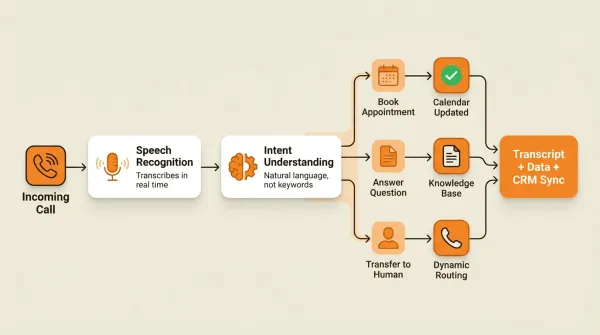
When a caller reaches an AI voice agent, the flow looks like this:
Incoming Call
    │
    ▼
AI Answers with Your Business Name
    │
    ▼
Caller Speaks Naturally (No Phone Tree)
    │
    ├── Wants to Book? → Check Calendar → Book Slot → Send Confirmation
    │
    ├── Has a Question? → Answer from Knowledge Base → Offer More Help
    │
    ├── Needs a Human? → Ask Who → Transfer Call
    │
    └── After Hours? → Take Message → Send Transcript via SMS/Email
-
Call routing. Your business phone number routes to the AI voice agent. With CallCow, this runs through your Twilio account. You provide your Account SID and Auth Token, and calls flow into your configured workflow.
-
Speech recognition. The AI transcribes the caller's speech in real time. Modern systems handle accents, background noise, and natural speech patterns. No "press 1 for sales, press 2 for support" phone trees.
-
Intent understanding. The AI determines what the caller wants. This isn't keyword matching. It's natural language understanding. A caller might say "I need to reschedule my Tuesday appointment" or "move my slot" and the AI handles both.
-
Action execution. Based on the caller's intent, the AI takes action. It might check calendar availability, book an appointment, answer a question from your knowledge base, or transfer the call to a human. CallCow's Dynamic Transfer asks the caller who they need and routes accordingly.
-
Follow-up. After the call ends, the system generates a transcript, summary, and any structured data from forms filled during the conversation. This data syncs to your CRM via webhooks. Caveat: webhooks fire on call completion only, not in real time.
Build vs buy: developer platforms vs no-code solutions
This is the decision most business owners end up making, even if they do not frame it that way. Every "AI voice agent" search result falls into one of two camps.
Developer platforms
Retell, Vapi, Bland, Synthflow, and OpenAI's voice API are all developer tools. You get:
- API access with fine-grained control over every call
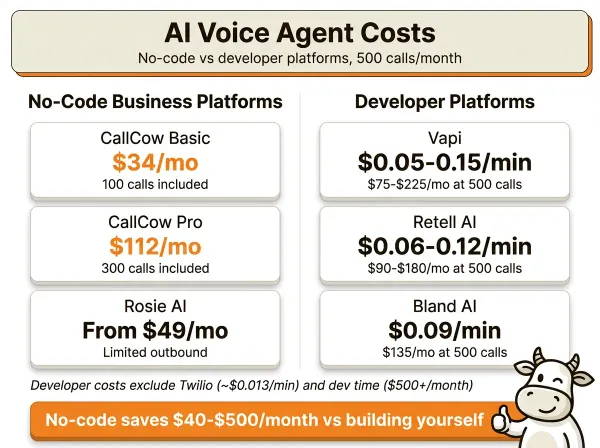
- Per-minute pricing ($0.05 to $0.15/min)
- Custom model selection (GPT-4o, Claude, Gemini, etc.)
- Full webhook and integration control
- SDK in Python, Node.js, etc.
You also need:
- A developer to build and maintain the system
- Telephony infrastructure (Twilio or similar)
- Ongoing prompt engineering and testing
- Error handling, retry logic, and monitoring
The real cost is not usage pricing alone. It is usage pricing plus telephony plus developer time plus the ongoing work of keeping the system reliable.
No-code business platforms
CallCow, Rosie, and Goodcall give you a visual interface. You configure what the AI says and does through a workflow builder. No code.
The tradeoff: less granular control, but a much simpler rollout. With CallCow, you connect your own Twilio account through a BYOC model, so the phone layer stays separate from the software layer.
For most businesses, the no-code route wins. You don't need custom model selection or fine-grained API control. You need your phones answered reliably. Read more about no-code vs developer platforms.
If you're non-technical and want the lowest-risk rollout, start with voicemail forwarding instead of moving your whole phone line on day one. That lets you keep the normal human answer-first experience and use AI only for missed calls. CallCow documents that setup here: voicemail forwarding guide.
AI voice agent features that matter for business
Most AI voice agent reviews focus on model quality, latency, and API features. Those matter for developers. For business owners, the features that actually matter are different.
The easiest way to think about it: developers buy primitives, business owners buy outcomes. So I would prioritize the features below in this order: can it capture structured lead data, can it fit into your current phone workflow, can it book or route calls correctly, and can you get it live without hiring someone.
Voicemail forwarding
This is one of the most practical differentiators for small businesses because it gives you a gradual rollout path. Instead of sending every call straight to AI, you configure your carrier voicemail to forward missed calls to CallCow. You still answer when you're available. The AI covers the calls you miss.
That matters because most business owners don't want a big-bang phone migration. They want fewer missed calls next week. CallCow's voicemail forwarding guide is built for that use case.
Limitations: not every carrier supports the same forwarding flow, and some setups may require manual carrier configuration.
Inbound contacts
CallCow automatically creates contact records for people who call or message you. That sounds small until you compare it to the usual setup, where missed calls live in one system, transcripts live in another, and follow-up happens from someone's memory.
For developers, this is a contact layer tied to inbound voice and SMS events. For business owners, it means new callers do not disappear after the call ends. CallCow also maintains SMS threads per contact and auto-links preferred numbers for better follow-up rates.
Conversational workflow builder
The core of any no-code platform. You define what the AI says, how it responds to different caller intents, and what actions it takes. CallCow's custom workflow builder lets you create these flows visually. Caveat: the documentation for workflows is thin (mostly a YouTube video), but the builder itself is functional.
Appointment scheduling
Your AI voice agent should book appointments directly into your calendar. CallCow integrates with Google Calendar (beta), Outlook Calendar (beta), Cal.com, Calendly, TidyCal, and Trafft. That covers most scheduling setups small businesses already use.
Caveats: TidyCal cannot book paid appointments via API. Trafft always selects the first available employee, not a specific one.
Voice cloning
Some platforms let you clone a voice from a short audio sample. CallCow uses a 30-second recording. Your AI voice agent sounds like you or your brand on every call. This matters more than most people think. Callers respond better to a consistent, branded voice.
Caveat: the AI always identifies itself as AI regardless of voice customization. You can't disable this. See the voice cloning guide.
Structured data collection
Advanced platforms use forms to collect structured data during calls: name, email, phone number, service type, preferred time. This data flows to your CRM via webhooks, turning every call into a lead record. Most developer platforms don't offer this out of the box. You'd build it yourself.
SMS Instructions
During a live call, the AI agent can text the caller links and instructions directly. Payment portals, booking confirmation URLs, directions, resource links. Anything that is painful to spell out verbally. CallCow supports this as SMS Instructions, configured per-workflow. It requires Twilio SMS capability on your account. For businesses that regularly send callers to a website, payment page, or scheduling tool, this removes a real friction point.
Outbound calling
Most AI voice agents only handle inbound calls. CallCow's Agent Calling API lets you make outbound calls with a single API request. You send a natural language prompt and a phone number, and CallCow generates a workflow, executes the call, and returns results via callback.
Each API call executes a single phone call. For multi-call sequences (follow-up, then qualify, then book), the orchestration logic needs to be built externally via Make.com, Zapier, or custom code. Make.com is fully documented today. Zapier exists, but it is invite-only. This means your AI doesn't just answer calls. It can follow up with leads, confirm appointments, and re-engage cold prospects. See the prompt-to-call API guide. Read about automated outbound calling.
Website widget
An embedded widget turns your website into a calling surface. Visitors click a button and talk to your AI voice agent directly from the browser. No phone number needed. Two widget types are available, floating chat-style (bottom-right) and inline. Each workflow gets an 'Embed on Website' button for one-click setup. Read about website widgets.
Call transfer
When callers need a human, the AI should transfer intelligently. CallCow's Dynamic Transfer uses a webhook to determine the right destination based on caller input.
Caveats: transfers are cold/blind only (no warm transfer where the AI briefs the human first). Requires a verified Twilio Business Profile.
How much does an AI voice agent cost?
Business platforms (no-code)
| Setup | Pricing model |
|---|---|
| CallCow | Platform pricing plus separate Twilio BYOC costs |
| Rosie AI | Bundled subscription model |
| Goodcall | Verify current pricing directly |
What to verify before you trust a pricing claim
For CallCow, check the current plan price and any included usage, then add separate Twilio number and usage costs because of the BYOC model.
Developer platforms (per-minute pricing)
| Platform | Pricing approach |
|---|---|
| Vapi | Usage-based developer pricing |
| Retell AI | Usage-based developer pricing |
| Bland AI | Usage-based developer pricing |
| Synthflow | Verify directly |
Developer platform costs also do not include telephony or developer time. That is the part buyers underestimate most often.
Hidden costs
- Transferred calls count both call legs on the telephony side.
- Toll-free numbers usually cost more than local numbers.
- Trial accounts on CallCow include 4 concurrent calls with verified numbers only. Full capacity requires a Twilio Business Profile.
- Voice cloning storage: CallCow stores the 30-second training snippet but never stores actual call audio.
Model selection
CallCow now supports GPT 5.4 as a selectable model in LLM settings. For business phone workflows, GPT 5.4 is the safest default. The improvement in accuracy and fewer hallucinations is noticeable, especially when the AI is collecting caller details or answering questions based on your knowledge base. There is a slight latency increase, but for business calls where getting the information right matters more than shaving response time, the tradeoff is worth it. Model selection is per-workflow, so you can use GPT 5.4 for intake-heavy workflows and a faster model for simple routing.
AI voice agent platforms compared
| Feature | CallCow (no-code) | Retell AI (dev) | Vapi (dev) | Bland AI (dev) | Rosie AI (no-code) |
|---|---|---|---|---|---|
| Target user | Business owner | Developer | Developer | Developer | Business owner |
| Pricing model | Subscription + BYOC | Usage-based | Usage-based | Usage-based | Subscription |
| Code required | No | Yes | Yes | Yes | No |
| Inbound calls | Yes | Yes | Yes | Yes | Verify directly |
| Outbound calls | Yes (Agent Calling) | Yes | Yes | Yes | Verify directly |
| Documented business workflow features | Strong | More build-it-yourself | More build-it-yourself | More build-it-yourself | Verify directly |
| Webhook caveat | Completion only | Verify directly | Verify directly | Verify directly | Verify directly |
*CallCow's 7-day trial includes 4 concurrent calls with verified numbers only.
The big differentiator is still build burden. If you're a business owner who wants working AI on your phones this week, the developer platforms are a different category of decision.
How to set up an AI voice agent without code
-
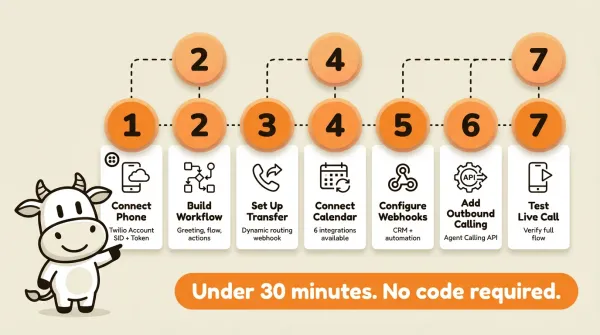
Connect your phone number. Sign up for Twilio, buy a phone number (or port your existing one), and enter your Account SID and Auth Token in CallCow Settings. CallCow uses a bring-your-own-carrier (BYOC) model. You manage Twilio billing directly, so budget for a separate carrier bill on top of the software.
If you want the simpler buyer path, start with voicemail forwarding instead of porting or replacing your main line immediately. It's the fastest way to get coverage on missed calls while keeping your current setup intact. The voicemail forwarding guide also points to a setup-call option if you want help.
-
Create a workflow. Open the workflow builder. Set your greeting, define the conversation flow, and configure what happens for each caller intent (booking, questions, transfers). See the custom workflow guide.
-
Set up call transfer. If you want the AI to transfer calls, configure a transfer number. For intelligent routing, set up a Dynamic Transfer URL, a webhook that receives caller info and returns the right destination number. This requires a verified Twilio Business Profile.
-
Connect your calendar. Link your scheduling tool so the AI can book in real time. Google Calendar (beta), Outlook Calendar (beta), Cal.com, Calendly, TidyCal, and Trafft are all supported. If you use TidyCal, paid bookings are excluded. If you use Trafft, it books the first available employee rather than a specific one.
-
Configure webhooks. Set up an endpoint to receive call data (transcripts, summaries, form fills) directly to your CRM. Webhooks fire on call completion and include structured JSON payloads. See webhook automation.
-
Test with a live call. Call your configured number and run through the full flow. Test the greeting, try booking an appointment, test a transfer, and verify webhook data arrives correctly.
-
(Optional) Add outbound calling. Use the Agent Calling API to make outbound calls. Send a natural language prompt and a phone number via POST /api/call-prompt. The AI generates a workflow, places the call, and returns results via callback. Rate limit: 60 requests per minute.
If you are evaluating platforms this week, do one practical check before you buy anything: can it handle inbound calls, structured forms, and transfer logic without custom code. That separates a business-ready voice agent from a developer toolkit fast.
If you just want help getting this live, not a DIY project, here's the practical path: start the free trial, use voicemail forwarding first, then book setup help from the voicemail forwarding flow if you need someone to walk you through Twilio and workflow configuration.
If you want to test it yourself, CallCow has a 7-day trial at callcow.ai.
Which businesses use AI voice agents?
Real estate
Agents miss calls while showing properties. An AI voice agent can qualify leads, answer property questions, and book viewings after hours. With outbound calling, it can also follow up with leads who did not book.
Law firms
Potential clients call at all hours. An AI voice agent can capture intake information, schedule consultations, and transfer urgent calls to the on-call attorney.
Medical offices
Missed calls mean missed appointments. An AI voice agent handles scheduling and routes urgent calls. Important: AI voice agents are not HIPAA-compliant by default. Use AI for non-PHI calls only, and route PHI-related calls to a HIPAA-compliant service.
Home services
Plumbers, electricians, and HVAC companies get emergency calls after hours. An AI voice agent can triage urgency, collect job details, and route the call or follow-up based on your workflow.
Sales teams
Outbound AI voice agents can call leads to qualify them, confirm appointments, or re-engage cold prospects. CallCow's Agent Calling API handles this without manual dialing. See automated outbound calling.
See how AI outbound calling works for your team at callcow.ai
What to look for in an AI voice agent platform
I've tested both developer platforms and no-code tools. The features I'd weigh:
Must-haves:
- No-code setup: if you need a developer, it's the wrong tool for most businesses
- Appointment booking: must integrate with your existing calendar, not a proprietary one
- Call transfer: intelligent routing, not forwarding everything to one number
- Transparent pricing: subscription or per-minute with clear numbers
Nice-to-haves:
Voice cloning gives you a branded voice on every call. Outbound calling lets you handle both directions from the same system. Structured data capture through forms that sync to your CRM turns calls into lead records. A website widget lets visitors call without needing a phone number.
Red flags:
Walk away if there's no free trial, pricing is hidden behind "contact sales," you need API keys and webhooks just to answer a phone call, calendar integrations are missing (only third-party Zapier/Make), or there's no inbound call support (outbound only).
Make.com offers bidirectional integration, trigger calls from Make scenarios and receive call data via webhooks. Unlike Zapier, Make.com is fully available (not invite-only).
Can you get it live in under an hour?
Can you set it up yourself in under an hour and have it answering real calls? If the answer is no, keep looking.
Who this is for (and who it's not)
Good fit:
- Business owners who want phone calls answered in under 30 minutes without writing code or hiring a developer
- Teams already using Calendly, Google Calendar, or Cal.com for scheduling and wanting callers to book directly over the phone
- Businesses that want to own their phone numbers and see exact per-minute costs through Twilio BYOC
Not a good fit:
- Developers building a custom voice AI product who need real-time streaming, custom model selection, or mid-call webhooks. Use Vapi, Retell, or OpenAI's Realtime API instead
- Anyone needing warm transfer: CallCow only supports cold/blind transfer, so your team picks up without context
- Healthcare practices handling PHI: CallCow is not HIPAA compliant
- Businesses wanting bundled pricing with one invoice for everything
Frequently asked questions
What is the difference between an AI voice agent and a chatbot?
A chatbot handles text conversations on websites and messaging apps. An AI voice agent handles phone calls using speech recognition and text-to-speech. The AI technology is similar (both use LLMs), but voice agents add an extra layer: they need to understand spoken language with all its imperfections (accents, background noise, interruptions, incomplete sentences) and respond audibly in real time. A voice agent also needs telephony infrastructure (phone numbers, call routing, transfer capabilities) that chatbots don't.
Do I need coding skills to use an AI voice agent?
It depends on the platform. Developer tools like Retell, Vapi, and Bland require Python or JavaScript knowledge, plus telephony infrastructure setup. No-code platforms like CallCow and Rosie let you configure everything through a visual workflow builder. You can set up CallCow in under 30 minutes by connecting a Twilio phone number and building a conversation flow in the UI. No code needed.
Can AI voice agents make outbound calls?
Yes, but it depends on the platform. CallCow's Agent Calling API lets you trigger outbound calls with a single API request. You send a natural language prompt (like "Call to confirm the appointment for Sarah at 3pm tomorrow") and a phone number. The AI generates a workflow, places the call, and returns results via webhook callback. Developer platforms like Vapi and Bland also support outbound calls, but you build the logic yourself. Rate limit: 60 requests per minute on CallCow.
How do AI voice agents handle accents and different languages?
Modern AI voice agents are better with accents and noisy calls than older phone trees, but language and accent performance still varies by platform, voice model, and caller mix. If your callers are primarily non-English speakers or use strong regional accents, test the platform with real calls before committing.
If you want to test it yourself, start with voicemail forwarding so AI only catches missed calls, then use the setup-call path in the voicemail forwarding guide. You can try that in the trial at callcow.ai.
Yiming Han is the founder of CallCow and writes about phone automation, missed calls, and the tradeoffs that show up when small businesses actually deploy voice AI.