OpenAI voice agent vs built platforms: a dev comparison
OpenAI Realtime API vs built voice platforms, with a grounded look at phone infrastructure, operational tradeoffs, and where CallCow is actually different.OpenAI voice agent vs built platforms: a dev comparison
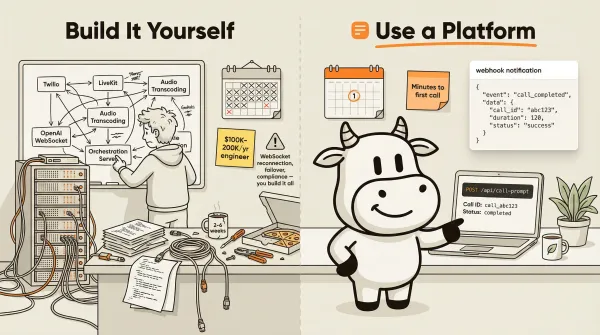
An OpenAI voice agent uses the Realtime API for low-latency speech-to-speech conversations. A purpose-built voice agent platform handles the phone stack around it: telephony, call routing, forms, transfers, and post-call automation. Engineers ask which path saves time and money at scale. Founders, ops leads, and revenue teams ask how fast they get to a live workflow that captures leads or books appointments.
I spent years as an Android lead at Snap and Nanoleaf. I know what "just build it yourself" costs in practice. This piece compares the two approaches with architecture diagrams, cost tradeoffs, and a side-by-side look at raw OpenAI DIY versus the built-platform category. I call out CallCow where the docs support it and stay broad where competitor details are too fuzzy to state cleanly.
Table of contents
- What OpenAI's Realtime API actually gives you
- What you need to build yourself
- What platforms handle for you
- Architecture comparison: DIY vs platform
- Code comparison: CallCow API vs OpenAI directly
- Cost comparison at scale
- Full comparison table
- When to build vs when to buy
- Frequently asked questions
What OpenAI's Realtime API actually gives you
The OpenAI Realtime API provides a WebSocket connection to speech-to-speech models. Audio goes in, audio comes out. The latency is low enough for natural conversation. That's the product.
OpenAI's own docs describe it as "low-latency communication with models that natively support speech-to-speech interactions as well as multimodal inputs." The Agents SDK wraps this with some tool-calling and state management, but the core offering is the model connection.
What the Realtime API does not include:
- No telephony. There is no phone number provisioned. No PSTN connection. No inbound call handling.
- No call routing. No transfer logic, no queue management, no fallback to voicemail.
- No STT/TTS choice. You get OpenAI's models. If you want Deepgram for transcription or ElevenLabs for voice, you handle that yourself.
- No phone-specific compliance layer. No built-in consent workflow, no call recording disclosure system, no transfer prerequisites handled for you.
- No form collection. The model can extract entities, but there's no structured form system.
- No phone-oriented webhook layer. No post-call payload with summaries, transcripts, and typed form data unless you build it.
- No failover. If the WebSocket drops, you write reconnection logic.
- No rate limiting beyond what OpenAI imposes at the model level.
The OpenAI Agents SDK (JS and Python) adds some structure. You can define tools, manage conversation context, and chain voice workflows with text-based agent steps. The GitHub repo openai/openai-realtime-agents demonstrates advanced patterns. But these are SDK conveniences. They don't solve the telephony problem.
If you're building a web-based voice chatbot (think a browser widget), the Realtime API is sufficient. You need a WebSocket client and a UI. A prototype can be relatively quick compared with a phone-first build.
If you're building a phone-based voice agent, the Realtime API is the starting point, not the solution.
What you need to build yourself
Building a production phone voice agent on top of OpenAI requires a stack that most engineers underestimate.
Telephony layer
You need a telephony provider. Twilio is the standard choice. You provision phone numbers, configure webhooks for inbound calls, and handle SIP/media streams. Twilio charges per minute for calls plus number rental fees. You write the TwiML or use the Twilio Voice API to bridge incoming phone calls to your WebSocket server.
For outbound calling, you use Twilio's REST API to initiate calls, then stream the audio to your OpenAI WebSocket connection. You handle call status callbacks (ringing, answered, completed, failed) and write retry logic for failed calls.
Audio streaming bridge
Phone audio and WebSocket audio are different formats. Phone calls use PCM or Opus at specific sample rates (8000 Hz for narrowband, 16000 Hz for wideband). The OpenAI Realtime API expects PCM at 24000 Hz. You need a media server that handles the transcoding in real time.
LiveKit is the most common choice here. It's an open-source WebRTC stack that bridges phone calls (via Twilio SIP) to WebSocket connections. LiveKit handles the audio format negotiation and provides a client SDK. You still need to host and scale it.
Other options: build your own with GStreamer or FFmpeg pipes, or use a commercial media server. Either way, this is real-time audio processing with strict latency requirements. If your pipeline adds more than 300ms of latency, the conversation feels broken.
Call orchestration
A production voice agent needs call orchestration logic:
- Call routing: Route inbound calls to the right agent configuration based on time of day, caller ID, or IVR input.
- Transfer handling: When the AI determines a call needs a human, bridge the call to a staff member's phone number. Handle the case where the staff member doesn't answer (fallback to voicemail or another agent).
- Failover: If your WebSocket server goes down, calls need somewhere to go. You need health checks, circuit breakers, and a fallback message or voicemail.
- Concurrency management: How many simultaneous calls can your server handle? How do you queue calls when at capacity?
- Call recording: If you record calls for QA or compliance, you need a recording pipeline separate from the real-time audio stream.
STT/TTS if you want alternatives
The Realtime API bundles speech-to-speech. But you might want different models. Deepgram for transcription (faster, cheaper for some languages). ElevenLabs for voice output (more natural voices, voice cloning). Cartesia for ultra-low latency TTS. If you go this route, you're building a pipeline: audio in to STT, text to LLM, text to TTS, audio out. Each step adds latency and a failure point.
Compliance
Phone calls have legal requirements that web APIs don't. TCPA regulations govern outbound calling in the US. You need to scrub numbers against do-not-call lists, maintain consent records, and handle opt-out requests. If you're in healthcare, HIPAA applies. If you're recording calls, you need one-party or two-party consent depending on jurisdiction. None of this comes with the Realtime API.
Monitoring and analytics
You need to know what's happening in production. Call volume, duration, completion rate, average latency, error rates, cost per call. You build dashboards, set up alerting, and log every call for debugging. The Realtime API doesn't give you any of this.
What platforms handle for you
Purpose-built voice agent platforms sit on top of the model layer and handle everything I just described. The exact feature set varies by vendor, but the category usually provides:
- Telephony built in: Phone number provisioning, inbound/outbound calling, SIP handling. You don't touch Twilio directly (or the platform manages it for you).
- Call routing and transfer: Configure when calls transfer to humans, how fallback works, and what happens when agents are unavailable.
- Workflow builder: Define conversation flows, prompts, and behaviors without writing a media server.
- Forms and data collection: Structured fields that the AI fills conversationally. Data ships to your CRM via webhooks. CallCow's forms system supports 6 field types with typed validation.
- Voice selection: Pick from multiple TTS providers or clone your own voice. No audio pipeline engineering. CallCow's voice cloning works from a 30-second sample.
- Monitoring: Call logs, transcripts, and varying levels of operational visibility depending on the vendor.
- Compliance basics: Some platforms add disclosure controls, consent workflows, or outbound safeguards.
- Website widgets: Embeddable phone widgets for your site. CallCow offers floating and inline widgets.
- Outbound calling: API-initiated calls for lead follow-up and campaigns. CallCow's outbound calling runs through the prompt-to-call endpoint at up to 60 RPM.
If you're comparing CallCow with platforms like Vapi or Bland, the useful question is not "which landing page sounds better?" It is "which layers of the phone stack disappear, and what limits still remain?" That's where the build-vs-buy decision becomes real.
CallCow's documented position is clear. It gives you a prompt-to-call endpoint (documented at POST /api/call-prompt), typed forms, voice cloning, inbound contact creation, website widgets, voicemail forwarding on supported carriers, transfer to human, completion webhooks, and GPT 5.4 as the recommended LLM model (selectable per-workflow, fewer hallucinations with a slight latency increase). It also comes with real caveats: AI always identifies itself as AI, transfers are cold/blind only, transfer requires a Twilio Business Profile, webhooks fire on completion only, outbound rate limits are 60 RPM, and Twilio stays in your account because the telephony model is BYOC. CallCow's getting-started guide covers the setup path.
If scheduling is part of the buying decision, keep the details straight. Google Calendar and Outlook Calendar are native beta integrations. Calendly, Cal.com, TidyCal, and Trafft are supported, but TidyCal paid bookings cannot be booked through the API and Trafft picks the first available employee. Zapier exists, but it is invite-only.
That speed changes more than the engineering roadmap. It affects how quickly an ops team can test a new intake flow, how fast sales can trial AI follow-up on missed leads, and whether leadership gets a working prototype this week or another architecture review.
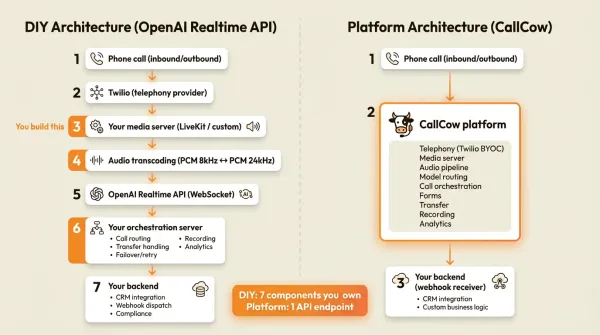
Architecture comparison: DIY vs platform
The two architectures look different from an engineering perspective.
DIY architecture (OpenAI Realtime API)
Phone call (inbound/outbound)
    |
    v
Twilio (telephony provider)
    |
    v
Your media server (LiveKit / custom)
    |
    v
Audio transcoding (PCM 8kHz <-> PCM 24kHz)
    |
    v
OpenAI Realtime API (WebSocket)
    |
    v
Your orchestration server
    - Call routing logic
    - Transfer handling
    - Failover/retry
    - Recording
    - Analytics/logging
    |
    v
Your backend
    - CRM integration
    - Webhook dispatch
    - Compliance checks
You own and operate every component. The model connection is one small piece of the system.
Platform architecture (CallCow)
Phone call (inbound/outbound)
    |
    v
CallCow platform
    - Telephony (Twilio BYOC)
    - Media server
    - Audio pipeline
    - Model routing
    - Call orchestration
    - Forms
    - Transfer
    |
    v
Your backend (webhook receiver)
    - CRM integration
    - Custom business logic
You interact with one API endpoint. The platform handles the real-time complexity. Your backend only needs to receive results and act on them.
For a team shipping an MVP, the platform path usually means you get to first live call much faster than building the whole phone stack yourself. That means faster stakeholder feedback, earlier proof that the workflow actually books meetings or qualifies leads, and less time stuck waiting on infrastructure before non-engineering teams can evaluate the result. For a team with specific latency requirements, custom model routing, or existing telephony infrastructure, the DIY path gives you control that platforms can't match.
Code comparison: CallCow API vs OpenAI directly
Two code examples that do the same thing: make an AI phone call that collects a lead's name, email, and preferred appointment time, then sends the data to your backend.
With CallCow
import requests

response = requests.post(
    "https://www.callcow.ai/api/call-prompt",
    headers={
        "Authorization": "Bearer YOUR_API_KEY",
        "Content-Type": "application/json"
    },
    json={
        "recipient_phone": "+14155550123",
        "prompt": (
            "Call the lead and introduce yourself as an AI assistant "
            "from Acme Services. Ask for their name, email, and when "
            "they'd like to schedule a demo. Be friendly but concise."
        ),
        "context": {
            "company": "Acme Services",
            "demo_type": "product walkthrough"
        }
    }
)

call = response.json()
print(f"Call ID: {call['call_id']}")
print(f"Workflow ID: {call['workflow_id']}")
The call executes. When it finishes, CallCow sends a POST to your webhook URL with the transcript, summary, and any form data the AI collected:
{
  "call_id": "call_abc123",
  "call_status": "completed",
  "duration_seconds": 127,
  "call_summary": "Spoke with Sarah. She wants a demo next Tuesday at 2pm.",
  "form_fills": {
    "name": "Sarah Chen",
    "email": "sarah@example.com",
    "preferred_time": "Tuesday 2pm"
  },
  "messages": [...]
}
One API call to start. One webhook to receive results. No WebSocket management, no media server, no audio transcoding.
With OpenAI Realtime API (simplified)
import asyncio
import websockets
import json
from twilio.rest import Client

twilio = Client("TWILIO_SID", "TWILIO_TOKEN")

# 1. Provision a phone number (one-time setup)
# 2. Configure Twilio webhook to hit your server on inbound calls
# 3. Build the WebSocket server that connects Twilio to OpenAI

async def handle_call(from_number, to_number, prompt):
    # Initiate outbound call via Twilio
    call = twilio.calls.create(
        to=to_number,
        from_=from_number,
        url="https://your-server.com/twilio-webhook"
    )

    # Your server receives the Twilio webhook
    # It opens a WebSocket to Twilio's Media Streams
    # It opens another WebSocket to OpenAI's Realtime API
    # It transcodes audio between the two
    # It monitors for tool calls (form fields)
    # It handles transfer when the AI decides to hand off
    # It logs everything for analytics
    # It sends results to your backend when the call ends
    pass

async def openai_websocket():
    async with websockets.connect(
        "wss://api.openai.com/v1/realtime",
        extra_headers={
            "Authorization": "Bearer YOUR_OPENAI_KEY",
            "OpenAI-Beta": "realtime=v1"
        }
    ) as ws:
        # Configure the session
        await ws.send(json.dumps({
            "type": "session.update",
            "session": {
                "modalities": ["text", "audio"],
                "instructions": prompt,
                "voice": "alloy",
                "input_audio_format": "pcm16",
                "output_audio_format": "pcm16"
            }
        }))

        # Bridge audio between Twilio and OpenAI
        # Handle interruptions, tool calls, errors
        # Manage conversation state
        pass
This is simplified. A production implementation handles WebSocket reconnection, audio format transcoding (Twilio uses mulaw/PCM 8kHz, OpenAI expects PCM 24kHz), call status tracking, error recovery, and more. The real implementation is substantially larger than the toy example here, plus the media-server infrastructure around it.
The point is not the exact line count. It is that the OpenAI path still leaves you owning the telephony setup, the media bridge, the operational layer, and the failure handling.
Cost comparison at scale
This is where most cost comparisons fall apart. They compare one API line item against another and ignore the rest of the system.
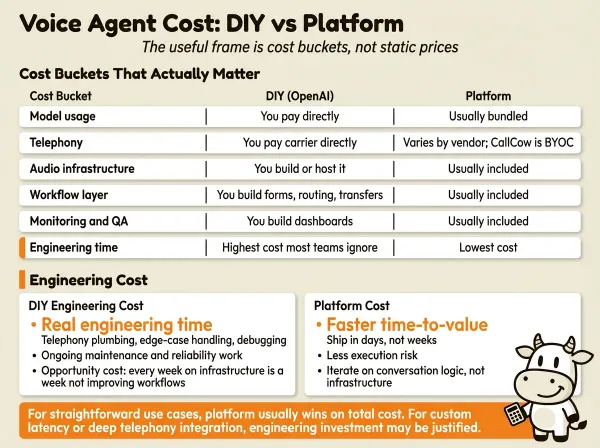
I am not going to pretend a static pricing table here will stay accurate. Model pricing changes, telephony pricing depends on geography and carrier setup, and platform plans move around. The useful frame is cost buckets.
Cost buckets that actually matter
| Cost bucket | OpenAI DIY | Built platform | What changes the math |
|---|---|---|---|
| Model usage | You pay model usage directly | Usually bundled or marked up into platform pricing | Depends on model choice and call length |
| Telephony | You pay carrier directly | Varies by vendor; CallCow is BYOC with Twilio | Geography, outbound volume, phone numbers |
| Audio infrastructure | You build or host it | Usually included | Media server, transcoding, reliability |
| Workflow layer | You build forms, routing, transfers, callbacks | Usually included | Complexity of your business logic |
| Monitoring and QA | You build dashboards and logging | Usually included to some degree | How much debugging visibility you need |
| Engineering time | Highest cost most teams ignore | Lowest cost | Team size, speed, reliability expectations |
The DIY path can absolutely be cheaper on raw usage if you already have the right team and enough volume to justify the maintenance. But for most teams, the first expensive mistake is not the API bill. It is tying up a good engineer on telephony plumbing, edge-case call handling, and debugging latency instead of improving the workflow that is supposed to make money.
Engineering cost
This is the number most teams ignore.
Building and maintaining a production voice agent stack takes real engineering time. The exact cost depends on your team and your standards, but it is usually much more expensive than the first API comparison spreadsheet suggests.
There is also an opportunity-cost line item that never shows up in the cloud bill. Every week spent on telephony plumbing is a week you are not testing conversion scripts, measuring appointment-show rates, improving lead qualification, or proving to leadership that the channel deserves budget. For many teams, the platform decision is less about minimizing API spend and more about reducing time-to-value and execution risk.
If your use case is straightforward - inbound answering, outbound lead qualification, appointment scheduling, missed-call recovery - the platform usually wins on total cost because it cuts the operational work. If you need custom model routing, ultra-low latency for a specific use case, or deep integration with an existing telephony stack, the engineering investment might be justified.
Full comparison table
This table is intentionally grounded. I am comparing raw OpenAI DIY against the built-platform category, then calling out what CallCow documents clearly today.
| Decision point | OpenAI DIY | Typical built platform | CallCow |
|---|---|---|---|
| Phone calling | You build it | Usually included | Twilio BYOC |
| Setup model | Code first | Usually workflow builder + API | Workflow builder + POST /api/call-prompt |
| Prompt-to-call | You build the orchestration | Sometimes | Core documented feature |
| Structured data collection | You build extraction and storage | Sometimes | Built-in forms with 6 field types |
| Webhook payloads | You design the schema | Usually supported | Completion webhook with summary, messages, form_fills, context |
| Transfer to human | You build it | Usually supported | Supported, but cold/blind only |
| Transfer prerequisites | You own carrier setup | Vendor-specific | Requires Twilio Business Profile |
| Website widget | You build it | Some platforms include it | Floating and inline embed widgets |
| Voice cloning | You integrate a provider | Vendor-specific | Built in from a 30-second sample |
| Inbound contact capture | You build it | Vendor-specific | Auto-created inbound contacts |
| Voicemail coverage | You build missed-call logic | Vendor-specific | Carrier voicemail forwarding on supported carriers |
| Scheduling options | You build or integrate them | Vendor-specific | Native Google/Outlook beta plus Calendly, Cal.com, TidyCal, Trafft |
| Scheduling caveats | Your responsibility | Vendor-specific | TidyCal paid bookings unsupported via API; Trafft picks first available employee |
| Zapier | You build it | Often marketed heavily | Invite-only |
| AI disclosure | Your policy decision | Vendor-specific | AI always identifies itself as AI |
| Rate limits | OpenAI account limits | Vendor-specific | 60 RPM |
| LLM model | Your choice (any available) | Vendor-selected | GPT 5.4 recommended, per-workflow selection |
| SMS during calls | You build it | Rarely documented | AI can text callers links, payment URLs, or booking URLs mid-call |
Three things stand out from that table:
- OpenAI DIY gives you maximum control. It also makes you responsible for the entire phone system.
- Built platforms compress time-to-value. That matters more than feature-count screenshots for most teams.
- CallCow is strongest when you want prompt-to-call, typed lead capture, and fast deployment on top of your own Twilio account.
- CallCow is weaker when you need warm transfer, mid-call webhooks, parallel dialing, or a heavier white-label story than shared billing.
When to build vs when to buy
I'll give you the decision framework I use when talking to engineers.
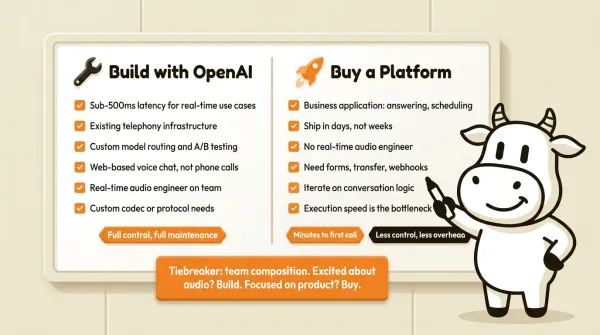
Build with OpenAI directly if:
- You need sub-500ms latency for a specific real-time use case (gaming, trading, live interpretation).
- You already have telephony infrastructure and just want to swap in a better model.
- You need custom model routing (different models for different callers, A/B testing models in real time).
- Your use case is web-based voice chat, not phone calls.
- You have a team that understands real-time audio processing and has the bandwidth to maintain it.
- You need to support a codec or protocol that platforms don't support.
Buy a platform if:
- You're building a business application (answering service, lead qualification, appointment scheduling, customer support).
- You want to ship in days, not weeks.
- You don't have a real-time audio engineer on the team.
- You need forms, transfer, webhooks, and monitoring without building each one.
- You want to iterate on the conversation logic without touching infrastructure.
- Your main bottleneck is execution speed, not squeezing every last point of margin out of infrastructure.
For non-dev stakeholders, that usually translates into clearer business outcomes too: faster pilot launches, lower implementation risk, quicker feedback from customers, and a shorter path to deciding whether voice automation improves lead capture or support coverage.
The gray zone:
Most teams land in a gray zone where either path works. The tiebreaker is usually team composition. If you have an engineer who's excited about real-time audio and wants to own it, building is a valid choice. If your team is focused on the product - the conversation logic, the business integrations, the user experience - buy the platform and move on.
CallCow came out of the same problem: I kept running into teams that spent months on voice infrastructure and never got to the part that actually mattered: making the AI useful on phone calls. The prompt-to-call API exists so you can send one request and get a phone call back. You do not manage media servers, WebSocket connections, or audio transcoding.
CallCow has real product limits today. If you need warm transfer, real-time event streaming during a call, or aggressive parallel outbound dialing, those are real gaps. If you need fast phone automation, structured post-call data, and a direct path from prompt to live call, that is exactly where it is strong.
If your team wants to prototype fast, start with CallCow's getting-started guide, connect Twilio, and use the prompt-to-call endpoint to place a real test call. Trial accounts are limited to 4 concurrent calls with verified numbers only. You can validate the conversation, review the summary and form_fills callback payload, and decide from real call data whether to keep iterating on a platform or invest in a deeper custom build.
Who this is for (and who it's not)
Good fit:
- Engineers evaluating whether to build a phone voice agent on OpenAI's Realtime API or buy a platform that handles telephony, forms, and webhooks out of the box
- Teams that want to ship in days, not weeks, and don't have a real-time audio engineer to maintain a media server pipeline
- Developers who want the prompt-to-call pattern: one HTTP request, no workflow pre-configuration, results via callback
Not a good fit if you need:
- Real-time mid-call webhooks or streaming data during the conversation. CallCow fires callbacks on completion only
- Warm transfer where the AI briefs a human agent before connecting. Cold transfer only
- Custom model routing or A/B testing different models in real time. Use OpenAI directly or choose a platform built around that level of control
- Parallel outbound dialing for high-volume campaigns. CallCow runs sequentially at 60 RPM max
Frequently asked questions
Can I build a voice agent with just the OpenAI Realtime API?
Yes, for web-based voice chat. For phone-based voice agents, you need telephony infrastructure on top (Twilio, media server, audio transcoding). The Realtime API handles the model connection, not the phone connection.
How long does it take to build a production voice agent with OpenAI?
It depends on the team and the scope. A web prototype can be quick. A production phone agent usually takes materially more work because telephony, monitoring, failure handling, and operational safeguards still need to be built.
What's the difference between the OpenAI Realtime API and the Agents SDK?
The Realtime API is the WebSocket connection to speech-to-speech models. The Agents SDK is a higher-level framework that wraps the Realtime API with tool calling, state management, and workflow chaining. The Agents SDK makes development easier but doesn't add telephony or compliance features.
Is CallCow's prompt-to-call API a replacement for the OpenAI Realtime API?
No. CallCow sits above the model layer and adds phone-oriented workflow features like telephony, forms, and completion webhooks. If you need raw model access for a custom application, use OpenAI directly.
Does CallCow support warm (attended) transfer?
No. CallCow supports cold/blind transfer only. The AI can bridge a call to a human phone number, but there's no pre-call whisper or consultation step before the transfer connects. If warm transfer is a hard requirement, use OpenAI directly or pick a platform that explicitly documents attended transfer.
Why does CallCow use a BYOC (bring your own carrier) model?
CallCow uses a Twilio BYOC model, which means you connect your own Twilio account and manage your own phone numbers and telephony billing directly. The tradeoff is that you need a Twilio account, and some features such as transfer require a Twilio Business Profile.
If you want to compare the build-it-yourself path against a working phone workflow, do it with one real use case instead of a spreadsheet. Start with the getting started guide, look at the Agent Calling docs, and then trial at callcow.ai. You will learn more from one live inbound or outbound test than from another hour of architecture debate.
Yiming Han is the founder of CallCow and writes about phone automation, missed calls, and the tradeoffs that show up when small businesses actually deploy voice AI.