AI voice agent platform: forms that collect structured data on phone calls
AI voice agent forms let your phone agent collect structured data during calls. Six field types, webhook delivery, and CRM integration, explained by a founder.AI voice agent platform: forms that collect structured data on phone calls
Every AI voice agent platform page loves to talk about conversation quality, natural language understanding, and latency benchmarks. Far fewer pages focus on what happens after the call ends and you need the data in your CRM, your spreadsheet, or your pipeline.
That's the gap I noticed when building CallCow. You can have the most natural-sounding voice agent on the market, but if the call ends and all you have is a transcript blob, you've created work for yourself. Someone has to listen to the recording, pick out the caller's email, write down their service interest, type it into HubSpot. At that point, you might as well have answered the phone yourself.
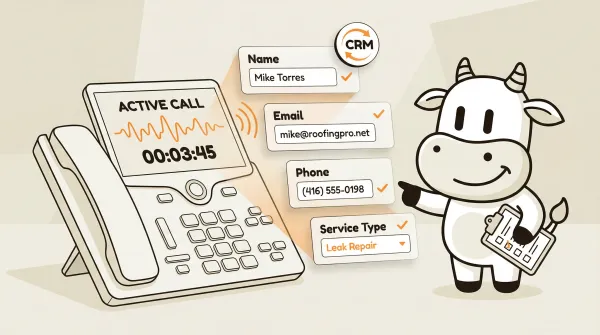
Forms fix this. Your AI voice agent asks the right questions during the call, fills out structured fields in real time, and sends clean data to your systems when the call wraps up. You avoid transcript parsing and manual data entry. The caller has a normal conversation, and your CRM gets a clean form submission.
This post covers what forms do on a phone call, how they work, and why they matter more than conversation quality for most businesses. Most voice agent platforms won't say this, but the conversation quality threshold is "good enough." What actually drives business value is what happens with the data after the call. Forms shift the value proposition from "our AI sounds more human" to "our AI gives you actionable data." For API integration details, see the full reference at docs.callcow.ai.
Table of contents
- The problem: voice transcripts are not data
- What forms are in CallCow
- The six field types and when to use each
- How forms work inside a call
- Webhook integration: getting data into your systems
- Inbound contacts: automatic contact creation
- Real examples of forms in business calls
- Forms vs. transcript parsing: why structure wins
- What forms don't do: honest limitations
- CallCow forms vs. other voice agent platforms
- Pros and cons of AI forms for data collection
- Who this is for (and who it's not)
- Build your first form in CallCow
- Quick setup and evaluation checklist
- Frequently asked questions
The problem: voice transcripts are not data
Transcripts are text. Data is structured. Those are different things, and the distinction matters when you're trying to run a business.
When a caller says something like, "Yeah, I'm looking to get a quote for roofing, my email is mike at roofing pro dot net, phone number is 416-555-0198, and I need it done by next month," a transcript captures that as a paragraph. A human has to read it, identify the intent, extract the email, normalize the phone number, and enter it somewhere useful.
That works when you get five calls a day. It falls apart at fifty. It completely breaks at five hundred.
Many voice agent platforms I reviewed position transcripts, summaries, or extraction outputs as the main output. That can work, but extraction is still probabilistic. Sometimes it catches "416-555-0198" as a phone number. Sometimes it doesn't. Sometimes it splits the email across two lines and the parser misses it.
Forms are deterministic. You define the fields you need. The AI agent asks for them specifically. The data goes into typed fields.
What forms are in CallCow
Forms in CallCow are structured data collection templates. You define the fields you want collected, attach the form to a workflow state, and the AI agent fills those fields conversationally during the call.
The form lives as a state node inside the workflow builder. When the call reaches that state, the AI shifts from general conversation into data collection mode. It asks the caller for each piece of information, validates what it hears against the field type, and moves on.
After the call completes, the filled form data appears on the call detail page under /calls. It's also included in the webhook payload, so any system you've connected receives the structured data automatically. The same pattern works whether the call came from your main phone line, a website widget, or the Agent Calling API.
This is not a new concept in software. Every web form you've ever filled out works the same way. What's different is that the "input method" is a voice conversation instead of a keyboard and mouse.
The six field types and when to use each
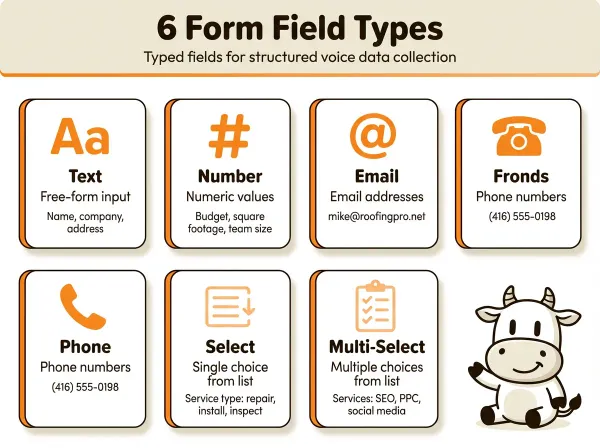
CallCow forms support six field types. Each one maps to a common piece of business information you'd want from a phone caller.
Text fields
Text fields capture free-form input. The AI agent records whatever the caller says as a plain string. Use text fields for names, company names, addresses, or any information that doesn't fit a stricter format.
A roofing company might use a text field for "describe your roofing issue" so callers can explain their situation in their own words. A law firm might use one for "case description" to capture the initial problem statement.
Text fields have no validation beyond being non-empty. The AI writes down what the caller says.
Number fields
Number fields capture numeric values. The AI agent recognizes digits in spoken language and stores them as numbers. Use number fields for quantities, budgets, square footage, employee counts, or anything that needs to be numeric.
A commercial cleaning service could use a number field for "square footage of the space." A SaaS company doing outbound sales might use one for "current team size" to qualify leads by company scale.
The AI handles spoken number formats. Someone saying "about three thousand five hundred" gets stored as 3500. Someone saying "two point five" gets stored as 2.5.
Email fields
Email fields capture email addresses. The AI agent listens for email addresses in spoken language and formats them correctly. Use email fields for contact information, newsletter signups, or sending follow-up documents.
Spoken email addresses are tricky. People say "mike at roofing pro dot net" or "john dot smith at gmail dot com." The AI agent handles these spoken patterns and converts them to standard email format: mike@roofingpro.net, john.smith@gmail.com.
Email fields are useful for any call where you want to send something afterward. Quote, proposal, calendar invite, confirmation email.
Phone fields
Phone fields capture phone numbers. The AI agent recognizes phone numbers in various spoken formats and normalizes them. Use phone fields for callback numbers, secondary contacts, or business phone lines.
People say phone numbers differently. "Four one six, five five five, oh one nine eight" or "416-555-0198" or "four sixteen, five fifty-five, nineteen eight." The AI agent normalizes all of these to a consistent format.
A home services company might collect a callback number in case the call drops. A medical office might collect a secondary contact number for emergencies.
Select fields
Select fields present a fixed list of options and capture one choice. The AI agent reads the options to the caller and records their selection. Use select fields when the answer must come from a predefined list.
A plumbing company could offer options like "drain cleaning," "water heater repair," "leak detection," "pipe installation." A real estate agency could offer "buying," "selling," "renting," "property management."
The key constraint with select fields: options must be predefined when you create the field. You cannot dynamically generate options based on previous answers. The AI agent will only accept answers that match one of the listed options. If the caller says something that doesn't match, the AI asks them to pick from the available choices.
Multi-select fields
Multi-select fields work like select fields but allow the caller to choose multiple options. The AI agent reads through the list and the caller can pick as many as apply. Use multi-select fields when a caller might need more than one service or fall into more than one category.
A marketing agency could offer "SEO," "PPC," "social media," "email marketing," "content writing" and let clients select all services they're interested in. A healthcare clinic could list service types and let patients select multiple appointments they want to book.
Like select fields, the options must be predefined. No conditional option lists. No "if they pick A, show them options X, Y, Z."
How forms work inside a call
Four stages: creation, workflow attachment, live collection, and post-call delivery.
Creating the form
You create forms in the CallCow dashboard at /forms. Each form has a title and a list of fields. You choose the field type for each, set a label, and for select and multi-select fields, define the available options.
The docs do not describe a hard field-count limit, but in practice, keeping it under eight fields usually produces a better phone experience. Callers lose patience after too many questions. Four to six fields is a practical starting point for most business calls.
Adding the form to a workflow
In the workflow builder, you add a Form state node. This is one of the available state types alongside regular conversation states, transfer states, and booking states. You either select an existing form or create one inline.
The position of the form state in your workflow matters. If you put it at the beginning of the call, the AI starts collecting data immediately. If you put it after a conversation state, the AI has some back-and-forth with the caller first, then transitions into data collection.
For inbound calls, I typically recommend a short greeting state first ("Hi, thanks for calling [company], how can I help?"), then the form state. The caller feels like they're being heard before being asked questions.
For outbound calls, the form state often comes after the initial pitch. The AI explains why it's calling, the caller expresses interest (or doesn't), and then the AI collects the relevant details.
During the call
When the call reaches the form state, the AI agent starts asking for each field in order. The conversation is still natural. The AI doesn't read field names or say "please enter your email in the email field." Instead, it asks questions conversationally:
"What's the best email to send you the quote?"
"What's your callback number in case we get disconnected?"
"What type of service are you looking for? We handle drain cleaning, water heater repair, leak detection, and pipe installation."
The caller responds normally. The AI validates the response against the field type. If someone says their email is "mike at roofing," the AI agent asks for clarification because that's not a complete email format.
If the caller provides information for a later field before being asked, the AI agent captures it and skips that question when it comes up. This prevents the frustrating "I already told you that" scenario.
The AI agent collecting this data can also use your cloned voice, you can clone your own voice from a 30-second recording for a branded caller experience.
After the call
Once the call ends (the caller hangs up, the agent completes the workflow, or the call drops), the form data is stored with the call record. You can view it on the call detail page under /calls. Each filled field shows the caller's response.
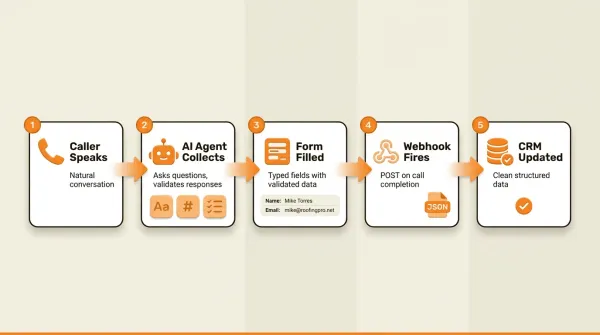
The form data is also included in the webhook payload that fires when the call completes. The form_fills array in the webhook contains the form title and all field values. Your CRM, spreadsheet, or custom system receives this data and can process it immediately. The same pattern works whether the call came from your main phone line, a website widget, or the Agent Calling API.
Form collection often identifies leads that need immediate human handoff, CallCow's transfer-to-human feature routes calls to your team with static or dynamic routing.
After collecting form data, the AI can also text the caller a confirmation link, booking URL, or payment link via SMS Instructions.
Forms data can also trigger direct booking into Google Calendar (beta), Outlook Calendar (beta), Calendly, or Cal.com.
Webhook integration: getting data into your systems
The form data is only useful if it reaches the systems where your team actually works. In CallCow, this happens through webhooks.
When a call completes, CallCow sends a POST request to any webhook URL you've configured. The payload includes the form_fills array alongside call metadata like call ID, status, transcript, and summary.
A sample form section from a webhook payload:
{
  "form_fills": [
    {
      "title": "Roofing Quote Request",
      "values": {
        "Name": "Mike Torres",
        "Email": "mike@roofingpro.net",
        "Phone Number": "+14165550198",
        "Roofing Issue": "Leak near chimney, getting worse after rain",
        "Service Type": "Leak Repair",
        "Preferred Timeline": "Within 2 weeks"
      }
    }
  ]
}
The values object uses your field labels as keys. This makes it straightforward to map the data into your CRM fields.
A few things to understand about webhook timing. Webhooks fire on call completion, not in real time. If a call lasts three minutes, the webhook doesn't fire until the call ends. This is not a streaming integration. For most CRM workflows, this is fine. You want the complete data, not partial fields arriving one at a time.
To set up webhooks, create a webhook in the Integration tab and update your custom workflow metadata to reference it. Your receiving endpoint needs to accept POST requests with JSON and return a 2xx status code. Process the payload asynchronously if needed, and use the call_id field as your own dedupe key so repeated processing does not create duplicate records on your side.
The webhook payload also includes context (a JSON string with custom data like name, email, phone passed when triggering the call) and the full messages transcript. So you get structured form data alongside the raw conversation in a single payload.
If you do not want to write the receiver yourself, Make.com is the cleanest no-code option because it has a documented bidirectional integration with CallCow. Zapier can still work through generic webhooks, but the native CallCow Zapier app is invite-only right now.
Inbound contacts: automatic contact creation
When someone calls your AI agent and provides their information through a form, CallCow automatically creates an inbound contact record. You can find these under /contacts/inbound.
Each contact record stores the phone number, name, email, and notes. The "preferred number" field tracks which of your phone numbers the caller used, which matters if you have multiple numbers routed to different workflows.
This means even if you don't have a webhook set up, the form data still creates a usable contact record in CallCow. You can review inbound contacts, see their call history, and even send them SMS messages directly from the contact page.
For small businesses that aren't running a CRM stack yet, this is often enough. The data lives in CallCow, accessible through the dashboard. When you're ready to integrate with a CRM, the webhook gives you the same data in a structured format.
Real examples of forms in business calls
Theory only goes so far. Below are four ways businesses use forms in practice.
Home services lead capture
A roofing company's AI agent answers inbound calls. The form collects: name (text), email (email), phone (phone), address (text), issue description (text), and service type (select: inspection, repair, full replacement).
When a homeowner calls about a leak, the AI agent walks them through these fields conversationally. The webhook sends the data to their job management software. A new lead appears in the system before the caller hangs up.
Medical office intake
A dental clinic's AI agent handles after-hours calls. The form collects: patient name (text), phone (phone), email (email), reason for visit (select: routine cleaning, emergency, consultation, other), preferred days (multi-select: Monday through Friday).
The data goes into their patient management system via webhook. The front desk staff sees new intake submissions when they arrive the next morning and can schedule accordingly.
SaaS outbound qualification
A B2B SaaS company runs outbound call campaigns. The AI agent calls prospects from a list. The form collects: company size (number: employee count), current tool (text), pain points (text), budget range (select: under $500/mo, $500-2000/mo, $2000+/mo), decision timeline (select: immediately, this quarter, next quarter, exploring).
Qualified leads (right company size, right budget, right timeline) get routed to the sales team through the webhook. Unqualified leads get a follow-up email sequence instead.
Real estate buyer inquiry
A real estate agency's AI agent handles website call inquiries. The form collects: name (text), phone (phone), email (email), property type (select: residential, commercial, investment), budget range (number), preferred locations (multi-select: neighborhood list).
The webhook pushes data into their CRM with the lead tagged by property type and budget range. Agents see qualified inquiries immediately.
Forms vs. transcript parsing: why structure wins
Here's how they compare.
With transcript parsing, you're relying on the AI to extract the right information from free-form speech. The quality depends on the model, the prompt, the caller's communication style, and background noise. Sometimes it works perfectly. Sometimes it hallucinates an email address that doesn't exist. Sometimes it misses a field entirely. CallCow supports GPT 5.4 as the recommended LLM model, selectable per-workflow in LLM Models settings. In testing shows it produces fewer hallucinations than earlier models, though there is a slight latency increase. That tradeoff is worth it for data quality. But even the best model is still probabilistic.
With forms, the AI agent asks specific questions for specific fields. The response goes into a typed field. An email field stores an email. A number field stores a number. The data type is guaranteed by the field definition, not by the AI's interpretation.
Transcript parsing gives you a best guess. Forms give you collected data. For business operations, the difference matters. You don't want your sales team following up on a "maybe this is their email" lead. You want confirmed data.
Forms also solve the problem of missing information. With a transcript, you only get what the caller volunteered. With a form, the AI agent asks for every field. If the caller didn't mention their email, the agent asks. Nothing gets missed because nothing is optional unless you configure it that way.
What forms don't do: honest limitations
Forms have limitations worth knowing before you build.
No conditional logic. You cannot set up rules like "if they select 'repair,' ask for warranty info; if they select 'new installation,' ask for square footage." Every caller gets the same set of questions regardless of previous answers. For complex qualification flows, that is the biggest limitation today.
No file upload field. Callers cannot send documents, photos, or files through a voice call. If you need a photo of a damaged roof or a copy of an insurance card, the AI agent has to ask the caller to email it separately or visit a web form.
Select options must be predefined. You can't dynamically generate the options list based on external data. If you have a list of 200 service categories that changes weekly, you'll need to update the form manually. The options are static once configured.
Webhooks fire on completion, not real time. If a call lasts five minutes, you get no data until it ends. You cannot stream form field values as they're collected. For most use cases this is fine, but if you need live updates on a dashboard as the call progresses, this won't work.
Trial accounts are limited to four concurrent calls with verified numbers only. If you want to test forms at scale during your trial, you'll hit that ceiling quickly.
The AI always self-identifies as AI. CallCow's agent announces that it's an AI at the start of the call. You cannot configure it to present itself as a human. This is a deliberate choice for transparency, but it means callers know they're talking to a machine from the first second.
CallCow forms vs. other voice agent platforms
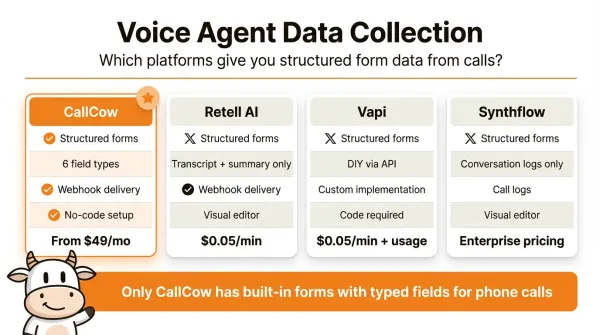
I reviewed this against the platforms that show up in search results for "ai voice agent platform." Treat the comparison below as a reading of their public positioning, not a claim that every edge case has been exhaustively verified.
Retell AI publicly emphasizes transcripts, summaries, and developer-oriented controls. I did not find a documented typed forms model on the pages reviewed, so the practical assumption is that you still need your own extraction and data-mapping layer.
Vapi is a developer platform. You build the conversation logic yourself through their API. If you want structured data collection, plan to build the extraction and storage path yourself unless their current docs say otherwise.
Synthflow targets enterprise phone automation. From the public material I reviewed, the data model is more conversation-first than form-first. Verify current feature depth and pricing directly before treating it as a typed-forms product.
Voiceflow started as a chatbot builder and added voice later. Its form patterns are easier to understand in chat than in phone workflows, so if voice-first typed collection is your main use case, check the current implementation carefully.
Bland AI focuses on outbound calling at scale. I did not find a documented first-class forms construct in the public pages I checked, so expect API-driven extraction rather than a built-in typed form state unless their current docs say otherwise.
I did not see a clearly documented first-class "form" object in the public public pages I checked for those platforms. That is the gap CallCow documents directly: forms as a workflow state the AI enters, collects data through, and exits with structured results.
Side-by-side comparison:
| Feature | CallCow | Retell AI | Vapi | Synthflow |
|---|---|---|---|---|
| Structured data collection | Built-in forms | Transcript + summary | DIY via API | Conversation logs only |
| Field types | 6 (text, number, email, phone, select, multi-select) | None | None | None |
| Webhook integration | Form data in payload | Transcript payload | Custom implementation | Call logs |
| No-code setup | Dashboard builder | Visual editor | Code-required | Visual editor |
| Phone-based forms | Yes, native | No | No | No |
| CRM integration | Webhooks + auto contacts | Manual | Build yourself | Enterprise custom |
| Pricing | Check current pricing | Check current pricing | Check current pricing | Check current pricing |
If you want to test forms on live calls, CallCow lets you do that in the trial at callcow.ai.
Pros and cons of AI forms for data collection
Pros:
- Consistent data quality. Every call produces the same structured fields, so your downstream systems always get data in the expected format.
- No manual data entry. The AI collects information during the call and delivers it directly to your CRM or spreadsheet via webhook.
- Works at any volume. Forms scale without adding headcount. One call or five hundred, the process is identical.
- Better caller experience than web forms. Callers answer questions conversationally instead of typing on a tiny phone screen.
- Automatic validation. Email fields validate email format. Number fields store numbers. Select fields restrict to predefined options.
Cons:
- No conditional logic yet. Every caller gets the same questions regardless of previous answers. Complex qualification flows need workarounds.
- Voice isn't ideal for everything. Long addresses, exact spellings, and complex inputs are harder over the phone than in a web form.
- Select options must be predefined. You can't pull dynamic lists from an external database during the call.
- Webhooks fire on call completion, not in real time. You won't see partial form data until the call ends.
- Callers who distrust AI may give incomplete or inaccurate answers, knowing they're talking to a machine.
Who this is for (and who it's not)
Good fit:
- Businesses tired of parsing phone call transcripts to extract lead information. Forms give you typed, validated fields instead
- Teams using CRMs that need structured data (name, email, phone, service type) flowing in automatically via webhooks
- High-volume operations where manual data entry from voicemails doesn't scale
Not a good fit:
- Anyone needing conditional form logic (if they pick "repair," ask about warranty info). Forms are flat: every caller gets the same questions regardless of previous answers
- Use cases requiring file uploads through the voice call. Callers can't send photos or documents by talking
- Businesses needing real-time form data during the call. Webhooks fire on completion only
- Teams that need dynamic select options pulled from an external database during the call
Build your first form in CallCow
If you're evaluating platforms, don't start by comparing demo transcripts. Start by building one real form and seeing whether the data lands where your team needs it.
Use a first form like this:
Name(text)Email(email)Phone Number(phone)Service Type(select)
That setup is enough to validate CallCow's core difference from transcript-first platforms. Instead of ending the call with a blob of text and a parsing problem, you end with typed fields attached to the call record and included in the completion webhook.
Fastest path from zero to collecting data on calls:
First, create a form. Go to /forms in the CallCow dashboard. Click create. Give it a title that describes what it collects ("Lead capture," "Service inquiry," "Patient intake"). Add your fields with the right types. Keep it to four or five fields for your first attempt.
Second, create or edit a workflow. Open the workflow builder, add a new state, and choose the Form type. Select the form you just created. Position the form state where it makes sense in your call flow. After the greeting, usually.
Third, set up your webhook. Go to the Integration tab, create a webhook endpoint, and configure it in your workflow metadata. Your endpoint needs to accept POST with JSON and return 200. If you do not have a server ready, use a tool like ngrok to forward to a local development endpoint, or check whether Zapier access is available for your account before planning around it because CallCow's Zapier integration is invite-only.
Fourth, test with a browser call. CallCow supports browser-based calls for testing. Make a test call, answer your own questions, and check the call detail page to see the filled form data. Verify the webhook payload arrives at your endpoint with the form_fills array populated correctly.
Fifth, go live with a real phone number. Connect a Twilio number, route it to your workflow, and let real callers interact with the form. Monitor the first few calls to make sure the AI agent is collecting data correctly.
If you want to try forms on actual phone calls, start with CallCow's free trial. You get four concurrent calls and can test with verified numbers. For existing articles in this series, check out the complete guide to AI voice agents for platform comparisons, the prompt-to-call API guide for programmatic call triggering, and the website widget guide for embedding voice agents on your site.
Quick setup and evaluation checklist
If you're using this article to decide whether CallCow fits your business, evaluate it in this order:
First, confirm your use case matches the product. Forms are a strong fit when you need the same set of lead or intake fields on every call. They are a weaker fit if your flow depends on conditional branching, dynamic option lists, file uploads, or live mid-call data streaming.
Second, scope a small pilot. Pick one workflow with four to six fields, one webhook destination, and one success metric. Good first metrics are form completion rate, valid email capture rate, or percentage of calls that create a usable CRM record without human cleanup.
Third, verify the implementation basics early. You'll need your workflow, your form, and a webhook endpoint that accepts JSON POST requests. For live phone testing beyond browser calls, you'll also need a Twilio number, and trial accounts are limited to four concurrent calls with verified numbers only.
Fourth, review the output where your team actually works. Check the /calls detail page, inspect the form_fills payload, and make sure the field labels map cleanly into your CRM, spreadsheet, or automation tool. That is the real buying test, not whether the agent sounded 5 percent more natural.
Frequently asked questions
What is an AI voice agent form?
An AI voice agent form is a structured data collection template that your AI phone agent fills out during a call. Rather than recording a transcript, the agent asks specific questions and stores each answer in a typed field: text, number, email, phone, select, or multi-select. When the call ends, you get clean structured data, not a paragraph to parse.
How does AI collect data during phone calls?
The AI agent enters a form state in the workflow and asks the caller questions conversationally. It listens for the response, validates it against the field type, and stores the value. For example, an email field catches spoken email patterns like "john at gmail dot com" and formats them correctly. The data stays typed and structured throughout.
Can AI voice agents fill out forms?
Yes. CallCow's AI voice agents fill out structured forms during phone calls as part of the workflow. You define the fields you need, attach the form to a workflow state, and the AI collects each one through natural conversation. The filled form data is stored with the call record and sent via webhook to your CRM or other systems.
What data can AI capture from phone calls?
AI voice agents can capture names, email addresses, phone numbers, numeric values like budgets or square footage, and predefined selections like service types or timeframes. CallCow supports six field types: text, number, email, phone, select, and multi-select. The key advantage is that each field is typed and validated, so an email field always stores a valid email format.
How is voice form data different from transcript parsing?
Transcript parsing relies on an AI model to extract information from free-form speech, which is probabilistic and sometimes misses fields or hallucinates values. Forms are deterministic. The agent asks for each field directly and validates the response against the field type. You get collected data, not a best guess. This makes forms more reliable for business operations where data accuracy matters.
Ready to stop parsing transcripts? If you want to test it on your own number, CallCow has a trial at callcow.ai.