AI Phone Answering Service Cost: Complete 2026 Pricing Breakdown
AI phone answering service cost depends on billing model, call volume, transfer rate, and integrations. This guide breaks down the cost buckets that actually matter.AI Phone Answering Service Cost: Complete 2026 Pricing Breakdown
AI phone answering service cost depends on the billing model. Some providers use a subscription plus carrier billing. Some bundle the phone costs into one plan. Some developer platforms bill by the minute. The mistake buyers make is comparing one headline number without modeling call volume, transfer rate, and the extra tools they still need.
I spent weeks researching pricing pages, Reddit threads, and provider positioning. The common pattern is the same: headline pricing hides the operational details that actually change the bill. This article is meant as a buyer framework, not a promise that every number stays current after the next pricing-page edit.
If you want the full picture on what these services do and which one to pick, I covered that in the virtual receptionist complete guide. This article is about one thing: what it actually costs.
Table of contents
- How much does an AI receptionist cost in 2026?
- The pricing models explained
- Itemized cost breakdown
- Hidden costs nobody mentions
- AI receptionist costs by call volume
- AI vs human receptionist costs
- AI receptionist pricing compared
- How to calculate your actual cost
- Tips to reduce your AI receptionist bill
- Frequently asked questions
How much does an AI receptionist cost in 2026?
The answer depends on which pricing model you choose and how many calls you handle.
The range breaks down by provider type:
Budget AI services (BYOC model): subscription plus direct carrier billing. This is how CallCow works. The real differentiator is not the lower-looking bill alone. You get direct visibility into Twilio charges, ownership of your phone number, and flexibility to layer in features like voicemail transfer, transfer logic, forms, webhooks, and Agent Calling API without hiding telephony costs inside one opaque subscription.
Mid-range AI services (bundled): one monthly plan with some or all usage included. The upside is simplicity. One bill. The tradeoff is usually less control over telephony, less visibility into transfer costs, and fewer portable assets if you ever want to switch vendors.
Enterprise AI services: sales-led pricing, usually with more support, heavier integration work, and broader account management.
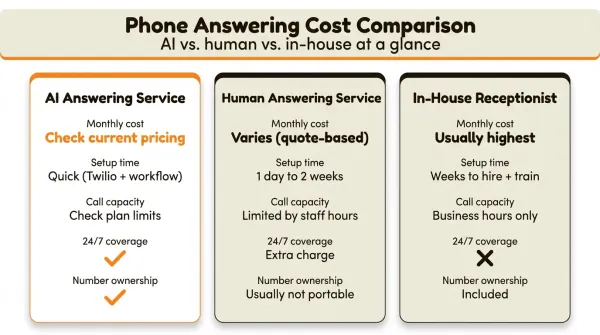
Human answering services: usually much higher than AI-first setups, with pricing tied to hours, call volume, and handling depth. These are real humans answering, which matters for some businesses, but the cost usually scales poorly. For a deeper look at options across all categories, see the best phone answering service comparison. For small businesses specifically, the best answering service for small business guide breaks down which services fit different budgets.
In-house receptionist: usually the highest-cost route once salary, benefits, taxes, and management overhead are included.
The dirty secret of the AI receptionist industry is that many providers do not publish the real operating details behind the plan. "Unlimited" often needs fine-print verification, especially around transfers, outbound use, and number ownership.
The pricing models explained
There are three distinct pricing models in the AI receptionist space. Understanding which one a provider uses tells you more about your real cost than any advertised price.
Subscription plus BYOC (bring your own carrier)
You pay a flat monthly subscription to the AI platform. You set up your own Twilio account (free to create) and pay Twilio directly for phone numbers and per-minute charges. The AI platform never touches your phone money.
This is how CallCow works. You pay the software subscription, then you pay Twilio directly for the phone number and usage. Verify the current plan and Twilio rate card when you model your own bill.
The advantage is transparency paired with more flexible operations. You can log into Twilio and inspect the underlying usage. You own your phone number. If you leave CallCow, your number goes with you. And because CallCow sits on top of your own Twilio setup, pricing stays tied to features that actually matter in production: voicemail transfer for missed-call coverage, structured forms for lead capture, transfer-to-human routing, Google Calendar and Outlook Calendar in beta, Calendly, Cal.com, TidyCal, Trafft, webhooks, Agent Calling API, SMS Instructions for texting callers links mid-conversation, and GPT 5.4 if you want fewer hallucinations and can accept a slight latency tradeoff.
The disadvantage is you manage two accounts. Twilio setup is straightforward, but it is still one more thing. If you want toll-free numbers, expect them to cost more than local numbers.
Bundled subscription
You pay one monthly fee to the AI provider. They handle the phone number, the minutes, everything. One bill. No Twilio account needed.
Bundled providers vary widely in how they package minutes, numbers, and overages. Verify current plan structure directly before comparing them.
This model is simpler. But simplicity is what you are paying extra for. You do not usually own the phone number, you cannot inspect the underlying per-minute rate, and feature depth is whatever the provider packages. If you need custom transfer behavior, webhook-based follow-up, reusable forms, or deeper telephony control, the monthly fee alone does not tell you whether the product can actually support your workflow.
There's also a psychological pricing trick at work. One flat number sounds cleaner than subscription plus usage. Sometimes that simplicity is worth paying for. Sometimes it hides that your real usage is nowhere near the point where a bundled plan makes financial sense.
Per-minute or per-call
Developer platforms like Vapi, Retell AI, and Bland AI often charge by the minute with little or no business-facing workflow layer on top.
This sounds cheap, and for very low volumes it can be. But these are developer tools, not turnkey business products. You build your own call flow, configure your own voice model, handle your own error states, and usually add separate telephony costs underneath.
CallCow's Agent Calling API lets any AI agent trigger a real phone call with a single natural language prompt, no workflow setup needed. For developers building custom integrations, this removes the usual complexity of call orchestration.
Which model is cheapest?
For most small businesses, the BYOC model stays compelling because the lower starting cost comes with meaningful control, not just cheaper-looking minutes. The honest answer still depends on call volume and transfer behavior.
Use your own worksheet instead of trusting a generic crossover point. For lower-volume businesses, BYOC is often attractive. For very high-volume businesses, bundled plans can become more attractive. For developer tools, the raw minute cost may look low, but the missing workflow and operations layer still has to be paid for somewhere.
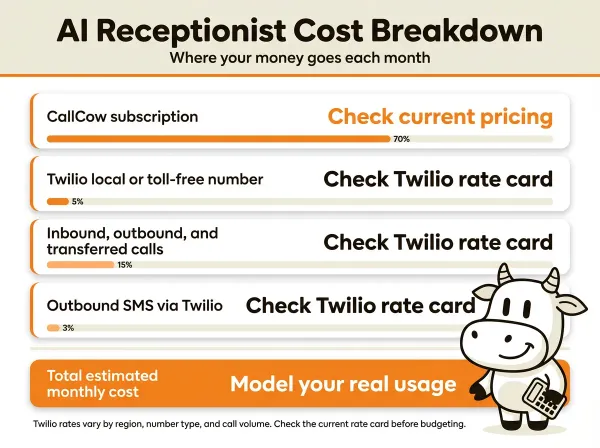
Itemized cost breakdown
Most pricing pages show you a single monthly number and call it done. That's not how billing works. Every line item you'll actually pay for, with real numbers, follows below. If you're comparing services more broadly, the best virtual receptionist guide covers feature differences alongside pricing.
Phone number
Every AI receptionist needs a phone number. This is a recurring monthly charge, separate from the subscription.
| Number type | Twilio BYOC cost | Bundled provider cost |
|---|---|---|
| Local number | Check current Twilio rate card | Usually included |
| Toll-free number | Check current Twilio rate card | Usually included |
| Number porting | Verify current carrier process | Verify current provider process |
| Additional numbers | Check current Twilio rate card | Often an added monthly fee |
If you use CallCow's BYOC model, you pay Twilio directly. Check the current Twilio rate card for local numbers, toll-free numbers, and porting timelines before you turn this into a budget line item.
With bundled providers, the phone number is typically included in the subscription. But if you need multiple numbers for departments or locations, expect additional fees and verify them directly.
Per-minute call charges
This is where costs vary the most, and where most providers are least transparent.
| Call type | Twilio rate (BYOC) | Typical bundled rate |
|---|---|---|
| Inbound call | Check current Twilio rate card | Often included in subscription |
| Outbound call | Check current Twilio rate card | Sometimes billed separately |
| Transferred call | Higher than non-transferred because of the double leg | Often underdisclosed |
| SIP media | Check current Twilio rate card | N/A |
Transferred calls deserve special attention. When the AI answers a call and then transfers it to your cell phone, Twilio charges you for two legs: the inbound call from the caller to Twilio, and the outbound call from Twilio to your phone. That means transfers can materially change your effective cost per handled call.
Most bundled providers don't disclose this. They advertise "unlimited inbound" but transfers count as outbound, and outbound is either limited, charged separately, or simply not mentioned until you see the bill.
Software subscription
This is the platform fee. What you get for it varies wildly between providers, which is why the cheapest sticker price is not always the best buy.
| Provider | Basic plan | What's included | Pro/Enterprise |
|---|---|---|---|
| CallCow | Check current pricing | 1 workflow, voice cloning, forms, API/webhook support, calendar options | Check current pricing |
| My AI Front Desk | Check current pricing | Call handling, scheduling | Check current pricing |
| NextPhone | Check current pricing | Unlimited inbound | Check current pricing |
| Ringly.io | Check current pricing | Tiered minutes, CRM | Check current pricing |
| Smith.ai | Check current pricing | AI + human | Check current pricing |
| Dialzara | Custom | Per-minute, custom | Custom |
| RingCentral | Custom | Enterprise features | Custom |
Integrations and add-ons
Most businesses need at least one integration. Calendar booking, CRM sync, or automation tools. These costs sit on top of everything else.
| Integration | Cost | Notes |
|---|---|---|
| Google Calendar | Free | CallCow supports this in beta |
| Outlook Calendar | Free | CallCow supports this in beta |
| Calendly | Check current pricing | Connected via personal access token |
| Cal.com | Check current pricing | Connected via API key set to never expire |
| TidyCal | Check current pricing | Paid bookings cannot be booked through the API |
| Trafft | Check current pricing | API books the first available employee only |
| Make.com | Check current pricing | Bidirectional with CallCow |
| Zapier | Check current pricing | CallCow integration is invite-only |
| Monday.com | Varies | Direct integration available |
Hidden costs nobody mentions
I've read through dozens of pricing pages, Reddit threads, and customer reviews. These are the costs that surprise people.
Transferred call double-billing
I mentioned this above, but it's worth repeating because nobody else does. When the AI transfers a call to you, you pay for two call legs. Inbound from the caller. Outbound to your phone. This doubles the per-minute cost for every transferred call.
With Twilio BYOC, transferred calls cost materially more than non-transferred calls because you are paying two call legs. If your workflow transfers a large share of calls, your effective operating cost can look very different from a simple call-count estimate.
Toll-free number premium
Local numbers are usually cheaper than toll-free numbers. If you think you need toll-free because it "looks more professional," ask whether that really matters to your customers before paying for it.
Trial limitations
CallCow's trial gives you 4 concurrent calls and requires verified numbers. This is to prevent abuse. But it means you can't test with a personal cell phone that isn't verified. Most competitors have similar restrictions. "Free trial" doesn't always mean "unrestricted access."
Overages on "unlimited" plans
"Unlimited" plans need careful reading. Inbound minutes, outbound use, transfers, and overages are not always treated the same way. If your AI makes follow-up calls or transfers callers to humans, verify what is actually included.
Number porting delays
Porting your existing business number to Twilio takes 1 to 4 weeks. During that time, you either use a temporary number (confusing for callers) or wait. With bundled providers, porting is handled for you but can take just as long. If you're in a hurry, budget for a temporary number and plan your marketing accordingly.
Carrier voicemail transfer limitations
CallCow's voicemail transfer feature (where the AI only handles calls you don't answer) is the smartest way to use an AI receptionist. But it doesn't work on every carrier. Some carriers don't support conditional call forwarding, or they charge extra for it. Check with your carrier before you plan around this feature.
The cost of not setting up properly
I've seen businesses sign up for an AI receptionist, configure it in 10 minutes, and wonder why it doesn't work well. The AI answers calls but gives wrong information. It transfers calls to the wrong person. It books appointments into the wrong calendar.
Setup time is a real cost. Even if the software itself does not charge for configuration, your time still has a cost. Count that when you compare providers.
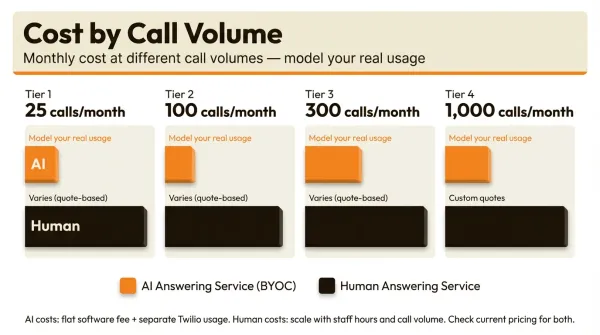
AI receptionist costs by call volume
Call volume is the single biggest factor in your actual cost. Here's what different volumes look like across pricing models.
Low volume: 25 calls per month
This is a solo professional. A consultant, realtor, or freelancer who gets a handful of calls daily.
| Component | BYOC (CallCow basic) | Bundled provider |
|---|---|---|
| Subscription | Check current pricing | Check current pricing |
| Phone number | Separate carrier billing | Often included |
| Call minutes | Separate carrier billing | Often bundled |
| Total | Model your real usage | Model your real usage |
At this volume, the dollar gap is modest. The more important question is whether you want one simple bundled bill or direct control over the number, transfer behavior, and downstream integrations.
Medium volume: 100 calls per month
A small business. A clinic, law firm, or home services company with steady inbound calls.
| Component | BYOC (CallCow basic) | Bundled provider |
|---|---|---|
| Subscription | Check current pricing | Check current pricing |
| Phone number | Separate carrier billing | Often included |
| Call minutes | Separate carrier billing | Often bundled |
| Total | Model your real usage | Model your real usage |
At 100 calls per month, the price gap becomes hard to ignore. But cost still should not be the only filter. If you need direct Twilio ownership, forms for structured intake, webhook automations, or voicemail transfer workflows, the lower-cost BYOC model also gives you more operational flexibility. If your top priority is one bill and minimal setup, bundled pricing can still be worth considering.
High volume: 300 calls per month
A busy practice or growing business. Multiple staff, lots of appointment booking and call transfers.
| Component | BYOC (CallCow pro) | Bundled provider |
|---|---|---|
| Subscription | Check current pricing | Check current pricing |
| Phone number | Separate carrier billing | Often included |
| Call minutes | Separate carrier billing | Often bundled |
| Transfer surcharge | Depends on workflow | Verify included usage |
| Total | Model your real usage | Model your real usage |
At this level, the answer depends less on a generic industry average and more on your exact workflow. Transfer-heavy setups and bundled plans can move the crossover point in either direction.
Very high volume: 1,000+ calls per month
At this level, you're a large practice or call center. You should be talking to providers directly for custom pricing.
| Component | BYOC (CallCow pro) | Bundled enterprise |
|---|---|---|
| Subscription | Check current pricing | Check current pricing |
| Phone number | Separate carrier billing | Often included |
| Call minutes | Separate carrier billing | Often bundled |
| Transfer surcharge | Depends on workflow | Verify included usage |
| Total | Model your real usage | Model your real usage |
At very high call volume, the gap narrows. That is the point where bundled plans can start looking more attractive on pure pricing, but you still need to weigh that against number ownership, transfer visibility, and workflow depth.
Quick buyer checklist
Before you choose based on monthly price alone, run through this short checklist:
- Your monthly call volume: Lower-volume businesses often prefer transparent BYOC pricing; very high volume can tilt toward bundled plans.
- Number ownership: If keeping your existing number portable matters, make sure you control the Twilio account or confirm the provider's port-out process.
- Transfer needs: If you expect frequent transfers, ask exactly how outbound or transferred minutes are billed.
- Workflow depth: If you need forms, webhooks, Agent Calling API, SMS Instructions for texting callers links mid-call, or voicemail transfer, compare those features before comparing totals.
- Setup tolerance: If you want one bill and less configuration, bundled plans may justify the higher monthly price.
If you want a calculator-style estimate, use this quick worksheet before any sales call:
Estimated monthly cost = subscription + phone number + non-transferred minutes + transferred minutes + integrations

Non-transferred minutes = calls x (1 - transfer rate) x average duration
Transferred minutes = calls x transfer rate x average duration x 2
That gives you a cleaner buying decision than looking at a single advertised plan price in isolation.
AI vs human receptionist costs
This comparison gets brought up constantly on Reddit and in sales calls.
Monthly cost comparison
| Cost item | AI receptionist (BYOC) | Human answering service | In-house receptionist |
|---|---|---|---|
| Subscription/service fee | Varies | Varies | $0 |
| Phone number | Varies | Included or bundled | Varies |
| Per-minute charges | Varies | Usually bundled | Included |
| Salary | $0 | $0 | $3,000 to $4,500 |
| Benefits + payroll tax | $0 | $0 | $800 to $1,500 |
| Training (initial) | 30 minutes of your time | Included | $500 to $2,000 |
| Monthly total | Usually lowest at modest volume | Usually higher | Usually highest |
Annual cost comparison
| Option | Low end | High end |
|---|---|---|
| AI receptionist (BYOC) | Lower | Higher |
| Human answering service | Higher | Higher |
| In-house receptionist | Highest | Highest |
On direct monthly operating cost, AI receptionists usually sit far below human answering services and far below an in-house receptionist. What that lower cost does not guarantee is the same experience on emotionally complex calls or edge cases.
What humans do that AI doesn't
To be fair, human receptionists handle things AI still struggles with. Complex emotional situations. Nuanced scheduling conflicts. Calls where the caller is upset and needs empathy. Multi-step problem resolution that requires judgment.
If your business handles mostly routine calls like appointment booking, FAQs, lead capture, and message taking, AI is usually strongest when it does the repetitive front-line work and hands off exceptions. CallCow's transfer-to-human feature supports that model, though it requires a Twilio Business Profile and it is a cold transfer, not a warm one.
In practice, a hybrid setup is often the most realistic approach: let the AI handle routine intake first, then transfer when the caller asks for a human or the workflow reaches a limit. CallCow supports this with both static transfer rules and a dynamic transfer URL that routes calls based on caller input.
The real comparison beyond the bill
Most cost comparisons stop at the monthly bill. They should also ask what kind of coverage and workflow support you actually need.
If you need 24/7 first-response coverage, structured data capture, or a voicemail-transfer setup that only activates when you miss a call, that changes the value of the product even when two plans look similar on price. If you need human empathy on difficult calls, the lowest-cost AI plan may still not be the right fit.
AI receptionist pricing compared
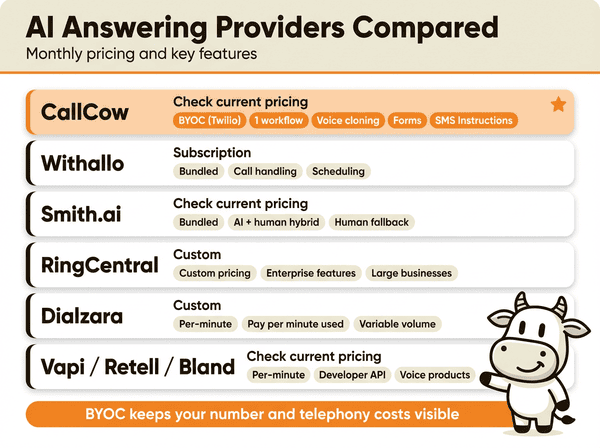
Here's a consolidated comparison table of every major provider I could find with published or verifiable pricing.
| Provider | Pricing model | Starting price | What you get at starting price | Best for |
|---|---|---|---|---|
| CallCow | BYOC (Twilio) | Check current pricing | 1 workflow, basic features, voice cloning, forms, SMS Instructions | Businesses wanting BYOC control |
| My AI Front Desk | Bundled | Check current pricing | Call handling, scheduling | Businesses wanting simplicity |
| NextPhone | Bundled | Check current pricing | Bundled inbound usage | Businesses with high call volume |
| Ringly.io | Bundled | Check current pricing | Tiered minutes, CRM focus | Businesses wanting CRM integration |
| Withallo | Bundled | Subscription | Call handling, scheduling | Service businesses |
| Dialzara | Per-minute | Custom | Pay per minute used | Variable volume businesses |
| Smith.ai | Bundled | Check current pricing | AI + human hybrid | Businesses wanting human fallback |
| RingCentral | Custom | Custom | Enterprise features | Large businesses |
| Vapi | Per-minute | Check current pricing | Developer API | Developers building voice products |
| Retell AI | Per-minute | Check current pricing | Developer API | Developers building voice products |
| Bland AI | Per-minute | Check current pricing | Developer API | Developers building voice products |
A few observations from this table:
For small businesses that want transparent telephony costs, CallCow's BYOC model is often one of the lowest-cost structures at modest volume.
The "unlimited" pitch becomes more compelling at higher call volume, but for lower-volume teams the included minutes can mask a much higher effective monthly cost.
Per-minute developer platforms (Vapi, Retell, Bland) are cheap per minute but require significant technical investment. You're not buying a product. You're buying infrastructure to build a product.
Smith.ai is a prominent AI-plus-human hybrid option. That can be compelling for businesses that absolutely cannot have AI fail, but the cost structure needs close review if volume grows.
RingCentral and Dialzara use sales-led pricing. Treat that as a sign to ask harder questions about what is included, how usage is billed, and how hard it is to leave later.
Why CallCow for cost-conscious buyers
If your main concern is getting the most capability per dollar, CallCow's BYOC model stacks up in ways that aren't always visible from the pricing page alone.
BYOC transparency: You log into Twilio and see exactly what you're paying for phone numbers and minutes. No hidden per-transfer surcharges buried in a bundled bill.
Voice cloning: Upload a 30-second audio sample and get a cloned voice. No extra charge on top of the subscription.
Forms: Six field types (text, number, email, phone, select, multi-select) with webhook output, so caller data goes straight into your CRM or automation tool after the call completes.
SMS Instructions: Text callers links, directions, or any other information mid-conversation. This requires Twilio SMS capability on the connected number.
Calendar integrations: Google Calendar (beta), Outlook Calendar (beta), Calendly, Cal.com, TidyCal, and Trafft. TidyCal paid bookings are excluded, and Trafft books the first available employee rather than a specific one.
Voicemail transfer: The AI only handles calls you do not answer, reducing usage costs while maintaining coverage. It is not available on every carrier.
GPT 5.4: Recommended model per workflow. Fewer hallucinations with a slight latency tradeoff.
Agent Calling API: Lets any AI agent trigger a real phone call with a single natural language prompt, no workflow setup needed.
Embed widgets: Add a floating or inline voice widget to any website page, turning it into a lead-capture surface.
Inbound contacts: Every caller automatically becomes a contact - phone, name, email, and notes when available - building a passive lead database that reduces manual data-entry costs.
How to calculate your actual cost
Don't trust any provider's advertised price. Calculate your own.
Step 1: Count your calls
Look at your phone bill or call logs for the last 3 months. Count the total number of calls and calculate the average. Most businesses have seasonal variation, so use a 3-month average, not a single month.
Also note your average call duration. Most business calls are 2 to 4 minutes. Use 3 minutes as a default if you don't know.
Step 2: Estimate your transfer rate
What percentage of calls will the AI transfer to a human? If you're using AI as a primary answering service with human backup, estimate 20 to 40%. If you're using voicemail transfer (AI only handles missed calls), estimate 5 to 15%.
Step 3: Calculate per-minute costs
For BYOC (Twilio) pricing:
Non-transferred minutes = (total calls × (1 - transfer rate)) × avg duration
Transferred minutes = (total calls × transfer rate) × avg duration × 2 (double leg)
Total Twilio cost = phone number + (non-transferred minutes × current Twilio rate) + (transferred minutes × current Twilio rate)
For bundled pricing, your cost is just the subscription fee. But verify whether transfers are truly unlimited.
Step 4: Add the subscription
For CallCow: use the current plan page, not this article, as the final pricing source of truth.
Step 5: Add integrations
Calendar tools, CRM sync, automation. Verify the current price of every extra tool you plan to connect.
Example calculation
A law firm gets 150 calls per month, average 3 minutes per call, 30% transfer rate.
Non-transferred calls: 150 × 0.70 = 105 calls × 3 min = 315 minutes
Transferred calls: 150 × 0.30 = 45 calls × 3 min × 2 legs = 270 minutes
Total minutes: 585 minutes
Twilio cost: number cost + (billable minutes × current Twilio rate)
Subscription: current CallCow plan cost
Integration (Google Calendar): verify current pricing if any
Total: add the current rate card values for your own estimate
Model your own call volume and transfer rate instead of trusting a headline plan price.
Tips to reduce your AI receptionist bill
After auditing pricing across dozens of providers and talking to customers, here are the practical ways to keep costs down.
Start with the cheapest plan that fits
Every provider offers multiple tiers. Start with the cheapest one that still supports your core workflow. You can always upgrade. With CallCow, verify the current plan page before you assume which features belong in which tier.
Use voicemail transfer instead of answering every call
Instead of having the AI answer every single call, configure your carrier to forward only unanswered calls (after 3-4 rings) to the AI. You answer calls you can take. The AI catches everything else.
This can materially reduce AI-handled call volume if you already answer a meaningful share of calls yourself. For example, if you personally handle 60% of calls, only the remaining 40% would reach the AI. At 100 total calls, that would mean roughly 40 AI-handled calls instead of 100, and your usage-based Twilio costs would drop accordingly.
CallCow supports this with voicemail transfer. Setup is carrier-dependent and does not work on every carrier, but when it works, it is the cleanest starting point. If you want to test that setup first, read the voicemail transfer docs and the phone number guide before you connect a production number. You keep the personal touch for calls you can take, and the AI acts as a safety net.
Minimize transferred calls
Every transferred call costs double in per-minute charges. Configure your AI workflow to handle as much as possible without transferring. Use forms to collect information. Answer common questions in the AI script. Only transfer for genuinely complex situations.
If your current transfer rate is 50%, work on getting it to 20%. That's a 30% reduction in your most expensive call minutes.
Use a local number, not toll-free
Local numbers on Twilio usually cost less than toll-free numbers. Unless you have a specific reason for toll-free, a local number is often the cheaper default. Check the current rate card before deciding.
Keep calls short
Every extra minute on a call costs money. Train your AI to be efficient. Short greetings. Direct questions. Quick form filling. If a caller asks a question the AI can answer in 30 seconds, don't let it ramble for 3 minutes. Review your call logs periodically and look for patterns where calls run longer than necessary.
Review your actual usage monthly
Log into Twilio (if using BYOC) or your provider's dashboard. Check your actual call volume and duration against your estimates. Most businesses overestimate their volume when choosing a plan. If you're on a bundled plan and using 40% of your included minutes, you're overpaying.
Don't pay for features you don't use
Some providers charge extra for voice cloning, custom workflows, or integrations. CallCow includes voice cloning and basic integrations at no extra cost. Make sure you're not paying a premium for features you'll never use.
Negotiate at high volumes
If you're handling high call volume, contact your provider directly. Most offer some version of custom pricing or custom terms once the account gets large enough.
Who this is for (and who it's not)
This guide is for business owners and agency operators who want to understand what an AI receptionist actually costs before signing up. If you have been burned by "contact us for pricing" pages and want itemized numbers you can put into a spreadsheet, this is for you.
CallCow's BYOC model is often the strongest fit for businesses that want full transparency on telephony costs, ownership of their phone number, and feature flexibility around forms, transfer rules, webhooks, native calendar connections in beta, API-triggered calling, or SMS Instructions for texting callers links during conversations. It is not a good fit if you want one bill and zero infrastructure management. It also is not a fit if you need HIPAA claims, warm transfers, or broad Zapier access today because Zapier is currently invite-only. Production calling is capped at 60 requests per minute. Webhook data arrives after the call ends, not in real time. The AI always identifies itself as AI, callers know they're talking to a machine. Agencies reselling AI receptionist services may also like the share-billing setup, but it is billing management rather than a full white-label product.
Frequently asked questions
How much should I charge for an AI receptionist?
If you're an agency reselling AI receptionist services to clients, your pricing depends on your service layer: setup, monitoring, reporting, and workflow maintenance. CallCow's share billing feature lets agencies manage multiple client accounts under one billing relationship, but it is a billing structure rather than full white-label branding. Price around your support scope and margin expectations, not raw software cost alone.
Is an AI receptionist worth it?
It can be worth it for businesses that need consistent phone coverage, basic intake, scheduling, or after-hours answering. The best way to judge that is not a generic ROI promise. Compare your call volume, average call type, transfer needs, and whether the product can actually handle your workflow without creating more manual work for your team.
Is there a free AI receptionist?
No. Phone calls have infrastructure costs that can't be zeroed out. You need a phone number, call charges, and a software platform to handle the AI logic. Some providers offer trials or very limited free tiers, but those are usually test environments rather than practical production setups. The closest thing to "cheap" is using voicemail transfer so the AI only handles the calls you miss.
How much does an AI call center cost?
An AI call center handling high volumes of inbound and outbound calls with advanced routing, multiple departments, and CRM integration usually sits in a different product category from a small-business receptionist tool. Expect sales-led pricing, heavier implementation work, and more customization than a receptionist-focused setup. If you need a call center rather than a receptionist, plan for enterprise-style pricing and implementation, not a lightweight signup flow.
Test a real workflow before you commit to any pricing model. Connect Twilio, set up one workflow, and estimate your bill from actual usage instead of a headline plan. The getting started guide and the phone number guide are the fastest way to price the BYOC setup against your own call volume. trial at callcow.ai
Yiming Han is the founder of CallCow and writes about phone automation, missed calls, and the tradeoffs that show up when small businesses actually deploy voice AI.