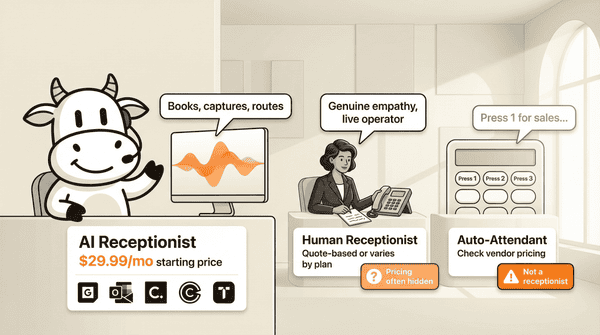
Best virtual receptionist services compared in 2026: public pricing where available
Compare the 10 best virtual receptionist services with public pricing where available, honest limitations, and AI vs human vs auto-attendant breakdowns. Updated April 2026.Best virtual receptionist services compared in 2026: public pricing where available
A virtual receptionist answers calls on behalf of your business, routes them, books appointments, and captures caller information. AI tools usually start lower than human services, but the real total depends on whether telephony is bundled and how usage is billed. The industry has a transparency problem. Three of the top five Google results for this keyword are auto-attendants disguised as receptionist services, and four do not show pricing. CallCow came out of the same problem: I was tired of paying human services $400/month for inconsistent quality and zero data capture. This comparison covers ten real options and uses public pricing where vendors actually publish it.
Table of contents
- How virtual receptionist services work
- AI vs human vs auto-attendant: know the difference
- CallCow
- Ruby
- Smith.ai
- Abby Connect
- ReceptionHQ
- Posh
- My AI Front Desk
- RingCentral AI Receptionist
- Vonage Virtual Receptionist
- Davinci Virtual
- Virtual receptionist comparison table
- Who this is for (and who it's not)
- How to choose a virtual receptionist
- Frequently asked questions
How virtual receptionist services work
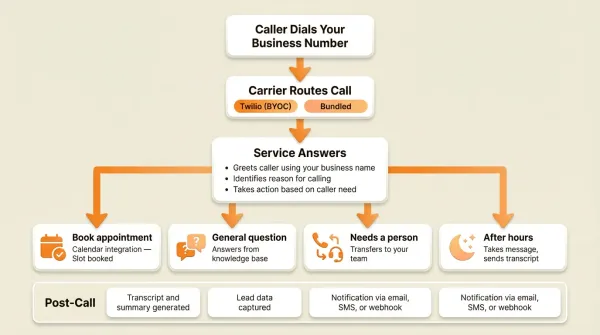
The mechanics are the same across every provider. A call comes in to your business number. Instead of ringing your desk phone or going to voicemail, the call routes to a service that answers on your behalf.
Caller Dials Your Business Number
    |
    v
Carrier Routes Call (Twilio or Bundled)
    |
    v
Service Answers
    +-- Greets caller using your business name
    +-- Identifies reason for calling
    +-- Takes action:
    |     Book appointment? --> Calendar integration --> Slot booked
    |     General question? --> Answers from knowledge base
    |     Needs a person?   --> Transfers to your team
    |     After hours?      --> Takes message, sends transcript
    +-- Thanks caller, ends call
    |
    v
Post-Call
    +-- Transcript and summary generated
    +-- Lead data captured
    +-- Notification via email, SMS, or webhook
The three categories that matter are AI receptionists, human receptionists, and auto-attendants. Most people do not realize these are different products. Google mixes them in the same search results, which makes comparison harder than it should be.
With an AI service like CallCow, you configure a workflow that tells the AI what to say, what information to collect, and when to transfer. Calls flow through your own Twilio account (BYOC model), so you pay Twilio directly for phone minutes. Twilio costs are usage-based and separate under BYOC, so your total depends on your number setup, country, and minutes.
With a human service like Ruby or Posh, trained receptionists answer calls using your custom script. The phone infrastructure is bundled into the monthly fee. You pay one price but have no visibility into per-minute costs.
With an auto-attendant like Vonage or Grasshopper, callers hear a recorded menu: "Press 1 for sales, press 2 for support." There is no conversation. This is not a receptionist. Three of the top ten results for "virtual receptionist" are auto-attendants.
For a full breakdown of how these services differ, see our virtual receptionist complete guide.
AI vs human vs auto-attendant: know the difference
This distinction matters because most comparison articles and Google search results treat all three as the same product. They are not.
AI virtual receptionists
AI services use natural language processing to handle full conversations. The AI greets callers, answers questions, books appointments, captures lead data, and transfers calls. They usually combine software pricing with separate or bundled phone costs depending on the vendor.
Strengths: instant answer time, 24/7 availability, consistent quality on every call, structured data capture, and direct calendar booking. Weaknesses: no genuine emotional intelligence, and on CallCow the AI always identifies itself as AI.
Human virtual receptionists
Human services employ real people who answer calls using your custom script. Ruby, Posh, Abby Connect, and ReceptionHQ are the established names. They usually cost materially more than AI-only tools, with exact totals depending on coverage hours, plan structure, and overages.
Strengths: genuine empathy, better handling of emotionally sensitive calls, and a real person on the line. Weaknesses: quality varies between agents, limited availability on cheaper plans, manual data entry, and costs that scale poorly with volume.
Auto-attendants
Auto-attendants are phone menus. Press 1, press 2, leave a voicemail. Vonage, Grasshopper, and Dialpad offer these. They are usually priced more like phone-system features than receptionist services. They are useful for routing calls within a large organization but they do not answer questions, book appointments, or have conversations. They are not receptionists.
The problem: Vonage, Grasshopper, and Dialpad all rank in the top 10 for "virtual receptionist" on Google despite being auto-attendants. If you are researching this space, know that three of the results are not actually selling what you are looking for.
If you already know you want an AI receptionist rather than a human service, the shortlist gets much smaller. CallCow is the better fit when you want transparent pricing, structured lead capture through forms, native or direct booking workflows, webhook or API access, and you are comfortable with a Twilio BYOC setup. If you need a human voice for emotionally sensitive calls, warm handoffs, or a fully bundled phone bill, skip to the human or hybrid options instead.
Want to test the AI path before reading every vendor profile? The CallCow getting-started guide shows the setup flow, including Twilio connection, workflow setup, and trial limits. That is the fastest way to see whether the BYOC model and AI-first workflow fit your business.
CallCow
CallCow is an AI phone answering service I built after spending too much on human receptionists at my previous company. The service answers inbound calls, books appointments, captures structured lead data, and transfers calls to your team. It runs on your own Twilio account, so you control phone costs.
What it does: 24/7 AI call answering, appointment scheduling through six calendar integrations (Google Calendar beta, Outlook Calendar beta, Cal.com, Calendly, TidyCal, and Trafft), structured forms for lead capture (6 field types - text, number, email, phone, select, and multi-select - that the AI fills conversationally, with data flowing to your CRM via webhooks), inbound contacts, voicemail transfer for missed-call coverage, call transfer via dynamic webhook routing, voice cloning from a 30-second audio sample, SMS Instructions for texting links and information to callers mid-call, website embed widgets, and bulk sequential calling. TidyCal paid bookings are excluded, Trafft books the first available employee, and SMS Instructions require Twilio SMS capability. Agent Calling API lets an external AI agent trigger a real phone call with a natural language prompt, with no prebuilt workflow required. GPT 5.4 is available as a selectable model per workflow for reduced hallucinations with a slight latency tradeoff.
Pricing: CallCow publicly shows plans starting at $29.99/month. Phone costs through Twilio are separate under the BYOC model, so your real total depends on usage and setup.
Inbound contacts: Every caller automatically becomes a contact -- phone, name, email, notes -- so you build a lead database passively without manual data entry.
Best for: Small businesses, solo founders, and agencies that want transparent pricing and structured data capture. Also good for businesses using Make.com or Monday.com since CallCow integrates natively.
Limitations to know about: AI always self-identifies as AI and you cannot disable this. Call transfer requires a Twilio Business Profile and only supports cold/blind transfer (no warm handoff where the AI briefs your team before connecting). Webhooks fire on call completion only, not mid-call. The trial supports 4 concurrent calls with verified numbers only. Zapier integration is invite-only. Voicemail transfer is not available on all carriers. Bulk calling is sequential only with no parallel dialing. Production calling is capped at 60 requests per minute. The workflow builder works, but it still feels rough in places. There is a YouTube setup guide if you want a walkthrough.
If you want to see whether the setup fits your business, the getting started guide and phone number guide show the full flow before you touch a production number. You can test it with the 7-day trial at callcow.ai.
Ruby
Ruby is one of the most recognized names in virtual receptionist services. They provide live human receptionists who answer calls and chat on your behalf.
What it does: Human receptionists answer calls 24/7, take messages, transfer calls, and provide live chat support. Receptionists are trained on your business specifics and answer in your company name.
Pricing: Ruby pricing is quote-based. Check the vendor directly for current plan structure, minute bundles, and overages.
Best for: Businesses that specifically want a human voice on every call and are willing to pay for it. Law firms and medical practices that prioritize personal touch over cost efficiency.
Limitations: Pricing is quote-based with nothing published online. They offer no AI option and no structured data capture. Limited calendar integration compared to AI services. Quality depends on which agent picks up. 24/7 human coverage is expensive.
Smith.ai
Smith.ai offers a hybrid model combining AI receptionists with live human agents. AI handles routine calls, and human agents step in when a caller needs complex help or explicitly asks for a person.
What it does: AI answers calls first, qualifies leads, books appointments, and transfers when needed. Human agents handle escalations. The service also offers outbound calling and web chat.
Pricing: Smith.ai publishes pricing, but plans and call allowances can change. Check the vendor directly for the current structure.
Best for: Businesses that want AI efficiency with a human safety net. Real estate agencies and professional services that handle a mix of routine and complex calls.
Limitations: The $140/month plan includes only 20 calls. Costs can escalate quickly once you move past lower-volume tiers. No structured forms for data collection. Limited calendar integrations. The hybrid model means you are paying for both AI and human infrastructure.
For industry-specific options, see our guides on AI receptionists for real estate and AI phone answering for law firms.
Abby Connect
Abby Connect provides 24/7 human virtual receptionists with an AI component. They position themselves as a premium hybrid service.
What it does: Bilingual receptionists (English and Spanish) answer calls, transfer to your team, take messages, and handle scheduling. The AI component handles basic routing and screening before connecting callers to a human.
Pricing: Abby Connect pricing is quote-based. Verify current packages directly with the vendor.
Best for: Businesses that need bilingual support and are willing to pay premium pricing for it. Service businesses and medical practices with Spanish-speaking clientele.
Limitations: No listed pricing. Expensive compared to AI alternatives. No structured data capture. Scheduling capabilities are limited to message-taking rather than direct calendar booking. The AI component is basic routing, not conversational AI.
ReceptionHQ
ReceptionHQ offers US-based human virtual receptionists with the most transparent pricing among the human-only services.
What it does: Human receptionists answer calls, take messages, transfer calls, and provide basic scheduling. All agents are based in the United States. They offer both dedicated and shared agent models.
Pricing: ReceptionHQ publishes entry pricing, but meaningful coverage usually depends on minute bundles and overages. Verify the current plan math directly on the vendor site.
Best for: Small businesses that want a human answering service at the lowest possible price point and need US-based agents specifically.
Limitations: Per-minute billing makes costs unpredictable. You get no AI capabilities, no direct calendar booking, and no structured forms. Limited after-hours options on lower plans. Message delivery can have delays.
Posh
Posh provides live human virtual receptionists focused on professional services. They target law firms, medical practices, and financial services specifically.
What it does: Trained receptionists answer calls 24/7, follow custom scripts, take messages, transfer calls, and handle intake for professional services. They offer industry-specific training for legal, medical, and financial callers.
Pricing: Posh pricing is quote-based. Check the vendor directly for current packaging.
Best for: Law firms and medical practices that need industry-trained receptionists and want 24/7 live human coverage.
Limitations: Pricing is not published anywhere. You do not get an AI option, direct calendar booking, or structured data capture. Expensive for small businesses. The industry-specific training is a selling point, but the price reflects it.
For medical-specific options, see our best medical answering service guide. For law firms, see AI phone answering for law firms.
My AI Front Desk
My AI Front Desk is an AI-only virtual receptionist focused on appointment scheduling. It targets small businesses that want AI call handling without complexity.
What it does: AI answers calls and texts 24/7, answers common questions from a knowledge base you configure, and books appointments. The setup process is designed to be simple with a visual interface for configuring responses.
Pricing: My AI Front Desk has publicly shown lower-cost entry pricing, but verify the current plan on the vendor site before treating any comparison as final.
Best for: Small businesses that want a simple AI receptionist for appointment booking. Salons, clinics, and service providers with straightforward scheduling needs.
Limitations: No voice cloning. No structured forms for lead capture. Limited integrations compared to competitors. No website embed widget. No API or webhook access for custom workflows. The knowledge base approach means complex caller questions may not be handled well.
RingCentral AI Receptionist
RingCentral offers an AI receptionist as part of their unified communications platform. It combines AI call handling with a full business phone system.
What it does: AI answers calls, routes based on caller intent, handles basic questions, and transfers to the right department or person. Integrated with RingCentral's full UCaaS platform including video, messaging, and phone.
Pricing: RingCentral does not clearly publish standalone AI receptionist pricing. Treat it as part of a broader phone-system purchase and verify the current packaging directly with RingCentral.
Best for: Mid-size businesses already using or considering RingCentral as their phone system. Companies that want AI receptionist capabilities integrated into a broader communications platform.
Limitations: No standalone pricing for the AI receptionist feature. Requires committing to the RingCentral ecosystem. No structured forms for lead capture. No voice cloning. Limited calendar integrations compared to purpose-built AI receptionist services.
Vonage Virtual Receptionist
Vonage offers a virtual receptionist feature, but it is an auto-attendant, not a conversational AI or human service. It ranks first on Google for "virtual receptionist" despite this.
What it does: Callers hear a recorded greeting and press numbers to route themselves. You can set up schedules for routing rules, text-to-speech messages, and multi-level menus. There is no conversation and no AI intelligence.
Pricing: Vonage packages this inside its broader phone plans. Verify current plan pricing directly on the vendor site.
Best for: Businesses that need call routing within a phone system. Not suitable if you want a service that actually talks to callers, answers questions, or books appointments.
Limitations: This is not a receptionist. It is a phone menu. No conversation. No appointment booking. No lead capture. No AI intelligence. Ranks first on Google for this keyword despite being a fundamentally different product from what searchers want.
Davinci Virtual
Davinci Virtual provides live human virtual receptionists as part of a broader virtual office suite that includes mail handling and meeting room access.
What it does: Human receptionists answer calls, take messages, transfer calls, manage calendars, and handle basic administrative tasks. Available as part of Davinci's virtual office packages or as a standalone answering service.
Pricing: Davinci pricing depends on bundle choice and minute allowances. Verify the current structure directly with the vendor.
Best for: Businesses that want a virtual office package (mail, meeting rooms, receptionist) from a single provider. Remote teams that need a business address and phone presence.
Limitations: No AI option. No transparent pricing for standalone receptionist service. Per-minute billing on overages. Limited calendar integration. No structured data capture. The bundled model means you pay for services you might not need.
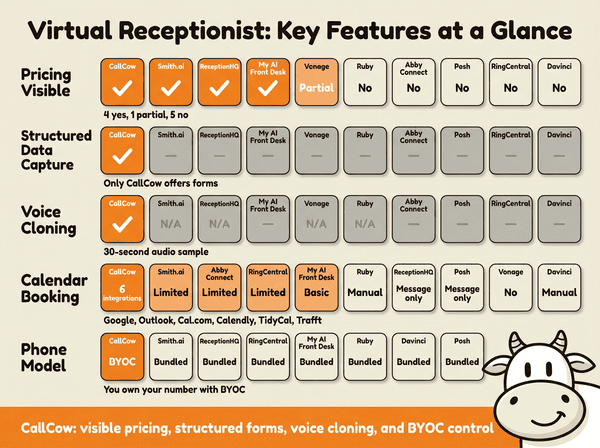
Virtual receptionist comparison table
| Feature | CallCow | Ruby | Smith.ai | Abby Connect | ReceptionHQ | Posh | My AI Front Desk | RingCentral | Vonage | Davinci |
|---|---|---|---|---|---|---|---|---|---|---|
| Type | AI | Human | Hybrid | Hybrid | Human | Human | AI | AI/UCaaS | Auto-attendant | Human |
| Public starting price | $29.99/mo | Quote-based | $95/mo AI; human plans higher | Quote-based | From $35/mo | Quote-based | $99/mo | Quote-based | Check vendor site | Quote-based |
| Pricing visible | Yes | No | Yes | No | Yes | No | Yes | No | Partial | No |
| 24/7 coverage | Yes | Varies by plan | Varies by plan | Varies by plan | Varies by plan | Varies by plan | Vendor says yes | Varies by plan | Varies by plan | Varies by plan |
| Calendar booking | 6 integrations | Manual | Limited | Limited | Message only | Message only | Basic | Limited | No | Manual |
| Structured forms | Yes | No | No | No | No | No | No | No | No | No |
| Call transfer | Dynamic or static transfer | Verify directly with vendor | Verify directly with vendor | Verify directly with vendor | Verify directly with vendor | Verify directly with vendor | Verify directly with vendor | Verify directly with vendor | Routing only | Verify directly with vendor |
| Voice cloning | Yes | N/A | No | No | N/A | N/A | No | No | No | N/A |
| API/webhooks | REST + webhooks | Limited | Limited | None | None | None | None | Limited | None | None |
| Website widget | Floating + inline | No | No | No | No | No | No | No | No | No |
| Free trial | 7-day* | No | 30-day money-back guarantee | No | 7-day | No | Free tier + free start | No | Yes | No |
| Phone model | BYOC (Twilio) | Bundled | Bundled | Bundled | Bundled | Bundled | Bundled | Bundled | Bundled | Bundled |
*CallCow trial supports 4 concurrent calls with verified numbers only. Full capacity requires a Twilio Business Profile.
Use this table as a decision filter, not just a feature grid. Choose CallCow if all five of these are true: you want an AI receptionist, you want visible pricing before talking to sales, you care about structured lead capture, you need webhook or API flexibility, and you are fine managing Twilio separately. If any of those are false, a human, hybrid, or bundled phone-system option may be the better fit.
The row that matters most is still pricing transparency. More vendors show some pricing now than they did a year ago, but a lot of the market still hides meaningful totals behind quotes, bundles, or plan math that only makes sense after a sales call.
The second row that matters: actual type. Vonage is an auto-attendant, not a receptionist. RingCentral is a UCaaS platform with AI features, not a dedicated receptionist service. Grasshopper is a virtual phone system with call routing. These products rank for "virtual receptionist" because of SEO, not because they are the same category of product.
For cost details across more providers, see our AI phone answering service cost guide.
Who this is for (and who it's not)
Good fit:
- Small business owners comparing virtual receptionist options and wanting public pricing where vendors actually show it
- Teams that value transparent costs and structured data capture over a polished human voice
- Businesses that want to own their phone numbers and see exact per-minute costs through Twilio BYOC
Not a good fit:
- Businesses where warm transfer is a hard requirement. CallCow does cold/blind transfer only. Look at Ruby, Smith.ai, or Abby Connect for warm handoffs
- Healthcare practices handling PHI. CallCow is not HIPAA compliant
- Anyone wanting bundled pricing with one invoice for everything. The BYOC model means separate bills from CallCow and Twilio
- Buyers who don't distinguish between auto-attendants (Vonage, Grasshopper) and actual receptionists. Three of the top ten search results are phone menus, not receptionists
How to choose a virtual receptionist
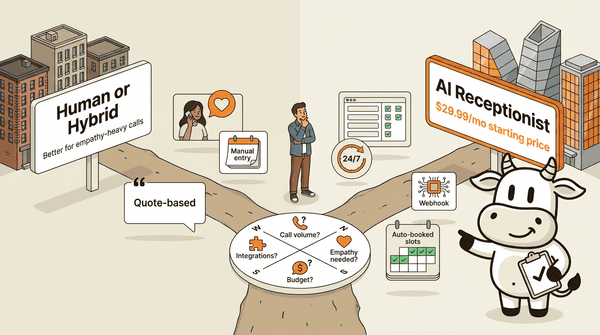
This decision comes down to four questions. I have talked to hundreds of business owners about this, and the same pattern repeats.
How many calls do you get per month?
Under 100 calls per month, a lower-cost AI service is usually the easiest thing to test first. Human services can feel expensive relative to the amount of coverage you actually need at that volume.
Between 100 and 500 calls per month, AI still works but you may want a hybrid service if a meaningful percentage of your callers need human empathy. A hybrid service with human fallback can make sense if those 20 complex calls are high-value (legal consultations, medical intake, luxury services).
Over 500 calls per month, you need to look at per-minute costs carefully. Human services often use minute bundles and overages, so high call volume is where careful quote review matters most. AI services handle this volume at a fraction of the cost because there are no per-minute labor charges.
Do you need human empathy or AI efficiency?
Legal intake, medical triage, and bereavement-related businesses need human empathy. A person calling about a custody dispute or a terminal diagnosis should not talk to an AI. For these cases, Ruby, Posh, or Abby Connect are the right call despite the higher cost.
Appointment booking, general inquiries, lead capture, and after-hours coverage are better handled by AI. AI answers consistently and captures structured data on every call. A human receptionist will not consistently fill out a form with name, email, phone, service requested, and preferred time slot on every single call.
Is pricing transparency important to you?
If you want to know what you are paying before committing, start with the vendors that publish real numbers: CallCow, Smith.ai, ReceptionHQ, My AI Front Desk, and Goodcall. Even then, the pricing models are not directly comparable. Some bill by call, some by agent, some by bundle, and some still push you into quote territory as soon as your volume increases.
What integrations do you actually need?
If you use Google Calendar or Calendly for scheduling, verify the vendor's current setup carefully. For CallCow specifically, documented options include Google Calendar and Outlook in beta plus Calendly, Cal.com, TidyCal, and Trafft, while automation paths include webhooks, Make.com, Monday.com, and invite-only Zapier. If you need Zapier, note that CallCow's Zapier integration is currently invite-only.
For more on what to look for, see our guide on the best answering service for small business.
Industry-specific considerations
Different industries have different requirements. Real estate agencies need showing schedulers and CRM integrations. Law firms need intake forms and confidentiality handling. Medical offices usually need stricter compliance review and emergency-routing policies than general-purpose AI tools can promise. Home services businesses need dispatch and payment collection. Match the service to the industry, not the other way around.
Frequently asked questions
What is the best virtual receptionist?
The best virtual receptionist depends on your needs. For many small businesses, lower-cost AI tools are worth testing first if your main problem is missed calls, appointment booking, or repetitive intake. Human or hybrid tools are still better fits for empathy-heavy workflows. Based on our comparison, CallCow leads on pricing transparency, structured data capture, and number ownership. Test it with the 7-day free trial. If you specifically need a human voice, established human-first providers are usually the better place to start than AI-first tools.
Is a virtual receptionist worth it?
A virtual receptionist is worth it if you miss more than a few calls per week or spend meaningful time answering routine questions. A missed call is often a missed customer. The ROI depends on your call volume and the value of a recovered call.
How much does a virtual receptionist cost?
AI virtual receptionist software often starts below human receptionist pricing, but total cost depends on whether telephony is bundled, how usage is billed, and what the vendor includes. Auto-attendants are often cheaper still, but they are not the same product category.
Can a virtual receptionist answer calls 24/7?
AI virtual receptionists answer calls 24/7 by default. Many AI-first products market round-the-clock coverage, but you should still verify current plan details directly with the vendor. Human services like Ruby charge significantly more for 24/7 coverage versus business-hours-only plans. Some human services offer 24/7 only on their highest-tier plans.
Is virtual receptionist legit?
Virtual receptionist services are legitimate and widely used. Large, established virtual receptionist providers serve many businesses. AI receptionist services like CallCow use real phone infrastructure through Twilio and process real calls with transcripts, summaries, and structured data. On CallCow, callers are explicitly told they are speaking to AI. CallCow's AI identifies itself as AI on every call.
What is the difference between a virtual receptionist and an auto-attendant?
A virtual receptionist has a conversation with the caller. It answers questions, collects information, books appointments, and makes routing decisions. An auto-attendant plays a menu: press 1 for sales, press 2 for support. Auto-attendants are phone routing tools. Virtual receptionists (whether AI or human) actually handle the call. Vonage, Grasshopper, and Dialpad offer auto-attendants, not receptionists, despite ranking for "virtual receptionist" in search results.
Conclusion
The virtual receptionist market in 2026 splits into three real categories: AI services, human services, and auto-attendants. AI and human services solve different problems, while auto-attendants are really phone menus rather than receptionists.
CallCow came out of a pretty specific frustration: the human services I used at my previous company were expensive, inconsistent, and bad at handing back usable data. I wanted 24/7 coverage, appointment booking into my real calendar, structured lead data in the CRM, and a bill I could actually understand. The AI approach got much closer to that mix.
If you want to test it, the CallCow getting-started guide walks through the setup flow. Connect Twilio, configure one workflow, and run a few calls through it. The trial at callcow.ai gives you enough room to do that.
For a broader look at the category, read our virtual receptionist complete guide. For pricing details across every major provider, see our AI phone answering service cost breakdown.
Yiming Han is the founder of CallCow and writes about phone automation, missed calls, and the tradeoffs that show up when small businesses actually deploy voice AI.