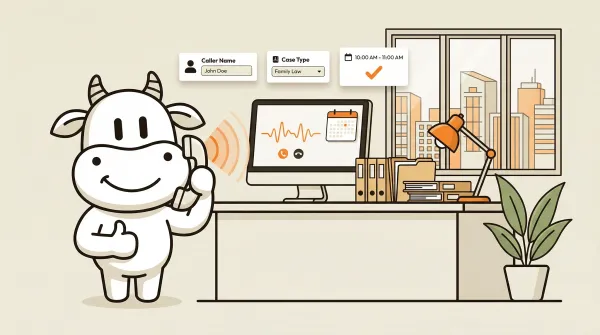
Virtual receptionist for law firms: AI vs human, costs, and what works
Virtual receptionist for law firms: AI vs human answering, practical legal intake workflows, and the transfer and setup limits most firms miss.Virtual receptionist for law firms: AI vs human, costs, and what works
A virtual receptionist for law firms is an AI or human service that answers calls, gathers basic intake details, and routes the next step when your staff cannot. What matters is whether it helps you stop sending good leads to voicemail.
Law firms lose clients to missed calls. Not occasionally, not rarely, but systematically. A potential client calls at 6pm after finding your firm online. Voicemail. They hang up. They call the next firm in the search results.
CallCow came out of the same problem: I kept losing leads to missed calls while running my previous company. The problem is worse for law firms because the stakes are higher. A family law lead at 9pm on a Friday is often someone under pressure. They want a next step now, not a voicemail box and a callback promise.
This article breaks down what a virtual receptionist actually does for law firms, where AI is genuinely useful, and which limits matter before you put it in front of prospective clients. I am sticking to documented product features and explicit caveats, not fantasy workflow diagrams.
Table of contents
- How AI phone answering works for law firms
- Why law firms need a virtual receptionist
- AI vs human receptionists for law: the real tradeoffs
- Legal intake with AI: what you can actually automate
- After-hours intake: the biggest opportunity most firms ignore
- Comparison: AI vs traditional answering services for law firms
- How to set up AI phone answering for your law firm
- Pros and cons of AI phone answering for law firms
- Frequently asked questions
How AI phone answering works for law firms
The mechanics are straightforward. A call comes in. AI answers it. The conversation happens. Data gets collected. The right person gets notified.
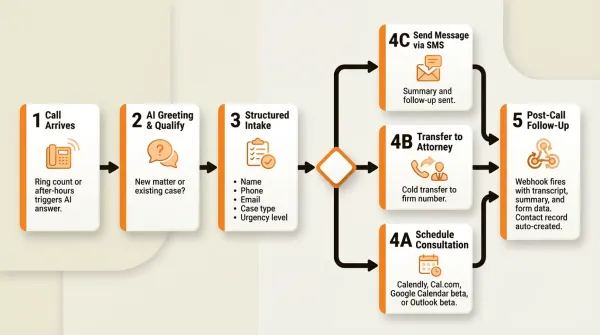
Here is what happens step by step:
Step 1: The call arrives. Your firm's phone number rings. If nobody picks up within your configured ring count, or if the call comes in after business hours, the AI answers.
Step 2: AI identifies itself and asks questions. The AI opens with a greeting specific to your firm and identifies itself as AI. Then it asks the questions in the workflow you defined, such as whether this is a new matter, what type of help the caller needs, and how urgent it is.
Step 3: Structured data collection. Using CallCow's forms feature, the AI collects caller name, phone number, email, case type, and urgency level. This data is typed and validated during the conversation. The caller does not fill out a form. The AI asks naturally and fills it behind the scenes.
Step 4: Action based on the call. Depending on your workflow, the AI can offer consultation booking through supported calendar integrations, transfer the call to a number you define, or complete the intake and hand the result to your team after the call.
Step 5: Post-call follow-up. A webhook fires on call completion with the full transcript, summary, and all form data. This can push to your CRM, case management system, or email through webhooks or automation tools, rather than implying a documented native legal integration. An inbound contact record is auto-created for follow-up SMS conversations.
When this setup works, the attorney gets a structured summary with the data they actually need instead of a vague message like "someone called about a case."
Why law firms need a virtual receptionist
Missed calls cost law firms money. Firms know calls get missed and assume there is nothing to do about it besides hiring more staff.
You do not need an industry study to know the economics here. If you are paying for search traffic, referrals, or local SEO and the caller hits voicemail, you just paid to create demand for the next firm that answers.
After-hours is where the real damage happens. A lot of legal calls come when the office is closed because people deal with legal problems when life is already on fire: at night, on weekends, during a custody dispute, after an arrest, after an accident.
Round-the-clock human coverage is expensive. Most firms know that already. AI is interesting because it can cover missed and after-hours calls without you staffing a true 24/7 front desk, but the real comparison still depends on your call volume, Twilio costs, and whether you need human-style handoffs.
The economics of missed calls extend beyond law. Medical offices, home service businesses, and real estate agencies all face the same problem, and our complete guide to virtual receptionists covers how each industry adapts AI answering differently. But law firms feel it more acutely because legal services are high-value, low-frequency purchases. A potential client does not comparison shop attorneys the way they shop for a plumber. They call the first firm that answers and makes them feel heard.
Beyond cost, there is the consistency problem. Humans improvise. Sometimes that is valuable. Sometimes it means the receptionist skips the case type, misses the callback number, or leaves you with notes that are too thin to use. A structured AI workflow does the same intake pattern every time.
AI vs human receptionists for law: the real tradeoffs
Most of the articles ranking for "virtual receptionist for law firms" present this as an obvious choice. They should not. There are real situations where a human receptionist is better. Here is the breakdown.
Where AI wins
Cost structure. AI usually wins if your main goal is answering missed calls, collecting intake, and booking consultations without staffing a human around the clock. Human services usually start with higher base pricing or custom quotes. The catch is that CallCow is BYOC through Twilio, so compare the full setup, not the software line item by itself.
Availability. AI does not sleep, take breaks, or disappear after 5pm. For after-hours legal intake, that matters more than almost anything else.
Consistency of data collection. A form-driven intake workflow collects the same fields on every call. Name, phone, email, case type, urgency. No variation, no forgetting, no illegible handwriting. The data goes into your system via webhook or automation after the call completes.
Speed. AI can answer immediately when your workflow is configured to take the call instead of pushing the caller into a voicemail box or hold queue.
Where human receptionists still win
Warm transfers. This is the biggest gap. CallCow does cold or blind transfers only. That means the AI patches the call through and drops off. The attorney picks up cold, without context from the AI about who is calling or what they need. Our guide to AI call transfer explains how this works in practice and what alternatives exist. Some firms, especially litigation practices, consider this a dealbreaker. Services like Veza Reception specifically advertise warm transfers where a human briefs the attorney before connecting the call.
Judgment calls. An experienced legal receptionist can often tell the difference between a qualified lead, an existing client, and someone who just needs general information. AI is better at structured questioning than open-ended judgment.
Client relationship nuances. Existing clients with ongoing matters sometimes need reassurance, context, or simple human sensitivity. AI can follow the script you give it. That is not the same thing as a staff member who knows the client and the stakes.
Sensitivity concerns. Some lawyers are uncomfortable with AI handling calls that may contain confidential case details. That is a legitimate concern to think through before you use AI beyond basic intake.
The hybrid approach
Most firms that adopt AI start with a specific use case rather than replacing everything. Common patterns:
- AI handles after-hours calls only. During business hours, staff answer normally.
- AI handles initial intake and schedules consultations. Attorneys handle the actual consultation calls.
- AI screens calls and transfers qualified leads to the firm when transfer is enabled. Unqualified calls get a message or a follow-up step after the call.
This is not a binary choice between AI and human. It is a question of which calls to automate and which to keep manual.
Legal intake with AI: what you can actually automate
Legal intake is repetitive by nature. Every new caller needs to provide the same basic information: who they are, how to reach them, what type of case they have, and how urgent it is. That repetition is exactly what AI handles well.
CallCow's forms feature lets you define a structured intake template with typed fields. For a law firm, a practical intake form might include:
- Caller name (text field)
- Phone number (phone field, validated format)
- Email address (email field, validated format)
- Matter type (select field: personal injury, family law, criminal defense, estate planning, employment law, immigration, other)
- Urgency level (select field: emergency, within 24 hours, this week, flexible)
- Brief description (text field)
- How they found the firm (select field: Google search, referral, social media, other)
The AI fills these fields conversationally during the call. The caller never sees a form. They just answer questions naturally. After the call, the complete structured data is available in the call record and sent via webhook to your CRM, case system, or intake workflow through webhook-based automation.
For legal intake where accuracy matters, CallCow supports GPT 5.4 as the recommended LLM model, selectable per-workflow. In testing shows it produces fewer hallucinations than earlier models, which matters when you are collecting case details that need to be right. There is a slight latency increase, but for legal intake the accuracy gain is worth the tradeoff.
One caveat: the webhook fires on call completion, not in real time. If you need live data streaming during an active call, CallCow does not support that. For most intake workflows this does not matter, but if you are building a real-time dashboard, know the limitation.
The inbound contacts feature auto-creates a contact record for every caller. This means your contact database builds itself. Every person who calls your firm, whether they become a client or not, gets a record with their phone number, name, and call history. Follow-up can continue through SMS conversations from the CallCow dashboard.
For scheduling, CallCow documents integrations for Calendly, Cal.com, Google Calendar beta, and Outlook beta. That matters because legal booking is only useful if the caller can move to an actual next step while motivation is still high. The main thing to watch is fit: if your firm uses a different booking stack, or you need a very specific scheduling workflow, confirm it before promising anything internally.
SMS Instructions lets the AI text the caller a consultation booking link, intake form URL, or directions to the office during the conversation. For law firms, this is useful because case evaluation questionnaires and scheduling pages are much easier to share as clickable links than to spell out over the phone. Requires Twilio SMS capability.
After-hours intake: the biggest opportunity most firms ignore
After-hours is the cleanest place to start with AI phone answering. The logic is simple:
- Your staff is not there anyway, so AI is not replacing anyone.
- Callers who reach voicemail after hours usually do not get help in that moment.
- The calls that come in after hours are often the ones with the most urgency.
- A family law or criminal defense call at 10pm is exactly the kind of call you do not want going nowhere.
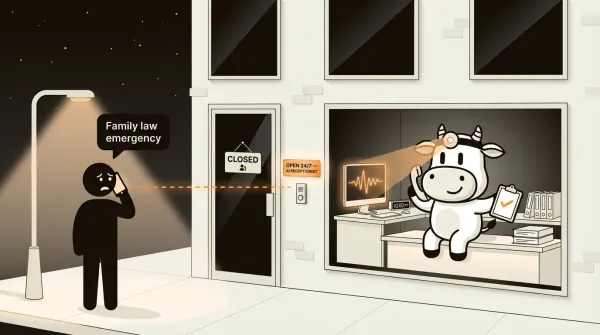
That is why after-hours is the practical first rollout. You are not trying to replace a great front-desk person. You are fixing the ugliest failure mode first: good calls landing in a dead-end voicemail box. Medical offices often start in the same place, which is why the rollout logic in our article on AI receptionists for medical offices looks similar even though the intake questions are different.
There is also a voicemail transfer option. Instead of playing your standard voicemail greeting, missed calls get forwarded to the AI. The caller never hears "please leave a message." They get a live conversation. This is the recommended setup for firms that want to preserve the option of answering calls personally while ensuring nothing falls through.
One real limitation here: voicemail forwarding does not work on all carriers. It depends on your phone provider. Rogers works, as there is a documented setup. Other carriers vary. Check with your provider before building a workflow around this feature.
Comparison: AI vs traditional answering services for law firms
I looked at the pages ranking for "virtual receptionist for law firms." Most dodge the details that actually matter in implementation: who handles transfer, what kind of intake gets structured, what setup dependencies exist, and where the product still has limits. That is what you should compare.
| Feature | CallCow (AI) | Ruby (Human) | LEX Reception (Human) | AnsweringLegal (Human) |
|---|---|---|---|---|
| Pricing style | Check current pricing plus Twilio costs | Sales-led, published ranges vary | Custom quote | Custom quote |
| Minutes model | Depends on current plan and Twilio usage | Varies by plan | Varies | Varies |
| Available hours | 24/7 when configured | 24/7 | 24/7 | 24/7 |
| Call transfer | Cold/blind only | Warm transfer | Warm transfer | Warm transfer |
| Intake data capture | Structured forms | Manual notes | Manual notes | Manual notes |
| Calendar scheduling | Calendly, Cal.com, Google Calendar beta, Outlook beta | Limited | Limited | Limited |
| CRM integration | Webhooks on completion | Varies | Varies | Varies |
| Voicemail forwarding | Supported, carrier-dependent | No documented equivalent | No documented equivalent | No documented equivalent |
| AI self-identification | Yes, always | N/A | N/A | N/A |
| BYOC model | Yes, Twilio | No | No | No |
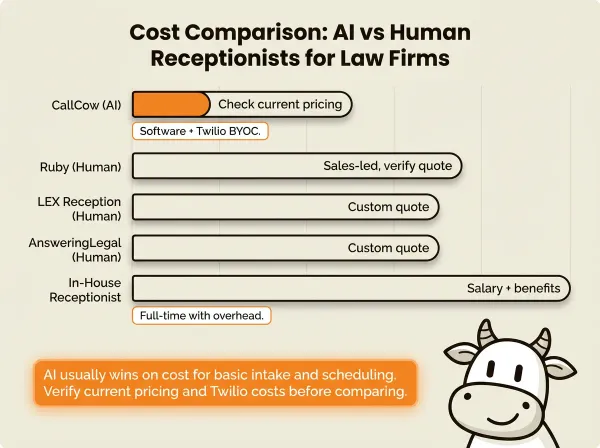
A few notes on this table. For a broader comparison beyond legal-specific services, our best answering service for small business roundup covers more general-purpose options. I removed hard CallCow pricing and minutes here because those details can change and they are not the product-doc source of truth for this article. If you are comparing vendors, verify current software pricing, Twilio costs, and what is included before you make the spreadsheet look cleaner than reality.
CallCow's BYOC model means you bring your own Twilio account and manage your own phone billing. That gives you full control over your phone number and carrier costs, but it also means an extra setup step. Trial accounts are limited to 4 concurrent calls with verified numbers only. To unlock higher limits, you need a Twilio Business Profile, which takes a few business days to approve.
Want to test the intake workflow described above? Start a free 7-day trial at callcow.ai with one missed-call or after-hours workflow first.
See how CallCow works for law firms if you want a walkthrough specific to legal intake before committing to a trial.
The transfer limitation is worth repeating. CallCow does cold transfers. The AI patches the call to your number and disconnects. You pick up without knowing who is on the line or what they need. For some practice areas this is fine. For others, especially where the attorney needs preparation before taking a client call, it is a genuine problem. If warm transfers are non-negotiable for your firm, a hybrid AI-and-human service or a traditional human service is the better path.
How to set up AI phone answering for your law firm
Before setup, decide which operating model fits your firm size:
- Solo practitioner. Use AI for every missed call, after-hours intake, and consultation booking so you do not have to monitor the phone personally.
- Small firm (2-10 attorneys). Use AI for overflow, after-hours coverage, and first-pass intake so staff can stay focused on active matters during the day.
- Multi-attorney firm (10+ attorneys). Use AI to standardize intake across practice groups, route by matter type, and push structured summaries into internal workflows via webhooks or automation.
The setup itself is straightforward once you have your Twilio details and you know which workflow you want. Here is the process.
Step 1: Create your intake workflow
Log into CallCow and create a new workflow. You can start from a prompt or use the workflow builder to configure each step manually.
Define your intake form with the fields listed earlier. These become the structured data the AI collects on every call.
Step 2: Connect your integrations
Link your calendar so the AI can offer consultation booking. CallCow documents support for Calendly, Cal.com, Google Calendar beta, and Microsoft Outlook beta. Set up your webhook URL to push completed call data to your CRM or case management system through webhook-based automation. CallCow also integrates with Make.com for firms that want to trigger calls or route data through automation scenarios. Zapier can trigger calls too, but it is invite-only.
Step 3: Connect your phone number
Connect your existing Twilio phone number to CallCow. This uses the BYOC model. You need your Twilio Account SID and Auth Token, which you can find in your Twilio console. If you want call transfer to work, your Twilio account needs an approved Business Profile. The approval process takes a few business days.
If you want voicemail forwarding, configure it through your carrier so that unanswered calls route to the AI instead of playing your standard greeting.
For firms that want intake directly from their website, CallCow offers embeddable voice widgets, either a floating button or an inline embed, that turn your site into a live intake surface.
Step 4: Test and refine
Call your firm's number and run through the intake flow as if you were a potential client. Check that the AI identifies itself clearly, collects the form fields you actually care about, offers booking the way you expect, and sends the completed webhook payload where your team needs it. Adjust the workflow until it handles your real intake pattern, not an idealized demo call.
The custom workflow builder is underdocumented right now. The product works, but the written setup guides need improvement. If you hit a wall, book a custom setup call and the team will build your workflow with you.
Pros and cons of AI phone answering for law firms
Pros
- Lower staffing pressure. AI can cover missed and after-hours calls without hiring a true 24/7 receptionist team.
- 24/7 availability. When your routing is set up correctly, missed and after-hours calls can still be answered on evenings, weekends, and holidays.
- Structured data collection. Intake forms capture typed, validated data on every call. No variation, no transcription errors.
- Calendar integration. Consultations can be offered during the call through supported integrations including Calendly, Cal.com, Google Calendar beta, and Outlook beta.
- Automatic contact records. Every caller gets a contact entry with call history and SMS follow-up capability.
- Consistent caller experience. Same greeting, same questions, same rules every time.
- Voice cloning. You can clone your existing receptionist's voice from a 30-second recording, so the AI sounds like your firm rather than a generic robot.
Cons
- No warm transfer. CallCow does cold/blind transfer only. The attorney picks up without context from the AI. This is a real limitation for firms that need pre-call briefing.
- Transfer requires Twilio Business Profile. You cannot transfer calls without going through Twilio's identity verification process, which takes days.
- Voicemail forwarding is carrier-dependent. Not all carriers support forwarding unanswered calls to the AI. Check with your provider.
- Webhooks are post-call only. If you need real-time data during an active call, that is not available.
- AI always identifies itself as AI. You cannot configure the AI to pretend to be a human receptionist. For some firms that is fine. For others it is a non-starter.
- Trial limitations. Trial accounts are capped at 4 concurrent calls and require verified phone numbers. There is a 60 requests-per-minute rate limit, which matters for firms planning high-volume outreach or parallel workflows.
- BYOC model. You manage your own Twilio billing. More control, but more setup.
Who this is for (and who it's not)
CallCow works well for solo practitioners, small firms, and some multi-attorney firms, but the fit looks different in each case. A solo attorney can use it as a safety net for missed calls, after-hours legal intake, and consultation booking without adding another person to payroll. A small firm can use it for overflow and after-hours coverage so front-desk staff do not become a bottleneck. A multi-attorney firm can use it to standardize first-call intake across practice areas, then move structured summaries into internal systems through webhooks or automation. If your firm loses leads to after-hours voicemail and you mainly need consistent intake plus a reliable next step, this is where the product makes sense.
It is not a good fit for firms that need warm call transfer. CallCow does cold transfer only, meaning the attorney picks up blind without context. If your practice area requires preparation before taking a client call, this is a dealbreaker. Firms that are uncomfortable having AI handle sensitive intake should also think carefully before going beyond basic screening. And if you need the AI to sound like a human receptionist who does not disclose it is AI, that is not possible because CallCow always self-identifies.
Frequently asked questions
How much does a virtual receptionist for a law firm cost?
Human legal answering services usually mean a custom quote or a few hundred dollars per month before usage gets heavy. AI setups are often cheaper, but that is not the whole story. With CallCow, you also need to account for the BYOC Twilio model, any transfer prerequisites, and the workflow you actually want to run. Compare the real operating setup, not a headline number by itself.
Do law firms use virtual receptionists?
Yes. Law firms use virtual receptionists for after-hours coverage, overflow, basic intake, and consultation booking. The most practical setup is usually AI on missed and after-hours calls while staff keep handling calls that need judgment, reassurance, or a warmer handoff.
What does a legal virtual receptionist do?
A legal virtual receptionist answers incoming calls, gathers intake details like name, contact information, matter type, urgency, and a short description of the issue, then handles the next step your workflow allows. That next step might be booking through a supported calendar integration, sending the completed intake to your team, or transferring the call if your Twilio setup supports it.
How much does Ruby cost for law firms?
Ruby does not publish the kind of detailed line-item pricing most firms want for an apples-to-apples comparison. You usually need a sales conversation to get a real number based on volume and workflow needs. That is one reason many firms end up comparing process fit first and price second.
If you want to test better legal intake without hiring another receptionist, the trial is at callcow.ai. The best first rollout is usually simple: send missed and after-hours calls to AI, collect name, matter type, urgency, and callback details, then push the completed intake to your team through webhooks or automation.
If you already know your intake questions, book a custom setup call and the team will build the workflow with you. If you are evaluating vendors, use the trial to test one real scenario: a new client calling after hours and needing a consultation on the next business day.
CallCow came out of the same problem: missed calls cost real money. For law firms, those missed calls are often high-intent leads that come in after hours from people who need help now. If your firm keeps losing those calls to voicemail, fixing that gap is usually worth more than polishing another intake spreadsheet.
Yiming Han is the founder of CallCow and writes about phone automation, missed calls, and the tradeoffs that show up when small businesses actually deploy voice AI.