AI appointment scheduling: how it works on phone calls
AI appointment scheduling handles bookings over live phone calls, not calendar links. See how it works, which calendars integrate, and the limitations.AI appointment scheduling: how it works on phone calls
AI appointment scheduling is the process of booking time slots with customers over live phone calls using conversational AI, rather than sending them a calendar link. A caller says they want an appointment, the AI checks available times during the call, offers options, and confirms the booking. With CallCow, that can happen through native Google Calendar and Outlook Calendar integrations in beta, or through supported scheduling tools like Calendly and Cal.com. CallCow plans start at $29.99/month, with Twilio billed separately under the BYOC model.
Table of contents
- How AI phone scheduling works
- Phone-based scheduling vs sending a Calendly link
- Calendar integrations that actually work
- Collecting booking data with forms during the call
- Comparison: AI phone scheduling options
- How to set up AI appointment scheduling
- Pros and cons
- Frequently asked questions
How AI phone scheduling works
Most articles about AI appointment scheduling describe tools like Calendly or Reclaim.ai. Those are calendar productivity apps. They work well when someone already has your link and wants to self-serve. But that is not what happens when someone picks up the phone and calls your business.
That distinction matters even more because CallCow is not limited to third-party schedulers. If you already run your business on Google Calendar or Outlook, CallCow's native scheduling assistant integrations for both are available in beta, so callers can book directly against the calendar you already use. If you prefer a dedicated scheduling layer, Calendly, Cal.com, TidyCal, and Trafft are also supported with their own caveats.
-
The caller dials your business number. The phone rings. Instead of voicemail or a hold queue, an AI answers the call in a natural voice. If you have set up voice cloning, it sounds like your brand, not a generic robot.
-
The AI determines scheduling intent. Through the conversation, the caller says something like "I need to book a consultation" or "When is the next available time?" The AI understands this is a scheduling request, not a general inquiry.
-
The AI checks calendar availability during the call. It uses your connected calendar or supported scheduling tool to find open slots that match what the caller needs.
-
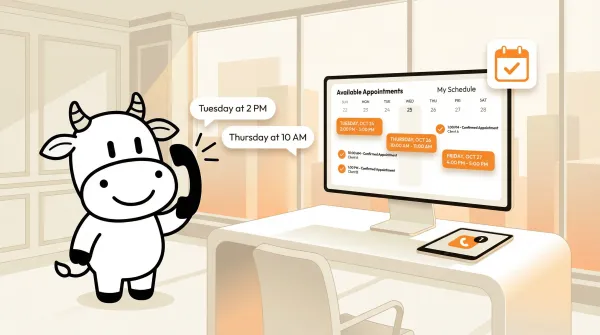
The AI offers specific time slots. "I have Tuesday at 2 PM, Thursday at 10 AM, and Friday at 1 PM. Which works for you?" The caller picks one. The AI confirms the details: date, time, and any service type.
-
The booking is created and confirmed. The appointment is written directly into your calendar. A webhook fires on call completion, pushing the booking data to your CRM, notification system, or any other tool you have wired up. The caller gets off the phone with a confirmed appointment. You don't need to send a follow-up email.
-
The AI sends follow-up links via SMS. You can configure the AI to text the caller a confirmation link, directions to your office, or intake form URLs mid-conversation using SMS Instructions. Links are hard to communicate over the phone, the caller gets them on their screen while still talking to the AI. This requires Twilio SMS capability on your number.
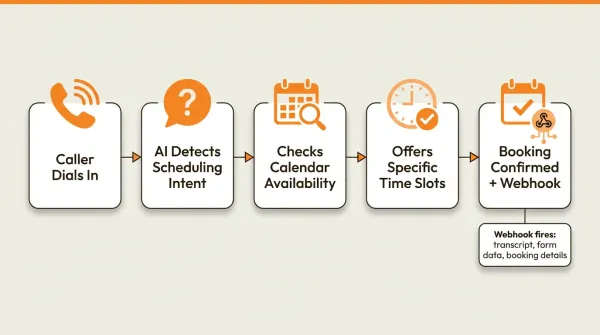
A simple booking flow can be quick once the workflow and calendar connection are configured correctly. Compare that to the alternative: caller leaves voicemail, someone listens to it hours later, calls back, plays phone tag, and eventually books something two days after the original call.
This is the gap most "AI scheduling" articles miss. When someone searches for "AI appointment scheduling," Google shows them nine results about calendar tools. Only two results (talkie.ai and retellai.com) even mention doing this over a phone call. And neither of those covers what a general business needs: multi-calendar support, form data collection during the call, and webhook confirmations. If you are deciding between AI and a traditional answering service, phone-based scheduling is a key differentiator.
Phone-based scheduling vs sending a Calendly link
These are different experiences, and businesses treat them as interchangeable when they are not.
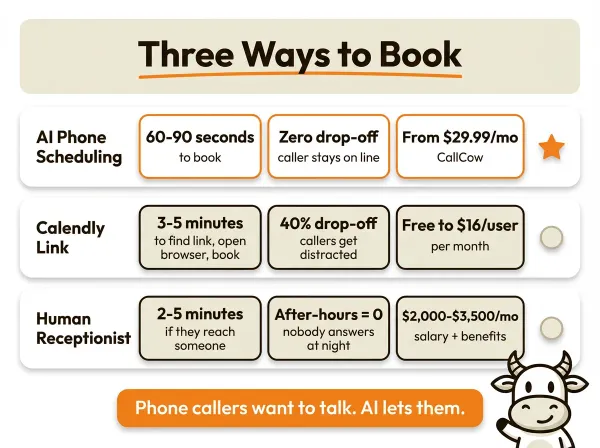
Sending a Calendly link works like this: a caller reaches your business, a human or voicemail says "visit our website to book," the caller hangs up, opens their browser, navigates to your link, picks a time, enters their details, and submits. If they complete every step, great. Most do not. They get distracted, forget, or find the process annoying enough to call your competitor instead.
Phone-based scheduling works like this: a caller reaches your business, says they want to book, and the booking happens right there on the call. The caller never opens a browser. They never fill out a form. They talk, the AI listens, the appointment is set.
I have seen businesses where 40% of inbound calls are scheduling-related. Dentists, consultants, real estate agents, salons, law firms. The caller is not browsing your website. They are holding a phone. If you send them to a link, you are adding friction to the exact moment they are most ready to buy.
The other difference is what happens after hours. A Calendly link works at midnight, sure, but only if the person knows to look for it. With AI phone scheduling, someone calls at 9 PM on a Saturday, the AI answers, checks the calendar, and books them for Monday morning. The caller never had to wait. You never had to pay for overnight staff. For callers who reach voicemail, CallCow's voicemail transfer feature routes them to AI instead of a dead-end greeting, the recommended best experience for scheduling businesses. This ties directly into how after-hours answering services work.
CallCow also offers embed widgets for your website, so visitors who prefer not to call can still trigger a scheduling workflow.
There is a place for both. Calendly and similar tools work well for existing clients who want to reschedule or for prospects who found you through search and prefer self-serve. Phone-based AI scheduling is for the people who call you. The ones who chose voice over text. They want to talk to someone. The AI lets them do that without requiring you to hire a full-time receptionist.
Calendar integrations that actually work
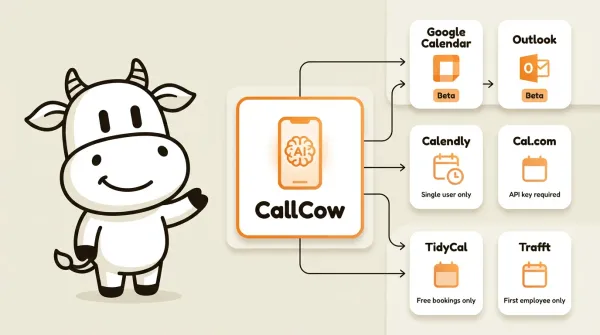
The scheduling is only as good as the calendar it connects to. The big differentiator here is that CallCow supports native Google Calendar and Outlook scheduling in beta, so some businesses can skip third-party schedulers entirely. It also supports multiple documented calendar and scheduling integrations, each with different capabilities and limitations.
Google Calendar (Beta)
Connects via Google OAuth. This is CallCow's native scheduling assistant integration, meaning you do not need a separate scheduling tool. The AI reads your Google Calendar availability directly and creates events when a caller books a slot.
Being in beta means it works, but expect occasional rough edges. The connection process itself is straightforward: authorize your Google account in the CallCow dashboard, set your availability parameters, and the AI handles the rest. For businesses that already run on Google Calendar (which is most small businesses), this removes the need for Calendly or Cal.com entirely.
Outlook Calendar (Beta)
Same concept as Google Calendar but for Microsoft 365 and Outlook users. Connects via Microsoft OAuth. Also in beta with the same caveats: functional but still being refined.
If your business runs on Office 365, this is your path. The AI reads your Outlook calendar and books appointments directly into it.
Calendly
Connects using a Calendly personal access token. The AI can check your Calendly availability and create bookings on your behalf when a caller requests an appointment.
The limitation to know about: Calendly integrations are tied to a single user, not an organization. If you have a team of five people who each manage their own calendars through Calendly, the AI can only book against one of them. This works well for solo practitioners and consultants. It does not work well for multi-staff operations that need org-level scheduling.
Cal.com
Connects using an API key. Same concept: the AI checks Cal.com availability and creates bookings during phone calls.
One specific requirement: your Cal.com API key must be set to never expire. If it expires, the integration stops working until you replace the key. Check this when you set it up. Also, Cal.com uses raw API key authentication, not OAuth, so keep the key secure.
TidyCal
Connects via API key for appointment booking. TidyCal is popular with service businesses because of its lifetime pricing model.
The limitation here is significant: TidyCal paid bookings cannot be booked via API. If you use TidyCal to sell paid appointment slots, the AI cannot complete those bookings over the phone. It can only book free appointments. This is a TidyCal API restriction, not a CallCow one. If your business model depends on paid bookings, TidyCal is not the right integration for phone-based scheduling.
Trafft
Connects via API key with a required Service ID. Used by salons, spas, and service businesses that need employee-level scheduling.
The limitation: Trafft always picks the first available employee. The caller cannot request a specific stylist, technician, or agent. If your customers expect to book with a specific person, this integration will frustrate them. If you operate more like a queue where anyone available is fine, it works.
What about Make.com and Zapier?
Make.com offers a bidirectional integration. You can trigger AI calls from Make scenarios and receive call data (including booking confirmations) via webhooks. This is useful if you have complex automation pipelines where a booking should trigger follow-up actions in other tools.
Zapier integration exists but is currently invite-only and limited to a single action (creating a workflow to trigger calls). If you need Zapier, you have to request access. Most businesses will get further faster with Make.com or direct webhooks.
Webhooks for booking confirmations
Regardless of which calendar you use, webhooks fire on call completion with a JSON payload that includes the booking details, call transcript, summary, and any form data collected during the call. You can wire this into Slack notifications, CRM updates, email follow-ups, or any other system. Read the full webhook documentation for the payload structure.
One thing to be clear about: webhooks fire after the call ends, not during it. You will not get real-time updates while the caller is on the line. The webhook fires when the call completes and the booking is finalized.
If you want the booking result to update other systems, this is also where CallCow's named integrations matter. Make.com works well for multi-step automations. Monday.com can trigger calls from new board rows and write call logs back, though the documented trigger is row creation rather than row updates. Zapier exists, but it is still invite-only and limited compared with Make.com.
Collecting booking data with forms during the call
Scheduling is not just about finding a time slot. You usually need information from the caller: their name, the reason for the appointment, their email for confirmation, maybe their address if you are a service business that does house calls.
CallCow's forms feature handles this conversationally. You define a form template with typed fields (text, number, email, phone, select, multi-select), and the AI collects this information through natural conversation during the call. The caller does not know they are filling out a form. It just feels like the AI asking relevant questions.
Example: a caller books a plumbing appointment. The AI asks for their address, describes the issue, and confirms a time. The form data gets stored with the call record and included in the webhook payload. Your dispatch system gets everything it needs without anyone typing anything into a CRM.
Forms have some limitations worth knowing. There is no conditional logic, so you cannot show field B only if the caller answered "yes" to field A. Select options must be predefined in the form template; the AI cannot invent new options on the fly. And there is no file upload field type, so if you need callers to submit documents, that still happens outside the call.
Combined with inbound contacts, which auto-create records for every caller, you get a growing database of who called, what they needed, and what got booked. The contact record stores phone, name, email, and notes across all their interactions. If you also need to set up AI phone answering beyond just scheduling, the same CallCow workflow handles general inquiries alongside bookings.
Comparison: AI phone scheduling options
| Feature | CallCow | Calendly | Traditional receptionist |
|---|---|---|---|
| Scheduling method | Live phone call with AI | Self-serve web link | Human on phone |
| Documented integrations | Google, Outlook, Calendly, Cal.com, TidyCal, Trafft | Calendly ecosystem | Manual or office-specific tools |
| Availability check | During the call | On the booking page | Depends on staff process |
| After-hours booking | Yes | Yes, if the caller uses the link | Depends on staffing |
| Data collection during call | Forms with 6 field types | Web form before booking | Manual notes or office software |
| Booking confirmation | Calendar update plus optional post-call webhook workflows | Email plus calendar event | Manual entry or office workflow |
| Cost structure | Starts at $29.99/month plus Twilio | Vendor pricing varies by plan | Usually labor-based and quote-dependent |
| Branding | Voice cloning available | Branded page | Human voice |
If you want phone-based booking without forcing callers onto a web link, this is the point where CallCow stands apart. Try CallCow for phone-based scheduling, trial at callcow.ai. Start with the native Google Calendar or Outlook beta if you already live in those calendars. If not, connect Calendly or Cal.com and test a real booking flow on your business line with the free 7-day trial.
How to set up AI appointment scheduling
- Connect your phone number.
CallCow uses a BYOC (Bring Your Own Carrier) model through Twilio. You connect your existing Twilio account with your Account SID and Auth Token. If you do not have a Twilio account, create one, get a phone number, and connect it in the CallCow dashboard under phone number settings. Full instructions are in the phone number guide.
- Connect your calendar.
Go to the integrations section in your CallCow dashboard. Choose the calendar or scheduling tool you use:
- Google Calendar: Click connect, authorize via Google OAuth, select the calendar the AI should read.
- Outlook Calendar: Click connect, authorize via Microsoft OAuth, select the calendar.
- Calendly: Generate a personal access token in your Calendly account, paste it into CallCow.
- Cal.com: Generate an API key in your Cal.com account (set it to never expire), paste it into CallCow.
- TidyCal: Generate an API key, paste it in. Remember: paid bookings will not work.
- Trafft: Generate an API key, enter your Service ID. Remember: it will always pick the first available employee.
- Build your scheduling workflow.
Create a custom workflow that instructs the AI on how to handle scheduling calls. Tell it what to say, what information to collect, and how to check availability. The workflow builder lets you define the conversation flow, including when to check the calendar and when to present time slots.
CallCow runs on GPT 5.4, which reduces hallucinations in calendar lookups and time-slot communication.
The custom workflow builder is functional but underdocumented. CallCow has a YouTube video guide that walks through it. If you get stuck, book a free custom setup and the team will build the workflow while you watch. If you want the product docs first, start with the scheduling integrations and workflow guide.
- Set up forms for data collection.
In the forms section, create a template with the fields you need for each booking type. Name, email, phone, service type, address, notes. Select the appropriate field type for each. The AI will collect these through conversation during the call.
- Configure webhooks for confirmations.
In the integrations tab, add your webhook URL. When a call completes with a booking, CallCow will POST the full payload to your endpoint. The payload includes the call transcript, summary, form data, and booking details. Wire this into your CRM, Slack, email system, or wherever your team needs to see new bookings.
- Set up transfer to human (optional).
Some callers will need to speak to a specific person. Configure transfer to human in your workflow. You can set a static transfer number or use a dynamic transfer webhook that returns the right destination based on the caller's request. Note that transfer requires a Twilio Business Profile, and transfers are cold/blind only, not warm. The caller gets transferred; the AI does not brief the human first.
- Test with a live call.
Call your business number and walk through the scheduling flow yourself. Check that the AI checks the right calendar, offers real available slots, collects the form data you configured, and creates the booking. Verify the webhook fires and your downstream systems receive the data.
During the trial period, you are limited to 4 concurrent calls and must use verified phone numbers. If you need to test at higher volumes, complete the Twilio Business Profile verification.
For outbound scheduling calls, CallCow's Agent Calling API lets external AI agents trigger calls from a single prompt, no workflow setup needed.
Pros and cons
Pros
- Callers can get booked on the same call without opening a browser or clicking a link.
- Six calendar integrations cover most business setups. You likely do not need to change your existing scheduling tool.
- Forms collect structured data conversationally during the call, so your CRM gets clean, typed information instead of handwritten notes.
- 24/7 coverage means callers who ring at 10 PM on a Sunday still get booked for Monday morning. You don't end up with a voicemail backlog on Monday.
- Webhooks push booking data to any system you use. Slack notifications, CRM updates, email confirmations, all automated.
- Voice cloning gives callers a branded experience. It does not sound like a generic bot.
- The starting plan price makes it easier to test phone-based scheduling without committing to a full receptionist hire.
Cons
- Google Calendar and Outlook Calendar integrations are in beta. They work, but you may encounter bugs or behavior changes as they are developed.
- TidyCal cannot book paid appointments via API. If you sell appointment slots, this integration will not handle those.
- Trafft always selects the first available employee. Callers who want a specific person will not get that option.
- Calendly is tied to a single user. Multi-staff businesses need a different approach.
- Cal.com API keys must be set to never expire, which is a security consideration.
- Webhooks fire on call completion, not during the call. You cannot get real-time updates while the caller is still on the line.
- The custom workflow builder has limited written documentation. Most guidance is through a YouTube video or a live setup call.
- CallCow uses a BYOC model with Twilio, meaning you manage your own Twilio billing separately from your CallCow subscription.
- AI always identifies itself as AI during calls. You cannot disable this.
Not sure if AI scheduling fits your practice? Start a 7-day trial at callcow.ai.
Who this is for (and who it's not)
Good fit:
- Businesses where callers pick up the phone to book rather than clicking a calendar link: dentists, consultants, real estate agents, salons, law firms
- Teams already using Google Calendar, Outlook, Calendly, or Cal.com that want callers to book directly over the phone without switching devices
- Practices that want 24/7 booking. A caller at 10 PM on Saturday gets scheduled for Monday morning without waiting
Not a good fit:
- TidyCal users who sell paid appointment slots. The TidyCal API doesn't support paid bookings, so AI can't complete those
- Teams using Trafft where callers expect to book with a specific employee. Trafft always selects the first available person
- Businesses needing real-time scheduling updates during the call. Webhooks fire on completion only
- Anyone wanting to disable AI self-identification. The AI always tells callers it's an AI
Frequently asked questions
How does AI appointment scheduling work?
AI appointment scheduling works by answering incoming phone calls with a conversational AI agent. The AI understands that the caller wants to book, checks your connected calendar for available time slots, presents options to the caller, and creates the booking directly in your calendar. The caller talks normally. The AI handles the calendar lookup and data entry. A webhook fires after the call with the full booking details.
Can AI schedule appointments over the phone?
Yes. That is the distinction most "AI scheduling" articles miss. Tools like Calendly and Reclaim.ai are self-serve calendar apps. AI phone scheduling is different: the caller talks to an AI on a regular phone call, and the AI books the appointment during the call. The caller never opens a browser or fills out a web form. The booking happens through voice conversation. CallCow supports this with integrations for Google Calendar, Outlook, Calendly, Cal.com, TidyCal, and Trafft.
What is the best AI scheduling assistant?
It depends on what you mean by "scheduling assistant." If you need a tool to manage your personal calendar, find meeting times across time zones, and auto-schedule based on priorities, Reclaim.ai or Clockwise are strong options. If you need something that answers your business phone and books appointments for callers, CallCow handles that with documented phone-based booking integrations and a starting plan at $29.99/month, with Twilio billed separately. If you need healthcare-specific voice scheduling, talkie.ai focuses on that vertical. The right tool depends on whether your scheduling happens on a phone call or in a calendar app.
How much does AI appointment scheduling cost?
CallCow starts at $29.99/month for AI phone answering, and Twilio costs are separate under the BYOC model. Calendar-only tools like Calendly have their own pricing, but they solve a different problem because they do not answer phone calls. If you are comparing against human receptionists, get current quotes because staffing models and coverage hours change the total quickly.
If you want to test AI appointment scheduling with a live call, the trial is at callcow.ai. Setup is usually quick once your Twilio account is ready.
People do not call a business because they want homework. They call because they want the appointment handled. When nobody is available, the AI can fill that gap, check the calendar, and book the slot before the caller moves on.
Yiming Han is the founder of CallCow and writes about phone automation, missed calls, and the tradeoffs that show up when small businesses actually deploy voice AI.