Forwarding voicemail to an AI answering service: setup guide
Voicemail forwarding routes missed calls to an AI agent instead of voicemail. Setup guide, carrier support, and when it's the right choice for your business.Forwarding voicemail to an AI answering service: setup guide
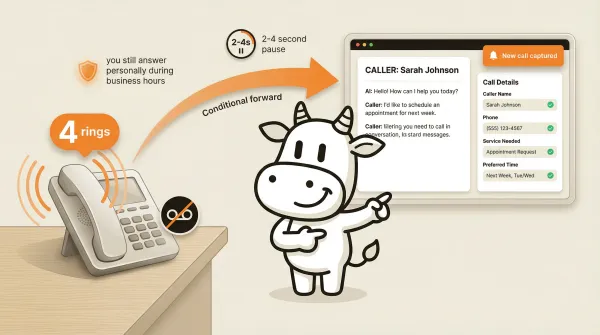
Voicemail transfer is a carrier feature that routes missed calls to a third party instead of your voicemail inbox. Instead of callers hearing "leave a message after the beep," they talk to an AI agent that can answer questions, collect information, book appointments, and transfer urgent calls. Your phone still rings normally. You still answer when you can. The AI only picks up when you don't.
This is the feature that convinced me CallCow could work as a real business tool rather than just a tech demo. Most business owners don't want to replace their phone system or get a new number. They want their phone to work exactly like it does today, except that missed calls get handled instead of dropped.
Voicemail transfer does exactly that. This guide covers how it works, how to set it up, and what to watch out for.
Table of contents
- What voicemail transfer is and why it matters
- How it works technically
- Step by step setup
- Pros and cons of voicemail transfer
- When voicemail transfer is the right choice
- When to use full call forwarding instead
- Comparison: voicemail transfer vs full forwarding
- FAQ
- Bottom line
What voicemail transfer is and why it matters
Voicemail forwarding, in the CallCow context, is not about sharing a saved voicemail audio file with a colleague. It's about redirecting unanswered calls at the carrier level.
Voicemail transfer in the CallCow context means configuring your phone carrier to redirect unanswered calls to a different phone number. When someone calls your business and you don't pick up, the carrier doesn't play your voicemail greeting. Instead, it forwards the call to your CallCow number, where our AI agent answers.
This changes the caller experience entirely. With regular voicemail, the caller hears a greeting, decides whether to leave a message, and waits for a callback that might never come. With voicemail transfer, the caller gets an immediate conversation. They can ask questions, get answers, and take action right then. The virtual receptionist guide explains how this fits into a broader call-handling strategy.
The impact on your business is practical, even without pretending there is one universal benchmark. Many callers who reach voicemail never leave a message, and many businesses already know from experience that response speed matters.
Voicemail transfer bridges the gap between "your phone is off" and "someone is always there to help." It preserves your ability to answer calls personally during business hours while ensuring that every call gets handled, regardless of when it comes in.
Voicemail forwarding is not available on all carriers. It requires carrier-level configuration, and the setup process varies significantly between providers. We don't have self-serve documentation for every carrier. For some, you'll need to call their support line. For others, it might not be possible at all. I'll detail what we know below.
How it works technically
The underlying mechanism is conditional call forwarding, sometimes called "no answer transfer" or "forward on no reply." It's a feature that phone carriers have offered for decades, originally designed for forwarding calls to an assistant or another office line.
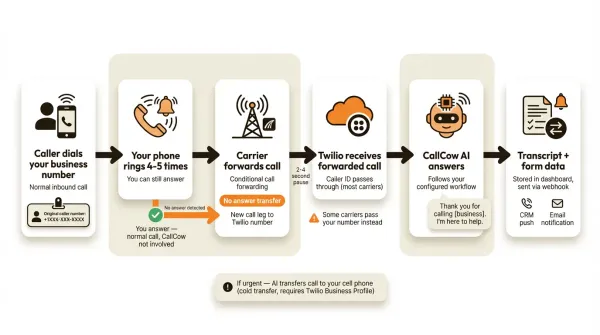
When you enable conditional call forwarding, your carrier monitors your line. If your phone rings a set number of times without an answer, the carrier redirects the call to a forwarding number you specify. This is different from unconditional forwarding, which sends every call to the forwarding number regardless of whether you're available.
The typical flow with CallCow:
- Caller dials your business number.
- Your phone rings normally. You have your normal number of rings to answer (usually 4-5).
- If you answer, the call proceeds as a normal conversation. CallCow is not involved at all.
- If you don't answer, the carrier detects the no-answer condition after the configured ring count.
- The carrier initiates a new call leg to your CallCow Twilio number.
- CallCow's AI agent answers the forwarded call.
- The AI greets the caller, follows your configured workflow, and handles the interaction.
From the caller's perspective, there might be a brief pause between your phone stopping ringing and the AI picking up. This is the carrier setting up the forwarded call leg. The exact delay depends on the carrier setup. CallCow offers multiple LLM models; GPT 5.4 is recommended for accuracy but adds slight latency, which compounds the carrier handoff delay.
The forwarded call arrives at CallCow as a regular inbound call. Our system processes it through whichever workflow you've configured for that number. The AI doesn't know or care that it was a forwarded call versus a direct call. The workflow is the same either way.
The caller ID on the forwarded call depends on how your carrier handles it. Most carriers pass through the original caller's number, so CallCow's AI can see who's calling. Some carriers pass through your business number instead. If your carrier passes your number, the AI won't have the caller's actual phone number, which affects features like inbound contact creation, contact lookup, and SMS follow-up.
Step by step setup
Step 1: Create your CallCow account and connect Twilio
Sign up at callcow.ai. During onboarding, you'll connect a Twilio account. If you don't have one, create a free account at twilio.com. The voicemail transfer documentation covers the Twilio connection process.
You'll need your Twilio Account SID and Auth Token from the Twilio console. Enter these in CallCow's settings. CallCow will use your Twilio account for all voice and SMS, so you pay Twilio directly for phone number costs and per-minute charges.
Twilio charges separately for phone numbers and call usage. Check the current Twilio rate card for your exact number type and geography when you model the bill.
Step 2: Create your answering workflow
In the CallCow dashboard, build a workflow that defines how the AI handles forwarded calls. This is where you customize the experience.
Start with the greeting. Tell the AI to introduce itself and your business. Something like: "Thank you for calling [your business]. We couldn't get to the phone right now, but I'm here to help." You can also clone your own voice from a 30-second recording so the AI answers in a voice your callers recognize.
Then define what information you want to collect. Use CallCow's forms feature to create structured data fields. For a medical office, keep the workflow focused on non-PHI scheduling or callback details unless you have separately validated your compliance posture. For a service business, you might collect the caller's name, service needed, preferred time, and address.
The AI fills these fields through natural conversation. It doesn't read a form to the caller. It asks questions conversationally and captures the answers as structured data. That data gets stored with each call record and can be pushed to your CRM via webhooks. Note that webhook data is sent after the call ends, not in real time during the conversation.
You can also configure SMS Instructions so the AI sends the caller a text with a booking link, directions, or payment URL during the conversation. This is useful for any information that is easier to share as a clickable link than to communicate verbally. Requires Twilio SMS capability.
For appointment booking, CallCow integrates directly with Google Calendar (beta), Outlook Calendar (beta), Calendly, Cal.com, TidyCal, and Trafft so the AI can book into your existing schedule. The caveats matter: TidyCal cannot book paid appointments through the API, and Trafft books the first available employee rather than a specific person. If you want the exact setup flow, use the voicemail transfer docs. If you are not sure your carrier supports voicemail forwarding, book a free setup call at callcow.ai.
Step 3: Configure transfer rules (optional)
If you want urgent calls to be transferred to a live human, set up transfer-to-human in your workflow. CallCow supports static transfers (always go to one number) and dynamic transfers (a webhook determines the right person based on caller information). The AI call transfer guide covers transfer configuration in detail.
Transfer requires a verified Twilio Business Profile. Getting verified takes a few business days. During that time, you can configure the transfer rules but won't be able to execute live transfers.
Important: CallCow supports cold transfers only, not warm transfers. When the AI transfers a call, it hands off the caller directly to the destination number. The AI doesn't stay on the line to introduce the caller or brief the human. This is a current limitation.
Step 4: Set up carrier voicemail forwarding
This is the step that varies most by carrier. You need to configure your carrier to forward unanswered calls to your CallCow Twilio number.
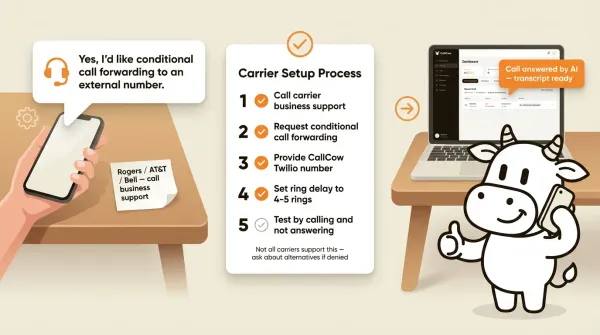
For Rogers (Canada): We have a documented setup process. There's a demo on YouTube showing the complete configuration. The general process involves calling Rogers business support, requesting conditional call forwarding, and providing your CallCow Twilio number as the destination. Set the ring delay to 4-5 rings to give yourself time to answer.
For other carriers: The process varies. Start with these steps:
- Call your carrier's business support line.
- Ask for "conditional call forwarding" or "no answer transfer." Some carriers call it different things. "Forward when no answer," "busy/no answer forwarding," and "conditional divert" are all names for the same feature.
- Provide your CallCow Twilio number as the forwarding destination. Make sure to give them the number in the correct format (usually just the 10-digit number for domestic forwarding, or +1XXXXXXXXXX for international).
- Ask them to set the ring delay to 4-5 rings. If they set it too short, you'll miss calls you could have answered. If they set it too long, callers will hang up before the forwarding kicks in.
- Test it. Call your business number from a different phone and don't answer. Wait for the forwarding to kick in and verify that CallCow's AI answers.
Carrier terminology is often the real blocker. If the first support rep says they do not support "voicemail forwarding," reframe the request using carrier language: "conditional call forwarding," "forward on no answer," "busy/no answer forwarding," "call forward no reply," or "no answer transfer." Many reps think voicemail means forwarding a saved message, not redirecting unanswered live calls.
It also helps to confirm three details explicitly before you hang up:
- Can unanswered calls be routed to an external third-party number, instead of only carrier voicemail?
- Can the ring count or no-answer timer be adjusted?
- Does the forwarded call preserve the original caller ID, or will it show my business number?
Important caveat: not all carriers support conditional forwarding to third-party numbers. Some carriers only allow forwarding within their own network. Some don't support conditional forwarding at all and only offer unconditional forwarding. Some carriers support it for consumer plans but not for business plans, or vice versa.
If your carrier tells you they can't do conditional forwarding, ask specifically about these alternatives:
- "Can you forward unanswered calls to any external number?"
- "Do you support no-answer diversion?"
- "Is there a way to route calls to an answering service when the line isn't picked up?"
If support still cannot confirm the feature, escalate one level and ask them to check the line features on your exact plan. Carrier support answers are often inconsistent across consumer vs business teams, and across wireless vs landline products from the same provider.
If none of these work, you have two alternatives. First, use unconditional forwarding, where every call goes to CallCow regardless. You lose the ability to answer calls personally, but you gain 24/7 AI coverage. Second, publish a separate CallCow number alongside your main line and direct after-hours callers to it.
If you want the least risky rollout, do not start with every call. Set up voicemail transfer first, test a handful of real missed calls, then decide whether you want broader forwarding or a dedicated AI number. The voicemail transfer docs are the product source of truth.
Step 5: Test the full flow
Once your carrier has configured forwarding, test it thoroughly.
Call your business number from a personal phone. Let it ring past your normal answer threshold. The carrier should forward to CallCow. The AI should answer with your configured greeting.
Try a few scenarios:
- A routine inquiry. The AI should handle it and collect the relevant information.
- An urgent request. The AI should trigger your transfer rules (if configured and your Twilio Business Profile is approved).
- A call during business hours where you do answer. The call should proceed normally without CallCow involvement.
Check the CallCow dashboard after each test call. Review the transcript, summary, and any form data the AI captured. Make adjustments to your workflow as needed.
If the test fails, these are the most common causes:
- Forwarding never triggers: Your carrier may have left standard voicemail active, set the ring delay too long, or enabled unconditional forwarding on the wrong line.
- The AI answers but too late: Ask the carrier to shorten the no-answer timer by one ring. Long delays increase hangups.
- The wrong caller ID shows up in CallCow: Your carrier is likely presenting your own number on forwarded calls. The setup may still work, but contact lookup and SMS follow-up will be less reliable.
- Calls fail only on some devices or extensions: Multi-line business systems, desk phones, and carrier voicemail products can have separate forwarding behavior per line or hunt group. Verify the exact published number is the one being forwarded.
- The carrier says the feature is enabled but nothing happens: Disable and re-enable the forwarding feature, then test again from an outside number, not from the same handset or PBX.
This troubleshooting step matters because voicemail transfer is only as good as the carrier setup. CallCow can answer the forwarded call, but it cannot override a carrier that keeps voicemail active or refuses third-party routing.
Pros and cons of voicemail transfer
Pros:
- You keep answering calls personally during business hours, AI only catches what you miss
- Your existing phone number stays the same, no number porting or new business cards needed
- Caller ID passes through on most carriers, so the AI can see who's calling
- Clear separation between CallCow software billing and Twilio telephony billing
- Works with the AI phone answering service stack for webhooks, forms, and CRM integration
- Every forwarded caller is automatically saved as a contact in CallCow, so you build a contact database passively from missed calls
Cons:
- Not supported on all carriers, and setup varies significantly between providers
- 2-4 second delay between your phone stopping ringing and the AI picking up
- Caller ID may not pass through correctly on some carriers, limiting contact lookup
- Cold transfer only, no warm handoff when routing urgent calls to a human
- Some carriers only support unconditional forwarding, which sends every call to AI
When voicemail transfer is the right choice
Voicemail transfer works best when you want to keep answering calls personally but need a safety net for the ones you miss.
Good fit if:
- You or your team answer most calls during business hours and want to keep doing that
- Your after-hours or missed-call volume is high enough that voicemail is already costing you opportunities
- You want AI to handle specific scenarios (appointment booking, FAQ, message taking) but not all calls
- You're in an industry where callers expect a personal touch (medical, legal, real estate)
- You want to preserve your existing phone number and carrier
Not the best fit if:
- Your carrier doesn't support conditional call forwarding
- You want every single call handled by AI regardless of whether you're available
- You need immediate response with effectively no carrier handoff delay
- Your carrier passes your number instead of the caller's number as the forwarded caller ID
The voicemail transfer approach is what I recommend as the starting point for most CallCow users. For many buyers, it is the best first deployment path because it proves AI answering in the least disruptive way possible. You don't change your phone number, you don't change your carrier, and you don't change how you handle calls during business hours. The AI only activates when you need it.
When to use full call forwarding instead
Full (unconditional) call forwarding sends every call to CallCow, whether or not you're available to answer. Your business number becomes a routing number that always directs to the AI.
This makes sense when:
- You don't have dedicated front desk staff to answer calls
- You're a solo operator who's frequently in meetings, on job sites, or with clients
- You want consistent caller experience regardless of who's available
- Your carrier supports unconditional forwarding but not conditional forwarding
The downside is obvious. You lose the personal touch of answering your own phone. Every caller talks to AI first. Some callers will prefer this (faster, no hold time). Others will want to talk to a human.
CallCow mitigates this with transfer-to-human. The AI can determine caller intent and route to you or a team member when appropriate. But it's still a different experience than picking up the phone on the first ring yourself.
Comparison: voicemail transfer vs full forwarding
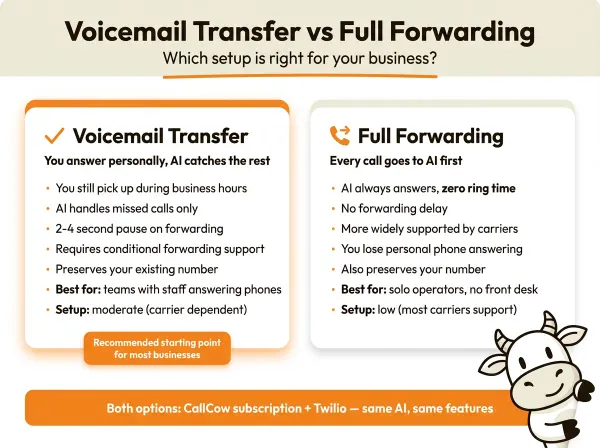
| Feature | Voicemail transfer | Full forwarding |
|---|---|---|
| You answer calls personally | Yes, during business hours | No, AI always answers first |
| AI handles missed calls | Yes | Yes (handles all calls) |
| Caller experience delay | 2-4 second pause on forwarding | No delay, direct to AI |
| Requires carrier support | Conditional forwarding required | Unconditional forwarding (more widely supported) |
| Preserves existing number | Yes | Yes |
| Risk of answering too late | You might accidentally answer during transfer | None, AI always picks up |
| Best for | Businesses with staff answering phones | Solo operators, no front desk |
| Transfer to human available | Yes | Yes |
| Setup complexity | Moderate (carrier dependent) | Low (most carriers support it) |
For most businesses with a receptionist or team member answering phones, voicemail transfer is the better choice. For solo operators and businesses without dedicated phone staff, full forwarding is simpler and more reliable.
FAQ
Can I forward voicemail to another phone?
Yes. Voicemail transfer (conditional call forwarding) routes unanswered calls to another phone number. This is different from forwarding an individual voicemail message. Contact your carrier to enable conditional call forwarding, and provide the destination number where you want unanswered calls routed.
How do I know if my carrier supports voicemail forwarding?
Call your carrier's business support line and ask for "conditional call forwarding" or "no answer transfer." If they offer it, they can set it up for you. Not all carriers support forwarding to external third-party numbers. Some only allow forwarding within their own network. If your carrier says no, ask specifically about forwarding to an answering service number.
What does it mean when a voicemail is forwarded?
In the context of AI answering services, voicemail forwarding means your carrier is configured to redirect unanswered calls to a different phone number instead of playing your voicemail greeting. The caller doesn't know they've been forwarded. They hear the AI answer and handle their request.
How long does carrier setup take?
It depends on the carrier. Some carriers can enable conditional forwarding over the phone in minutes. Others require a support ticket and take a few business days. Rogers in Canada typically handles it within one support call. US carriers vary. Plan for anywhere from same day to a week.
Will callers know they're talking to AI?
Yes. CallCow's AI always self-identifies as an automated assistant. It will tell callers they're speaking with AI. This is a deliberate design choice and cannot be disabled.
Can I use voicemail transfer with my existing business number?
Yes. Voicemail transfer works with your existing number. Your carrier configures forwarding at the carrier level. Your number doesn't change. Callers dial the same number they always have.
Bottom line
Voicemail transfer is the most practical way to add AI answering to your existing phone setup. You keep your number, your carrier, and your habit of answering calls during business hours. The AI catches everything you miss.
The main constraint is carrier support. Not every carrier offers conditional call forwarding. Not every carrier forwards to external numbers. You need to check with your provider before committing to this approach.
If your carrier supports it, the setup is straightforward. Create a CallCow workflow, configure your carrier's forwarding, and test. The total time depends mostly on how quickly your carrier confirms and applies the forwarding rules.
If your carrier doesn't support it, you're not out of options. Full call forwarding works with more carriers. A separate CallCow published number works with any carrier. Both approaches deliver the same AI answering capability.
If you're evaluating CallCow, start with voicemail transfer first. It is the cleanest way to validate missed-call coverage before you change your main call flow. If carrier support blocks you, move to full forwarding or a separate published number with a clear fallback plan.
If you want to see what voicemail transfer looks like for your business, you can test it at callcow.ai. If you need help confirming carrier support or getting the forwarding set up, use the voicemail transfer docs or book a setup call from there. For after hours specifically, the after hours answering service guide covers nighttime and weekend routing strategies.
Yiming Han is the founder of CallCow and writes about phone automation, missed calls, and the tradeoffs that show up when small businesses actually deploy voice AI.